
 ptp
Tiny YOLOv3 CPU-only real-time object detection using a camera; offline detection, script-triggered on-changes or on-demand results with class/scores.
 Windows
How to add the Darknet YOLO (Obj Detection) robot skill
- Load the most recent release of ARC (Get ARC).
- Press the Project tab from the top menu bar in ARC.
- Press Add Robot Skill from the button ribbon bar in ARC.
- Choose the Camera category tab.
- Press the Darknet YOLO (Obj Detection) icon to add the robot skill to your project.
Don't have a robot yet?
Follow the Getting Started Guide to build a robot and use the Darknet YOLO (Obj Detection) robot skill.
How to use the Darknet YOLO (Obj Detection) robot skill
You only look once (YOLO) is a state-of-the-art, real-time object detection system. using Tiny YOLOv3 a very small model as well for constrained environments (CPU Only, NO GPU)
Darket YOLO website: https://pjreddie.com/darknet/yolo/
Requirements: You only need a camera control, the detection is done offline (no cloud services).
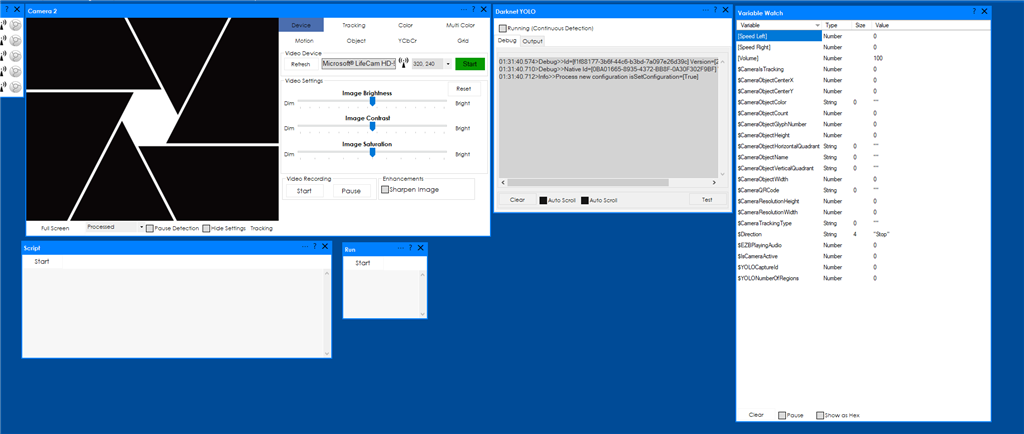
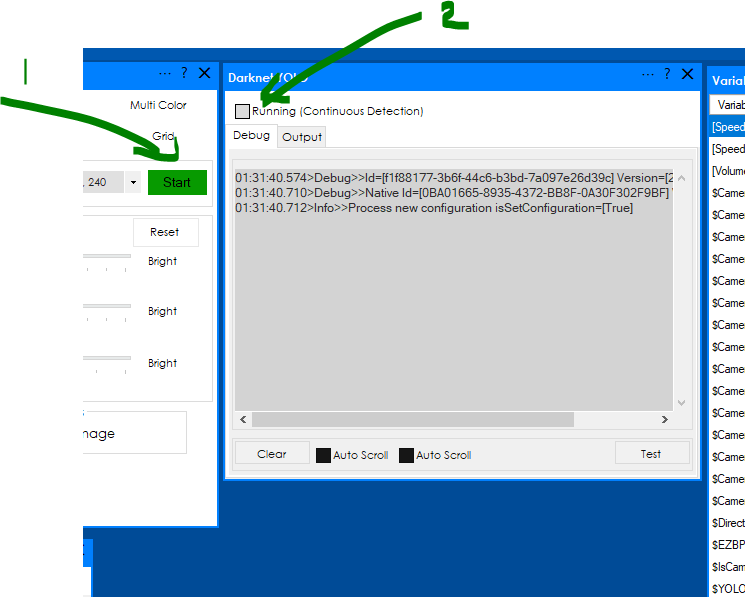
- start the camera.
- check the Running (check box)
The detection will run continuously when the detection results change an On Changes script is executed (check the configuration area):

- Press config
- Edit the on changes script
- on changes Javascript script
you can run the detection on demand, javascript:
controlCommand("Darknet YOLO", "Run");
The above command runs the configured on demand script.
An example of script:
var numberOfRegions=getVar('$YOLONumberOfRegions');
if (numberOfRegions==0)
{
   Audio.sayWait('No regions found');
}
else
{
   Audio.sayWait('Found ' + numberOfRegions + ' regions');
        var classes = getVar('$YOLOClasses');
        var scores = getVar('$YOLOScores');
        for(var ix=0; ix        {
           Audio.sayWait('Found ' + classes[ix] + ' with score: ' + (classes[ix]*100) + '%');
   }
}



Related Questions
Speech Recognition - Language Issue
Debouncing Darknet YOLO On Turtlebot3
Upgrade to ARC Pro
Stay on the cutting edge of robotics with ARC Pro, guaranteeing that your robot is always ahead of the game.
Debug:
Darknet - offline
09:32:39.250>Info>>Cleared
states numerously audibly: no Regions found:
09:32:39.276>Debug>>Detection Took:71 seconds
Regions found: 0
then:
09:32:52.701>Debug>>Detection Took:72 seconds
Regions found: 1
..class=[person] confidence=[0.5682923] X=[106] Y=[77]
says "a person" me, a cup,
a banana not recognize
works a little :-(
EzAng
@ptp upload file size is now increased so you should be fine
ok, I will try it - did not get an update yet
EzAng
@ptp Got it. I won't be installing my main computer into any robot soon.....as it seems the more power the better with the full YOLO version. I have a beast desktop with 32 cores 128 mb ram and I was one of the lucky ones to snag a Nvidia 3090Ti with 24 mg vram and 10,496 cuda cores. But as I said wont be putting it into a robot any time soon!
I like the idea of getting your plug in to maybe work with the Latte Panda. I have the ver 1 of the Panda installed in the bartender robot and its extremely impressive. This plug in will be a great addition to vision systems on robots.
Nice job as always!!!!
Hello again, back,
Is your version 2 up to date, or is an update coming?works ok
EzAng
OMG.... @fxrtst What are you up to???
This is a great plugin, I never thought that YOLO will make it into the heavenly realm of plugins!! Great work @ptp
your YOLO porting is nice and so perfect for my next Robot Gen. but the bug is annoying, because the voice repeat non stop what the cam saw.. I can only stop the voice if I close the ez-robot software.
working on a fix / update.