
Connects ARCx to Viam viam-server, auto-mapping robot resources to movement, servos, cameras, sensors, and Robot Bus data.
 Windows
 ARM
ARM
 Linux
Linux
 MacOS
MacOS
How to add the Viam Robot Controller robot skill
- Load the most recent release of ARCx on a compatible operating system (Get ARCx).
- Press the + Skills menu from the top menu bar in ARCx.
- Choose any of these category tabs, the robot skill appears in each of them: Communication, Movement Panels, Servo.
- Press the Viam Robot Controller icon to add the robot skill to your project.
Don't have a robot yet?
Follow the Getting Started Guide to build a robot and use the Viam Robot Controller robot skill.
How to use the Viam Robot Controller robot skill
Makes ARCx the user interface for a robot running the Viam platform. The robot skill is a native gRPC client for viam-server: it connects to the machine over the network, discovers every component and service on it, and maps each one into the part of ARCx that already knows what to do with it. No driver is written and nothing is installed on the robot.
What the machine's resources become in ARCx:
| On the Viam machine | In ARCx |
|---|---|
| Base | The project's movement panel. Every joystick, movement script, camera tracking skill and the Movement Manager drive it. |
| Servo | A virtual servo port (V0 to V255). Any servo robot skill (Servo, Auto Position, servo Pad, servo Animation, camera tracking...) moves it. |
| Motor | A virtual servo port that sets its power, RPM or position. A pair of motors can also be the Movement Panel as a differential drive. |
| Gripper | A virtual servo port: below centre opens, above centre grabs. |
| Arm | One virtual servo port per joint, consecutive from the first, in degrees. |
| Camera | An ARCx video source named after the camera, so face, colour, glyph and object detection work on it. |
| Vision service | Its detections are drawn on the camera's video source and handed to the vision tracking skills as detected objects. |
| Sensor, movement sensor, power sensor, encoder | Global variables, one per reading, polled at a rate you choose. |
| Board, switch, button, gantry, generic and anything else | Control commands, including a DoCommand that reaches any resource's own commands. |
Requirements
- A robot running
viam-server, reachable from the ARCx computer on the network. The default port is 8080. - For a machine set up through app.viam.com: an API key (Machine settings, API keys). The key ID and the key go in the configuration.
- For a
viam-serverstarted from a local config file without authentication: choose the None credential.
The connection is direct, from ARCx to the robot. The machine's app.viam.com address and the WebRTC path through Viam's cloud are not used, so ARCx and the robot have to be on the same network, or routed to each other.
The window
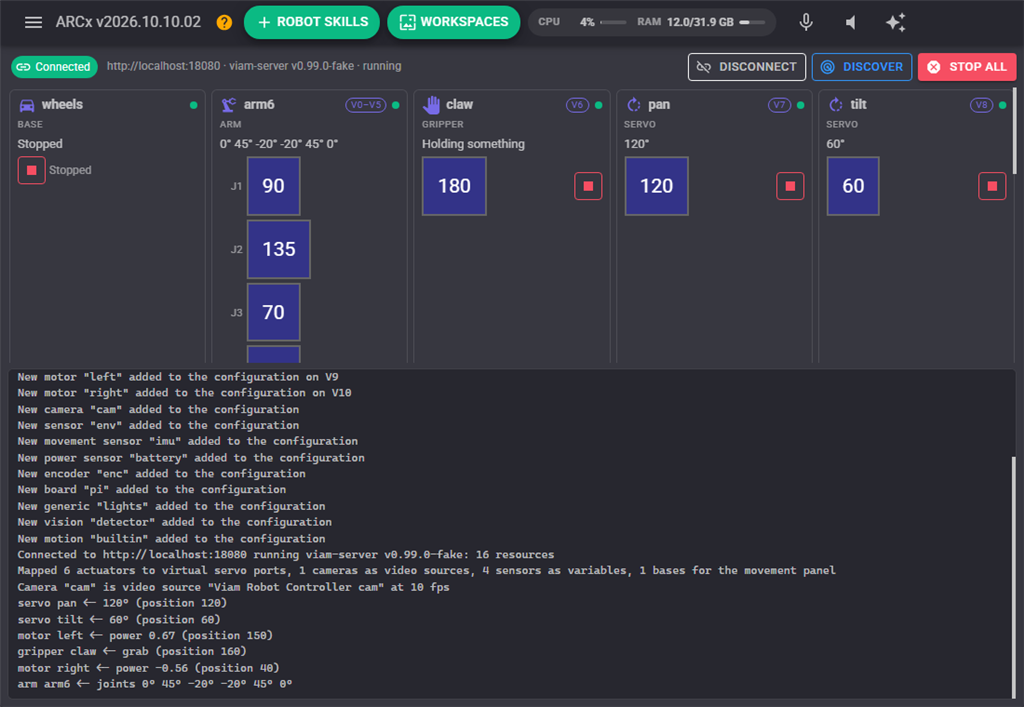
The strip at the top shows the connection (address, viam-server version, machine state) with Connect / Disconnect, Discover (ask the machine for its resources again) and Stop all, which stops every actuator on the machine at once.
Below it is one card per resource. Each card shows the kind, the name, the virtual port it answers to, a health dot (the machine's own report on that resource, red when it is unhealthy or a command failed) and its live value: a servo's angle, a motor's power and position, a base's drive state, an arm's joint angles, a gripper's state, a camera's picture, a sensor's readings, a vision service's detections. Actuator cards have a slider that moves the resource (through its virtual port, so the rest of the project sees the move too) and a stop button. Disabled resources are dimmed.
The log at the bottom says what the skill is doing: what was discovered, what was mapped, what failed and why.
Configuration
Connection
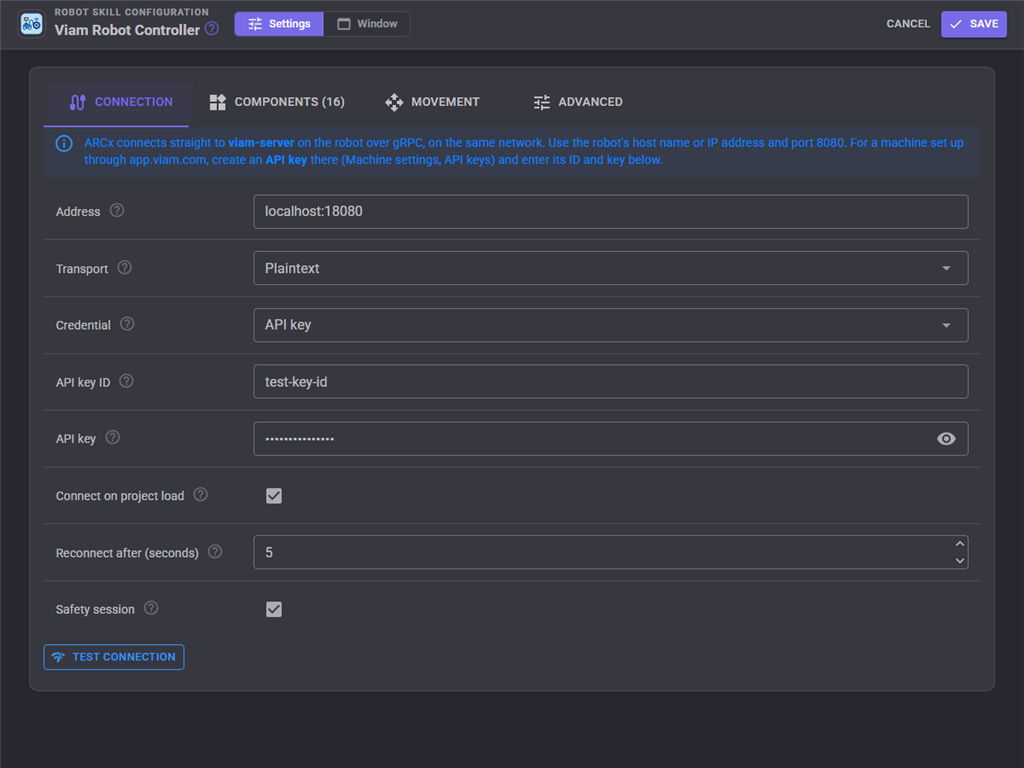
| Setting | Meaning |
|---|---|
| Address | host:port of viam-server, i.e. my-robot.local:8080 or 192.168.1.20:8080. |
| Transport | Auto tries TLS first and then plaintext. A machine configured through app.viam.com serves TLS; a bare viam-server from a local config is usually plaintext. |
| Verify TLS certificate | Off by default: a machine on the LAN presents a certificate for its cloud host name, which does not match its IP address. |
| Credential | API key (recommended), location secret (older), or none. |
| API key ID, API key | From app.viam.com. Stored in the project file. |
| Connect on project load | Connect as soon as the project loads and keep reconnecting while it is open. |
| Reconnect after | Seconds between attempts after the connection fails or drops. |
| Safety session | Opens a Viam safety session. While ARCx's heartbeats arrive the machine runs the commands; if ARCx or the network drops, viam-server stops every actuator ARCx commanded. |
Test connection opens a trial connection with the settings as typed and reports the viam-server version and what it found.
Components
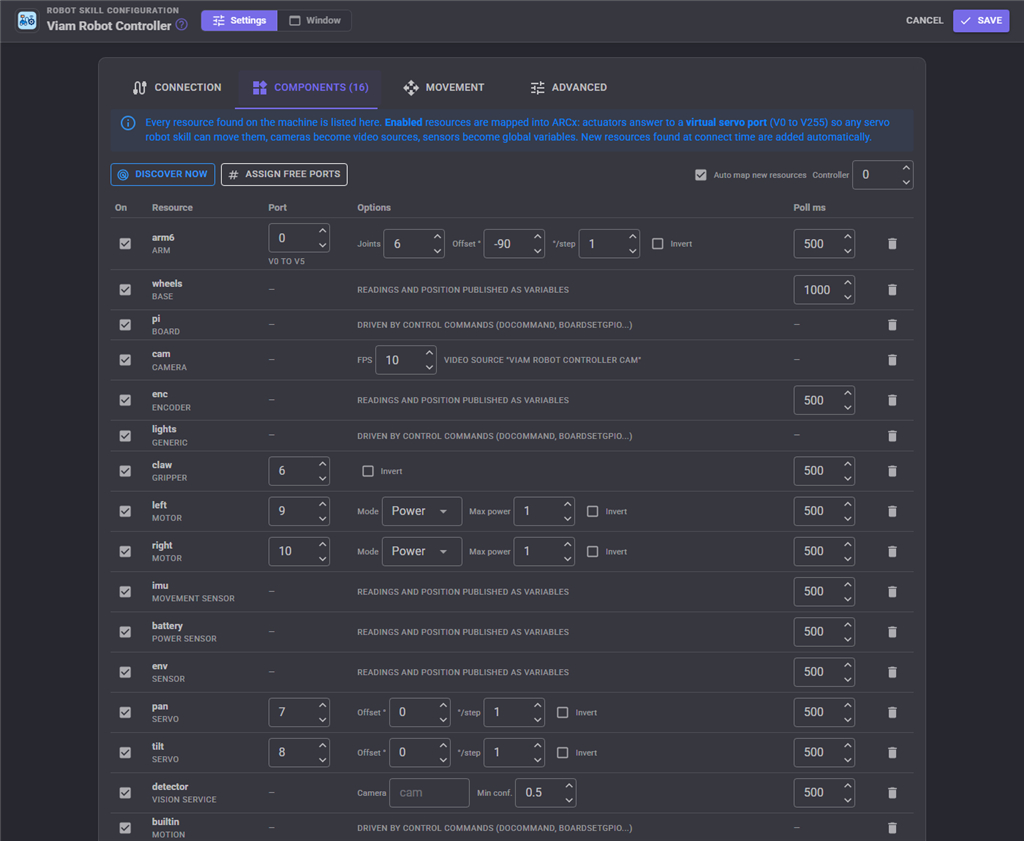
Every resource found on the machine is listed, with its kind and the options that apply to it. New resources found when the skill connects are added automatically (enabled, with the next free virtual port) unless Auto map new resources is off, in which case they are added disabled for you to enable.
| Column | Meaning |
|---|---|
| On | Whether the resource is mapped into ARCx at all. |
| Port | The virtual servo port (0 to 255 for V0 to V255) an actuator answers to; -1 for none. An arm takes one port per joint from here. Assign free ports fills in every enabled actuator that has none. |
| Options | Per kind, see below. |
| Poll ms | How often the resource's readings or position are read and published as variables. 0 turns polling off. |
Options by kind:
- Servo: Offset (degrees added to the ARCx position; 0 means ARCx position 90 is 90 degrees), degrees per step, invert.
- Arm: joints (learned from the arm, one port each), offset (default -90, so ARCx position 90 is the joint's zero and the range covers -89 to +90 degrees), degrees per step (2 covers 360 degrees), invert.
- Motor: mode (Power: the centre position stops, the ends are full power; RPM: the ends are the RPM setting; Position: the position is revolutions from the centre), max power, RPM, revolutions per step, invert.
- Gripper: invert (grab below centre instead of above).
- Camera: frames per second. Each frame is one call over the network; 10 is plenty for tracking.
- Vision service: the camera to run on (blank is the first enabled camera) and the minimum confidence.
Controller is the ARCx controller (EZB) whose virtual ports this skill answers to, normally 0.
Movement
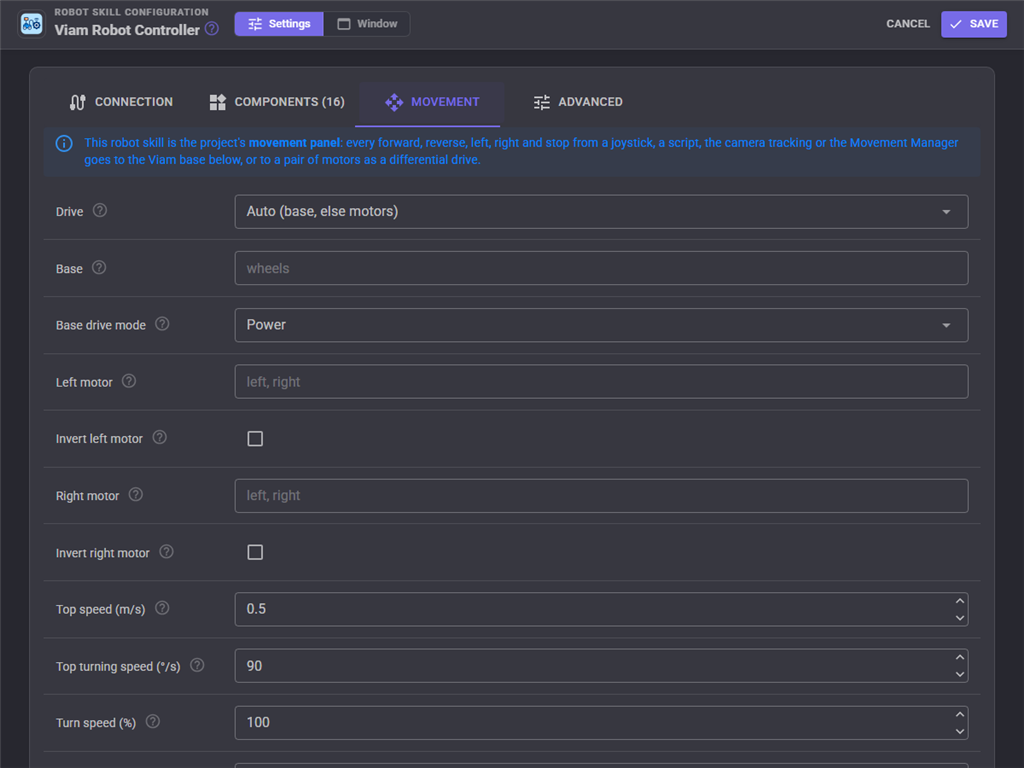
This robot skill is the project's movement panel. Drive chooses what the Movement Manager's forward, reverse, left, right and stop go to: a Viam base (the first enabled one, or the one named), a pair of motors as a differential drive (name the left and right motor and invert either), or nothing.
A base is driven by power (a fraction of full power, works on every base) or by velocity (metres per second and degrees per second, which needs a base that can measure its speed). Top speed and top turning speed set what the ARCx speed of 255 means in velocity mode, and the speeds BaseMoveStraight and BaseSpin use when none is given. Turn speed scales the left and right commands. Drive timeout stops the robot when no drive command has arrived for that long; the safety session stops it anyway if ARCx disappears.
Advanced
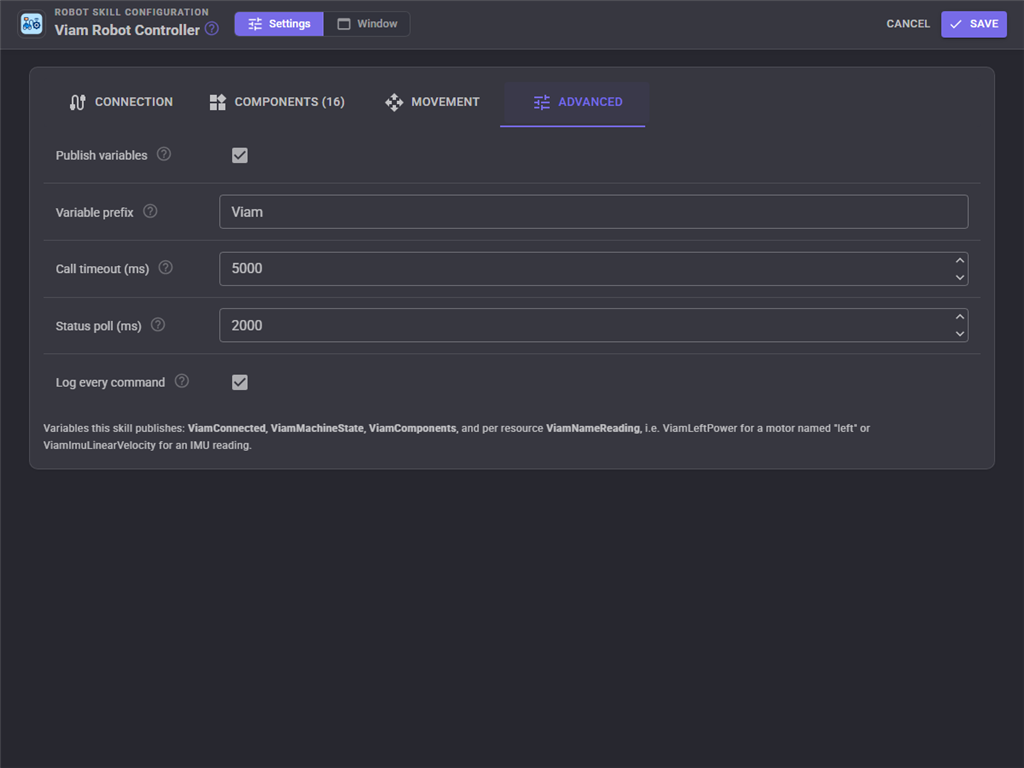
Whether variables are published and their prefix, the call timeout, how often the machine's status is read, and a switch that logs every command sent to the machine.
Variables
With the default prefix Viam:
| Variable | Meaning |
|---|---|
ViamConnected |
True while connected. |
ViamMachineState |
running, initializing, or blank. |
ViamVersion |
The viam-server version. |
ViamComponents |
The resources as subtype name strings. |
Viam<Name><Reading> |
One per reading of a sensor, movement sensor or power sensor, i.e. ViamEnvTemperatureC, ViamImuCompass. Structured readings are stored as JSON text. |
Viam<Name>Position |
A servo's angle, an encoder's position, a motor's revolutions (when it reports position). |
Viam<Name>Power, Viam<Name>IsPowered |
A motor's power from -1 to 1 and whether it is on. |
Viam<Name>IsMoving |
A base or arm. |
Viam<Name>Joints, Viam<Name>EndX/EndY/EndZ |
An arm's joint angles in degrees and its end effector position in metres. |
Viam<Name>IsHolding |
A gripper. |
Viam<Name>Count, Viam<Name>Objects |
What a vision service detected on its last look. |
Names are made from the Viam names with anything a script could not type removed: a motor named left-drive becomes ViamLeftDrive....
The Robot Bus
Everything this robot skill reads from the machine is also published on the ARCx Robot Bus, whole and structured, so robot skills, scripts, recordings and programs outside ARCx (through Options, Preferences, Robot Bus) see the Viam machine the way they see the rest of the robot. Views, Robot Bus shows it live. Topic and service names start with the window title as a name: viam_robot_controller for a skill titled Viam Robot Controller.
/viam/viam_robot_controller/statuscarries the machine's state and each resource's health, every status poll./viam/viam_robot_controller/<subtype>/<name>carries one resource's latest reading every time it is polled, with the message typeviam/<subtype>: a sensor's wholereadingsobject, a servo, encoder or switchposition, a motor'spower,isPoweredandposition, an arm'sjointsandendPose(millimetres, as Viam reports them), a gripper'sisHolding, a gantry'spositionsMm, a vision service'sdetections. A movement sensor namedimuis/viam/viam_robot_controller/movement_sensor/imu.
While connected, two services are offered:
/viam_robot_controller/do_commandsends DoCommand to any resource:resource(its name, orsubtype:name) andcommand(an object such as{"action": "blink"}). It returns the resource's answer, which reaches every modular resource's own commands./viam_robot_controller/resourceslists the discovered resources with their health and the topic each is published on.
For example, from JavaScript:
var imu = Bus.getLatest("/viam/viam_robot_controller/movement_sensor/imu");
print(imu.readings.compass);

Bus.call("/viam_robot_controller/do_command", { resource: "led", command: { action: "blink" } });
A recording made with the Robot Bus recorder captures these topics like any other, so a Viam machine's sensor data can be replayed at the desk.
Units in scripts
The control commands follow ARCx's conventions for anything that describes the robot moving in space: metres, radians, and a positive turn is to the left (counter clockwise). BaseMoveStraight("wheels", 0.5, 0.2) drives half a metre forward at 0.2 m/s; BaseSpin("wheels", 1.5708, 0) turns a quarter turn left at the configured speed. A compass heading comes back in radians growing counter clockwise. servo angles and arm joint angles are in degrees, motor positions in revolutions and speeds in RPM, as Viam reports them. DoCommand takes and returns JSON text.
Two machines
Add the robot skill twice, one per machine. Give each its own variable prefix and keep their virtual ports apart; the second one will have to be the movement panel's source only if the first has Drive set to None, because a project has one movement panel.
Custom UI
Two widgets: Viam machine (the connection with Connect, Disconnect and Stop all) and Viam component (the live value of one resource by name, with a Stop button for actuators).
Notes
- Every call carries a deadline (the call timeout); a machine that stops answering is reported as disconnected and reconnected automatically.
- Servo moves are sent through a queue that keeps only the newest command per resource, so dragging a slider faster than the network can carry leaves the hardware where the slider ended rather than lagging through every step.
- A camera's picture is fetched as JPEG when the machine can encode it, and Viam's raw RGBA and depth formats are decoded otherwise.
- Releasing a virtual port stops the resource behind it; the panic button stops everything on the machine.
Control Commands for the Viam Robot Controller robot skill
There are Control Commands available for this robot skill which allows the skill to be controlled programmatically from scripts or other robot skills. These commands enable you to automate actions, respond to sensor inputs, and integrate the robot skill with other systems or custom interfaces. If you're new to the concept of Control Commands, we have a comprehensive manual available here that explains how to use them, provides examples to get you started and make the most of this powerful feature.
Control Command ManualThis robot skill has 65 control commands, listed below. Send them from a JavaScript or Python script, from Blockly, or from another robot skill.
The first value is always the window title, which is the name in the title bar of the robot skill on your workspace. It starts out as Viam Robot Controller, which is what every example below uses. If you rename the robot skill, or add a second copy of it to the project, use the title as it appears on that window instead.
ControlCommand() can be shortened to CC(), and both spellings work in JavaScript and in Python. The examples are JavaScript; Python is the same call, except that true and false are written True and False.
ArmGetEndPosition
An arm's end effector pose as [x, y, z, o_x, o_y, o_z, theta]: metres and Viam's orientation vector with theta in degrees
Syntax
ControlCommand("Viam Robot Controller", "ArmGetEndPosition", (String)arm)
Parameters
| # | Name | Type | What to pass |
|---|---|---|---|
| 1 | arm | Text | Your text, in quotes |
Returns: Array of Double
Example
var result = ControlCommand("Viam Robot Controller", "ArmGetEndPosition", "arm");
ArmGetJointPositions
An arm's joint angles in degrees
Syntax
ControlCommand("Viam Robot Controller", "ArmGetJointPositions", (String)arm)
Parameters
| # | Name | Type | What to pass |
|---|---|---|---|
| 1 | arm | Text | Your text, in quotes |
Returns: Array of Double
Example
var result = ControlCommand("Viam Robot Controller", "ArmGetJointPositions", "arm");
ArmIsMoving
Whether an arm is moving
Syntax
ControlCommand("Viam Robot Controller", "ArmIsMoving", (String)arm)
Parameters
| # | Name | Type | What to pass |
|---|---|---|---|
| 1 | arm | Text | Your text, in quotes |
Returns: Boolean [true or false]
Example
var result = ControlCommand("Viam Robot Controller", "ArmIsMoving", "arm");
ArmMoveToJointPositions
Move an arm's joints to angles in degrees, given as a JSON array such as [0, 45, -30, 0, 90, 0] with one value per joint. Returns when done
Syntax
ControlCommand("Viam Robot Controller", "ArmMoveToJointPositions", (String)arm, (String)joint degrees JSON array)
Parameters
| # | Name | Type | What to pass |
|---|---|---|---|
| 1 | arm | Text | Your text, in quotes |
| 2 | joint degrees JSON array | Text | Your text, in quotes |
Returns: nothing
Example
ControlCommand("Viam Robot Controller", "ArmMoveToJointPositions", "arm", "joint degrees JSON array");
ArmMoveToPosition
Move an arm's end effector to a pose: x, y, z in metres and an orientation vector o_x, o_y, o_z with a rotation theta in degrees (Viam's orientation vector). Returns when done
Syntax
ControlCommand("Viam Robot Controller", "ArmMoveToPosition", (String)arm, (Number)x metres, (Number)y metres, (Number)z metres, (Number)o_x, (Number)o_y, (Number)o_z, (Number)theta degrees)
Parameters
| # | Name | Type | What to pass |
|---|---|---|---|
| 1 | arm | Text | Your text, in quotes |
| 2 | x metres | Number | A number, without quotes |
| 3 | y metres | Number | A number, without quotes |
| 4 | z metres | Number | A number, without quotes |
| 5 | o_x | Number | A number, without quotes |
| 6 | o_y | Number | A number, without quotes |
| 7 | o_z | Number | A number, without quotes |
| 8 | theta degrees | Number | A number, without quotes |
Returns: nothing
Example
ControlCommand("Viam Robot Controller", "ArmMoveToPosition", "arm", 0, 0, 0, 0, 0, 0, 0);
ArmStop
Stop an arm
Syntax
ControlCommand("Viam Robot Controller", "ArmStop", (String)arm)
Parameters
| # | Name | Type | What to pass |
|---|---|---|---|
| 1 | arm | Text | Your text, in quotes |
Returns: nothing
Example
ControlCommand("Viam Robot Controller", "ArmStop", "arm");
BaseIsMoving
Whether a base is moving
Syntax
ControlCommand("Viam Robot Controller", "BaseIsMoving", (String)base)
Parameters
| # | Name | Type | What to pass |
|---|---|---|---|
| 1 | base | Text | Your text, in quotes |
Returns: Boolean [true or false]
Example
var result = ControlCommand("Viam Robot Controller", "BaseIsMoving", "base");
BaseMoveStraight
Drive a base a distance in metres (negative reverses) at a speed in metres per second (0 uses the configured maximum). Returns when done
Syntax
ControlCommand("Viam Robot Controller", "BaseMoveStraight", (String)base, (Number)metres, (Number)metres per second)
Parameters
| # | Name | Type | What to pass |
|---|---|---|---|
| 1 | base | Text | Your text, in quotes |
| 2 | metres | Number | A number, without quotes |
| 3 | metres per second | Number | A number, without quotes |
Returns: nothing
Example
ControlCommand("Viam Robot Controller", "BaseMoveStraight", "base", 0, 0);
BaseSetPower
Drive a base by power: forward -1 to 1 and turn -1 to 1 (positive turns left). Keeps going until BaseStop or a Movement Manager command
Syntax
ControlCommand("Viam Robot Controller", "BaseSetPower", (String)base, (Number)forward -1 to 1, (Number)turn -1 to 1)
Parameters
| # | Name | Type | What to pass |
|---|---|---|---|
| 1 | base | Text | Your text, in quotes |
| 2 | forward -1 to 1 | Number | A number, without quotes |
| 3 | turn -1 to 1 | Number | A number, without quotes |
Returns: nothing
Example
ControlCommand("Viam Robot Controller", "BaseSetPower", "base", 0, 0);
BaseSetVelocity
Drive a base at a forward speed in metres per second and a turning speed in radians per second (positive turns left). Keeps going until BaseStop or a Movement Manager command
Syntax
ControlCommand("Viam Robot Controller", "BaseSetVelocity", (String)base, (Number)metres per second, (Number)radians per second)
Parameters
| # | Name | Type | What to pass |
|---|---|---|---|
| 1 | base | Text | Your text, in quotes |
| 2 | metres per second | Number | A number, without quotes |
| 3 | radians per second | Number | A number, without quotes |
Returns: nothing
Example
ControlCommand("Viam Robot Controller", "BaseSetVelocity", "base", 0, 0);
BaseSpin
Turn a base in place by an angle in radians (positive turns left) at a speed in radians per second (0 uses the configured maximum). Returns when done
Syntax
ControlCommand("Viam Robot Controller", "BaseSpin", (String)base, (Number)radians, (Number)radians per second)
Parameters
| # | Name | Type | What to pass |
|---|---|---|---|
| 1 | base | Text | Your text, in quotes |
| 2 | radians | Number | A number, without quotes |
| 3 | radians per second | Number | A number, without quotes |
Returns: nothing
Example
ControlCommand("Viam Robot Controller", "BaseSpin", "base", 0, 0);
BaseStop
Stop a base
Syntax
ControlCommand("Viam Robot Controller", "BaseStop", (String)base)
Parameters
| # | Name | Type | What to pass |
|---|---|---|---|
| 1 | base | Text | Your text, in quotes |
Returns: nothing
Example
ControlCommand("Viam Robot Controller", "BaseStop", "base");
BoardGetDigitalInterrupt
The tick count of a board's digital interrupt by its configured name
Syntax
ControlCommand("Viam Robot Controller", "BoardGetDigitalInterrupt", (String)board, (String)digital interrupt)
Parameters
| # | Name | Type | What to pass |
|---|---|---|---|
| 1 | board | Text | Your text, in quotes |
| 2 | digital interrupt | Text | Your text, in quotes |
Returns: Long [-9,223,372,036,854,775,808 to 9,223,372,036,854,775,807]
Example
var result = ControlCommand("Viam Robot Controller", "BoardGetDigitalInterrupt", "board", "digital interrupt");
BoardGetGpio
Read a GPIO pin of a board: true for high
Syntax
ControlCommand("Viam Robot Controller", "BoardGetGpio", (String)board, (String)pin)
Parameters
| # | Name | Type | What to pass |
|---|---|---|---|
| 1 | board | Text | Your text, in quotes |
| 2 | pin | Text | Your text, in quotes |
Returns: Boolean [true or false]
Example
var result = ControlCommand("Viam Robot Controller", "BoardGetGpio", "board", "pin");
BoardReadAnalog
Read a board's analog reader by its configured name
Syntax
ControlCommand("Viam Robot Controller", "BoardReadAnalog", (String)board, (String)analog reader)
Parameters
| # | Name | Type | What to pass |
|---|---|---|---|
| 1 | board | Text | Your text, in quotes |
| 2 | analog reader | Text | Your text, in quotes |
Returns: Integer [-2,147,483,648 to 2,147,483,647]
Example
var result = ControlCommand("Viam Robot Controller", "BoardReadAnalog", "board", "analog reader");
BoardSetGpio
Set a GPIO pin of a board high (true) or low (false). The pin is named as in the Viam configuration, i.e. "11" or "GPIO17"
Syntax
ControlCommand("Viam Robot Controller", "BoardSetGpio", (String)board, (String)pin, (Bool)high)
Parameters
| # | Name | Type | What to pass |
|---|---|---|---|
| 1 | board | Text | Your text, in quotes |
| 2 | pin | Text | Your text, in quotes |
| 3 | high | True or false | true or false, without quotes |
Returns: nothing
Example
ControlCommand("Viam Robot Controller", "BoardSetGpio", "board", "pin", true);
BoardSetPwm
Set the PWM duty cycle of a board pin, 0 to 1
Syntax
ControlCommand("Viam Robot Controller", "BoardSetPwm", (String)board, (String)pin, (Number)duty cycle 0 to 1)
Parameters
| # | Name | Type | What to pass |
|---|---|---|---|
| 1 | board | Text | Your text, in quotes |
| 2 | pin | Text | Your text, in quotes |
| 3 | duty cycle 0 to 1 | Number | A number, without quotes |
Returns: nothing
Example
ControlCommand("Viam Robot Controller", "BoardSetPwm", "board", "pin", 0);
BoardSetPwmFrequency
Set the PWM frequency of a board pin in hertz
Syntax
ControlCommand("Viam Robot Controller", "BoardSetPwmFrequency", (String)board, (String)pin, (Number)hertz)
Parameters
| # | Name | Type | What to pass |
|---|---|---|---|
| 1 | board | Text | Your text, in quotes |
| 2 | pin | Text | Your text, in quotes |
| 3 | hertz | Number | A number, without quotes |
Returns: nothing
Example
ControlCommand("Viam Robot Controller", "BoardSetPwmFrequency", "board", "pin", 0);
BoardWriteAnalog
Write a value to a board's analog writer pin
Syntax
ControlCommand("Viam Robot Controller", "BoardWriteAnalog", (String)board, (String)pin, (Number)value)
Parameters
| # | Name | Type | What to pass |
|---|---|---|---|
| 1 | board | Text | Your text, in quotes |
| 2 | pin | Text | Your text, in quotes |
| 3 | value | Number | A number, without quotes |
Returns: nothing
Example
ControlCommand("Viam Robot Controller", "BoardWriteAnalog", "board", "pin", 0);
ButtonPush
Push a button component
Syntax
ControlCommand("Viam Robot Controller", "ButtonPush", (String)button)
Parameters
| # | Name | Type | What to pass |
|---|---|---|---|
| 1 | button | Text | Your text, in quotes |
Returns: nothing
Example
ControlCommand("Viam Robot Controller", "ButtonPush", "button");
Connect
Connect to the Viam machine at the configured address and keep reconnecting while the project is open
Syntax
ControlCommand("Viam Robot Controller", "Connect")
Returns: nothing
Example
ControlCommand("Viam Robot Controller", "Connect");
Disconnect
Disconnect from the Viam machine and stay disconnected until Connect
Syntax
ControlCommand("Viam Robot Controller", "Disconnect")
Returns: nothing
Example
ControlCommand("Viam Robot Controller", "Disconnect");
Discover
Ask the Viam machine for its resources again, adding any new ones to the configuration. Returns them as "subtype name" strings
Syntax
ControlCommand("Viam Robot Controller", "Discover")
Returns: Array of String
Example
var result = ControlCommand("Viam Robot Controller", "Discover");
DoCommand
Send a custom command to any resource (component or service) as a JSON object, i.e. {"action": "blink"}. Returns the resource's JSON answer. This reaches every modular resource's own commands
Syntax
ControlCommand("Viam Robot Controller", "DoCommand", (String)resource, (String)command JSON)
Parameters
| # | Name | Type | What to pass |
|---|---|---|---|
| 1 | resource | Text | Your text, in quotes |
| 2 | command JSON | Text | Your text, in quotes |
Returns: String
Example
var result = ControlCommand("Viam Robot Controller", "DoCommand", "resource", "command JSON");
EncoderGetPosition
An encoder's position, in ticks or degrees depending on the encoder
Syntax
ControlCommand("Viam Robot Controller", "EncoderGetPosition", (String)encoder)
Parameters
| # | Name | Type | What to pass |
|---|---|---|---|
| 1 | encoder | Text | Your text, in quotes |
Returns: Double [5.0e324 to 1.7e308]
Example
var result = ControlCommand("Viam Robot Controller", "EncoderGetPosition", "encoder");
EncoderReset
Make the encoder's current position zero
Syntax
ControlCommand("Viam Robot Controller", "EncoderReset", (String)encoder)
Parameters
| # | Name | Type | What to pass |
|---|---|---|---|
| 1 | encoder | Text | Your text, in quotes |
Returns: nothing
Example
ControlCommand("Viam Robot Controller", "EncoderReset", "encoder");
GantryGetPosition
A gantry's axis positions in millimetres
Syntax
ControlCommand("Viam Robot Controller", "GantryGetPosition", (String)gantry)
Parameters
| # | Name | Type | What to pass |
|---|---|---|---|
| 1 | gantry | Text | Your text, in quotes |
Returns: Array of Double
Example
var result = ControlCommand("Viam Robot Controller", "GantryGetPosition", "gantry");
GantryHome
Home a gantry. Returns true when it homed
Syntax
ControlCommand("Viam Robot Controller", "GantryHome", (String)gantry)
Parameters
| # | Name | Type | What to pass |
|---|---|---|---|
| 1 | gantry | Text | Your text, in quotes |
Returns: Boolean [true or false]
Example
var result = ControlCommand("Viam Robot Controller", "GantryHome", "gantry");
GantryMoveToPosition
Move a gantry's axes to positions in millimetres, given as a JSON array with one value per axis. Returns when done
Syntax
ControlCommand("Viam Robot Controller", "GantryMoveToPosition", (String)gantry, (String)positions mm JSON array)
Parameters
| # | Name | Type | What to pass |
|---|---|---|---|
| 1 | gantry | Text | Your text, in quotes |
| 2 | positions mm JSON array | Text | Your text, in quotes |
Returns: nothing
Example
ControlCommand("Viam Robot Controller", "GantryMoveToPosition", "gantry", "positions mm JSON array");
GantryStop
Stop a gantry
Syntax
ControlCommand("Viam Robot Controller", "GantryStop", (String)gantry)
Parameters
| # | Name | Type | What to pass |
|---|---|---|---|
| 1 | gantry | Text | Your text, in quotes |
Returns: nothing
Example
ControlCommand("Viam Robot Controller", "GantryStop", "gantry");
GetComponents
The names of the resources on the Viam machine, optionally only those of one subtype (motor, servo, base, camera, arm, gripper, sensor, movement_sensor, power_sensor, encoder, board, vision...)
Syntax
ControlCommand("Viam Robot Controller", "GetComponents", (String)subtype (optional))
Parameters
| # | Name | Type | What to pass |
|---|---|---|---|
| 1 | subtype (optional) | Text | Your text, in quotes |
Returns: Array of String
Example
var result = ControlCommand("Viam Robot Controller", "GetComponents", "subtype (optional)");
GetMachineState
The Viam machine's state: running, initializing, or blank when disconnected
Syntax
ControlCommand("Viam Robot Controller", "GetMachineState")
Returns: String
Example
var result = ControlCommand("Viam Robot Controller", "GetMachineState");
GetReading
One named reading of a sensor, movement sensor or power sensor
Syntax
ControlCommand("Viam Robot Controller", "GetReading", (String)sensor, (String)reading name)
Parameters
| # | Name | Type | What to pass |
|---|---|---|---|
| 1 | sensor | Text | Your text, in quotes |
| 2 | reading name | Text | Your text, in quotes |
Example
ControlCommand("Viam Robot Controller", "GetReading", "sensor", "reading name");
GetReadings
Every reading of a sensor, movement sensor or power sensor as a JSON object
Syntax
ControlCommand("Viam Robot Controller", "GetReadings", (String)sensor)
Parameters
| # | Name | Type | What to pass |
|---|---|---|---|
| 1 | sensor | Text | Your text, in quotes |
Returns: String
Example
var result = ControlCommand("Viam Robot Controller", "GetReadings", "sensor");
GetVersion
The viam-server version of the connected machine
Syntax
ControlCommand("Viam Robot Controller", "GetVersion")
Returns: String
Example
var result = ControlCommand("Viam Robot Controller", "GetVersion");
GripperGrab
Close a gripper. Returns true when it grabbed something
Syntax
ControlCommand("Viam Robot Controller", "GripperGrab", (String)gripper)
Parameters
| # | Name | Type | What to pass |
|---|---|---|---|
| 1 | gripper | Text | Your text, in quotes |
Returns: Boolean [true or false]
Example
var result = ControlCommand("Viam Robot Controller", "GripperGrab", "gripper");
GripperIsHolding
Whether a gripper is holding something
Syntax
ControlCommand("Viam Robot Controller", "GripperIsHolding", (String)gripper)
Parameters
| # | Name | Type | What to pass |
|---|---|---|---|
| 1 | gripper | Text | Your text, in quotes |
Returns: Boolean [true or false]
Example
var result = ControlCommand("Viam Robot Controller", "GripperIsHolding", "gripper");
GripperOpen
Open a gripper. Returns when done
Syntax
ControlCommand("Viam Robot Controller", "GripperOpen", (String)gripper)
Parameters
| # | Name | Type | What to pass |
|---|---|---|---|
| 1 | gripper | Text | Your text, in quotes |
Returns: nothing
Example
ControlCommand("Viam Robot Controller", "GripperOpen", "gripper");
GripperStop
Stop a gripper
Syntax
ControlCommand("Viam Robot Controller", "GripperStop", (String)gripper)
Parameters
| # | Name | Type | What to pass |
|---|---|---|---|
| 1 | gripper | Text | Your text, in quotes |
Returns: nothing
Example
ControlCommand("Viam Robot Controller", "GripperStop", "gripper");
IsConnected
Whether ARCx is connected to the Viam machine
Syntax
ControlCommand("Viam Robot Controller", "IsConnected")
Returns: Boolean [true or false]
Example
var result = ControlCommand("Viam Robot Controller", "IsConnected");
MotorGetPosition
A motor's position in revolutions since its zero. Needs position reporting
Syntax
ControlCommand("Viam Robot Controller", "MotorGetPosition", (String)motor)
Parameters
| # | Name | Type | What to pass |
|---|---|---|---|
| 1 | motor | Text | Your text, in quotes |
Returns: Double [5.0e324 to 1.7e308]
Example
var result = ControlCommand("Viam Robot Controller", "MotorGetPosition", "motor");
MotorGoFor
Turn a motor a number of revolutions at a speed in RPM, relative to where it is. Returns when the move is done. Needs position reporting
Syntax
ControlCommand("Viam Robot Controller", "MotorGoFor", (String)motor, (Number)rpm, (Number)revolutions)
Parameters
| # | Name | Type | What to pass |
|---|---|---|---|
| 1 | motor | Text | Your text, in quotes |
| 2 | rpm | Number | A number, without quotes |
| 3 | revolutions | Number | A number, without quotes |
Returns: nothing
Example
ControlCommand("Viam Robot Controller", "MotorGoFor", "motor", 0, 0);
MotorGoTo
Move a motor to an absolute position in revolutions at a speed in RPM. Returns when the move is done. Needs position reporting
Syntax
ControlCommand("Viam Robot Controller", "MotorGoTo", (String)motor, (Number)rpm, (Number)position revolutions)
Parameters
| # | Name | Type | What to pass |
|---|---|---|---|
| 1 | motor | Text | Your text, in quotes |
| 2 | rpm | Number | A number, without quotes |
| 3 | position revolutions | Number | A number, without quotes |
Returns: nothing
Example
ControlCommand("Viam Robot Controller", "MotorGoTo", "motor", 0, 0);
MotorIsMoving
Whether a motor is moving
Syntax
ControlCommand("Viam Robot Controller", "MotorIsMoving", (String)motor)
Parameters
| # | Name | Type | What to pass |
|---|---|---|---|
| 1 | motor | Text | Your text, in quotes |
Returns: Boolean [true or false]
Example
var result = ControlCommand("Viam Robot Controller", "MotorIsMoving", "motor");
MotorResetZero
Make the motor's current position the given position in revolutions (0 makes here the zero)
Syntax
ControlCommand("Viam Robot Controller", "MotorResetZero", (String)motor, (Number)offset revolutions)
Parameters
| # | Name | Type | What to pass |
|---|---|---|---|
| 1 | motor | Text | Your text, in quotes |
| 2 | offset revolutions | Number | A number, without quotes |
Returns: nothing
Example
ControlCommand("Viam Robot Controller", "MotorResetZero", "motor", 0);
MotorSetPower
Run a motor at a fraction of full power, -1 (full reverse) to 1 (full forward). 0 stops it
Syntax
ControlCommand("Viam Robot Controller", "MotorSetPower", (String)motor, (Number)power -1 to 1)
Parameters
| # | Name | Type | What to pass |
|---|---|---|---|
| 1 | motor | Text | Your text, in quotes |
| 2 | power -1 to 1 | Number | A number, without quotes |
Returns: nothing
Example
ControlCommand("Viam Robot Controller", "MotorSetPower", "motor", 0);
MotorSetRpm
Run a motor at a speed in revolutions per minute; negative reverses. Needs a motor that can measure its speed
Syntax
ControlCommand("Viam Robot Controller", "MotorSetRpm", (String)motor, (Number)rpm)
Parameters
| # | Name | Type | What to pass |
|---|---|---|---|
| 1 | motor | Text | Your text, in quotes |
| 2 | rpm | Number | A number, without quotes |
Returns: nothing
Example
ControlCommand("Viam Robot Controller", "MotorSetRpm", "motor", 0);
MotorStop
Stop a motor
Syntax
ControlCommand("Viam Robot Controller", "MotorStop", (String)motor)
Parameters
| # | Name | Type | What to pass |
|---|---|---|---|
| 1 | motor | Text | Your text, in quotes |
Returns: nothing
Example
ControlCommand("Viam Robot Controller", "MotorStop", "motor");
MovementSensorGetAngularVelocity
A movement sensor's angular velocity as [x, y, z] in radians per second (Viam's degrees per second converted)
Syntax
ControlCommand("Viam Robot Controller", "MovementSensorGetAngularVelocity", (String)movement sensor)
Parameters
| # | Name | Type | What to pass |
|---|---|---|---|
| 1 | movement sensor | Text | Your text, in quotes |
Returns: Array of Double
Example
var result = ControlCommand("Viam Robot Controller", "MovementSensorGetAngularVelocity", "movement sensor");
MovementSensorGetHeading
A movement sensor's compass heading in radians, 0 north, growing counter clockwise (ARCx convention; Viam's clockwise degrees converted)
Syntax
ControlCommand("Viam Robot Controller", "MovementSensorGetHeading", (String)movement sensor)
Parameters
| # | Name | Type | What to pass |
|---|---|---|---|
| 1 | movement sensor | Text | Your text, in quotes |
Returns: Double [5.0e324 to 1.7e308]
Example
var result = ControlCommand("Viam Robot Controller", "MovementSensorGetHeading", "movement sensor");
MovementSensorGetLinearAcceleration
A movement sensor's linear acceleration as [x, y, z] in metres per second squared
Syntax
ControlCommand("Viam Robot Controller", "MovementSensorGetLinearAcceleration", (String)movement sensor)
Parameters
| # | Name | Type | What to pass |
|---|---|---|---|
| 1 | movement sensor | Text | Your text, in quotes |
Returns: Array of Double
Example
var result = ControlCommand("Viam Robot Controller", "MovementSensorGetLinearAcceleration", "movement sensor");
MovementSensorGetLinearVelocity
A movement sensor's linear velocity as [x, y, z] in metres per second
Syntax
ControlCommand("Viam Robot Controller", "MovementSensorGetLinearVelocity", (String)movement sensor)
Parameters
| # | Name | Type | What to pass |
|---|---|---|---|
| 1 | movement sensor | Text | Your text, in quotes |
Returns: Array of Double
Example
var result = ControlCommand("Viam Robot Controller", "MovementSensorGetLinearVelocity", "movement sensor");
MovementSensorGetOrientation
A movement sensor's orientation as Viam's orientation vector [o_x, o_y, o_z, theta degrees]
Syntax
ControlCommand("Viam Robot Controller", "MovementSensorGetOrientation", (String)movement sensor)
Parameters
| # | Name | Type | What to pass |
|---|---|---|---|
| 1 | movement sensor | Text | Your text, in quotes |
Returns: Array of Double
Example
var result = ControlCommand("Viam Robot Controller", "MovementSensorGetOrientation", "movement sensor");
MovementSensorGetPosition
A movement sensor's GPS position as [latitude, longitude, altitude metres]
Syntax
ControlCommand("Viam Robot Controller", "MovementSensorGetPosition", (String)movement sensor)
Parameters
| # | Name | Type | What to pass |
|---|---|---|---|
| 1 | movement sensor | Text | Your text, in quotes |
Returns: Array of Double
Example
var result = ControlCommand("Viam Robot Controller", "MovementSensorGetPosition", "movement sensor");
PowerGetCurrent
A power sensor's current in amperes
Syntax
ControlCommand("Viam Robot Controller", "PowerGetCurrent", (String)power sensor)
Parameters
| # | Name | Type | What to pass |
|---|---|---|---|
| 1 | power sensor | Text | Your text, in quotes |
Returns: Double [5.0e324 to 1.7e308]
Example
var result = ControlCommand("Viam Robot Controller", "PowerGetCurrent", "power sensor");
PowerGetPower
A power sensor's power in watts
Syntax
ControlCommand("Viam Robot Controller", "PowerGetPower", (String)power sensor)
Parameters
| # | Name | Type | What to pass |
|---|---|---|---|
| 1 | power sensor | Text | Your text, in quotes |
Returns: Double [5.0e324 to 1.7e308]
Example
var result = ControlCommand("Viam Robot Controller", "PowerGetPower", "power sensor");
PowerGetVoltage
A power sensor's voltage in volts
Syntax
ControlCommand("Viam Robot Controller", "PowerGetVoltage", (String)power sensor)
Parameters
| # | Name | Type | What to pass |
|---|---|---|---|
| 1 | power sensor | Text | Your text, in quotes |
Returns: Double [5.0e324 to 1.7e308]
Example
var result = ControlCommand("Viam Robot Controller", "PowerGetVoltage", "power sensor");
ServoGetPosition
A Viam servo's angle in degrees
Syntax
ControlCommand("Viam Robot Controller", "ServoGetPosition", (String)servo)
Parameters
| # | Name | Type | What to pass |
|---|---|---|---|
| 1 | servo | Text | Your text, in quotes |
Returns: Integer [-2,147,483,648 to 2,147,483,647]
Example
var result = ControlCommand("Viam Robot Controller", "ServoGetPosition", "servo");
ServoMove
Move a Viam servo to an angle in degrees (0 to 359)
Syntax
ControlCommand("Viam Robot Controller", "ServoMove", (String)servo, (Number)degrees)
Parameters
| # | Name | Type | What to pass |
|---|---|---|---|
| 1 | servo | Text | Your text, in quotes |
| 2 | degrees | Number | A number, without quotes |
Returns: nothing
Example
ControlCommand("Viam Robot Controller", "ServoMove", "servo", 0);
ServoStop
Stop a Viam servo where it is
Syntax
ControlCommand("Viam Robot Controller", "ServoStop", (String)servo)
Parameters
| # | Name | Type | What to pass |
|---|---|---|---|
| 1 | servo | Text | Your text, in quotes |
Returns: nothing
Example
ControlCommand("Viam Robot Controller", "ServoStop", "servo");
StopAll
Stop every actuator on the Viam machine at once (motors, servos, base, arms, grippers)
Syntax
ControlCommand("Viam Robot Controller", "StopAll")
Returns: nothing
Example
ControlCommand("Viam Robot Controller", "StopAll");
SwitchGetPosition
A switch's position (0 based)
Syntax
ControlCommand("Viam Robot Controller", "SwitchGetPosition", (String)switch)
Parameters
| # | Name | Type | What to pass |
|---|---|---|---|
| 1 | switch | Text | Your text, in quotes |
Returns: Integer [-2,147,483,648 to 2,147,483,647]
Example
var result = ControlCommand("Viam Robot Controller", "SwitchGetPosition", "switch");
SwitchSetPosition
Set a switch to a position (0 based)
Syntax
ControlCommand("Viam Robot Controller", "SwitchSetPosition", (String)switch, (Number)position)
Parameters
| # | Name | Type | What to pass |
|---|---|---|---|
| 1 | switch | Text | Your text, in quotes |
| 2 | position | Number | A number, without quotes |
Returns: nothing
Example
ControlCommand("Viam Robot Controller", "SwitchSetPosition", "switch", 0);
VisionGetClassifications
Run a Viam vision service's classifier on a camera and return the top N classifications as JSON: class and confidence
Syntax
ControlCommand("Viam Robot Controller", "VisionGetClassifications", (String)vision service, (String)camera (optional), (Number)count)
Parameters
| # | Name | Type | What to pass |
|---|---|---|---|
| 1 | vision service | Text | Your text, in quotes |
| 2 | camera (optional) | Text | Your text, in quotes |
| 3 | count | Number | A number, without quotes |
Returns: String
Example
var result = ControlCommand("Viam Robot Controller", "VisionGetClassifications", "vision service", "camera (optional)", 0);
VisionGetDetections
Run a Viam vision service on a camera and return its detections as JSON: class, confidence, and the box as x_min, y_min, x_max, y_max in pixels or normalised 0 to 1
Syntax
ControlCommand("Viam Robot Controller", "VisionGetDetections", (String)vision service, (String)camera (optional))
Parameters
| # | Name | Type | What to pass |
|---|---|---|---|
| 1 | vision service | Text | Your text, in quotes |
| 2 | camera (optional) | Text | Your text, in quotes |
Returns: String
Example
var result = ControlCommand("Viam Robot Controller", "VisionGetDetections", "vision service", "camera (optional)");
This list is read out of the robot skill itself each time its package is uploaded, so it matches the published version (v3).



This robot skill has been updated to v1.
What has changed
initial release
This robot skill has been updated to v2.
What has changed
support added for arcx's latest robot bus
This robot skill has been updated to v3.
What has changed
updated to use some new ARCx UI features for improved performance.