System Status
The system status chip in the top bar shows how busy the processor is and how much memory is in use on the computer that runs ARCx. On a robot, that is usually the robot's own computer. Click the chip for more detail: two minutes of history, each processor core, disk space, and how much of the computer ARCx itself is using.
Look here when the robot feels slow, when a robot skill stutters, or before you add another heavy robot skill such as a camera or a speech engine.
Where to find it: Top bar, to the right of the Workspaces button. The figures are for the computer running ARCx, not for the phone, tablet or PC your browser is on.
Contents
The chip

| Part | Meaning |
|---|---|
| CPU | How busy the processor is, as a percentage, with a small bar. |
| RAM | Memory in use and total memory in GB, for example 6.1/15.9 GB, with a small bar. |
The bars change colour as use rises:
| Figure | Warning | Very high |
|---|---|---|
| Processor | 70% or more | 90% or more |
| Memory | 80% or more | 90% or more |
Hover over the chip for a sentence with the details, for example how much of the processor time is ARCx and how much memory is free. It shows -- until the first reading arrives.
The System Status window
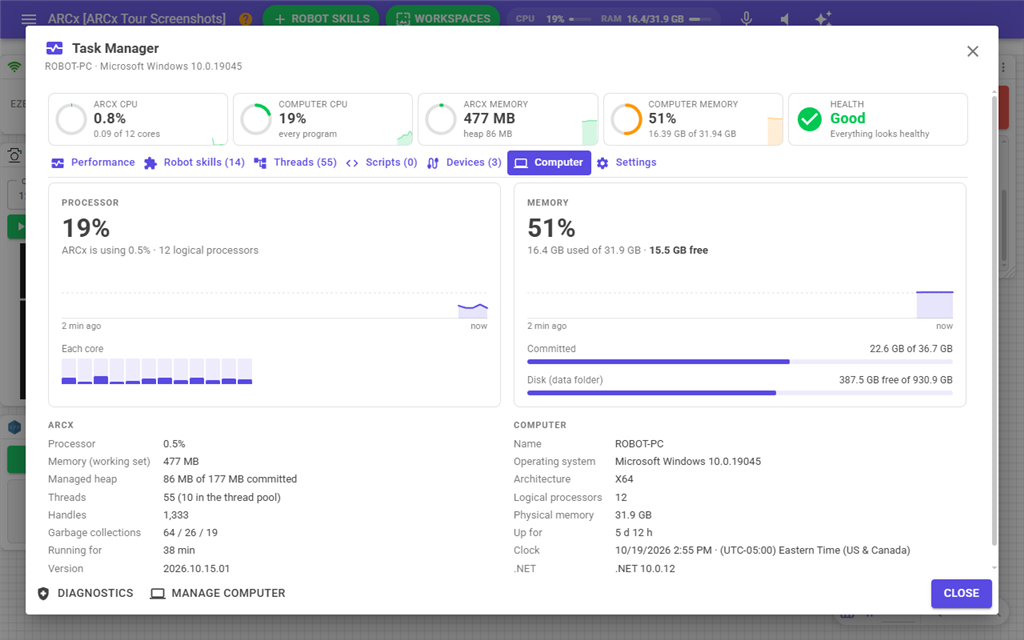
Click the chip to open System Status. Under the title are the computer's name and operating system. The figures update every two seconds while the window is open.
Processor
| Item | Meaning |
|---|---|
| Large percentage | How busy the whole processor is. A Busy or Very busy flag appears at the warning levels. |
| ARCx is using | How much of that is ARCx, and how many logical processors the computer has. |
| Graph | Processor use over the last two minutes. Hover over the graph to see the value and time of a reading. |
| Each core | A bar for each processor core. Hover over a bar to see its value. One full core while the others are idle usually means one robot skill or script is very busy. |
Memory
| Item | Meaning |
|---|---|
| Large percentage | How much memory is in use. A High or Very high flag appears at the warning levels. |
| Used, total and free | Memory in use, total memory, and how much is still free. |
| Graph | Memory use over the last two minutes. |
| Committed (Windows) or Swap (Linux, macOS) | How much of the computer's swap or page file is in use. Only shown when the computer has one. |
| Disk (data folder) | Free space on the drive that holds the ARCx data folder, where projects and logs are kept. |
ARCx
| Item | Meaning |
|---|---|
| Processor | ARCx's share of the processor. |
| Memory (working set) | The memory ARCx is using. |
| Managed heap | Memory used by ARCx and its robot skills' .NET code. |
| Threads | How many threads ARCx is running. |
| Handles (Windows) or Open files (Linux, macOS) | How many files and system resources ARCx has open. A number that keeps climbing can mean a robot skill is leaking them. |
| Garbage collections | Counts of .NET memory clean-ups, for troubleshooting. |
| Running for | How long ARCx has been running. |
| Version | The ARCx version. |
Computer
| Item | Meaning |
|---|---|
| Name | The computer's name. |
| Operating system | The operating system and version. |
| Architecture | For example x64 or Arm64. |
| Logical processors | The number of processor threads. |
| Physical memory | Total memory. |
| Up for | How long since the computer was started. |
| Clock | The computer's date, time and time zone. Schedules and logs use this clock. A robot with no real-time clock shows a wrong time here until it reaches a time server. |
| .NET | The .NET version ARCx runs on. |
Buttons
| Button | What it does |
|---|---|
| Diagnostics | Opens Views → Diagnostics. |
| Manage Computer | Opens Views → Computer, which shows the same detail plus power and Wi-Fi controls. |
| Close | Closes the window. You can also press Escape or click outside it. |
Notes
- ARCx only measures while at least one browser has the top bar open, so the readings cost nothing when nobody is watching. When the last browser closes, the history is cleared. It starts again when the next browser connects.
- The processor percentage is for the whole computer. A high figure with a low ARCx is using figure means another program is busy.