
Network Info
ARCx is a web server, and you control it from a web browser. Network Info shows the addresses the ARCx server can be reached on, so you can open ARCx from a phone, tablet or another computer. Type one of these addresses into the other device's browser, or copy it from here and send it over.
Where to find it: Side menu → Views → Network Info. The ARCx web server check on Views → Diagnostics also links here.
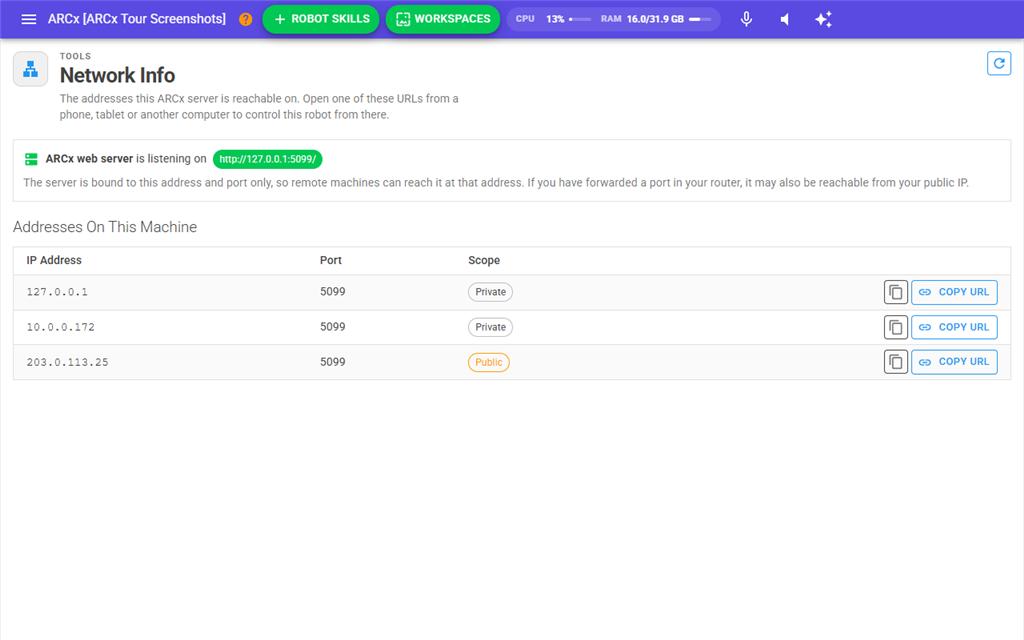
The listening address
The first panel reads ARCx web server is listening on, followed by the address and port the server was started with, for example http://0.0.0.0:5000. The text underneath explains what that means:
- 0.0.0.0 means the server is listening on every address of this computer. Any of the private addresses in the table below will reach it from your network.
- A specific address means the server only answers on that address and port. Remote devices must use exactly that address.
To reach ARCx from outside your own network, you would need to forward a port in your router to this computer's private address.
Addresses On This Machine
| Column | What it shows |
|---|---|
| IP Address | One address of this computer. The list always starts with 127.0.0.1, which only works in a browser on this same computer. Then come the computer's own network addresses, and last the public internet address of your network, when it can be found. |
| Port | The port the ARCx server listens on. It is the same for every row. |
| Scope | Private for addresses inside your own network. Public for the internet address of your network. |
Each row has two buttons:
| Button | What it does |
|---|---|
| Copy icon | Copies the IP address to the clipboard of the browser you are using. |
| Copy URL | Copies a complete address, such as http://192.168.1.20:5000, ready to paste into another browser. |
A message box confirms the copy.
The refresh button at the top right of the page reads the addresses again. Use it after joining a different network or plugging in a network cable.
Opening ARCx from another device
- Make sure the other device is on the same network as the computer running ARCx.
- On this page, find a Private address other than 127.0.0.1 and press Copy URL, or note the address and port.
- On the other device, open a web browser and enter that address, including the port.
Notes
- Only IPv4 addresses are listed.
- The Public address is the internet address of your router, looked up through Synthiam's servers. It only reaches ARCx if you have forwarded the port in your router. If this computer has no internet connection, the public row is missing.
- If ARCx is listening on more than one address, only the first one is shown in the top panel and its port is used for every row.
- Browsers only allow copying to the clipboard over
https://or on the computer running ARCx itself. When you open this page from another device over plainhttp://, the copy may not happen even though the success message appears. Read the address off the screen instead. - Browsers also only allow a web browser's microphone over
https://or on the same computer. See Options → Preferences for choosing the microphone.