
Drive Dynamixel smart servos from ARCx virtual ports over an EZB serial bus with sync writes, scans, telemetry, and mode control.
 Windows
 ARM
ARM
 Linux
Linux
 MacOS
MacOS
How to add the Dynamixel Servo Driver robot skill
- Load the most recent release of ARCx on a compatible operating system (Get ARCx).
- Press the + Skills menu from the top menu bar in ARCx.
- Choose the Servo category tab.
- Press the Dynamixel Servo Driver icon to add the robot skill to your project.
Don't have a robot yet?
Follow the Getting Started Guide to build a robot and use the Dynamixel Servo Driver robot skill.
How to use the Dynamixel Servo Driver robot skill
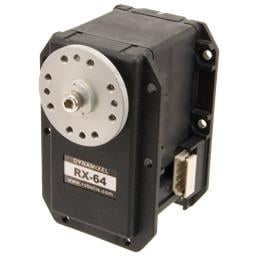
Drives Robotis Dynamixel smart servos from ARCx's virtual servo ports, over a serial bus wired to an EZB.
Once configured, a Dynamixel behaves like any other servo in ARCx: Auto Position, the servo skill, Servo.SetPosition(), the Kinematics Service and everything else move virtual port V1 and this skill turns that into the right packet on the bus.
Supported: AX-12/18, MX-28/64/106 (protocol 1 firmware), XL-320, XL330, XL430, XC430, XM430, XM540, XH430, XH540.
Untested against hardware at the time of writing - treat the first bring-up with care.
Requirements
- A connected EZB.
- Dynamixel servos daisy chained on one bus, all set to the same baud rate, each with a different ID.
- Power for the servos at their own voltage - they do not run from the EZB's logic supply.
- Ideally a hardware UART, which is full duplex and therefore able to read servos. A transmit-only digital port can move servos but cannot read, ping or scan.
Adding it to a project
- Wire the bus to a hardware UART on the EZB and connect.
- Add the skill (Servo category).
- On the Bus tab set the EZB index, the port and the baud rate. Dynamixels ship at 57600 (X series, XL-320) or 1000000 (AX series).
- On the Tools tab press Scan bus to see which IDs answer.
- On the Servos tab add an entry per servo: the virtual port other skills will use, the ID, the model, the operating mode and the position range.
- Press Initialize and move a servo from the servo skill to check it.
Mapping ports to IDs
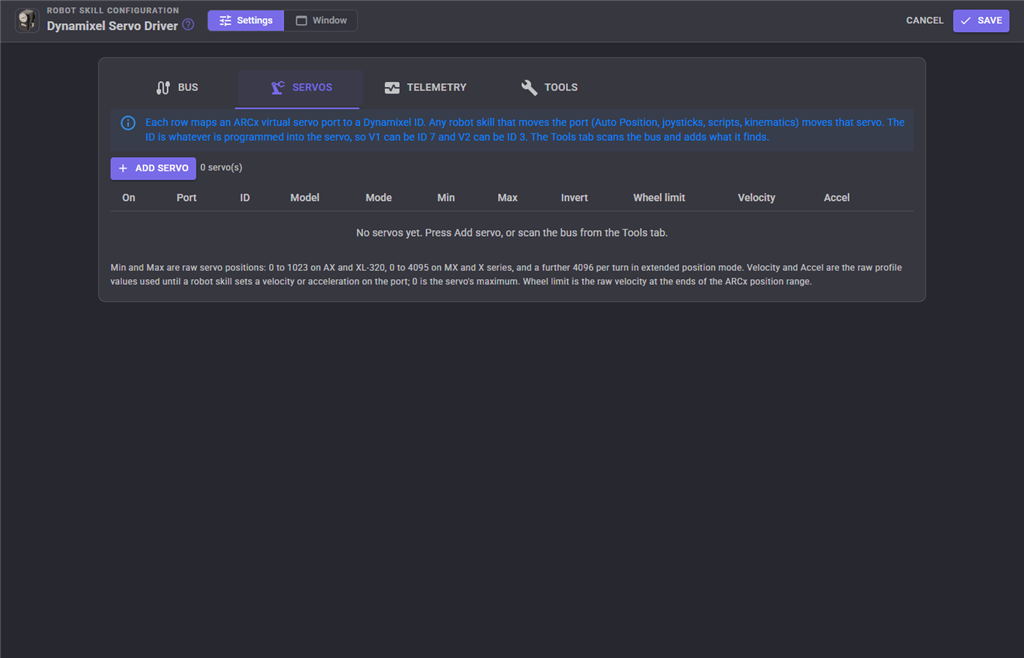
Each entry maps one ARCx virtual port (V0 to V255) to a Dynamixel ID. The ID does not have to match the port number - V3 can drive ID 17. Other skills only ever see the virtual port.
| Setting | Meaning | Default |
|---|---|---|
| Port | The ARCx virtual servo port other skills move. | V1 |
| ID | The Dynamixel ID (0-253) programmed into the servo. | 1 |
| Model | Decides the protocol and where every register lives, so it has to be right. | XL430 |
| Operating mode | Position moves between the min and max. Wheel spins continuously, with the ARCx position choosing direction and speed (centre is stopped). ExtendedPosition is the X series multi-turn mode. | Position |
| Min position / Max position | The raw servo positions the lowest and highest ARCx positions map to. 1023 for a 1024 step servo (AX, XL-320), 4095 for a 4096 step servo (MX, X series). | 0 / 4095 |
| Invert | Reverse the direction, for a mirrored mounting. | off |
| Wheel velocity limit | Wheel mode: the raw velocity the extreme ARCx positions map to. Must not exceed the servo's own velocity limit register. | 265 |
| Default profile velocity | Raw moving speed (protocol 1, XL-320) or profile velocity (X series) applied on initialization, until a skill sets one. 0 is maximum. | 0 |
| Default profile acceleration | Raw profile acceleration (X series, MX) applied on initialization. 0 is maximum. Ignored by servos without the register. | 0 |
| Enabled | A disabled entry is kept but ignored, so a servo can be parked without losing its settings. | on |
Bus settings
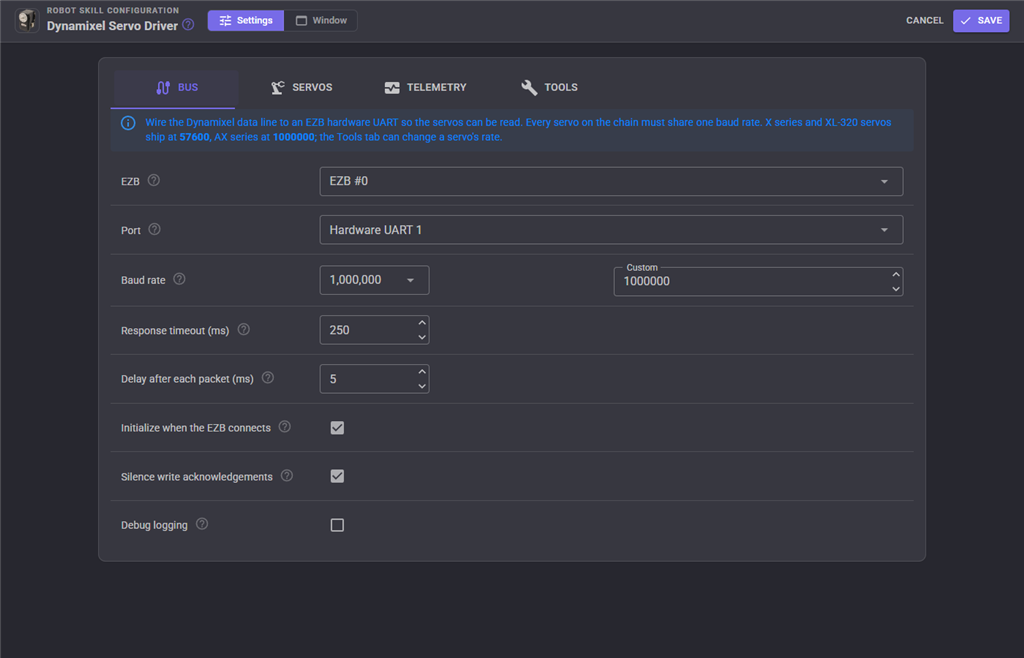
| Setting | Meaning | Default |
|---|---|---|
| Board index | Which EZB the bus is wired to. The virtual ports of this EZB are the ones the skill listens to. | 0 |
| Port type | UART1 is the usual choice - full duplex, so servos can be read. UART0 on an EZ-B v4 shares the camera port pins. DigitalPort is transmit-only software serial: servos can be moved but not read, and only 4800 to 115200 are available. | UART1 |
| Digital port | Which digital port to transmit from, when the port type is DigitalPort. | D0 |
| Baud rate | Every servo on the bus must be set to this. | 1000000 |
| Response timeout (ms) | How long to wait for an answer to a read or ping. | 250 |
| Inter-command delay (ms) | Pause after every packet, so a servo has time to act before the next arrives. 0 sends as fast as the EZB can. | 5 |
| Initialize on connect | Open the UART and apply each servo's mode automatically when the EZB connects. | on |
| Set status return level on init | Tell every servo to answer only reads and pings, so writes are not slowed by replies. Turn off to see every acknowledgement in the debug log. | on |
| Debug logging | Write every packet sent and received to the log as hex. Useful when wiring a new chain, noisy once it works. | off |
Telemetry
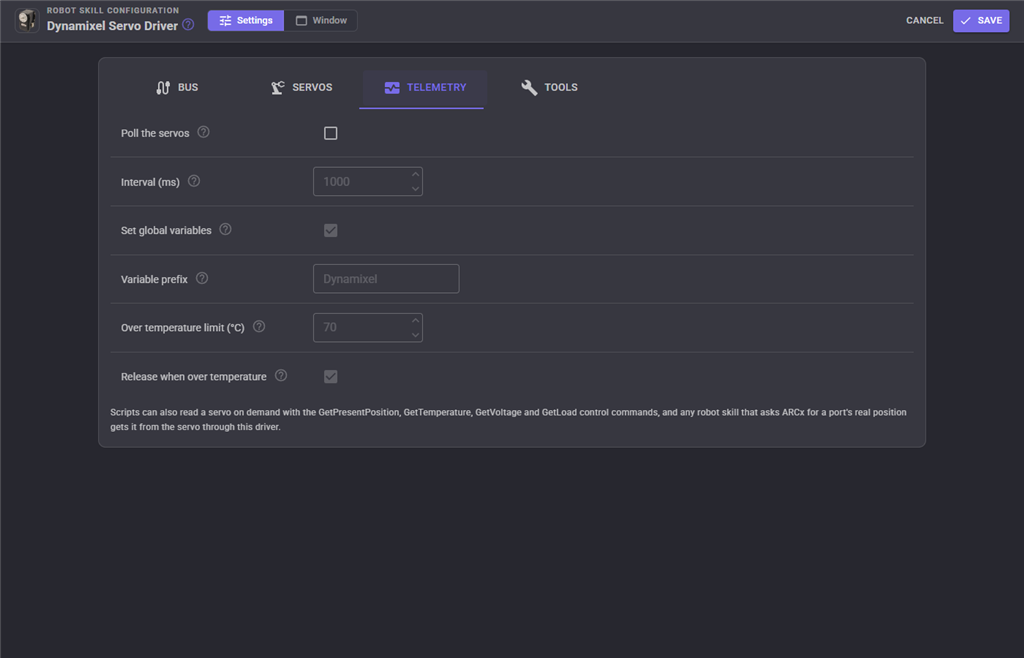
Background polling of every enabled servo's position, temperature, voltage, load and moving flag. It needs a hardware UART, and it is off by default because every poll is bus traffic that competes with movement.
| Setting | Meaning | Default |
|---|---|---|
| Enabled | Poll the servos. | off |
| Interval (ms) | How often a full pass is started. A pass that takes longer simply runs back to back. | 1000 |
| Set global variables | Publish each reading as script variables. | on |
| Variable prefix | Start of every variable name. | Dynamixel |
| Over temperature limit | A servo reaching this many degrees Celsius is reported in the log. 0 disables the check. Dynamixels shut themselves down around 70-80 degrees. | 70 |
| Release on over temperature | Torque off a servo that reaches the limit, so it cools instead of tripping its own shutdown. | on |
With the default prefix, port V1 publishes DynamixelV1Position, DynamixelV1Temperature, DynamixelV1Voltage, DynamixelV1Load, DynamixelV1Moving and DynamixelV1Online.
The window
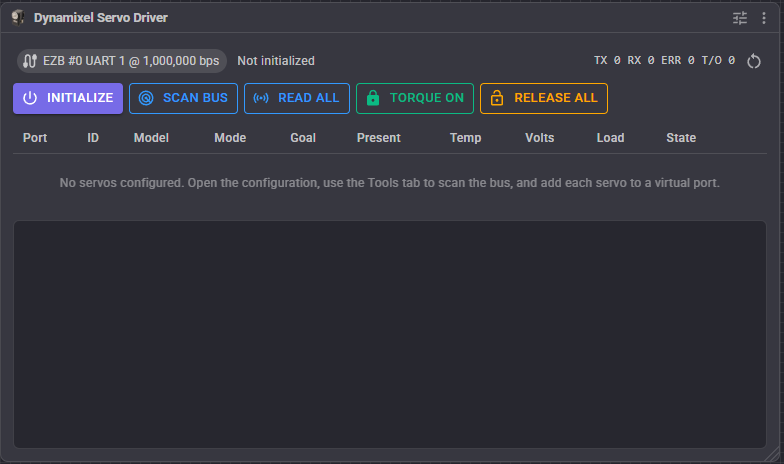
- Bus status and counters: packets sent, status packets received, servo errors and response timeouts.
- Initialize - open the UART and put every servo into its configured mode.
- Scan bus - broadcast ping on both protocols and list every servo that answers, configured or not.
- Read all - read position, temperature, voltage and load once.
- Torque on / Release all.
- A row per configured servo with its live values and last error.
Sync writes
When several configured servos are moved in the same operation, the driver sends a sync write - one packet for the whole group - rather than one packet per servo. That is what makes a whole-arm Auto Position frame arrive at the servos together.
Tools tab
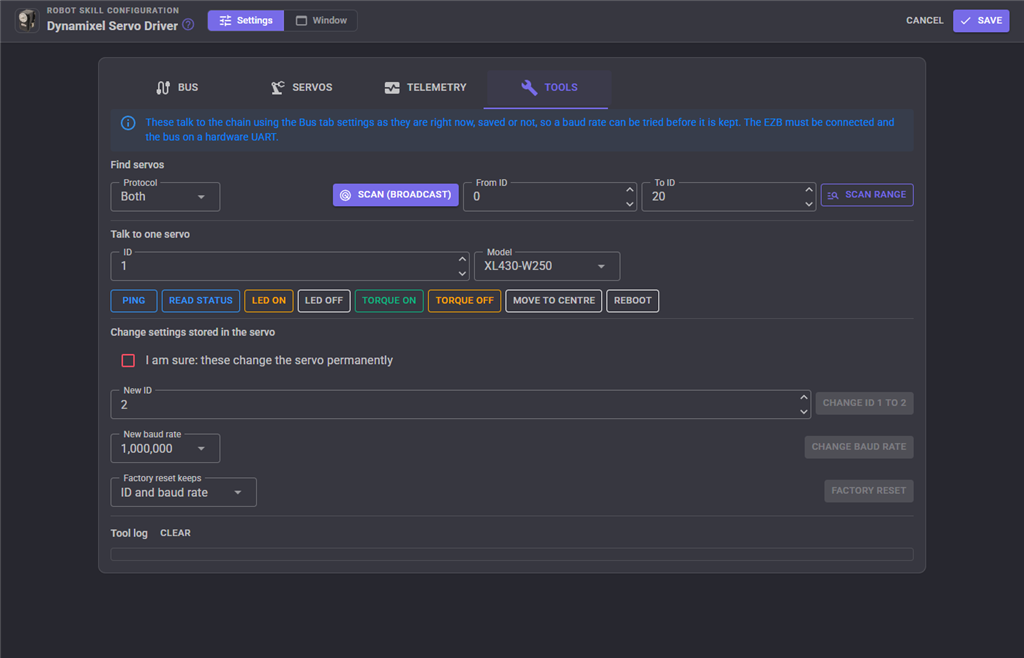
Scan the bus, ping a servo, change an ID, reboot a servo that has shut itself down on a hardware error, and factory reset.
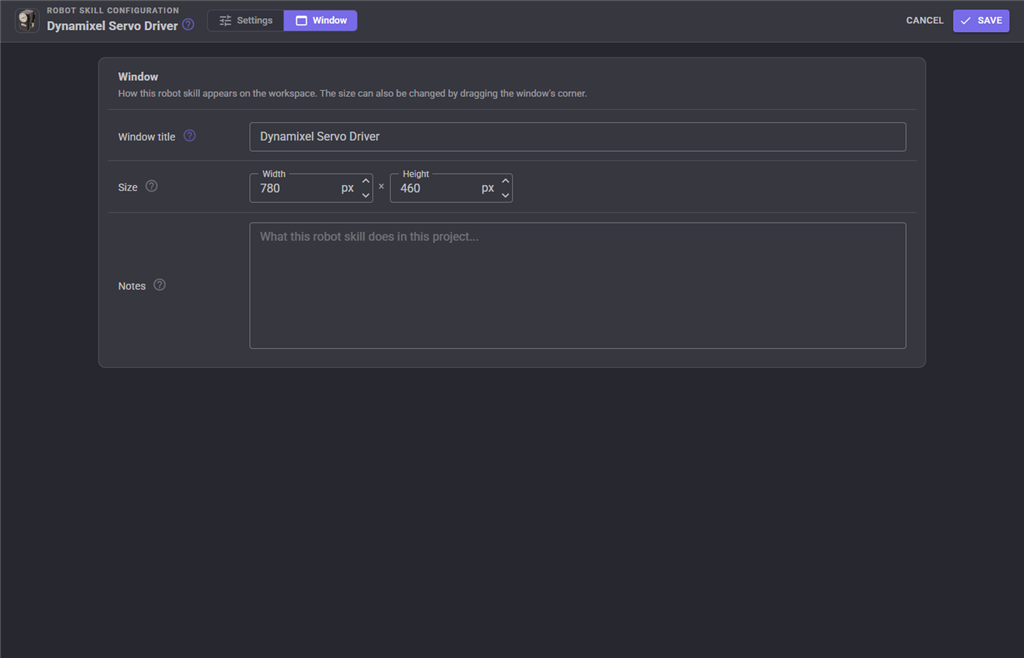
The Window tab sets the robot skill's window title, its size on the workspace and notes about what it does in this project.
Troubleshooting
| Symptom | Cause |
|---|---|
| Nothing answers a scan | Wrong baud rate, wrong UART, the bus is not powered, or the data line is wired the wrong way round. |
| Some servos answer, others do not | Duplicate IDs on the bus, or a bad link in the daisy chain. |
| Servos move but cannot be read | The bus is on a DigitalPort - transmit only. Move it to a hardware UART. |
| A servo moves the wrong way or to the wrong angle | Wrong model (so wrong control table), wrong min/max, or Invert needed. |
| Movement is jerky when several servos move | Raise Inter-command delay, or turn telemetry off or slower - it competes for the bus. |
| A servo stops responding and gets hot | It has shut down on a hardware error. Let it cool, then Reboot it. |
| Response timeouts in the counters | Raise Response timeout, check the baud rate and the wiring. |
| Positions jump when the mode is changed | Torque is turned off to change the operating mode; the servo may sag. |
See also
- Feetech Rs485 servo Driver / Feetech Bus servo Driver - the same idea for Feetech servos
- Servo, Auto Position (movement panel), Kinematics Service - things that move these ports
Control Commands for the Dynamixel Servo Driver robot skill
There are Control Commands available for this robot skill which allows the skill to be controlled programmatically from scripts or other robot skills. These commands enable you to automate actions, respond to sensor inputs, and integrate the robot skill with other systems or custom interfaces. If you're new to the concept of Control Commands, we have a comprehensive manual available here that explains how to use them, provides examples to get you started and make the most of this powerful feature.
Control Command ManualThis robot skill has 36 control commands, listed below. Send them from a JavaScript or Python script, from Blockly, or from another robot skill.
The first value is always the window title, which is the name in the title bar of the robot skill on your workspace. It starts out as Dynamixel servo Driver, which is what every example below uses. If you rename the robot skill, or add a second copy of it to the project, use the title as it appears on that window instead.
ControlCommand() can be shortened to CC(), and both spellings work in JavaScript and in Python. The examples are JavaScript; Python is the same call, except that true and false are written True and False.
ChangeID
Program a new Dynamixel ID (0 to 253) into the servo and update the configuration entry to match
Syntax
ControlCommand("Dynamixel servo Driver", "ChangeID", (String)servoPort, (Number)newId)
Parameters
| # | Name | Type | What to pass |
|---|---|---|---|
| 1 | servoPort | Text | Your text, in quotes |
| 2 | newId | Number | A number, without quotes |
Returns: Boolean [true or false]
Example
var result = ControlCommand("Dynamixel servo Driver", "ChangeID", "servoPort", 0);
FactoryReset
Restore factory settings. Option: ExceptIdAndBaud (default, protocol 2 only), ExceptId (protocol 2 only) or All. Protocol 1 always resets everything, which sets the ID to 1 and the baud rate to 1000000
Syntax
ControlCommand("Dynamixel servo Driver", "FactoryReset", (String)servoPort, (String)ExceptIdAndBaud|ExceptId|All)
Parameters
| # | Name | Type | What to pass |
|---|---|---|---|
| 1 | servoPort | Text | Your text, in quotes |
| 2 | ExceptIdAndBaud|ExceptId|All | Text | Your text, in quotes |
Returns: Boolean [true or false]
Example
var result = ControlCommand("Dynamixel servo Driver", "FactoryReset", "servoPort", "ExceptIdAndBaud|ExceptId|All");
GetBusStatus
A one line description of the bus and whether it initialized
Syntax
ControlCommand("Dynamixel servo Driver", "GetBusStatus")
Returns: String
Example
var result = ControlCommand("Dynamixel servo Driver", "GetBusStatus");
GetFirmwareVersion
The firmware version the servo reports
Syntax
ControlCommand("Dynamixel servo Driver", "GetFirmwareVersion", (String)servoPort)
Parameters
| # | Name | Type | What to pass |
|---|---|---|---|
| 1 | servoPort | Text | Your text, in quotes |
Returns: Integer [-2,147,483,648 to 2,147,483,647]
Example
var result = ControlCommand("Dynamixel servo Driver", "GetFirmwareVersion", "servoPort");
GetHardwareError
The hardware error status bits (XL-320 and X series). 0 is healthy. Reboot clears a shutdown
Syntax
ControlCommand("Dynamixel servo Driver", "GetHardwareError", (String)servoPort)
Parameters
| # | Name | Type | What to pass |
|---|---|---|---|
| 1 | servoPort | Text | Your text, in quotes |
Returns: Integer [-2,147,483,648 to 2,147,483,647]
Example
var result = ControlCommand("Dynamixel servo Driver", "GetHardwareError", "servoPort");
GetLoad
The servo's present load as a signed raw value. Negative is clockwise. Units depend on the model (0.1% or mA)
Syntax
ControlCommand("Dynamixel servo Driver", "GetLoad", (String)servoPort)
Parameters
| # | Name | Type | What to pass |
|---|---|---|---|
| 1 | servoPort | Text | Your text, in quotes |
Returns: Integer [-2,147,483,648 to 2,147,483,647]
Example
var result = ControlCommand("Dynamixel servo Driver", "GetLoad", "servoPort");
GetLoadDirection
The direction of the servo's present load: CW or CCW
Syntax
ControlCommand("Dynamixel servo Driver", "GetLoadDirection", (String)servoPort)
Parameters
| # | Name | Type | What to pass |
|---|---|---|---|
| 1 | servoPort | Text | Your text, in quotes |
Returns: String
Example
var result = ControlCommand("Dynamixel servo Driver", "GetLoadDirection", "servoPort");
GetModelNumber
The model number the servo reports
Syntax
ControlCommand("Dynamixel servo Driver", "GetModelNumber", (String)servoPort)
Parameters
| # | Name | Type | What to pass |
|---|---|---|---|
| 1 | servoPort | Text | Your text, in quotes |
Returns: Integer [-2,147,483,648 to 2,147,483,647]
Example
var result = ControlCommand("Dynamixel servo Driver", "GetModelNumber", "servoPort");
GetPresentPosition
The servo's real position read back from it, scaled to the ARCx servo position range like any other servo
Syntax
ControlCommand("Dynamixel servo Driver", "GetPresentPosition", (String)servoPort)
Parameters
| # | Name | Type | What to pass |
|---|---|---|---|
| 1 | servoPort | Text | Your text, in quotes |
Returns: Integer [-2,147,483,648 to 2,147,483,647]
Example
var result = ControlCommand("Dynamixel servo Driver", "GetPresentPosition", "servoPort");
GetPresentPositionDegrees
The servo's real position in degrees from the start of its range
Syntax
ControlCommand("Dynamixel servo Driver", "GetPresentPositionDegrees", (String)servoPort)
Parameters
| # | Name | Type | What to pass |
|---|---|---|---|
| 1 | servoPort | Text | Your text, in quotes |
Returns: Double [5.0e324 to 1.7e308]
Example
var result = ControlCommand("Dynamixel servo Driver", "GetPresentPositionDegrees", "servoPort");
GetPresentPositionRaw
The servo's real position as the raw register value (0 to 1023 or 0 to 4095, wider in extended position mode)
Syntax
ControlCommand("Dynamixel servo Driver", "GetPresentPositionRaw", (String)servoPort)
Parameters
| # | Name | Type | What to pass |
|---|---|---|---|
| 1 | servoPort | Text | Your text, in quotes |
Returns: Integer [-2,147,483,648 to 2,147,483,647]
Example
var result = ControlCommand("Dynamixel servo Driver", "GetPresentPositionRaw", "servoPort");
GetServoPorts
The virtual servo ports configured as Dynamixel servos, as strings such as V1
Syntax
ControlCommand("Dynamixel servo Driver", "GetServoPorts")
Returns: Array of String
Example
var result = ControlCommand("Dynamixel servo Driver", "GetServoPorts");
GetTemperature
The servo's internal temperature in degrees Celsius
Syntax
ControlCommand("Dynamixel servo Driver", "GetTemperature", (String)servoPort)
Parameters
| # | Name | Type | What to pass |
|---|---|---|---|
| 1 | servoPort | Text | Your text, in quotes |
Returns: Integer [-2,147,483,648 to 2,147,483,647]
Example
var result = ControlCommand("Dynamixel servo Driver", "GetTemperature", "servoPort");
GetVoltage
The servo's supply voltage in volts
Syntax
ControlCommand("Dynamixel servo Driver", "GetVoltage", (String)servoPort)
Parameters
| # | Name | Type | What to pass |
|---|---|---|---|
| 1 | servoPort | Text | Your text, in quotes |
Returns: Double [5.0e324 to 1.7e308]
Example
var result = ControlCommand("Dynamixel servo Driver", "GetVoltage", "servoPort");
InitializeBus
Open the UART and apply every servo's operating mode and default profile, as happens when the EZB connects
Syntax
ControlCommand("Dynamixel servo Driver", "InitializeBus")
Returns: Boolean [true or false]
Example
var result = ControlCommand("Dynamixel servo Driver", "InitializeBus");
IsMoving
True while the servo is still travelling to its goal
Syntax
ControlCommand("Dynamixel servo Driver", "IsMoving", (String)servoPort)
Parameters
| # | Name | Type | What to pass |
|---|---|---|---|
| 1 | servoPort | Text | Your text, in quotes |
Returns: Boolean [true or false]
Example
var result = ControlCommand("Dynamixel servo Driver", "IsMoving", "servoPort");
Ping
Ping the servo. Returns true when it answers, false when it does not. Needs a hardware UART
Syntax
ControlCommand("Dynamixel servo Driver", "Ping", (String)servoPort)
Parameters
| # | Name | Type | What to pass |
|---|---|---|---|
| 1 | servoPort | Text | Your text, in quotes |
Returns: Boolean [true or false]
Example
var result = ControlCommand("Dynamixel servo Driver", "Ping", "servoPort");
ReadByte
Read one byte from the servo's control table at the address
Syntax
ControlCommand("Dynamixel servo Driver", "ReadByte", (String)servoPort, (Number)address)
Parameters
| # | Name | Type | What to pass |
|---|---|---|---|
| 1 | servoPort | Text | Your text, in quotes |
| 2 | address | Number | A number, without quotes |
Returns: Integer [-2,147,483,648 to 2,147,483,647]
Example
var result = ControlCommand("Dynamixel servo Driver", "ReadByte", "servoPort", 0);
ReadBytes
Read a number of bytes from the servo's control table at the address. Returns them as space separated hex
Syntax
ControlCommand("Dynamixel servo Driver", "ReadBytes", (String)servoPort, (Number)address, (Number)count)
Parameters
| # | Name | Type | What to pass |
|---|---|---|---|
| 1 | servoPort | Text | Your text, in quotes |
| 2 | address | Number | A number, without quotes |
| 3 | count | Number | A number, without quotes |
Returns: String
Example
var result = ControlCommand("Dynamixel servo Driver", "ReadBytes", "servoPort", 0, 0);
ReadInt16
Read a signed 16 bit value (2 bytes) from the servo's control table at the address
Syntax
ControlCommand("Dynamixel servo Driver", "ReadInt16", (String)servoPort, (Number)address)
Parameters
| # | Name | Type | What to pass |
|---|---|---|---|
| 1 | servoPort | Text | Your text, in quotes |
| 2 | address | Number | A number, without quotes |
Returns: Integer [-2,147,483,648 to 2,147,483,647]
Example
var result = ControlCommand("Dynamixel servo Driver", "ReadInt16", "servoPort", 0);
ReadInt32
Read a signed 32 bit value (4 bytes) from the servo's control table at the address
Syntax
ControlCommand("Dynamixel servo Driver", "ReadInt32", (String)servoPort, (Number)address)
Parameters
| # | Name | Type | What to pass |
|---|---|---|---|
| 1 | servoPort | Text | Your text, in quotes |
| 2 | address | Number | A number, without quotes |
Returns: Integer [-2,147,483,648 to 2,147,483,647]
Example
var result = ControlCommand("Dynamixel servo Driver", "ReadInt32", "servoPort", 0);
ReadUInt16
Read an unsigned 16 bit value (2 bytes) from the servo's control table at the address
Syntax
ControlCommand("Dynamixel servo Driver", "ReadUInt16", (String)servoPort, (Number)address)
Parameters
| # | Name | Type | What to pass |
|---|---|---|---|
| 1 | servoPort | Text | Your text, in quotes |
| 2 | address | Number | A number, without quotes |
Returns: Integer [-2,147,483,648 to 2,147,483,647]
Example
var result = ControlCommand("Dynamixel servo Driver", "ReadUInt16", "servoPort", 0);
Reboot
Reboot the servo, which clears a hardware error shutdown. Protocol 2 servos only
Syntax
ControlCommand("Dynamixel servo Driver", "Reboot", (String)servoPort)
Parameters
| # | Name | Type | What to pass |
|---|---|---|---|
| 1 | servoPort | Text | Your text, in quotes |
Returns: Boolean [true or false]
Example
var result = ControlCommand("Dynamixel servo Driver", "Reboot", "servoPort");
ReleaseAll
Release (torque off) every configured servo
Syntax
ControlCommand("Dynamixel servo Driver", "ReleaseAll")
Returns: Boolean [true or false]
Example
var result = ControlCommand("Dynamixel servo Driver", "ReleaseAll");
ScanBus
Broadcast ping the bus and return a line per servo found (ID, protocol, model). protocol is 1, 2 or 0 for both
Syntax
ControlCommand("Dynamixel servo Driver", "ScanBus", (Number)protocol)
Parameters
| # | Name | Type | What to pass |
|---|---|---|---|
| 1 | protocol | Number | A number, without quotes |
Returns: Array of String
Example
var result = ControlCommand("Dynamixel servo Driver", "ScanBus", 0);
SetGoalVelocity
Wheel mode: spin at the raw signed velocity. Positive is counter clockwise, 0 stops. Bypasses the ARCx position mapping
Syntax
ControlCommand("Dynamixel servo Driver", "SetGoalVelocity", (String)servoPort, (Number)velocity)
Parameters
| # | Name | Type | What to pass |
|---|---|---|---|
| 1 | servoPort | Text | Your text, in quotes |
| 2 | velocity | Number | A number, without quotes |
Returns: Boolean [true or false]
Example
var result = ControlCommand("Dynamixel servo Driver", "SetGoalVelocity", "servoPort", 0);
SetHomingOffset
X series and MX: the raw offset added to the position, to shift where 0 is. Torque is turned off to write it
Syntax
ControlCommand("Dynamixel servo Driver", "SetHomingOffset", (String)servoPort, (Number)offset)
Parameters
| # | Name | Type | What to pass |
|---|---|---|---|
| 1 | servoPort | Text | Your text, in quotes |
| 2 | offset | Number | A number, without quotes |
Returns: Boolean [true or false]
Example
var result = ControlCommand("Dynamixel servo Driver", "SetHomingOffset", "servoPort", 0);
SetLED
Turn the LED of the Dynamixel on the virtual servo port (for example v1, or id:5 to address by Dynamixel ID) on or off
Syntax
ControlCommand("Dynamixel servo Driver", "SetLED", (String)servoPort, (Bool)on)
Parameters
| # | Name | Type | What to pass |
|---|---|---|---|
| 1 | servoPort | Text | Your text, in quotes |
| 2 | on | True or false | true or false, without quotes |
Returns: Boolean [true or false]
Example
var result = ControlCommand("Dynamixel servo Driver", "SetLED", "servoPort", true);
SetOperatingMode
Switch the servo between Position, Wheel and ExtendedPosition and remember it in the configuration. Torque is turned off to do it
Syntax
ControlCommand("Dynamixel servo Driver", "SetOperatingMode", (String)servoPort, (String)Position|Wheel|ExtendedPosition)
Parameters
| # | Name | Type | What to pass |
|---|---|---|---|
| 1 | servoPort | Text | Your text, in quotes |
| 2 | Position|Wheel|ExtendedPosition | Text | Your text, in quotes |
Returns: Boolean [true or false]
Example
var result = ControlCommand("Dynamixel servo Driver", "SetOperatingMode", "servoPort", "Position|Wheel|ExtendedPosition");
SetProfileAcceleration
The raw profile acceleration for position moves (X series and MX). 0 is the servo's maximum. Same as setting the port's acceleration
Syntax
ControlCommand("Dynamixel servo Driver", "SetProfileAcceleration", (String)servoPort, (Number)acceleration)
Parameters
| # | Name | Type | What to pass |
|---|---|---|---|
| 1 | servoPort | Text | Your text, in quotes |
| 2 | acceleration | Number | A number, without quotes |
Returns: Boolean [true or false]
Example
var result = ControlCommand("Dynamixel servo Driver", "SetProfileAcceleration", "servoPort", 0);
SetProfileVelocity
The raw speed limit for position moves (moving speed or profile velocity). 0 is the servo's maximum. Same as setting the port's velocity
Syntax
ControlCommand("Dynamixel servo Driver", "SetProfileVelocity", (String)servoPort, (Number)velocity)
Parameters
| # | Name | Type | What to pass |
|---|---|---|---|
| 1 | servoPort | Text | Your text, in quotes |
| 2 | velocity | Number | A number, without quotes |
Returns: Boolean [true or false]
Example
var result = ControlCommand("Dynamixel servo Driver", "SetProfileVelocity", "servoPort", 0);
TorqueEnable
Turn torque on (hold position) or off (free to move by hand) for the servo. Off is the same as releasing the port
Syntax
ControlCommand("Dynamixel servo Driver", "TorqueEnable", (String)servoPort, (Bool)enabled)
Parameters
| # | Name | Type | What to pass |
|---|---|---|---|
| 1 | servoPort | Text | Your text, in quotes |
| 2 | enabled | True or false | true or false, without quotes |
Returns: Boolean [true or false]
Example
var result = ControlCommand("Dynamixel servo Driver", "TorqueEnable", "servoPort", true);
TorqueEnableAll
Turn torque on or off for every configured servo
Syntax
ControlCommand("Dynamixel servo Driver", "TorqueEnableAll", (Bool)enabled)
Parameters
| # | Name | Type | What to pass |
|---|---|---|---|
| 1 | enabled | True or false | true or false, without quotes |
Returns: Boolean [true or false]
Example
var result = ControlCommand("Dynamixel servo Driver", "TorqueEnableAll", true);
WriteByte
Write one byte to the servo's control table at the address
Syntax
ControlCommand("Dynamixel servo Driver", "WriteByte", (String)servoPort, (Number)address, (Number)value)
Parameters
| # | Name | Type | What to pass |
|---|---|---|---|
| 1 | servoPort | Text | Your text, in quotes |
| 2 | address | Number | A number, without quotes |
| 3 | value | Number | A number, without quotes |
Returns: Boolean [true or false]
Example
var result = ControlCommand("Dynamixel servo Driver", "WriteByte", "servoPort", 0, 0);
WriteInt32
Write a signed 32 bit value (4 bytes) to the servo's control table at the address
Syntax
ControlCommand("Dynamixel servo Driver", "WriteInt32", (String)servoPort, (Number)address, (Number)value)
Parameters
| # | Name | Type | What to pass |
|---|---|---|---|
| 1 | servoPort | Text | Your text, in quotes |
| 2 | address | Number | A number, without quotes |
| 3 | value | Number | A number, without quotes |
Returns: Boolean [true or false]
Example
var result = ControlCommand("Dynamixel servo Driver", "WriteInt32", "servoPort", 0, 0);
WriteUInt16
Write an unsigned 16 bit value (2 bytes) to the servo's control table at the address
Syntax
ControlCommand("Dynamixel servo Driver", "WriteUInt16", (String)servoPort, (Number)address, (Number)value)
Parameters
| # | Name | Type | What to pass |
|---|---|---|---|
| 1 | servoPort | Text | Your text, in quotes |
| 2 | address | Number | A number, without quotes |
| 3 | value | Number | A number, without quotes |
Returns: Boolean [true or false]
Example
var result = ControlCommand("Dynamixel servo Driver", "WriteUInt16", "servoPort", 0, 0);
This list is read out of the robot skill itself each time its package is uploaded, so it matches the published version (v4).




This robot skill has been updated to v1.
This robot skill has been updated to v2.
This robot skill has been updated to v3.
This robot skill has been updated to v4.
What has changed
compatible with the latest ARCx v2026.09.27.01