
Functions
Name a group of blocks and use it again from anywhere in the program, optionally handing back a result. Right-click a function's block and choose Create to get a block that runs it.
Where to find it: the Functions category of the toolbox, in any script editor set to Blockly or on Top bar → Workspaces → Blockly
Blocks
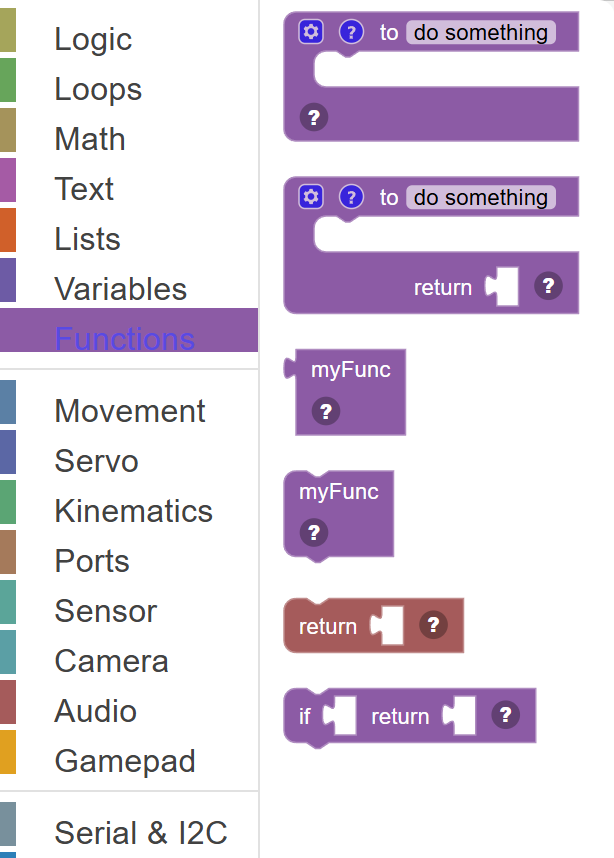
| Block | What it does |
|---|---|
| Define Function | Creates a reusable group of blocks that you can call by name from anywhere in your script. |
| Define Function (with Return) | Creates a reusable function that calculates and sends back a value when called. |
| Call Function (Get Result) | Runs a function and gives you back the value it returns. |
| Call Function | Runs a function that you defined earlier. |
| Return Value | Exits the current function immediately and sends back the connected value as the function's result. |
| If / Return | A combination block: if the condition is true, return the specified value and exit the function. |
Details
Define Function
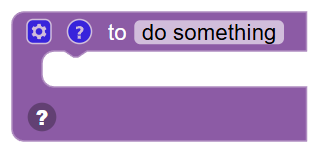
Creates a reusable group of blocks that you can call by name from anywhere in your script. This type of function does things but doesn't send back a value.
When to use it: Use this to avoid repeating the same blocks over and over. Group common actions into a named function and call it whenever needed.
Example: Define "doHappyDance" → put the servo movements inside, then call doHappyDance() from anywhere in the script.
Tips:
- Click the gear icon to add parameters (inputs) to your function.
- Good function names describe what the function does — like "moveArmUp" or "checkDistance".
- Functions make your script easier to read and maintain.
Define Function (with Return)
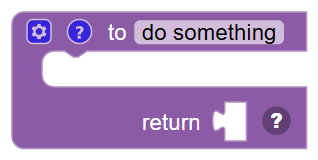
Creates a reusable function that calculates and sends back a value when called. The "return" value can be used just like any other block output.
When to use it: Use this when you want a function to calculate something and give you the result — like a function that measures distance and returns the value.
Example: Define "getAverageDistance" → runs multiple pings, calculates the average, and returns the number.
Tips:
- Connect a block to the "return" slot at the bottom to set what the function gives back.
- Call this function with the "call function" block that has an output socket.
- The return type is flexible — functions can return numbers, text, or booleans.
Call Function (Get Result)
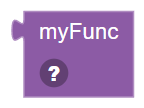
Runs a function and gives you back the value it returns. Connect this block's output to wherever you want to use the result.
When to use it: Use this when calling a function that calculates and returns a value — like getting an average distance or a formatted message.
Example: Set "dist" to [call "getAverageDistance"] → runs the function and saves its returned value into the variable.
Tips:
- Only works with functions defined using "Define Function (with Return)".
- The result can be used directly or stored in a variable.
- If the function has parameters, fill them in using the input slots.
In JavaScript: this block gives back the value of
myFunc()
Call Function
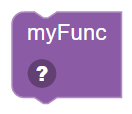
Runs a function that you defined earlier. All the blocks inside that function execute in order, then execution returns here.
When to use it: Use this wherever you want to run your custom function — call it once, or call it many times from different places.
Example: Call "doHappyDance" → runs all the blocks inside the doHappyDance function right now.
Tips:
- The function must be defined somewhere in your workspace before calling it.
- If your function has parameters, connect blocks to fill in those values.
- Calling a function is much cleaner than copying the same blocks everywhere.
In JavaScript: this block runs
myFunc();
Return Value
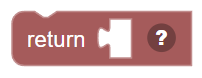
Exits the current function immediately and sends back the connected value as the function's result. Place this inside a function definition.
When to use it: Use this to exit a function early (before it reaches the end), or to send back a calculated result.
Example: If distance < 10 → Return 0 (stop early with zero speed if too close).
Tips:
- Everything after a Return block in that branch won't run.
- A function can have multiple Return blocks — useful for early exits with If blocks.
- You can return any type of value: number, text, or true/false.
In JavaScript: this block runs
return ;
If / Return
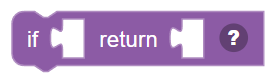
A combination block: if the condition is true, return the specified value and exit the function. If false, the function keeps running normally.
When to use it: Use this as a quick "guard clause" at the top of a function — exit early if conditions aren't right.
Example: If battery < 5 → Return 0 (exit the function early with 0 speed to protect the robot).
Tips:
- Only works inside a "Define Function with Return" block.
- Great for safety checks at the beginning of a function.
- Multiple If/Return blocks can be chained for multiple early exit conditions.
In JavaScript: this block runs
if (false) {
  return null;
}