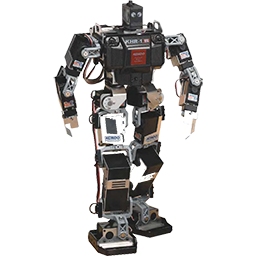

Controls Lynxmotion LSS/LSS-PRO smart servos from ARC virtual ports with UART, digital, or USB serial bus support.
 Windows
 ARM
ARM
 Linux
Linux
 MacOS
MacOS
How to add the Lynxmotion Smart Servo Driver robot skill
- Load the most recent release of ARCx on a compatible operating system (Get ARCx).
- Press the + Skills menu from the top menu bar in ARCx.
- Choose the Servo category tab.
- Press the Lynxmotion Smart Servo Driver icon to add the robot skill to your project.
Don't have a robot yet?
Follow the Getting Started Guide to build a robot and use the Lynxmotion Smart Servo Driver robot skill.
How to use the Lynxmotion Smart Servo Driver robot skill
Drives Lynxmotion Smart Servos from ARCx's virtual servo ports, over an EZB hardware UART, an EZB digital port, or a Lynxmotion LSS Adapter (or any USB serial adapter) on a COM port of the ARCx computer.
Once configured, a Lynxmotion servo behaves like any other servo in ARCx: Auto Position, the servo skill, Servo.setPosition(), the Kinematics Service and everything else move virtual port V1, and this skill turns that into the right command on the bus.
Works with both generations of Lynxmotion smart servo:
| Series | Models | Position units | Factory baud rate |
|---|---|---|---|
| LSS | LSS-ST1 (standard), LSS-HS1 (high speed), LSS-HT1 (high torque) | tenths of a degree | 115200 |
| LSS-PRO | LSS-P-L1, LSS-P-S1, LSS-P-M1 | hundredths of a degree | 921600 |
Both speak the same plain text protocol, so one bus can hold both kinds. The skill asks each servo its model when the bus initializes and uses the right units for it automatically. Newer features are supported too: speed and timed moves, current limited moves that hold or go limp when they meet resistance (LSS firmware 365 and newer), the motion profile and position filter, stiffness, and the PRO's extra temperatures and IMU.
Tested against the protocol with a simulated chain of LSS and LSS-PRO servos (every command checked as sent, every reply parsed, including the echo a half duplex bus produces) but not yet against servos on a real bus. Treat the first bring-up with care.
Requirements
- Lynxmotion servos daisy chained on one bus, each with a different ID. Every servo ships as ID 0, so new servos have to be given their own IDs one at a time (the Tools tab does it).
- Power for the servos at their own voltage. They do not run from the EZB's logic supply.
- Every servo on the bus set to the same baud rate. A standard LSS and an LSS-PRO ship at different rates, so change one of them (Tools tab) before mixing them.
- A way to talk to the bus:
- an EZB hardware UART, with the servos' TX reaching the UART's RX so they can be read, or
- a Lynxmotion LSS Adapter, an LSS-2IO, or another USB serial adapter plugged into the ARCx computer, or
- an EZB digital port, which can move servos but cannot read anything back.
Mapping ports to IDs
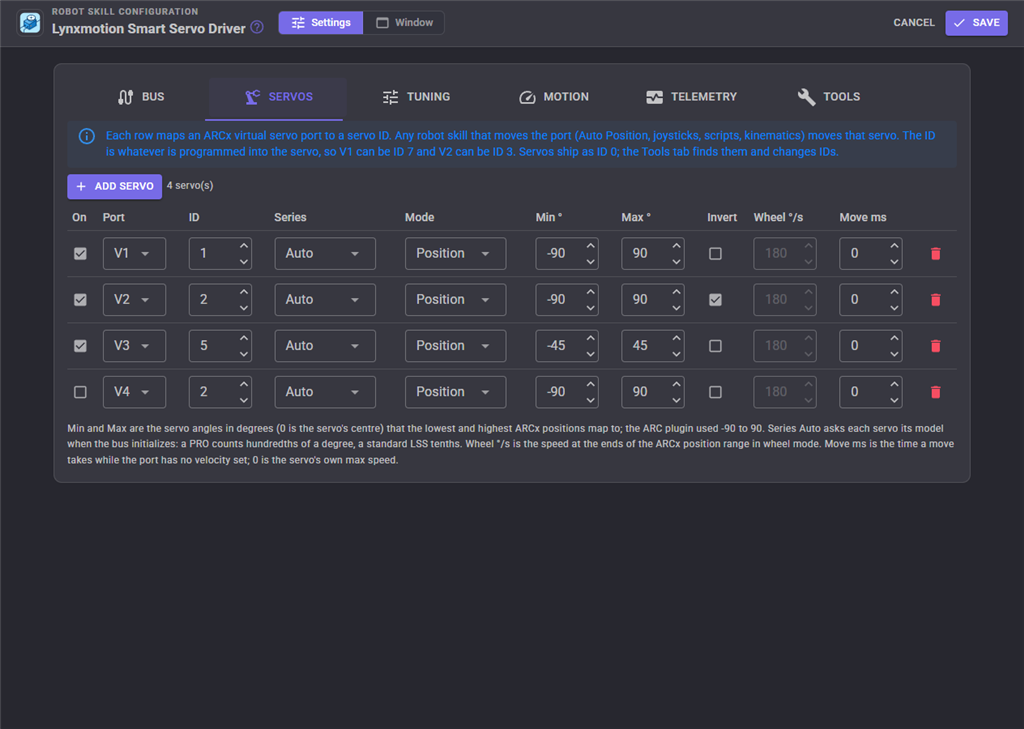
Each entry maps one ARCx virtual port (V0 to V255) to a servo ID. The ID does not have to match the port number: V3 can drive ID 17. Other skills only ever see the virtual port. The ARC plugin tied V0 to ID 0, V1 to ID 1 and so on; set the IDs that way to keep an old robot's numbering.
| Setting | Meaning | Default |
|---|---|---|
| On | A disabled entry is kept but ignored, so a servo can be parked without losing its settings. | on |
| Port | The ARCx virtual servo port other skills move. | V1 |
| ID | The servo ID (0 to 250) programmed into the servo. | 1 |
| Series | Auto asks the servo its model when the bus initializes. LSS or LSS-PRO fixes it, which a digital port bus needs because it cannot ask. | Auto |
| Mode | Position moves between the min and max angles. Wheel spins continuously, with the ARCx position choosing the direction and speed: the lowest position is full speed one way, the centre is stopped and the highest is full speed the other way. | Position |
| **Min ** / **Max ** | The servo angles the lowest and highest ARCx positions map to. 0 is the servo's centre. The ARC plugin used -90 to 90. | -90 / 90 |
| Invert | Reverse the direction, for a mirrored mounting. | off |
| Wheel /s | Wheel mode: the speed in degrees per second at the ends of the ARCx position range. | 180 |
| Move ms | The time a position move takes while the port has no velocity set. 0 moves at the servo's own max speed, which is what the ARC plugin always did. | 0 |
Tuning
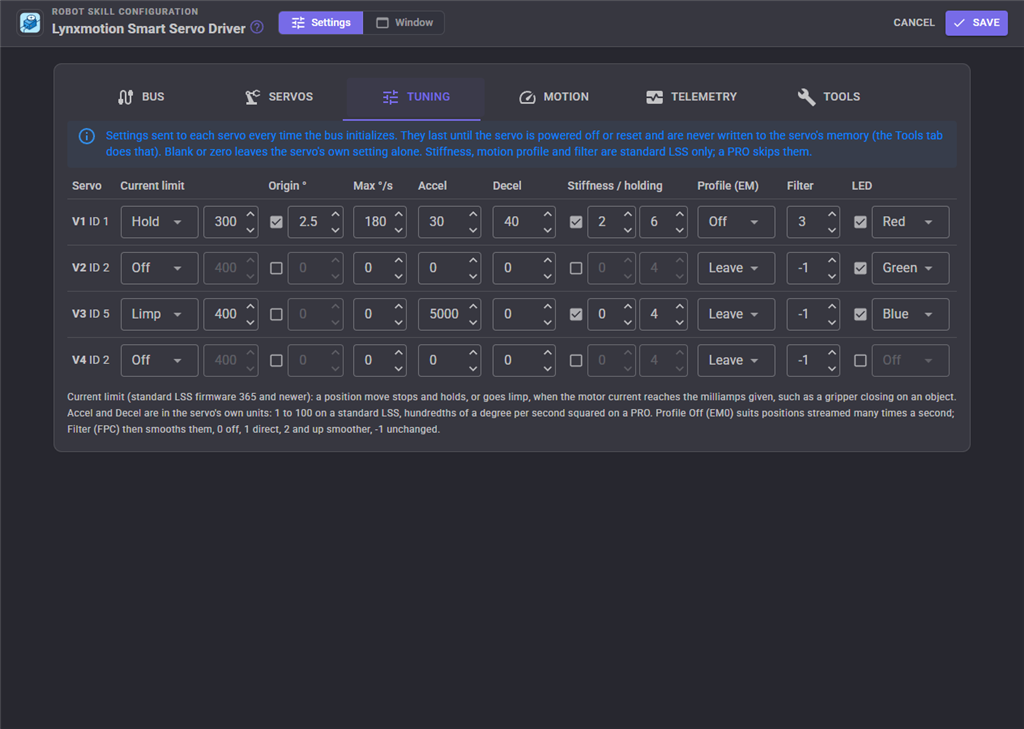
Settings sent to each servo every time the bus initializes. They last until the servo is powered off or reset and are never written to the servo's memory (the Tools tab does that). Leaving a value at 0 (or -1, or unticked) leaves the servo's own setting alone.
| Setting | Meaning | Series |
|---|---|---|
| Current limit | Hold or Limp adds a current limit to every position move: when the motor current reaches the milliamps given, the servo stops and holds there, or goes limp. A gripper that closes on an object without straining is the classic use. Needs firmware 365 or newer. | LSS |
| **Origin ** | Shifts the servo's zero by this many degrees, to trim an assembly without remounting a horn. | both |
| Max /s | The fastest the servo may move. | both |
| Accel / Decel | The motion profile's acceleration and deceleration, in the servo's own units: 1 to 100 on an LSS, hundredths of a degree per second squared on a PRO. | both |
| Stiffness / holding | How firmly the servo follows its path while moving (-4 to 4) and holds its position (-10 to 10). | LSS |
| Profile (EM) | On makes every move accelerate and decelerate. Off sends the servo straight for each new position, which suits positions streamed many times a second (joysticks, kinematics, servo Animation). | LSS |
| Filter | The position filter used while the profile is off: 0 off, 1 direct, 2 and up smoother. -1 leaves it alone. | LSS |
| LED | A colour set on every initialization, handy for telling servos apart. | both |
Settings marked LSS are skipped for a PRO servo, which does not have them.
Bus settings
| Setting | Meaning | Default |
|---|---|---|
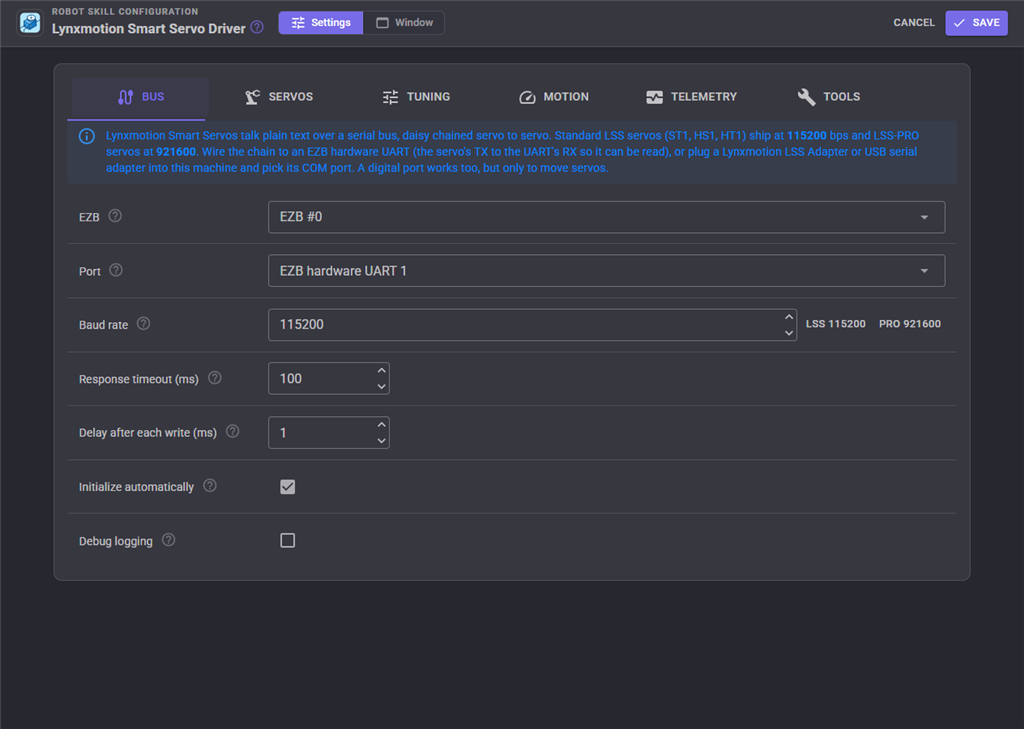
| EZB | The EZB whose virtual ports this skill answers to. For a UART or digital port it is also the EZB the bus is wired to. | EZB #0 |
| Port | EZB hardware UART 0, 1 or 2, EZB digital port (transmit only), or COM port on this machine. | UART 1 |
| Digital port / COM port | Shown for those port types. | |
| Baud rate | The rate every servo on the bus talks at. The two buttons fill in the factory rates. A digital port can only do 4800 to 115200. | 115200 |
| Response timeout (ms) | How long a query waits for a servo to answer. Raise it if reads time out over WiFi. | 100 |
| Delay after each write (ms) | A pause after every write. 0 sends as fast as the port can. | 1 |
| Initialize automatically | Open the port, detect each servo's model and send each servo's tuning as soon as the EZB connects (or the project loads, for a COM port). | on |
| Debug logging | Every line sent and received goes to the skill's log. Useful while wiring up a chain. | off |
One skill instance drives one bus. A robot with chains on two UARTs adds the skill twice.
Speed and timing
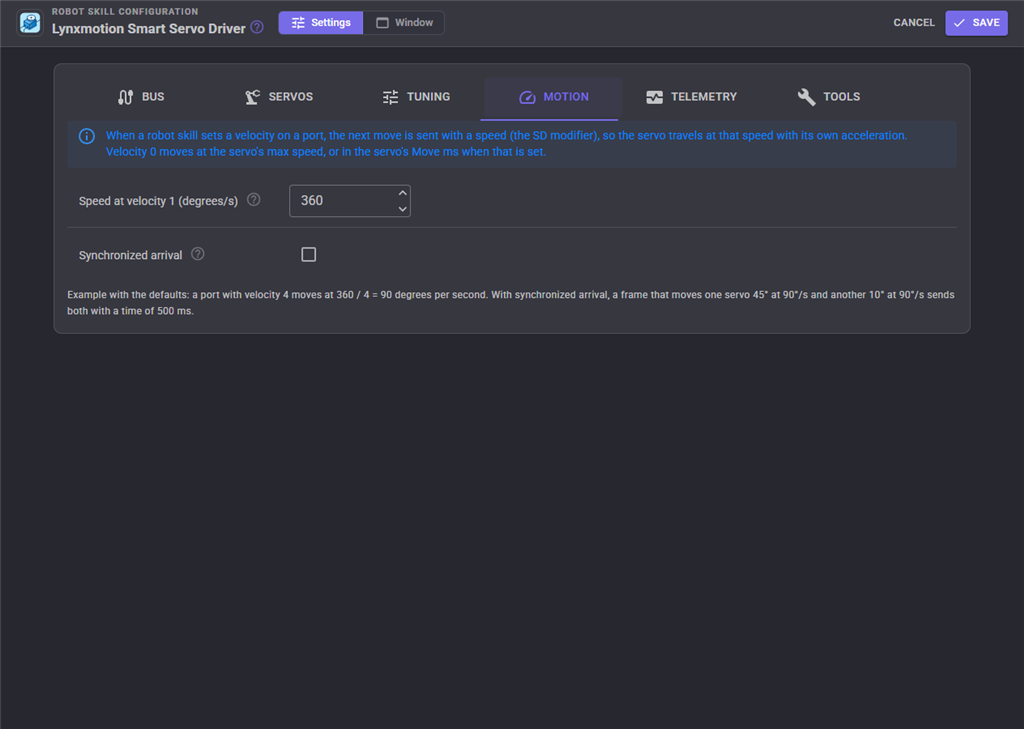
When a skill or script sets a velocity on a port, the next move is sent with that speed, and the servo gets there at that speed using its own acceleration.
| Setting | Meaning | Default |
|---|---|---|
| Speed at velocity 1 (degrees/s) | The speed velocity 1 means. Higher velocities are slower: the speed is this value divided by the velocity, so with 360, velocity 4 is 90 degrees per second. Velocity 0 is the servo's max speed, or the entry's Move ms. | 360 |
| Synchronized arrival | When one move changes several servos (an Auto Position frame, a kinematics pose), send them all with the same move time so they arrive together. The slowest servo sets the time. | off |
Telemetry
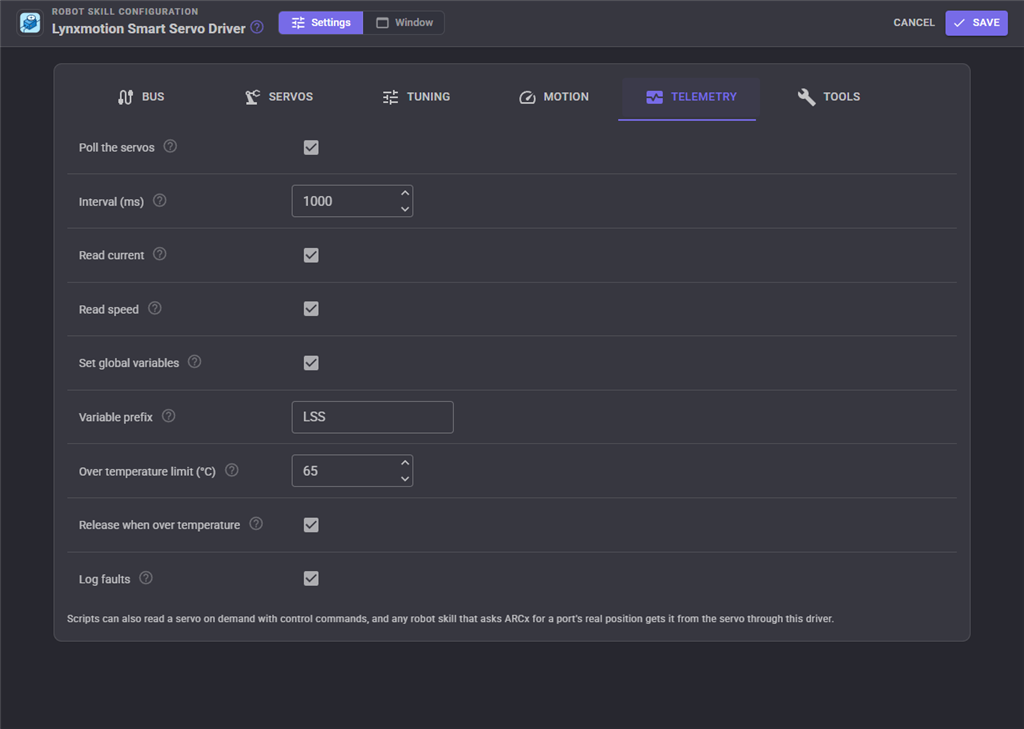
With polling on, the skill reads every servo's position, status, voltage and temperature (and optionally current and speed) in the background, shows them in its window and publishes them as global variables. It needs a hardware UART or COM port.
| Setting | Meaning | Default |
|---|---|---|
| Poll the servos | Turn background reads on. | off |
| Interval (ms) | How often a pass over all the servos starts. | 1000 |
| Read current / Read speed | Also read the motor current and the present speed on each pass. | on / off |
| Set global variables | Publish the readings to scripts. | on |
| Variable prefix | The start of each variable name. | LSS |
| Over temperature limit (C) | A servo at or above this is reported in the log. 0 turns the check off. | 65 |
| Release when over temperature | Limp a hot servo so it can cool down. It comes back on the next move. | on |
| Log faults | Report a servo that says it is outside its limits, stuck, blocked or in safe mode (an LSS) or in error (a PRO), and again when it recovers. | on |
With the default prefix, V1 publishes $LSSV1Degrees, $LSSV1Position (scaled to the ARCx servo range), $LSSV1Status, $LSSV1Temperature, $LSSV1Voltage, $LSSV1Current, $LSSV1Speed and $LSSV1Online.
Any skill that asks ARCx for a virtual port's real position (Auto Position's "get positions", the servo skill's read button, scripts) gets it from the servo through this skill, whether polling is on or not.
The window
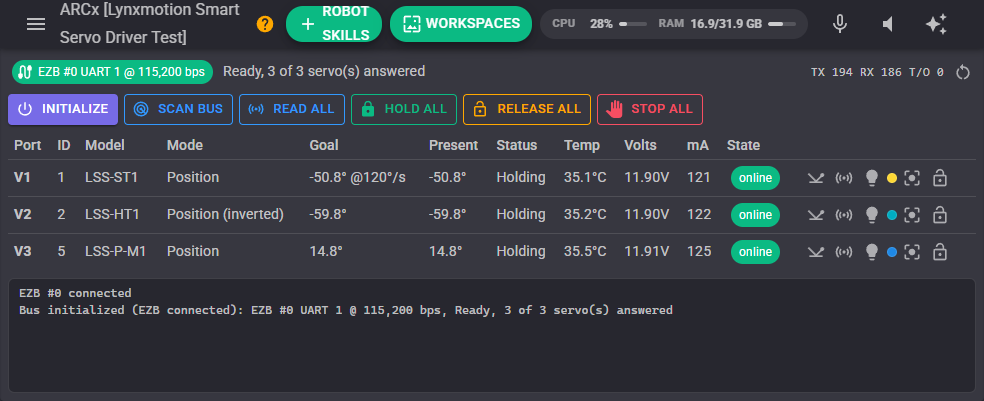
The top line shows the bus, whether it initialized and how many servos answered, and counters of lines sent, replies received and timeouts.
- Initialize opens the port, detects each servo's model and sends its tuning.
- Scan bus sweeps every ID from 0 to 250 and logs each servo that answers, with its model and firmware, and whether it is configured.
- Read all reads every servo once.
- Hold all, Release all and Stop all hold every servo where it is, let them all go limp, or stop every servo on the bus part way through a move.
Each servo row shows its model, the last goal sent, and what telemetry last read: the present angle, the motion status, temperature, voltage and current. The buttons on the right ping it, read it, step its LED through the colours (to find it on the robot), centre it through its ARCx port, and release it.
Tools tab
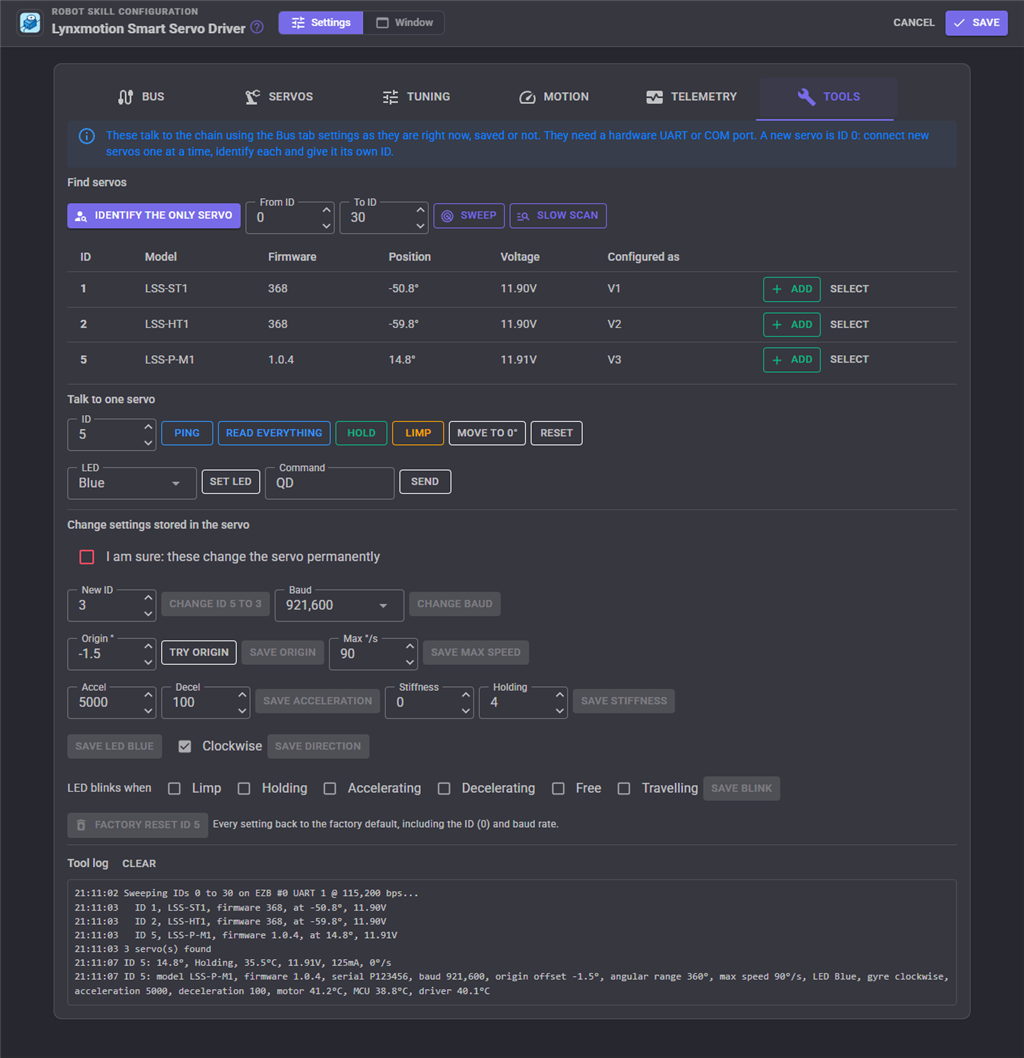
The Tools tab talks to the bus with the settings on the Bus tab as they are right now, saved or not, so a new chain can be brought up from one screen.
- Identify the only servo asks the broadcast ID who is there. It only works with one servo connected, which is how new servos (all ID 0) are given their own IDs one at a time.
- Sweep sends every ID in the range a query a few milliseconds apart and collects the answers. Slow scan asks each ID and waits for each, for a link that loses sweep replies. Found servos can be added to the next free port with Add.
- Talk to one servo pings, reads everything the servo reports, holds, limps, moves to 0, resets, sets the LED, or sends any LSS command typed in the Command box (without the # and ID, such as
QFPCorLED3; a query shows the answer). - Change settings stored in the servo writes to the servo's memory and needs the I am sure tick first: a new ID, a new baud rate, the origin, max speed, acceleration, stiffness, LED colour, direction of rotation and LED blink states, and a factory reset. Changing the ID or baud rate resets the servo so it takes effect; after a baud change set the Bus tab to the new rate.
Scripts from the ARC plugin
The ARC plugin's SetLED and TorqueEnable control commands still work, and SetLED accepts true and false as it did. Its GetLSSPosition, GetLSSTemp and GetLSSPing script functions are now the control commands GetPresentPositionDegrees, GetTemperature and Ping. Servos are named by their virtual port (v1), or by ID as id:5.
Troubleshooting
- Nothing answers a scan: check the servo power, that the baud rate matches the servos (115200 for a new LSS, 921600 for a new PRO), and that the servos' TX reaches the UART's RX. Turn on debug logging and look for
RXlines in the log. - Reads time out over WiFi: raise the response timeout to 200 or more.
- A PRO servo moves a tenth as far as it should: its series is set to LSS (or the bus is on a digital port with Series Auto). Set Series to LSS-PRO.
- Two servos move together: they share an ID. Connect them one at a time and give each its own ID with the Tools tab.
- The servo jerks on streamed positions: set its Profile to Off and its Filter to 5 or more on the Tuning tab.
Control Commands for the Lynxmotion Smart Servo Driver robot skill
There are Control Commands available for this robot skill which allows the skill to be controlled programmatically from scripts or other robot skills. These commands enable you to automate actions, respond to sensor inputs, and integrate the robot skill with other systems or custom interfaces. If you're new to the concept of Control Commands, we have a comprehensive manual available here that explains how to use them, provides examples to get you started and make the most of this powerful feature.
Control Command ManualThis robot skill has 43 control commands, listed below. Send them from a JavaScript or Python script, from Blockly, or from another robot skill.
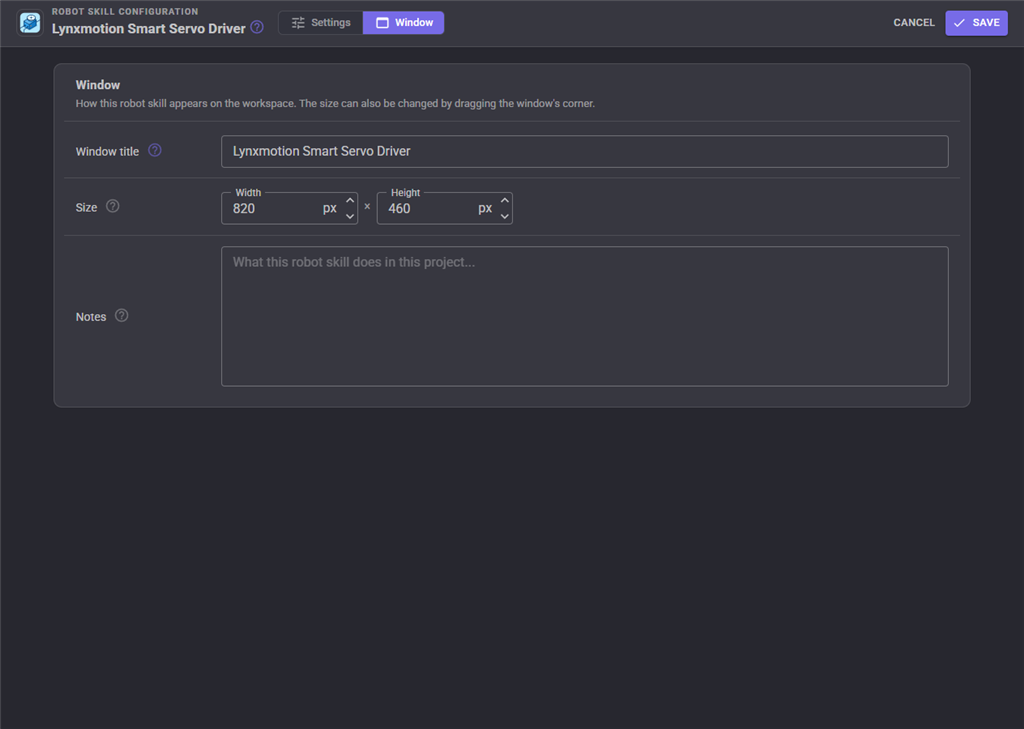
The first value is always the window title, which is the name in the title bar of the robot skill on your workspace. It starts out as Lynxmotion Smart servo Driver, which is what every example below uses. If you rename the robot skill, or add a second copy of it to the project, use the title as it appears on that window instead.
ControlCommand() can be shortened to CC(), and both spellings work in JavaScript and in Python. The examples are JavaScript; Python is the same call, except that true and false are written True and False.
ChangeID
Program a new servo ID (0 to 250) into the servo, reset it, and update the configuration entry to match
Syntax
ControlCommand("Lynxmotion Smart servo Driver", "ChangeID", (String)servoPort, (Number)newId)
Parameters
| # | Name | Type | What to pass |
|---|---|---|---|
| 1 | servoPort | Text | Your text, in quotes |
| 2 | newId | Number | A number, without quotes |
Returns: Boolean [true or false]
Example
var result = ControlCommand("Lynxmotion Smart servo Driver", "ChangeID", "servoPort", 0);
GetBusStatus
A one line description of the bus and whether it initialized
Syntax
ControlCommand("Lynxmotion Smart servo Driver", "GetBusStatus")
Returns: String
Example
var result = ControlCommand("Lynxmotion Smart servo Driver", "GetBusStatus");
GetCurrent
The servo's motor current in milliamps
Syntax
ControlCommand("Lynxmotion Smart servo Driver", "GetCurrent", (String)servoPort)
Parameters
| # | Name | Type | What to pass |
|---|---|---|---|
| 1 | servoPort | Text | Your text, in quotes |
Returns: Integer [-2,147,483,648 to 2,147,483,647]
Example
var result = ControlCommand("Lynxmotion Smart servo Driver", "GetCurrent", "servoPort");
GetFirmware
The firmware version the servo reports
Syntax
ControlCommand("Lynxmotion Smart servo Driver", "GetFirmware", (String)servoPort)
Parameters
| # | Name | Type | What to pass |
|---|---|---|---|
| 1 | servoPort | Text | Your text, in quotes |
Returns: String
Example
var result = ControlCommand("Lynxmotion Smart servo Driver", "GetFirmware", "servoPort");
GetIMU
LSS-PRO only: the inertial sensor readings as [x, y, z, a, b, g], as the servo reports them
Syntax
ControlCommand("Lynxmotion Smart servo Driver", "GetIMU", (String)servoPort)
Parameters
| # | Name | Type | What to pass |
|---|---|---|---|
| 1 | servoPort | Text | Your text, in quotes |
Returns: Array of Integer
Example
var result = ControlCommand("Lynxmotion Smart servo Driver", "GetIMU", "servoPort");
GetModel
The model the servo reports, such as LSS-ST1, LSS-HS1, LSS-HT1, LSS-P-L1, LSS-P-S1 or LSS-P-M1
Syntax
ControlCommand("Lynxmotion Smart servo Driver", "GetModel", (String)servoPort)
Parameters
| # | Name | Type | What to pass |
|---|---|---|---|
| 1 | servoPort | Text | Your text, in quotes |
Returns: String
Example
var result = ControlCommand("Lynxmotion Smart servo Driver", "GetModel", "servoPort");
GetPresentPosition
The servo's real position read back from it, scaled to the ARCx servo position range like any other servo
Syntax
ControlCommand("Lynxmotion Smart servo Driver", "GetPresentPosition", (String)servoPort)
Parameters
| # | Name | Type | What to pass |
|---|---|---|---|
| 1 | servoPort | Text | Your text, in quotes |
Returns: Integer [-2,147,483,648 to 2,147,483,647]
Example
var result = ControlCommand("Lynxmotion Smart servo Driver", "GetPresentPosition", "servoPort");
GetPresentPositionDegrees
The servo's real position in degrees, 0 being its centre
Syntax
ControlCommand("Lynxmotion Smart servo Driver", "GetPresentPositionDegrees", (String)servoPort)
Parameters
| # | Name | Type | What to pass |
|---|---|---|---|
| 1 | servoPort | Text | Your text, in quotes |
Returns: Double [5.0e324 to 1.7e308]
Example
var result = ControlCommand("Lynxmotion Smart servo Driver", "GetPresentPositionDegrees", "servoPort");
GetSerialNumber
The serial number the servo reports
Syntax
ControlCommand("Lynxmotion Smart servo Driver", "GetSerialNumber", (String)servoPort)
Parameters
| # | Name | Type | What to pass |
|---|---|---|---|
| 1 | servoPort | Text | Your text, in quotes |
Returns: String
Example
var result = ControlCommand("Lynxmotion Smart servo Driver", "GetSerialNumber", "servoPort");
GetServoPorts
The virtual servo ports configured as Lynxmotion servos, as strings such as V1
Syntax
ControlCommand("Lynxmotion Smart servo Driver", "GetServoPorts")
Returns: Array of String
Example
var result = ControlCommand("Lynxmotion Smart servo Driver", "GetServoPorts");
GetSettings
One line describing every setting the servo reports: model, firmware, baud, origin, range, max speed, LED, gyre, acceleration, stiffness, motion profile and (PRO) temperatures
Syntax
ControlCommand("Lynxmotion Smart servo Driver", "GetSettings", (String)servoPort)
Parameters
| # | Name | Type | What to pass |
|---|---|---|---|
| 1 | servoPort | Text | Your text, in quotes |
Returns: String
Example
var result = ControlCommand("Lynxmotion Smart servo Driver", "GetSettings", "servoPort");
GetSpeed
The servo's present speed in degrees per second
Syntax
ControlCommand("Lynxmotion Smart servo Driver", "GetSpeed", (String)servoPort)
Parameters
| # | Name | Type | What to pass |
|---|---|---|---|
| 1 | servoPort | Text | Your text, in quotes |
Returns: Double [5.0e324 to 1.7e308]
Example
var result = ControlCommand("Lynxmotion Smart servo Driver", "GetSpeed", "servoPort");
GetStatus
The servo's motion status in words, such as Holding, Travelling, Limp, Stuck, Blocked or Safe mode
Syntax
ControlCommand("Lynxmotion Smart servo Driver", "GetStatus", (String)servoPort)
Parameters
| # | Name | Type | What to pass |
|---|---|---|---|
| 1 | servoPort | Text | Your text, in quotes |
Returns: String
Example
var result = ControlCommand("Lynxmotion Smart servo Driver", "GetStatus", "servoPort");
GetStatusCode
The servo's motion status as the number the Q query returns
Syntax
ControlCommand("Lynxmotion Smart servo Driver", "GetStatusCode", (String)servoPort)
Parameters
| # | Name | Type | What to pass |
|---|---|---|---|
| 1 | servoPort | Text | Your text, in quotes |
Returns: Integer [-2,147,483,648 to 2,147,483,647]
Example
var result = ControlCommand("Lynxmotion Smart servo Driver", "GetStatusCode", "servoPort");
GetTargetPositionDegrees
Where the servo is heading, in degrees
Syntax
ControlCommand("Lynxmotion Smart servo Driver", "GetTargetPositionDegrees", (String)servoPort)
Parameters
| # | Name | Type | What to pass |
|---|---|---|---|
| 1 | servoPort | Text | Your text, in quotes |
Returns: Double [5.0e324 to 1.7e308]
Example
var result = ControlCommand("Lynxmotion Smart servo Driver", "GetTargetPositionDegrees", "servoPort");
GetTemperature
The servo's temperature in degrees Celsius
Syntax
ControlCommand("Lynxmotion Smart servo Driver", "GetTemperature", (String)servoPort)
Parameters
| # | Name | Type | What to pass |
|---|---|---|---|
| 1 | servoPort | Text | Your text, in quotes |
Returns: Double [5.0e324 to 1.7e308]
Example
var result = ControlCommand("Lynxmotion Smart servo Driver", "GetTemperature", "servoPort");
GetVoltage
The servo's supply voltage in volts
Syntax
ControlCommand("Lynxmotion Smart servo Driver", "GetVoltage", (String)servoPort)
Parameters
| # | Name | Type | What to pass |
|---|---|---|---|
| 1 | servoPort | Text | Your text, in quotes |
Returns: Double [5.0e324 to 1.7e308]
Example
var result = ControlCommand("Lynxmotion Smart servo Driver", "GetVoltage", "servoPort");
IdentifyServo
With exactly one servo connected, return its ID (-1 when nothing answers). Uses a broadcast ID query
Syntax
ControlCommand("Lynxmotion Smart servo Driver", "IdentifyServo")
Returns: Integer [-2,147,483,648 to 2,147,483,647]
Example
var result = ControlCommand("Lynxmotion Smart servo Driver", "IdentifyServo");
InitializeBus
Open the port, detect each servo's model and send each servo's configured settings, as happens when the EZB connects
Syntax
ControlCommand("Lynxmotion Smart servo Driver", "InitializeBus")
Returns: Boolean [true or false]
Example
var result = ControlCommand("Lynxmotion Smart servo Driver", "InitializeBus");
MoveDegrees
Move to an angle in degrees (0 is the centre). Optional speedDps travels at that speed, optional timeMs arrives in that time; both 0 use the servo's max speed. Bypasses the ARCx position mapping
Syntax
ControlCommand("Lynxmotion Smart servo Driver", "MoveDegrees", (String)servoPort, (Number)degrees, (Number)speedDps, (Number)timeMs)
Parameters
| # | Name | Type | What to pass |
|---|---|---|---|
| 1 | servoPort | Text | Your text, in quotes |
| 2 | degrees | Number | A number, without quotes |
| 3 | speedDps | Number | A number, without quotes |
| 4 | timeMs | Number | A number, without quotes |
Returns: Boolean [true or false]
Example
var result = ControlCommand("Lynxmotion Smart servo Driver", "MoveDegrees", "servoPort", 0, 0, 0);
MoveRelative
Move by a number of degrees from where the servo is now, at an optional speed in degrees per second
Syntax
ControlCommand("Lynxmotion Smart servo Driver", "MoveRelative", (String)servoPort, (Number)degrees, (Number)speedDps)
Parameters
| # | Name | Type | What to pass |
|---|---|---|---|
| 1 | servoPort | Text | Your text, in quotes |
| 2 | degrees | Number | A number, without quotes |
| 3 | speedDps | Number | A number, without quotes |
Returns: Boolean [true or false]
Example
var result = ControlCommand("Lynxmotion Smart servo Driver", "MoveRelative", "servoPort", 0, 0);
Ping
Ask the servo for its ID. Returns true when it answers, false when it does not. Needs a hardware UART or COM port
Syntax
ControlCommand("Lynxmotion Smart servo Driver", "Ping", (String)servoPort)
Parameters
| # | Name | Type | What to pass |
|---|---|---|---|
| 1 | servoPort | Text | Your text, in quotes |
Returns: Boolean [true or false]
Example
var result = ControlCommand("Lynxmotion Smart servo Driver", "Ping", "servoPort");
ReleaseAll
Release (limp) every configured servo
Syntax
ControlCommand("Lynxmotion Smart servo Driver", "ReleaseAll")
Returns: Boolean [true or false]
Example
var result = ControlCommand("Lynxmotion Smart servo Driver", "ReleaseAll");
ResetServo
Soft reset the servo: it restarts and reloads its stored settings, dropping every session change
Syntax
ControlCommand("Lynxmotion Smart servo Driver", "ResetServo", (String)servoPort)
Parameters
| # | Name | Type | What to pass |
|---|---|---|---|
| 1 | servoPort | Text | Your text, in quotes |
Returns: Boolean [true or false]
Example
var result = ControlCommand("Lynxmotion Smart servo Driver", "ResetServo", "servoPort");
ScanBus
Sweep each ID from first to last (default 0 to 250) and return a line per servo that answered, with its model and firmware
Syntax
ControlCommand("Lynxmotion Smart servo Driver", "ScanBus", (Number)first, (Number)last)
Parameters
| # | Name | Type | What to pass |
|---|---|---|---|
| 1 | first | Number | A number, without quotes |
| 2 | last | Number | A number, without quotes |
Returns: Array of String
Example
var result = ControlCommand("Lynxmotion Smart servo Driver", "ScanBus", 0, 0);
SendCommand
Send any LSS command to the servo, written without the # and ID, such as LED3, QFPC or CSD600. A query (starting with Q) returns the servo's answer; anything else returns an empty string. For protocol features this skill has no command of its own for
Syntax
ControlCommand("Lynxmotion Smart servo Driver", "SendCommand", (String)servoPort, (String)command)
Parameters
| # | Name | Type | What to pass |
|---|---|---|---|
| 1 | servoPort | Text | Your text, in quotes |
| 2 | command | Text | Your text, in quotes |
Returns: String
Example
var result = ControlCommand("Lynxmotion Smart servo Driver", "SendCommand", "servoPort", "command");
SetAcceleration
The motion profile acceleration and deceleration in the servo's own units (standard LSS 1 to 100, LSS-PRO hundredths of a degree per second squared). save true stores them in the servo
Syntax
ControlCommand("Lynxmotion Smart servo Driver", "SetAcceleration", (String)servoPort, (Number)acceleration, (Number)deceleration, (Bool)save)
Parameters
| # | Name | Type | What to pass |
|---|---|---|---|
| 1 | servoPort | Text | Your text, in quotes |
| 2 | acceleration | Number | A number, without quotes |
| 3 | deceleration | Number | A number, without quotes |
| 4 | save | True or false | true or false, without quotes |
Returns: Boolean [true or false]
Example
var result = ControlCommand("Lynxmotion Smart servo Driver", "SetAcceleration", "servoPort", 0, 0, true);
SetAngularRange
The total travel the servo allows, centred on its origin, in degrees. save true stores it in the servo
Syntax
ControlCommand("Lynxmotion Smart servo Driver", "SetAngularRange", (String)servoPort, (Number)degrees, (Bool)save)
Parameters
| # | Name | Type | What to pass |
|---|---|---|---|
| 1 | servoPort | Text | Your text, in quotes |
| 2 | degrees | Number | A number, without quotes |
| 3 | save | True or false | true or false, without quotes |
Returns: Boolean [true or false]
Example
var result = ControlCommand("Lynxmotion Smart servo Driver", "SetAngularRange", "servoPort", 0, true);
SetGyre
The direction a positive angle turns: true clockwise, false counter clockwise. save true stores it in the servo
Syntax
ControlCommand("Lynxmotion Smart servo Driver", "SetGyre", (String)servoPort, (Bool)clockwise, (Bool)save)
Parameters
| # | Name | Type | What to pass |
|---|---|---|---|
| 1 | servoPort | Text | Your text, in quotes |
| 2 | clockwise | True or false | true or false, without quotes |
| 3 | save | True or false | true or false, without quotes |
Returns: Boolean [true or false]
Example
var result = ControlCommand("Lynxmotion Smart servo Driver", "SetGyre", "servoPort", true, true);
SetLED
Set the LED of the servo on the virtual servo port (for example v1, or id:5 to address by servo ID) to a colour: Off, Red, Green, Blue, Yellow, Cyan, Magenta, White or 0 to 7. true is White and false is Off, as in the ARC plugin. save true stores it in the servo
Syntax
ControlCommand("Lynxmotion Smart servo Driver", "SetLED", (String)servoPort, (String)color, (Bool)save)
Parameters
| # | Name | Type | What to pass |
|---|---|---|---|
| 1 | servoPort | Text | Your text, in quotes |
| 2 | color | Text | Your text, in quotes |
| 3 | save | True or false | true or false, without quotes |
Returns: Boolean [true or false]
Example
var result = ControlCommand("Lynxmotion Smart servo Driver", "SetLED", "servoPort", "color", true);
SetLEDAll
Set the LED of every servo on the bus to a colour (broadcast): Off, Red, Green, Blue, Yellow, Cyan, Magenta, White or 0 to 7
Syntax
ControlCommand("Lynxmotion Smart servo Driver", "SetLEDAll", (String)color)
Parameters
| # | Name | Type | What to pass |
|---|---|---|---|
| 1 | color | Text | Your text, in quotes |
Returns: Boolean [true or false]
Example
var result = ControlCommand("Lynxmotion Smart servo Driver", "SetLEDAll", "color");
SetLEDBlink
Which states make the LED blink, as a sum: 1 limp, 2 holding, 4 accelerating, 8 decelerating, 16 free, 32 travelling (0 never). Stored in the servo
Syntax
ControlCommand("Lynxmotion Smart servo Driver", "SetLEDBlink", (String)servoPort, (Number)mask)
Parameters
| # | Name | Type | What to pass |
|---|---|---|---|
| 1 | servoPort | Text | Your text, in quotes |
| 2 | mask | Number | A number, without quotes |
Returns: Boolean [true or false]
Example
var result = ControlCommand("Lynxmotion Smart servo Driver", "SetLEDBlink", "servoPort", 0);
SetMaxSpeed
The fastest the servo may move, in degrees per second. save true stores it in the servo
Syntax
ControlCommand("Lynxmotion Smart servo Driver", "SetMaxSpeed", (String)servoPort, (Number)speedDps, (Bool)save)
Parameters
| # | Name | Type | What to pass |
|---|---|---|---|
| 1 | servoPort | Text | Your text, in quotes |
| 2 | speedDps | Number | A number, without quotes |
| 3 | save | True or false | true or false, without quotes |
Returns: Boolean [true or false]
Example
var result = ControlCommand("Lynxmotion Smart servo Driver", "SetMaxSpeed", "servoPort", 0, true);
SetMode
Switch how ARCx positions drive the servo, Position or Wheel, and remember it in the configuration
Syntax
ControlCommand("Lynxmotion Smart servo Driver", "SetMode", (String)servoPort, (String)Position|Wheel)
Parameters
| # | Name | Type | What to pass |
|---|---|---|---|
| 1 | servoPort | Text | Your text, in quotes |
| 2 | Position|Wheel | Text | Your text, in quotes |
Returns: Boolean [true or false]
Example
var result = ControlCommand("Lynxmotion Smart servo Driver", "SetMode", "servoPort", "Position|Wheel");
SetMotionProfile
Standard LSS: motion profile on (accelerate and decelerate every move) or off (go straight for the target through the position filter). Optional filterCount sets the position filter, 0 off, 1 direct, 2 and up smoother
Syntax
ControlCommand("Lynxmotion Smart servo Driver", "SetMotionProfile", (String)servoPort, (Bool)enabled, (Number)filterCount)
Parameters
| # | Name | Type | What to pass |
|---|---|---|---|
| 1 | servoPort | Text | Your text, in quotes |
| 2 | enabled | True or false | true or false, without quotes |
| 3 | filterCount | Number | A number, without quotes |
Returns: Boolean [true or false]
Example
var result = ControlCommand("Lynxmotion Smart servo Driver", "SetMotionProfile", "servoPort", true, 0);
SetMoveTime
The move time in milliseconds used for this servo's moves while the port's velocity is 0 (0 is the servo's max speed), and remember it in the configuration
Syntax
ControlCommand("Lynxmotion Smart servo Driver", "SetMoveTime", (String)servoPort, (Number)timeMs)
Parameters
| # | Name | Type | What to pass |
|---|---|---|---|
| 1 | servoPort | Text | Your text, in quotes |
| 2 | timeMs | Number | A number, without quotes |
Returns: Boolean [true or false]
Example
var result = ControlCommand("Lynxmotion Smart servo Driver", "SetMoveTime", "servoPort", 0);
SetOriginOffset
Shift the servo's zero by a number of degrees. save true stores it in the servo
Syntax
ControlCommand("Lynxmotion Smart servo Driver", "SetOriginOffset", (String)servoPort, (Number)degrees, (Bool)save)
Parameters
| # | Name | Type | What to pass |
|---|---|---|---|
| 1 | servoPort | Text | Your text, in quotes |
| 2 | degrees | Number | A number, without quotes |
| 3 | save | True or false | true or false, without quotes |
Returns: Boolean [true or false]
Example
var result = ControlCommand("Lynxmotion Smart servo Driver", "SetOriginOffset", "servoPort", 0, true);
SetStiffness
Standard LSS: angular stiffness while moving (-4 to 4) and while holding (-10 to 10). Higher is firmer. save true stores them in the servo
Syntax
ControlCommand("Lynxmotion Smart servo Driver", "SetStiffness", (String)servoPort, (Number)stiffness, (Number)holdingStiffness, (Bool)save)
Parameters
| # | Name | Type | What to pass |
|---|---|---|---|
| 1 | servoPort | Text | Your text, in quotes |
| 2 | stiffness | Number | A number, without quotes |
| 3 | holdingStiffness | Number | A number, without quotes |
| 4 | save | True or false | true or false, without quotes |
Returns: Boolean [true or false]
Example
var result = ControlCommand("Lynxmotion Smart servo Driver", "SetStiffness", "servoPort", 0, 0, true);
SetWheelSpeed
Spin continuously (wheel mode) at a signed speed in degrees per second, 0 stops. Switches the entry to wheel mode. Bypasses the ARCx position mapping
Syntax
ControlCommand("Lynxmotion Smart servo Driver", "SetWheelSpeed", (String)servoPort, (Number)speedDps)
Parameters
| # | Name | Type | What to pass |
|---|---|---|---|
| 1 | servoPort | Text | Your text, in quotes |
| 2 | speedDps | Number | A number, without quotes |
Returns: Boolean [true or false]
Example
var result = ControlCommand("Lynxmotion Smart servo Driver", "SetWheelSpeed", "servoPort", 0);
Stop
Stop the servo where it is and hold there, part way through a move. Also stops a wheel mode servo
Syntax
ControlCommand("Lynxmotion Smart servo Driver", "Stop", (String)servoPort)
Parameters
| # | Name | Type | What to pass |
|---|---|---|---|
| 1 | servoPort | Text | Your text, in quotes |
Returns: Boolean [true or false]
Example
var result = ControlCommand("Lynxmotion Smart servo Driver", "Stop", "servoPort");
StopAll
Stop every servo on the bus where it is and hold (broadcast)
Syntax
ControlCommand("Lynxmotion Smart servo Driver", "StopAll")
Returns: Boolean [true or false]
Example
var result = ControlCommand("Lynxmotion Smart servo Driver", "StopAll");
TorqueEnable
true holds the servo where it is (H). false releases it so it can be moved by hand, the same as releasing the port
Syntax
ControlCommand("Lynxmotion Smart servo Driver", "TorqueEnable", (String)servoPort, (Bool)enabled)
Parameters
| # | Name | Type | What to pass |
|---|---|---|---|
| 1 | servoPort | Text | Your text, in quotes |
| 2 | enabled | True or false | true or false, without quotes |
Returns: Boolean [true or false]
Example
var result = ControlCommand("Lynxmotion Smart servo Driver", "TorqueEnable", "servoPort", true);
TorqueEnableAll
Hold or release every configured servo
Syntax
ControlCommand("Lynxmotion Smart servo Driver", "TorqueEnableAll", (Bool)enabled)
Parameters
| # | Name | Type | What to pass |
|---|---|---|---|
| 1 | enabled | True or false | true or false, without quotes |
Returns: Boolean [true or false]
Example
var result = ControlCommand("Lynxmotion Smart servo Driver", "TorqueEnableAll", true);
This list is read out of the robot skill itself each time its package is uploaded, so it matches the published version (v1).



This robot skill has been updated to v1.
What has changed
initial release