
Skills Log
Many robot skills keep a log in their window: what they heard, what they detected, what they sent to the hardware. Skills Log puts the recent lines from every robot skill that logs side by side on one page, so you can see what the whole project is doing without opening each robot skill in turn. The page itself is titled Log Monitor.
Use it while testing a robot, when something happens and you are not sure which robot skill did it, or when a robot skill reports errors on Views → Diagnostics.
Where to find it: Side menu → Views → Skills Log. Also top bar → Workspaces → Skills Log, Help, and the robot skill error checks on Views → Diagnostics.
The log cards
Each robot skill that has a log gets its own card. The card's title is the robot skill's window title. Under it is the skill's log, ten lines high, with the newest line at the bottom. Scroll inside a card to see earlier lines. Each robot skill keeps its most recent 100 lines.
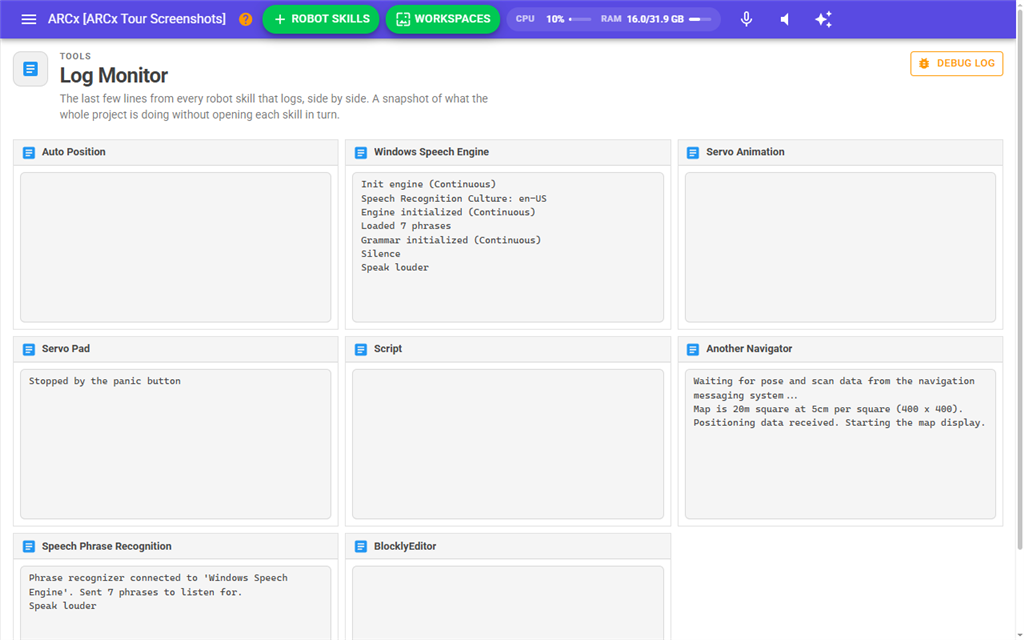
The cards update live. New lines appear within about half a second, and the card scrolls to show the newest line. The cards are laid out in a grid that fits as many columns as the browser window allows.
The text size is the Robot skill log font size setting in Options → Preferences.
The Debug Log button at the top of the page opens Views → Debug Log, which holds errors and warnings from ARCx itself and from robot skills. Skills Log only shows what robot skills write to their own logs.
If no robot skill has written a log line yet, the page says No robot skill has logged anything yet and offers Go To Workspace.
Notes
- The set of cards is fixed when the page opens. Lines added to a card that is already shown appear live, but a robot skill that writes its first line after you opened the page does not get a card until you open the page again.
- A card can be empty. A robot skill's log gets a place on this page as soon as its window is shown, even before it writes anything.
- A card titled with a long string of letters and numbers belongs to a log whose robot skill could not be matched, for example a robot skill that keeps more than one log. The text is the log's internal name.
- Clearing the log in a robot skill clears its card here too. Removing a robot skill from the project removes its log, and opening or creating another project clears every log.
- The logs are kept by ARCx, not by the browser, so every browser connected to ARCx sees the same lines and they are still there when you come back to the page.