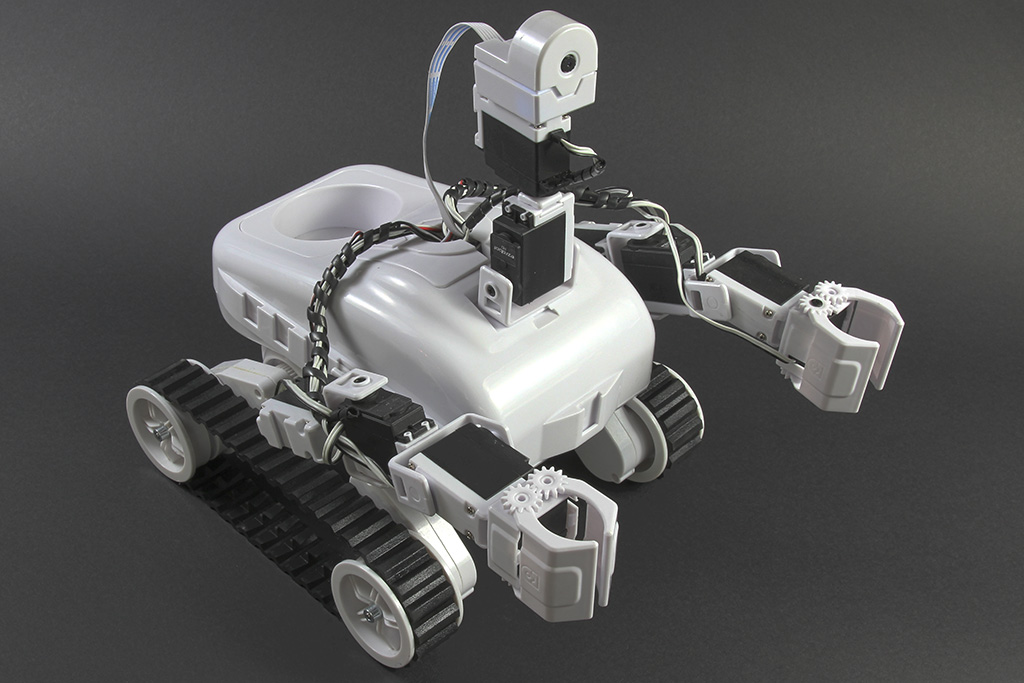
Roli Rover by EZ-Robot


The Roli Rover is a WiFi-enabled, planetary rover–style robot kit from Synthiam (EZ-Robot). Think of it like a small “space rover” that can drive over different surfaces and be expanded with add-on parts. It includes an EZ-Robot EZB v4 microcontroller (the robot’s “brain”) and a rugged rover base designed to be a reliable workhorse.
What You Can Do With Roli
- Drive like a rover on carpet, tile, and other common surfaces.
- Expand the robot using its built-in connection ports.
- Add sensors (distance, camera, line tracking, etc.) to make it smarter.
- Control it over WiFi using Synthiam ARC (on a PC).
- Create autonomous behaviors (avoid obstacles, follow a path, patrol).
- Customize the look by mounting accessories and add-ons.
- Learn robotics basics: motors, power, sensors, and programming.
What “13 Female EZ-Bit Connections” Means
Roli includes 13 female EZ-Bit connections. These are plug-in ports used to connect compatible add-ons (“EZ-Bits”), such as:
- Sensors (distance sensor, light sensor, line sensors, etc.)
- Outputs (LEDs, buzzers, extra servos, or other modules)
- Expansion parts that make the robot do more than just drive
Video Overview
Before You Start (Beginner Checklist)
- PC with Synthiam ARC installed: ARC is the software used to connect and control the robot.
- WiFi capability: Your PC will connect to the EZB over WiFi (directly or through your network, depending on your setup).
- Charged battery / correct power: Make sure the rover is properly powered before attempting to connect.
- Safe test area: Use a clear floor space so the rover can’t bump into fragile items.
Common First Steps in ARC
- Power on Roli and wait for it to fully start.
- Connect your PC to the EZB using the ARC connection options (WiFi).
- Load a simple control (for example, a movement/drive control) and test driving slowly.
- Only after driving works: add extra EZ-Bits (one at a time) and test each new part.
Where to Buy
Synthiam (EZ-Robot) products are available from the official online store and other online/offline retailers. Here is the direct product link:
Diagnosing a Damaged EZB v4
The EZB v4 uses two main circuit boards that work together during startup. The top board contains the communication processor and Wi-Fi antenna. The bottom board contains the I/O processor, which is responsible for handling hardware functions such as port control and startup audio.
When the EZB v4 powers on, the communication processor initializes first and then sends startup commands to the I/O processor. Once the I/O processor responds correctly, the EZB can complete its startup sequence, including playing the startup sound.
What It Means When the Startup Sound Does Not Play
If the startup sound does not play, the speaker may appear to be the problem, but that is usually not the cause. In many cases, the missing sound is a symptom that the lower I/O processor is not responding properly.
During connection, the communication processor accepts the incoming connection and performs the initial EZB protocol handshake. After that, it passes control to the I/O processor, which must return its firmware ID. This firmware ID is stored internally in the I/O processor and is required for the connection sequence to continue.
If the connection log stops at the firmware ID request and no firmware ID is returned, that indicates the I/O processor is not responding. This is a strong sign that the bottom board has been damaged.
Why the Camera May Still Work
In some cases, the camera may still function even when the EZB cannot complete a full connection. This is because the communication processor on the top board handles the camera video stream. A working camera does not confirm that the entire EZB is healthy. It only confirms that the communication board is still operating.
Common Cause of This Failure
The most common cause of this type of failure is electrical damage to the I/O system. This can happen if I/O pins are shorted, overloaded, or exposed to excessive voltage or current. Although the EZB v4 includes protection on its I/O circuitry, that protection has limits and cannot prevent all damage under severe conditions.
In these cases, the communication board may continue working while the lower I/O board becomes permanently damaged. This results in symptoms such as missing startup audio, incomplete connection attempts, and failure to return the firmware ID during initialization.
