
ROS 2 by Open Robotics
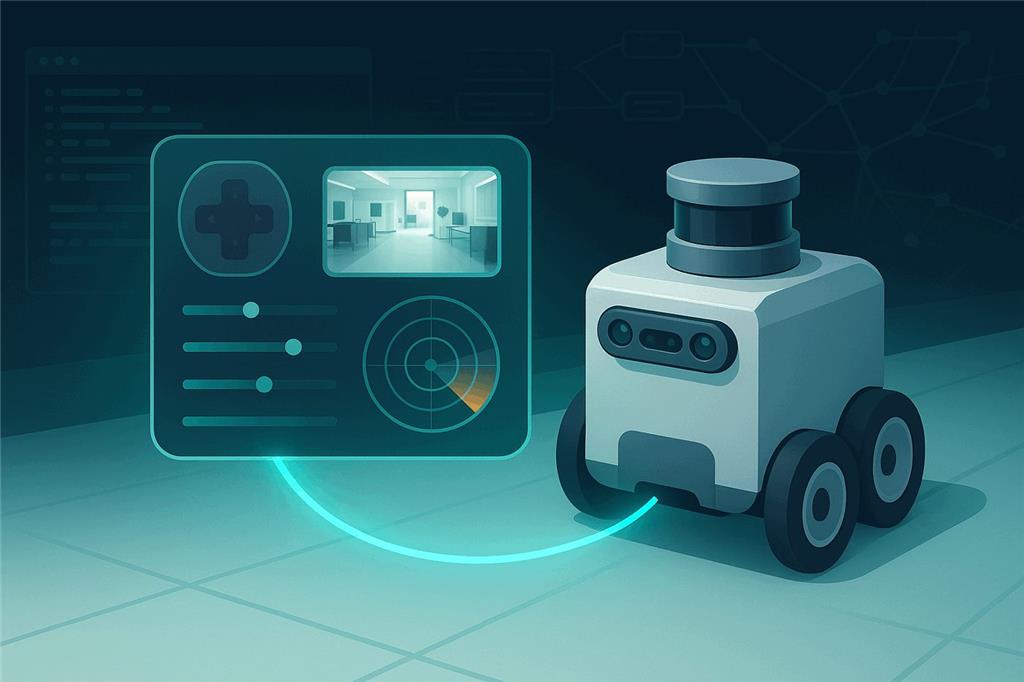
ROS 2 and ARCx, better together
ROS 2 and Synthiam ARCx are two robotics platforms, each strong in its own area. ROS 2 brings navigation, mapping and motion planning. ARCx brings an interface anyone can use: drive, program, talk to and share a ROS 2 robot from a web browser, with drag-and-drop robot skills instead of terminals, build systems and launch files.
ROS 2 is not an EZB, so why is it on this list? Because Synthiam makes it compatible. The ROS 2 Connector robot skill for ARCx (and the ROS2 Connector for ARC) bridges every part of a Synthiam project to ROS 2 topics and services. A ROS 2 robot becomes a Synthiam robot: the same joysticks, cameras, speech, scripts, AI and custom control screens that work with an EZB work with ROS 2. We recommend ARCx: it runs on Windows, Linux and Raspberry Pi, is used from any web browser, and has the most complete ROS 2 bridge we make.
What is ROS 2?
ROS (the Robot Operating System) is not really an operating system. It is a large, open-source collection of libraries, tools and conventions for building robot software. It began in 2007 at Willow Garage and grew into a widely used robotics middleware in research and industry. ROS 2 is its ground-up redesign, built on the industrial DDS communication standard, with real-time support, better security and multi-robot networking. Open Robotics maintains it, and a new distribution ships every May (Humble Hawksbill and Jazzy Jalisco are the current long-term-support releases).
A ROS 2 robot is a graph of small programs called nodes. Nodes publish and subscribe to topics (streams of typed messages such as velocity commands, laser scans and camera images), call services (request and reply), and run actions (long-running goals with feedback). On top of that graph sits a large ecosystem of packages, including:
- Nav2 — autonomous navigation, path planning and obstacle avoidance for mobile robots.
- SLAM Toolbox and friends — build a map of a building with a lidar and know where the robot is on it.
- MoveIt 2 — motion planning and collision checking for robot arms.
- Gazebo — physics simulation, so software can be tested before it touches hardware.
- RViz 2 — 3D visualization of what the robot senses and plans.
- Thousands of drivers for lidars, depth cameras, IMUs, motor controllers and robot arms.
Universities, research labs and robotics companies build on ROS 2. If a robot needs to map a warehouse or plan a grasp around obstacles, there is very likely a ROS 2 package that already does it.
ROS 2 at a glance
| Type | Open-source robotics middleware, libraries and tools |
|---|---|
| Maintained by | Open Robotics and the ROS community |
| Transport | DDS (Data Distribution Service) |
| Languages | C++ (rclcpp) and Python (rclpy) |
| Primary OS | Ubuntu Linux |
| Strengths | Navigation, SLAM, arm motion planning, simulation, sensor drivers |
| Synthiam connection | rosbridge (WebSocket JSON), port 9090 by default |
| Website | ros.org |
Capable, but hard to learn

ROS 2 was designed by engineers for engineers. That suits engineers, and it is why so many people who try it give up before their robot moves. The first weeks are usually spent on the platform, not on the robot.
Ask anyone who has taught ROS 2 in a classroom or started with it at home. The robotics concepts are the easy part. The problems are Linux, the build system, networking and the sheer number of moving pieces between “I have a robot” and “my robot does something.” Most people never get there.
Linux and the terminal first
ROS 2 is developed and best supported on Ubuntu. Day-to-day work happens in a terminal: sourcing setup files, building workspaces with colcon, and starting everything with ros2 run and ros2 launch.
Concepts before results
Nodes, topics, services, actions, parameters, QoS profiles, lifecycle nodes, tf2 coordinate frames, URDF robot descriptions, message definitions. All of them come up before the robot drives across the room.
Everything is code
Behaviors are C++ or Python nodes, built with CMake or setuptools, wired up with launch files and YAML parameter files. A small change can mean a rebuild, a re-source and a relaunch.
Networking surprises
DDS discovery, domain IDs, multicast over Wi-Fi and mismatched QoS settings cause some of the most common ROS 2 problems: messages that silently never arrive, and nodes that cannot see each other.
No interface for people
RViz and rqt are excellent developer tools, but they are not something you hand to a student, a customer or a family member. ROS 2 has no built-in operator dashboard, so building one is a separate software project.
Constant change
A new distribution every year, each tied to a particular Ubuntu release, with packages that differ between them. Tutorials age quickly, and an upgrade can break a working robot.
Synthiam brings ROS 2 to everyone else
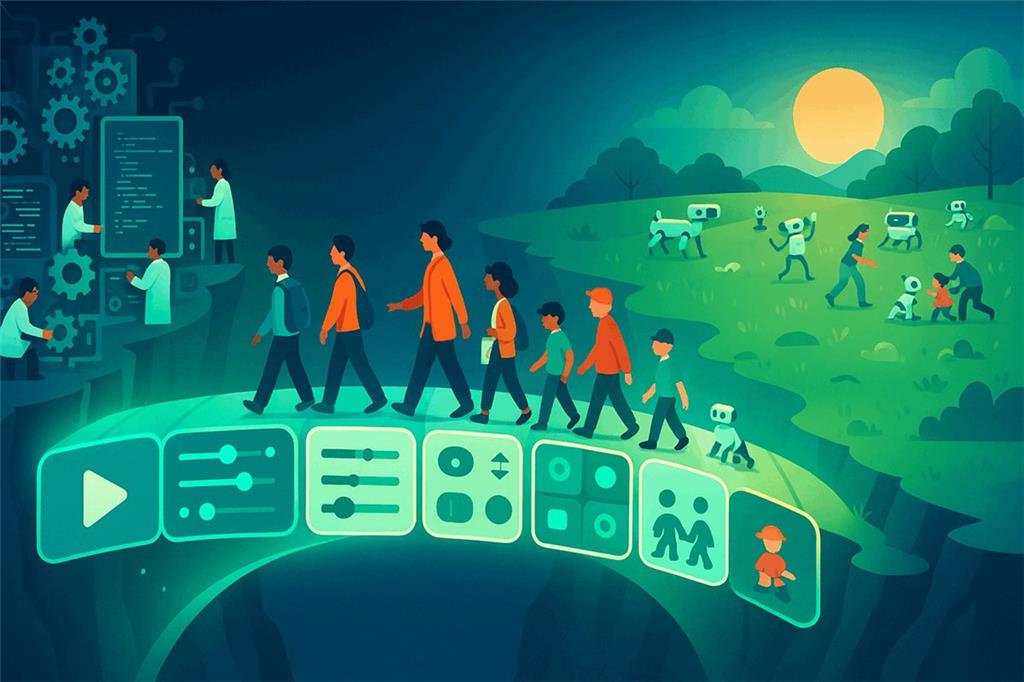
Synthiam's mandate is to make robotics accessible to everyone. ROS 2 has a large library of robotics software, but it mostly reaches people who are prepared to become Linux developers first. That leaves out most of the people who would love to build and use robots: students, teachers, artists, makers, small businesses, researchers outside computer science, and families.
Synthiam ARC and ARCx are the bridge. They let ROS 2 handle what it is built for (navigation, mapping, motion planning, drivers) and give everyone else a graphical, point-and-click way to use it. In ARCx a ROS 2 robot is driven with an on-screen joystick or a gamepad, programmed with Blockly, JavaScript or Python, given a voice and ears, taught to recognize faces and colors, connected to AI, and put on a custom touch screen, all without writing a ROS node.
This matters to the ROS community as much as to beginners. Every ROS 2 package becomes useful to a far larger audience. A ROS developer can hand a finished robot to people who will never open a terminal. A company building ROS 2 robots gets a customer-facing interface without writing one. A classroom can use real ROS 2 robots in a single lesson.
Two platforms, each strong in its own area. ROS 2 handles navigation, mapping and motion planning. ARCx handles everything people touch: the interface, programming, voice, vision and AI. You do not have to choose between the two. Keep Nav2, SLAM and MoveIt 2 running exactly as they are, and put ARCx in front of them.
Why ARCx is the best way to use ROS 2
ARCx is Synthiam's newest robot software. It runs on the robot's computer, including the same Ubuntu machines and Raspberry Pis that ROS 2 runs on, and is used from any web browser. For ROS 2 users that makes it a natural fit.
Runs where ROS runs
ARCx runs on Windows 10 and 11 (x64) and on Ubuntu 24.04 LTS for x64 and ARM64, including Raspberry Pi. Put it on the robot beside ROS 2, or on a laptop across the network.
No ROS install on the ARCx side
The connector talks to rosbridge_server over a WebSocket. ARCx does not need ROS, DDS or matching libraries installed, and it does not care which ROS 2 distribution the robot runs.
A browser is the remote control
Open the robot's ARCx interface on a laptop, tablet or phone. Several people can be connected at once, and closing the browser leaves the robot running.
The most complete bridge
Fifteen binding types in both directions, plus ROS services that ARCx advertises so a node or behavior tree can ask ARCx to do something and wait for the answer. Custom message types work through JSON templates.
AI on top of ROS
ARCx is an MCP server, so Claude, Cursor and other AI agents can see, drive and program the robot. Pair that with the Autonomous AI, Chat GPT and Hugging Face robot skills and a ROS 2 robot can hold a conversation and act on it.
Custom control screens
Design touch-friendly control screens with drag-and-drop Custom UI: buttons, joysticks, sliders, camera views and gauges bound to ROS data. Give your robot an operator panel in minutes, not a web development project.
How ARCx connects to ROS 2
ROS 2 ships an official bridge called rosbridge that exposes topics and services as JSON over a WebSocket. ARCx's ROS 2 Connector is a rosbridge client. Nothing in your ROS 2 graph changes: to ROS, ARCx simply looks like more nodes.
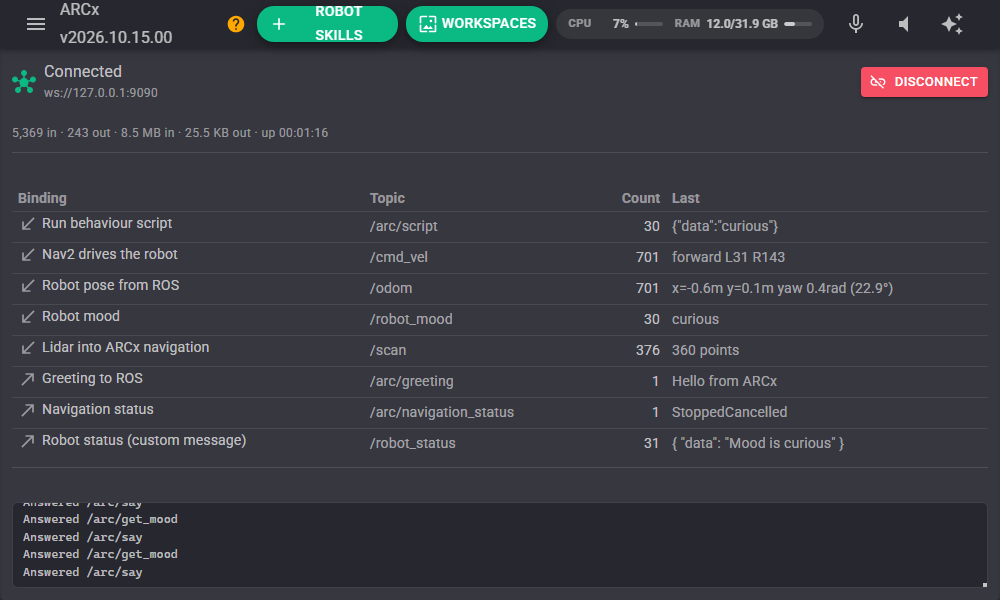
The connector's window is a live status board. At a glance you can see:
- Whether the link to rosbridge is up, and how much data is flowing each way.
- Each binding, its direction (arrows point into ARCx or out to ROS) and its topic.
- How many messages each binding has handled and the last value it saw, such as the speeds Nav2 is sending on
/cmd_vel. - Errors on the binding that caused them, in red, with the full message on hover.
- A log of service calls answered for ROS nodes.
ARCx publishes status variables too (ROSConnected, ROSStatus, ROSLastTopic, ROSLastMessage),
so a script or a Custom UI screen can react when the link drops.
Bind ARCx to any ROS 2 topic
A binding is one wire between ARCx and one ROS topic. Pick what to bridge, pick the direction, type the topic name.
ARCx fills in the right message type and converts units and coordinate frames for you.
A typical mobile robot starts with two: movement from /cmd_vel and a laser scan from /scan.
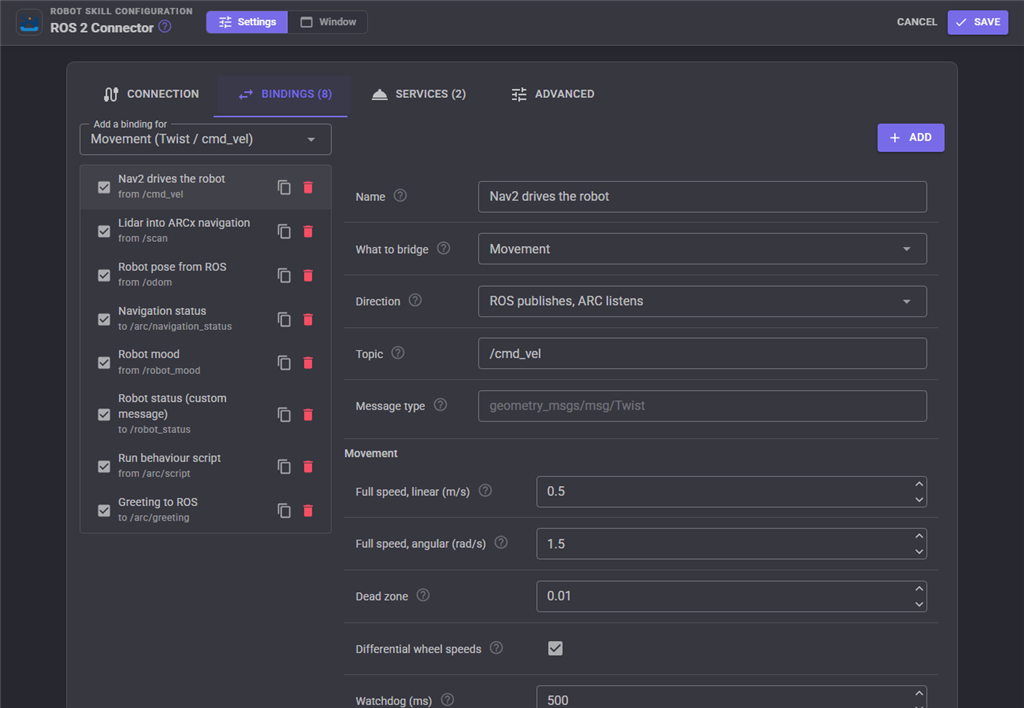
/cmd_vel drives the robot through the ARCx movement panel, with a watchdog and dead zone.| What to bridge | ROS message | What it does for you |
|---|---|---|
| Movement | geometry_msgs/Twist | Subscribe to /cmd_vel so Nav2 or teleop drives the robot through ARCx's movement panel, or publish what ARCx's joystick, scripts and tracking skills ask for. Speed scaling, dead zone, differential wheel speeds and a stop watchdog are built in. |
| Servos | sensor_msgs/JointState or one value per topic | Move ARCx servos from ROS joint states, or publish ARCx servo positions as joints, in radians, degrees, servo positions or normalized values. |
| Lidar | sensor_msgs/LaserScan | Feed a ROS lidar into ARCx's navigation messaging system for its mapping and navigation skills, or publish ARCx lidar data to ROS. |
| Pose | nav_msgs/Odometry | Share the robot's position in both directions, optionally with the matching /tf transform that RViz needs. ARCx uses the ROS frame convention, so poses pass straight across. |
| Navigation status | std_msgs/String | Tell ROS whether ARCx is navigating, paused or stopped. |
| Camera | sensor_msgs/CompressedImage | Publish any ARCx camera to ROS, original or with tracking overlays drawn, with frame rate and JPEG quality limits. |
| Digital, ADC, PWM | std_msgs types | Read and write controller ports, so ROS can switch a relay or read a sensor wired to an EZB. |
| Distance sensor, battery | sensor_msgs/Range, sensor_msgs/BatteryState | Publish ultrasonic distance and battery voltage to ROS. |
| Variable | Any | The universal escape hatch. Publish anything an ARCx script can compute, or land anything ROS publishes in an ARCx global variable. |
| Control command | Any | When a message arrives, tell any ARCx robot skill to do something: speak, play an animation, start tracking, take a photo. |
| Script | Any | Run a JavaScript or Python script on every message, with the message available to the script. |
| Custom | Your own message types | Build any message from a JSON template filled with ARCx variables, or pick incoming fields apart into variables. Works with message types the connector has never heard of. |
ROS nodes can call ARCx and wait for the answer
Topics fire and forget. When a ROS 2 behavior tree needs to know the robot has finished speaking, or wants a value back from ARCx, it needs a service. ARCx advertises ROS services on your behalf.
- Run a control command on any robot skill and return its result. Request fields map to the command's parameters.
- Run a script and return what it returns.
- Set or get an ARCx global variable.
- Any service type works. The response is a JSON template filled with the result and any ARCx variables.
std_srvs/srv/Triggeris the default.
ARCx scripts can go the other way too: advertise, publish, subscribe and call ROS services at runtime, and list the topics, services and nodes on the ROS graph.
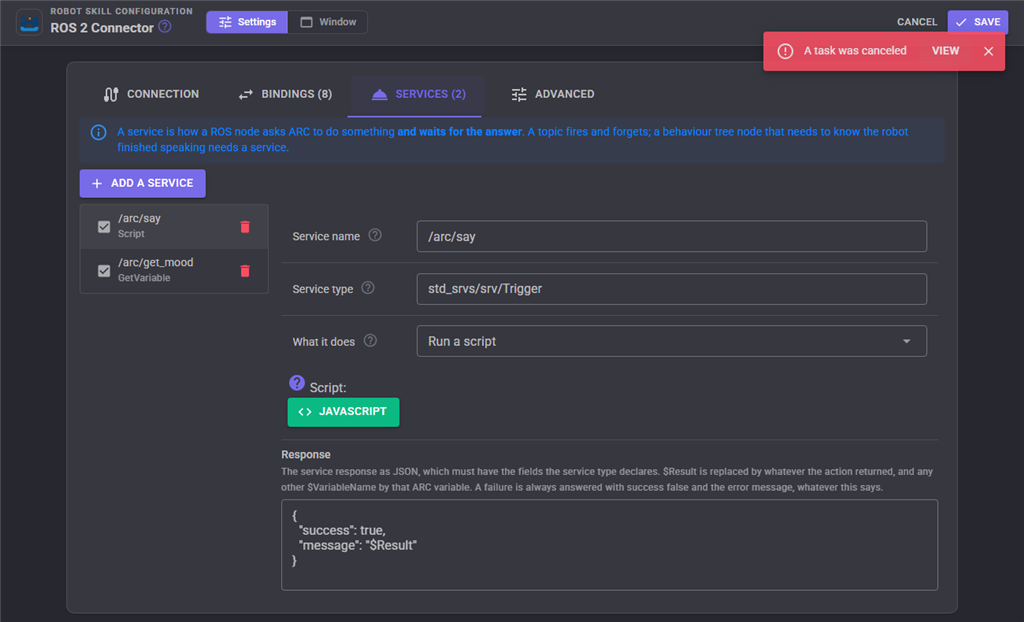
/arc/say runs a script, /arc/get_mood returns an ARCx variable.Everything Synthiam can do, your ROS 2 robot can do
Once ROS 2 is bound to ARCx's movement panel, servos, sensors and variables, every robot skill in the Synthiam store works with your ROS robot. Drag them onto a workspace and they simply work, because they talk to ARCx and ARCx talks to ROS.
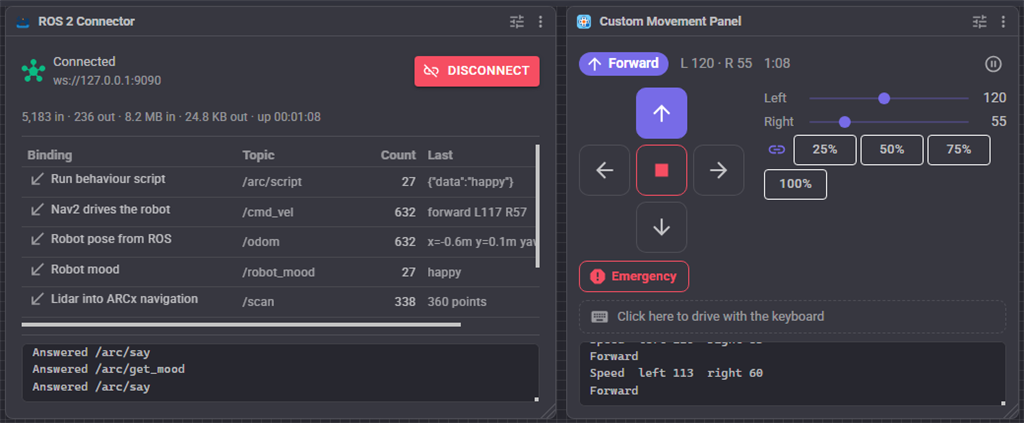
/cmd_vel.🎙 Voice
Speech recognition, wake words and text to speech from cloud and offline engines. “Robot, go to the kitchen” becomes a Nav2 goal.
👁 Vision
Face, color, glyph and object tracking on any camera. Publish detections to ROS, or move the robot to follow them.
🎮 Driving
On-screen joysticks, Xbox and PlayStation gamepads, MIDI controllers and keyboards drive the ROS base through the movement panel.
🌎 Remote access
With the Exosphere robot skill, drive your ROS 2 robot from anywhere in a web browser and invite others to use it for telepresence.
🧠 AI
Large language models that see through the camera, talk, and decide what the robot does next using ARCx tools that end in ROS topics.
🧩 Blockly
Students snap blocks together to make a ROS 2 robot speak, drive and react. When they are ready, the same program converts to JavaScript.
💬 Personality
Conversational menus, chatbots and sentiment analysis give a research robot a personality for demos and visitors.
📊 Dashboards
Charts, gauges and Custom UI screens show ROS data to people who will never run ros2 topic echo.
Connect a ROS 2 robot to ARCx
-
Install and start rosbridge on the ROS 2 machine. This is the only change on the ROS side.
sudo apt install ros-$ROS_DISTRO-rosbridge-suite ros2 launch rosbridge_server rosbridge_websocket_launch.xml - Install ARCx on the robot or on any computer on the same network. Download ARCx for Windows, Linux or Raspberry Pi.
- Add the ROS 2 Connector robot skill. Open Robot Skills, choose the Communication category and add ROS 2 Connector.
- Point it at the robot. In the skill's configuration, enter the ROS machine's address and port 9090, then press Connect. Turn on Connect on project load once it works so the robot comes up on its own.
-
Add bindings. Start with Movement on
/cmd_veland LaserScan on/scan, then add whatever else your robot needs. - Add robot skills. A joystick, a camera, speech, tracking, an AI, a Custom UI screen. Your ROS 2 robot now has a complete user interface.
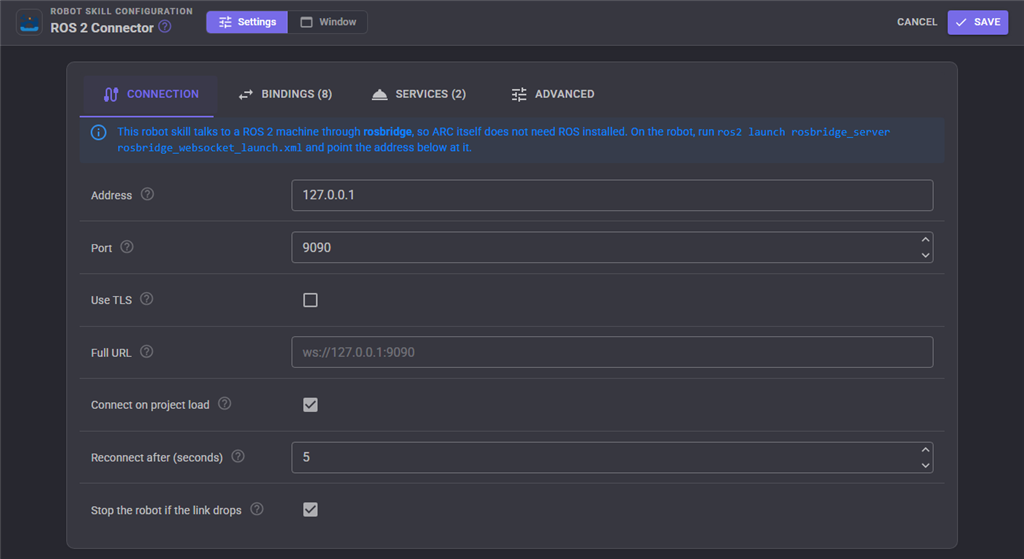
Good to know
- ROS 2 on Windows through WSL2 or in a container works too: forward port 9090 and connect to the local address.
- rosbridge has no authentication of its own. Keep it on a trusted network, or put it behind a TLS proxy and use a
wss://URL. - Turn on Stop the robot if the link drops so a lost connection never leaves the robot driving.
- Raise the throttle on a LaserScan binding if a fast lidar saturates a Wi-Fi link.
Two ways to connect, one clear recommendation
Synthiam makes a ROS 2 connector for both of its robot programming platforms. If you are starting today, choose ARCx. If you already have a Windows ARC project, the ARC connector brings ROS 2 into it.
| ARCx + ROS 2 Connector Recommended | ARC + ROS2 Connector | |
|---|---|---|
| Runs on | Windows 10/11 x64, Ubuntu 24.04 x64 and ARM64, Raspberry Pi | Windows |
| Runs on the robot itself | Yes, headless, beside ROS 2 on the same Linux computer | On a Windows PC on the robot or the network |
| User interface | Any web browser, several people at once | Windows desktop application |
| ROS needed on the Synthiam computer | No (rosbridge) | No (rosbridge) |
| Movement, servos, ports, lidar, pose, variables, scripts | Yes | Yes |
| ROS services that ARCx advertises for nodes to call | Yes, with control command, script and variable actions | Calls ROS services from scripts |
| Custom message types from JSON templates | Yes | Non-standard types exchanged as JSON variables |
| Store page | ROS 2 Connector (ARCx) | ROS2 Connector (ARC) |
The ARC connector supports ROS 2 Humble, Iron, Jazzy and newer, can show ROS camera topics inside ARC, and is limited to one connector per project.
Both connectors need rosbridge_suite running on the ROS 2 machine.
ROS 2 for the classroom, the workshop and the lab

- Educators put real ROS 2 robots in front of students on day one. Students drive, program and experiment in ARCx while the ROS 2 stack runs underneath, and the curious ones can look under the hood later.
- Makers and hobbyists use the ROS 2 drivers and navigation that came with their robot kit, without first becoming Linux administrators.
- Researchers keep their ROS 2 research stack and add voice, vision, AI and a demo-ready touch interface for visitors, user studies and funding reviews.
- Robot companies building on ROS 2 give their customers a polished, configurable interface instead of building and maintaining one.
- ROS developers prototype interactions fast: wire a topic to a button, a voice command or a script in seconds, with no rebuild.
Frequently asked questions
rosbridge_suite. Because ARCx talks rosbridge's JSON protocol rather than linking ROS libraries,
it is not tied to a particular ROS 2 release, and upgrading the robot's distribution does not mean upgrading ARCx.
127.0.0.1:9090, and use ARCx from a browser on any device. ARCx can also run on a separate Windows or Linux computer on the network.
Give your ROS 2 robot a user interface everyone can use
Install ARCx, add the ROS 2 Connector, and turn a ROS 2 robot into a Synthiam robot in minutes.
