
Navigation
Tell the navigation system where the robot is and what its sensors see, and set whether it is navigating.
Where to find it: the Navigation category of the toolbox, in any script editor set to Blockly or on Top bar → Workspaces → Blockly
Blocks
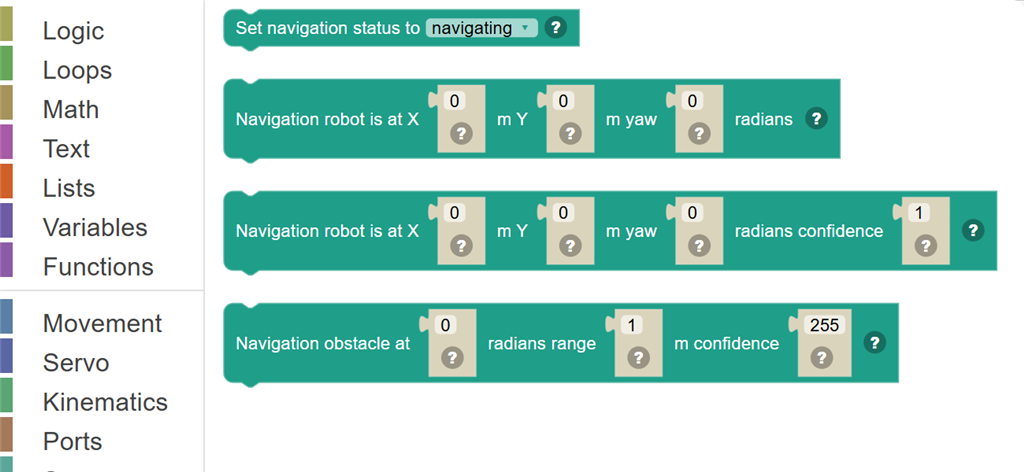
| Block | What it does |
|---|---|
| Set navigation status to … | Tell the navigator robot skill to navigate, pause, or stop and cancel where it was going. |
| Navigation robot is at X … m Y … m yaw … radians | Report where the robot is on the map and which way it faces, from a position sensor or a script that tracks it. |
| Navigation robot is at X … m Y … m yaw … radians confidence … | Report where the robot is and how sure the sensor is, from -1 (not at all) to 1 (certain). |
| Navigation obstacle at … radians range … m confidence … | Report one reading from a distance scanner, in ROS units: something detected at an angle in radians (0 ahead, pi/2 left, -pi/2 right) and a range in metres from the robot, with a confidence from 0 (not sure) to 255 (certain). |
Details
Set navigation status to …

Tell the navigator robot skill to navigate, pause, or stop and cancel where it was going.
In JavaScript: this block runs
Navigation.setNavigationStatusToNavigating();
Navigation robot is at X … m Y … m yaw … radians

Report where the robot is on the map and which way it faces, from a position sensor or a script that tracks it. ROS units: X and Y are metres from where tracking began (forward is +X, left is +Y); the yaw is radians, starting at 0 and growing as the robot turns left (-pi to pi).
In JavaScript: this block runs
Navigation.updatePose(0, 0, 0);
Navigation robot is at X … m Y … m yaw … radians confidence …

Report where the robot is and how sure the sensor is, from -1 (not at all) to 1 (certain). ROS units: X and Y in metres (forward is +X, left is +Y), yaw in radians growing as the robot turns left.
In JavaScript: this block runs
Navigation.updatePose(0, 0, 0, 1);
Navigation obstacle at … radians range … m confidence …

Report one reading from a distance scanner, in ROS units: something detected at an angle in radians (0 ahead, pi/2 left, -pi/2 right) and a range in metres from the robot, with a confidence from 0 (not sure) to 255 (certain).
In JavaScript: this block runs
Navigation.updateScan(1, 255, 0);