
About
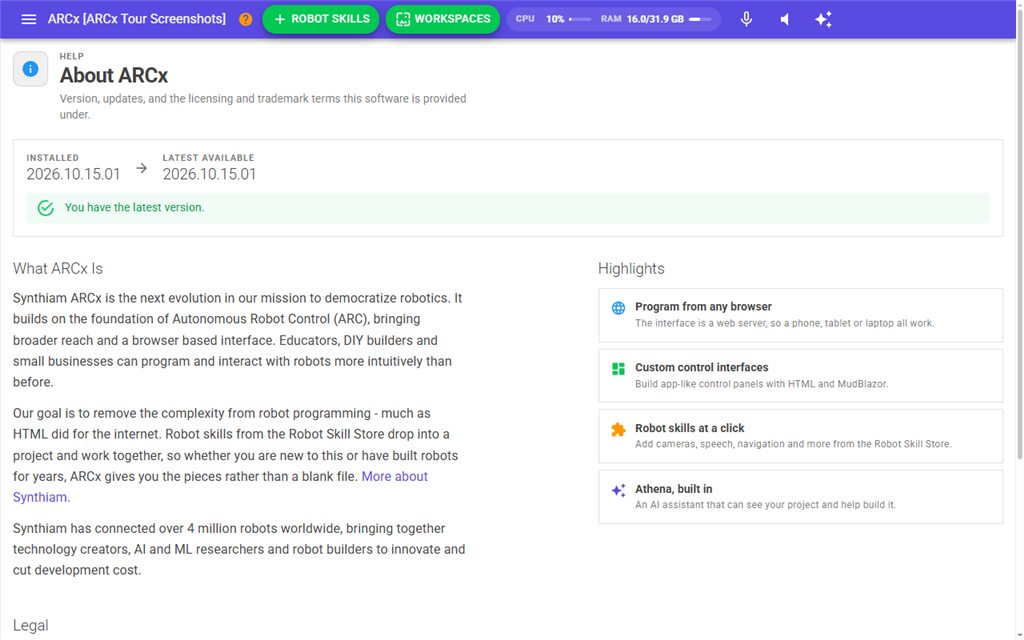
The About page shows which version of ARCx you have, whether a newer one is available, and the release notes for that newer version. It also has a short description of ARCx, the legal terms it is provided under, and ways to contact Synthiam.
Open it when you want to know your version, when you need to give your version number to someone helping you, or when ARCx tells you an update is available.
Where to find it: Side menu → About. When an update is available, a red update button appears in the top bar, next to the menu button (An update of ARCx is available. Click for details.). It opens this page. Help → About ARCx opens it too.
Contents
Version and updates
The card at the top shows two numbers:
| Field | Meaning |
|---|---|
| Installed | The version of ARCx that is running. |
| Latest available | The newest version published on synthiam.com for this kind of computer. It shows Unknown if ARCx could not find out. |
Each time you open the page, ARCx asks synthiam.com for the latest version. The message under the numbers says what it found:
| Message | Meaning |
|---|---|
| Fetching version information | ARCx is still waiting for synthiam.com to answer. |
| There is a new version available. | A newer version is published. A Download Update button appears. |
| You have the latest version. | Nothing to do. |
| This build is newer than the version published on synthiam.com. | You are running a test or pre-release build. ARCx doesn't offer a download, because it would be an older version. |
| Could not read the latest version from synthiam.com. Check again later. | synthiam.com could not be reached, or it sent back something ARCx could not read. |
Download Update opens the ARCx download page on synthiam.com in a new browser tab. ARCx does not install the update itself. Download it and install it on the computer that runs ARCx.
The update button in the top bar
ARCx also checks for updates in the background while it runs. If a check fails because there is no internet, ARCx tries again an hour later. When a check finds a newer version, the red update button appears in the top bar of every browser and stays there until ARCx is updated. You can turn the background checks off, or change how many hours apart they are, in Options → Preferences. That setting does not affect this page, which always checks when you open it.
Release notes
When the background check has found a newer version, the page also shows that version's release notes from synthiam.com, under their own heading. They describe what the new version changes. If ARCx could not get the notes, the section is left out, but the update is still offered.
What ARCx Is and Highlights
A short description of ARCx and Synthiam, with a More about Synthiam. link to the Synthiam website. The Highlights cards list the main features: programming from any browser, custom control interfaces, robot skills from the Robot Skill Store, and Athena.
Legal
| Item | What it does |
|---|---|
| Terms of Use | Opens the Synthiam terms of use in a new tab. |
| Privacy Policy | Opens the Synthiam privacy policy in a new tab. |
| Rights reserved | Click to expand the statement of rights. |
| Copyright and trademarks | Click to expand the list of Synthiam trademarks and copyright terms. |
Need a hand?
| Button | What it does |
|---|---|
| Contact Us | Opens the Synthiam contact page in a new tab. |
| Community | Opens the Synthiam community forum in a new tab. |