
Rename Robot Skill
Each robot skill has a unique name that can be used with the Control Command. The Control Command is a scripting function that sends commands or instructions to a robot skill. This lets robot skills communicate with one another.
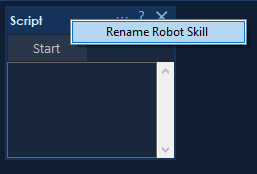
How to Rename a Robot Skill
- Right-click the title bar of the robot skill.
- Select Rename Robot Skill.
- Enter a unique name.