
Robot Bus
The Robot Bus is how the parts of an ARCx robot talk to each other and to the outside world. Robot skills, scripts and ARCx itself publish what they sense on topics, offer what they can do as services, and place their sensors in a tree of frames. Programs outside ARCx - written in Python, JavaScript, C#, Go, anything that speaks WebSocket or HTTP - join the same bus as equals: they read every topic, publish their own, call services and offer services of their own.
If you know ROS, this is the same idea as ROS topics, services and tf, without the install. If you know Viam, it is the same idea as a robot's API, without the cloud. And because the ROS Connector and Viam Robot Controller robot skills put ROS 2 and Viam robots on the bus too, ARCx is where the three meet.
Contents
- What is on the bus
- Topics
- Services
- Frames
- Recording and playback
- The Robot Bus view
- Scripts
- Programs outside ARCx
- The WebSocket protocol
- REST and streaming
- ROS 2 and Viam
- AI assistants
- Settings and security
- Compared with ROS 2 and Viam
What is on the bus
As soon as ARCx starts, everything that already flows through ARCx's core services is on the bus, with no change to any robot skill:
| Topic | What it carries |
|---|---|
/arcx/nms/pose |
The robot's pose from the navigation messaging system: x, y in metres from where tracking began, yaw in radians counter-clockwise (ROS REP 103) |
/arcx/nms/scan |
Each scan frame: the pose it was taken at, and parallel angles (radians) and ranges (metres) arrays, like a ROS LaserScan |
/arcx/nms/status |
The navigation status |
/arcx/vision/{camera}/detections |
What a camera detected in a frame: each object's name, rectangle, confidence, and - when a depth camera is aligned - its distance and position |
/arcx/speech/recognized |
What speech recognition heard |
/arcx/speech/speaking |
What the robot is saying |
/arcx/movement/state |
The movement direction and speeds |
/arcx/kinematics/{arm}/pose |
Where an arm's end effector is |
/arcx/variables |
Every change to a global variable |
/arcx/ezb/connection |
A controller connected or disconnected |
/arcx/log |
Warnings and errors from the ARCx log |
/tf, /tf_static |
Frames as they change |
/arcx/recorder/status |
What the recorder is doing |
Robot skills add their own topics and services, and so does every external program that connects.
Topics
A topic is a named stream of messages, such as /arcx/nms/pose or /my_robot/battery. Anyone publishes on a topic and anyone subscribes to it; neither side needs to know the other exists.
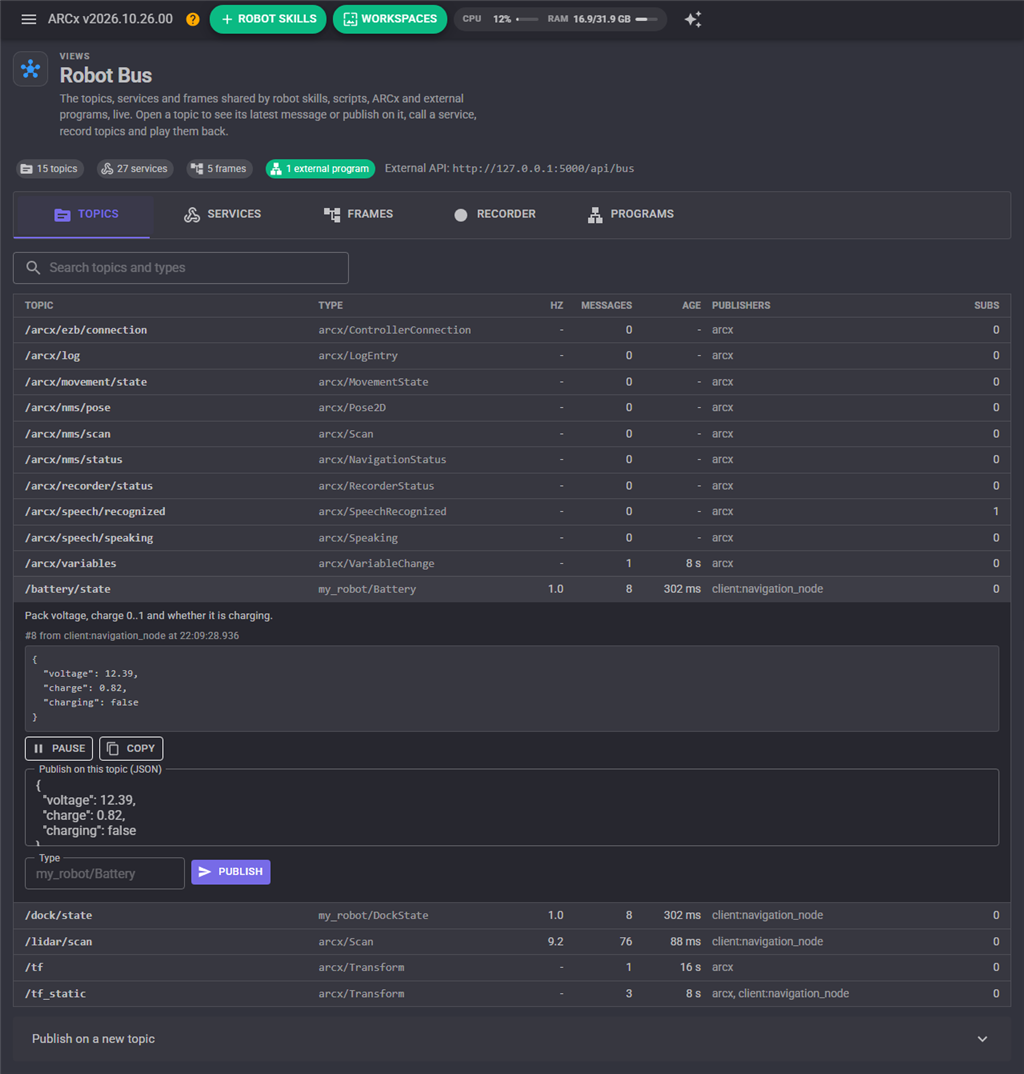
- Names look like file paths: they start with a slash and segments are letters, digits,
_,-and.. Case does not matter. - Messages are JSON. Every language reads JSON, and a message is turned into JSON once when it is published, however many subscribers receive it. A message also carries its topic, a type (free text such as
arcx/Pose2Dthat tells readers which fields to expect), a sequence number, a timestamp and who published it. - The latest message is kept. Any program can read a topic's current value at any time without waiting for the next message, and a new subscriber can ask for it straight away (like a latched ROS topic).
- Patterns subscribe to many topics at once:
*matches one segment (/arcx/vision/*/detections) and**any number (/arcx/**, or**for everything). - Slow subscribers never slow the robot. Each subscriber has its own queue; when it falls behind, its oldest messages are dropped. A subscriber can also ask for at most N messages a second per topic, and then gets the newest message of each topic at that rate - ideal for a dashboard or a phone on a slow network.
Services
A service is a named call: send JSON arguments, get a JSON result (or an error). It is the bus's way of asking for something to be done. ARCx provides these:
| Service | What it does |
|---|---|
/arcx/bus/list |
Every topic, service, frame and connected program |
/arcx/movement/go, /arcx/movement/stop |
Drive through whichever movement panel the project has |
/arcx/speech/say |
Speak text |
/arcx/servo/get, /arcx/servo/set, /arcx/servo/release |
Read, move and release servos |
/arcx/script/run |
Run a JavaScript or Python script and wait for its output |
/arcx/variables/get, /list, /set |
Global variables |
/arcx/skills/list, /arcx/skills/control_command |
The project's robot skills and their control commands |
/arcx/camera/snapshot |
A JPEG from any video source |
/arcx/tf/lookup, /arcx/tf/frames, /arcx/tf/set |
The transform tree |
/arcx/recorder/... |
start, stop, status, list, play, stop_playback, delete |
/arcx/tools/list, /arcx/tools/call |
Every MCP tool ARCx offers, including the tools robot skills add |
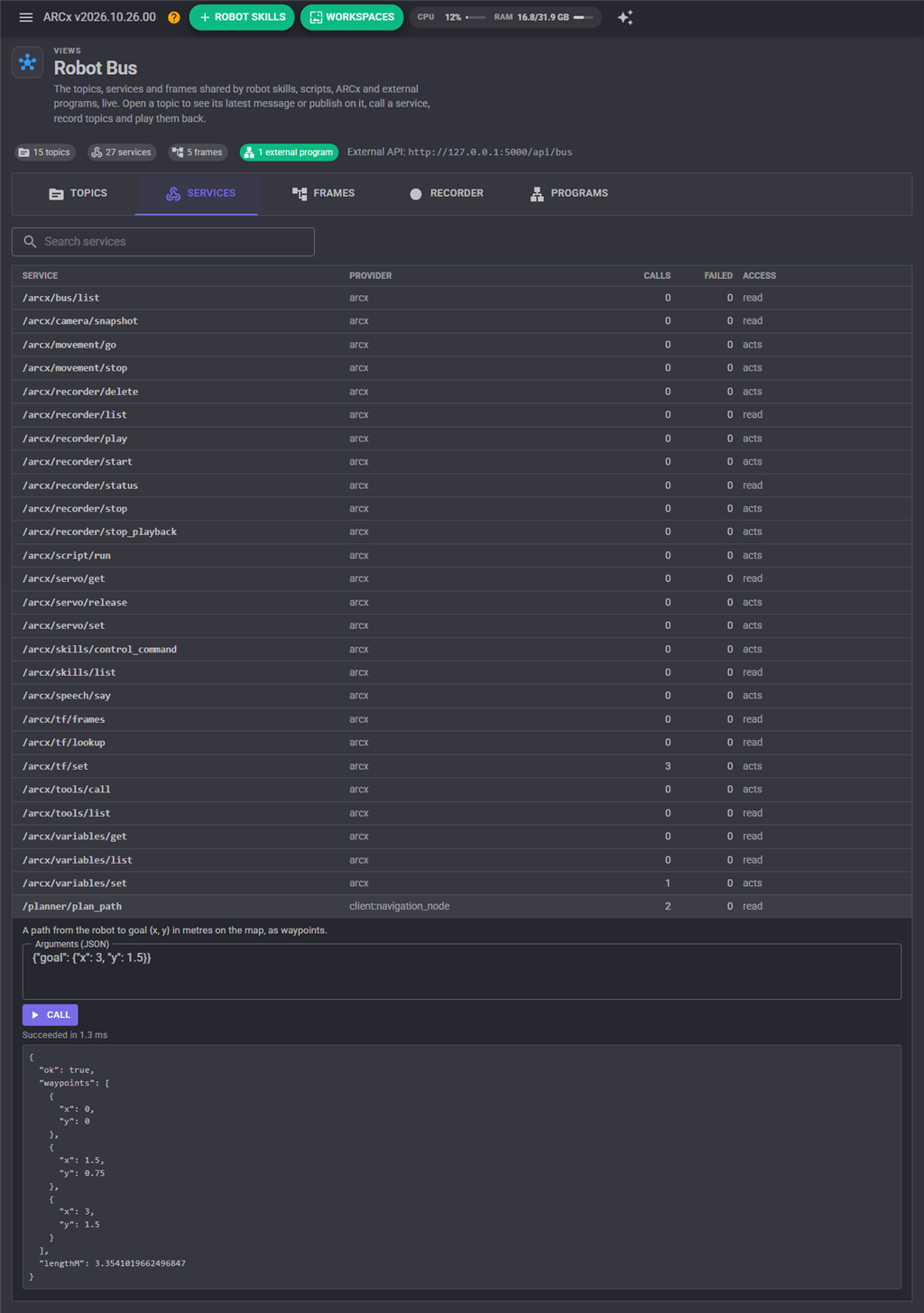
Services marked read only (lists, lookups, status) can be called by external programs even when they are not allowed to control the robot. Every service in the list has a description and, for ARCx's own, a JSON Schema of its arguments: /arcx/bus/list returns them.
A program outside ARCx can provide a service too. Python computing inverse kinematics, a planner on another computer, a ROS node behind the ROS Connector: once it advertises a service, every script, robot skill and program on the bus can call it by name.
Frames
Frames say where things are. Each frame has a parent and a pose in that parent: metres and radians, +X forward, +Y left, +Z up, angles counter-clockwise (ROS REP 103, the same convention as the NMS). Lookups work between any two connected frames, however many levels apart: ask where the camera is from odom, and the bus walks camera → base_link → odom for you.
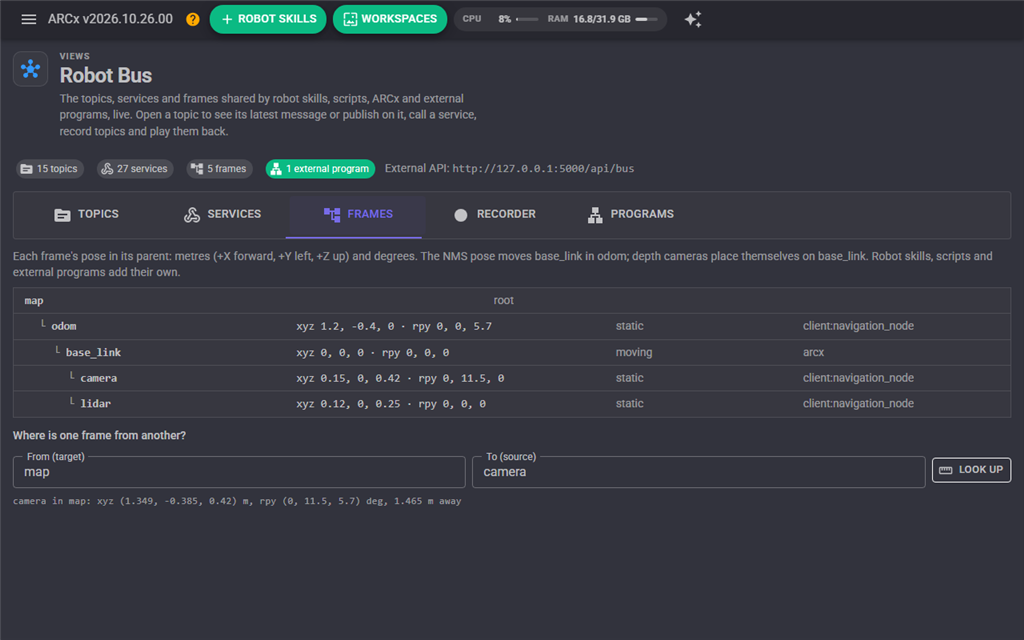
ARCx keeps two frames itself: base_link (the robot's body) moves in odom with every NMS pose, and every depth camera places itself on base_link from its mount settings. Scripts, robot skills and programs add their own: a camera on a pan/tilt, an arm's base, a tag on the floor.
Recording and playback
The recorder writes chosen topics to a file in ARCx Data\Recordings and plays them back later with their original timing - the lidar, the pose, what the camera saw, what was heard. A navigation or vision problem recorded once on the robot can be replayed at your desk as many times as it takes, without the robot.
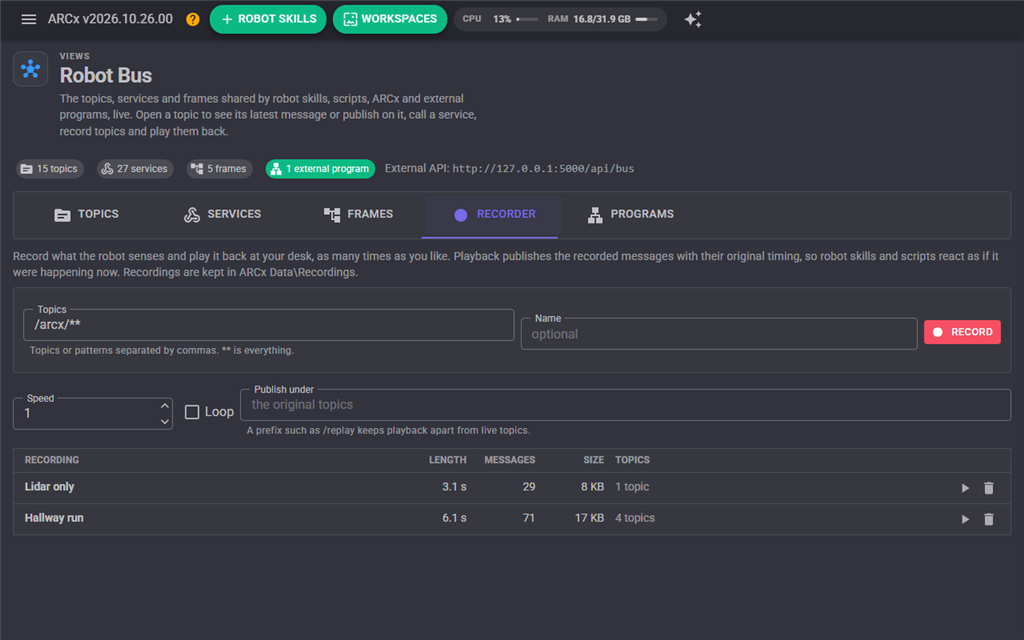
- Choose topics with patterns:
/arcx/nms/**,/arcx/vision/**, or**for everything. - Playback publishes the recorded messages on their original topics, so robot skills and scripts react as if it were happening now. Give a prefix such as
/replayto keep playback apart from live topics instead. - Playback runs at any speed from 0.05x to 100x and can loop.
- Service calls are not recorded: they are commands, and replaying "drive forward" at a desk is never what anyone wants.
Recordings are gzip compressed JSON lines (.arcxbag), so any language can read them: the first line is a header and each following line is {"t": milliseconds, "topic", "type", "src", "seq", "data"}.
The Robot Bus view
Views, Robot Bus shows the bus live:
- Topics: every topic with its type, rate, message count, age, publishers and subscriber count. Open one to watch its latest message, pause it, copy it or publish on it.
- Services: every service with its provider and call counts. Open one to read its description and argument schema, and call it with arguments you type.
- Frames: the transform tree, and a lookup between any two frames.
- Recorder: record, stop, and play or delete recordings.
- Programs: the external programs connected, what they subscribe to and provide, and how much they have sent and received.
Scripts
JavaScript and Python scripts have a Bus namespace. JavaScript names start lower case, Python names upper case.
// Publish, read and wait
Bus.publish("/my_robot/status", { state: "patrolling", lap: 3 });

var pose = Bus.getLatest("/arcx/nms/pose");
print(pose.x + ", " + pose.y);

var heard = Bus.waitForMessage("/arcx/speech/recognized", 10000);

if (heard != null)
  print("Heard " + heard.text);

// Call a service, including one an external program provides
Bus.call("/arcx/speech/say", { text: "Hello" });
var ik = Bus.call("/planner/solve", { x: 0.2, y: 0.1, z: 0.3 }, 5000);

// Frames
Bus.setTransform("base_link", "camera", 0.1, 0, 0.3, 0, 0.2, 0, true);
var p = Bus.transformPoint("odom", "camera", 1.5, 0, 0);
pose = Bus.GetLatest("/arcx/nms/pose")
print(pose["x"], pose["y"])
Bus.Publish("/my_robot/status", {"state": "docked"})
Bus.Call("/arcx/speech/say", {"text": "Hello"})The rest: getField(topic, "pose.yaw"), getAge, getRate, exists, getTopics(pattern), getServices(pattern), lookupTransform, getFrames, startRecording, stopRecording, startPlayback, stopPlayback. The script editor's API list documents each one.
Programs outside ARCx
Turn on Options, Preferences, Robot Bus, Allow external programs. A robot run without a screen can turn it on with the ARCX_ROBOT_BUS=1 environment variable instead, and set the access token with ARCX_ROBOT_BUS_TOKEN.
The bus is then at http://<address>:<port>/api/bus, and ARCx serves ready made clients:
- Python:
http://<address>:<port>/sdk/arcx_bus.py- one file, no dependencies, Python 3.8 or later. It is also a command line tool. - JavaScript:
http://<address>:<port>/sdk/arcx-bus.js- for web pages (including Custom UI pages) and Node.js 22 or later.
from arcx_bus import RobotBus

bus = RobotBus("http://192.168.1.20:5000", name="planner")

bus.subscribe("/arcx/nms/scan", lambda m: plan(m["data"]), max_rate_hz=5)

def solve(args):
    return {"joints": inverse_kinematics(args["x"], args["y"], args["z"])}

bus.provide("/planner/solve", solve, description="Joint angles for a target point")

bus.call("/arcx/movement/go", {"direction": "Forward", "speed": 120})
python arcx_bus.py --url http://192.168.1.20:5000 topic list
python arcx_bus.py --url http://192.168.1.20:5000 topic echo /arcx/nms/pose
python arcx_bus.py --url http://192.168.1.20:5000 topic hz /arcx/nms/scan
python arcx_bus.py --url http://192.168.1.20:5000 service call /arcx/speech/say '{"text":"hi"}'
python arcx_bus.py --url http://192.168.1.20:5000 record start /arcx/nms/** --name hallwayThe full client reference is /sdk/README.md on the robot.
The WebSocket protocol
Every client is a thin layer over one WebSocket at /api/bus/ws (add ?token= when a token is set and the client cannot send headers, and ?name= to name the program). Every frame is a JSON object with an op. A request may carry an id; the reply carries the same one.
| From the program | Reply |
|---|---|
{"op":"hello","name":"my_node"} |
{"op":"welcome","protocol":1,"client":"client:my_node","allowControl":true} |
{"op":"subscribe","id":1,"topic":"/arcx/nms/pose","latest":true,"maxRateHz":10} |
{"op":"ok","id":1,"subscription":"s1"}, then messages |
{"op":"unsubscribe","subscription":"s1"} |
{"op":"ok"} when it had an id |
{"op":"publish","topic":"/my/topic","type":"my/Type","data":{...}} |
none unless it fails, or ok with seq when it had an id |
{"op":"advertise","topic":"/my/topic","type":"...","description":"..."} |
as publish |
{"op":"get","id":2,"topic":"/arcx/nms/pose"} |
{"op":"result","id":2,"ok":true,"data":{message}} |
{"op":"call","id":3,"service":"/arcx/speech/say","args":{"text":"hi"},"timeoutMs":10000} |
{"op":"result","id":3,"ok":true,"data":...,"ms":12.5} |
{"op":"list","id":4,"pattern":"/arcx/**"} |
{"op":"result","id":4,"ok":true,"data":{topics,services,frames,clients}} |
{"op":"advertise_service","service":"/my/add","description":"...","readOnly":true} |
ok; then ARCx sends service_requests |
{"op":"service_response","id":"r7","ok":true,"data":{...}} |
the answer to a service_request |
{"op":"ping","id":5} |
{"op":"pong","id":5} |
From ARCx: {"op":"message","topic","type","seq","stamp","src","data"} for each subscribed message (stamp is Unix time in milliseconds), {"op":"service_request","id":"r7","service","args","caller"} for a call to a service the program provides, and {"op":"error","id","error"}.
REST and streaming
Everything that does not need a live connection is plain HTTP, so curl, a spreadsheet, a PLC or a microcontroller can take part:
| Request | What it does |
|---|---|
GET /api/bus |
What this is and how much is on it |
GET /api/bus/list?pattern= |
Topics, services, frames, programs |
GET /api/bus/topics/arcx/nms/pose |
The latest message on /arcx/nms/pose |
POST /api/bus/topics/my/topic?type=my/Type |
Publish the JSON body on /my/topic |
GET /api/bus/services |
The services |
POST /api/bus/services/arcx/speech/say |
Call /arcx/speech/say with the JSON body as its arguments |
GET /api/bus/frames, GET /api/bus/transform?target=odom&source=camera |
The transform tree |
GET /api/bus/stream?topic=/arcx/**&rate=5 |
Server-Sent Events: one event per message, for curl -N or a browser EventSource |
curl http://127.0.0.1:5000/api/bus/topics/arcx/nms/pose
curl -X POST -d '{"text":"hello"}' http://127.0.0.1:5000/api/bus/services/arcx/speech/say
curl -N "http://127.0.0.1:5000/api/bus/stream?topic=/arcx/vision/**"
ROS 2 and Viam
ARCx does not ask a ROS or Viam robot to change. Two robot skills bring them onto the bus:
- ROS Connector talks to a ROS 2 (or ROS 1) robot through rosbridge. Its Robot Bus bindings carry a ROS topic onto a bus topic or a bus topic out to ROS, and while it is connected it offers services that publish to any ROS topic, call any ROS service and list the ROS topics. A ROS navigation stack, a MoveIt planner or a perception node then works with every ARCx robot skill, script and program on the bus.
- Viam Robot Controller connects to a viam-server. The readings of its sensors and other components are published on the bus, and it offers services that list the Viam robot's resources and send DoCommand to any of them.
AI assistants
The MCP server (see the MCP manual) has bus tools: bus_list, bus_get_latest, bus_wait_for_message, bus_publish, bus_call_service and bus_lookup_transform. An AI assistant sees exactly what robot skills and programs see, including topics and services that external programs provide.
Settings and security
Under Options, Preferences, Robot Bus:
- Allow external programs: off by default. Robot skills and scripts inside ARCx use the bus whatever this says. The
ARCX_ROBOT_BUS=1environment variable turns it on regardless. - Access token: when set, programs must send
Authorization: Bearer <token>or?token=<token>. Set one whenever ARCx is bound to a network address rather than the default loopback.ARCX_ROBOT_BUS_TOKENsets it from the environment. - Allow external programs to control the robot: off leaves programs able to subscribe, read and call read only services, but not publish, provide services or call a service that acts.
A web page from another site is refused even when a program would be allowed, so visiting a web page cannot reach your robot. The bus is never reachable through Remote ARCx: it is for programs on the robot's own network.
Compared with ROS 2 and Viam
| ARCx Robot Bus | ROS 2 | Viam | |
|---|---|---|---|
| Install | Part of ARCx on Windows, Linux (Ubuntu 24.04) and macOS | ROS 2 distribution, usually Ubuntu | viam-server plus a cloud account |
| Publish/subscribe | Topics, patterns, latest value, per-subscriber rate limits | Topics, QoS profiles | Component streams |
| Request/response | Services, provided by anyone | Services and actions | Component APIs and DoCommand |
| Transforms | Frame tree with lookups between any frames | tf2 | Frame system |
| Record and replay | Built in, any language reads the files | rosbag2 | Data capture to the cloud |
| Languages | Any: WebSocket, REST, SSE; Python and JavaScript clients served by the robot | C++, Python, others through client libraries | SDKs for Python, Go, TypeScript, C++, Flutter |
| Wire | JSON over WebSocket and HTTP | DDS | gRPC and WebRTC |
| Visual tools | The Robot Bus view, the whole ARCx interface | rqt, RViz | The Viam app |
| Works with the others | ROS Connector and Viam Robot Controller put them on the bus | rosbridge | Modules |
The bus is built for robots that are put together from parts made by different people: a robot skill from the store, a Python program, a ROS node, an AI assistant. JSON costs more bytes than DDS or protobuf; for the rates robots run at (lidars at tens of Hz, poses at hundreds) it does not matter, and every message can be read by a person.