
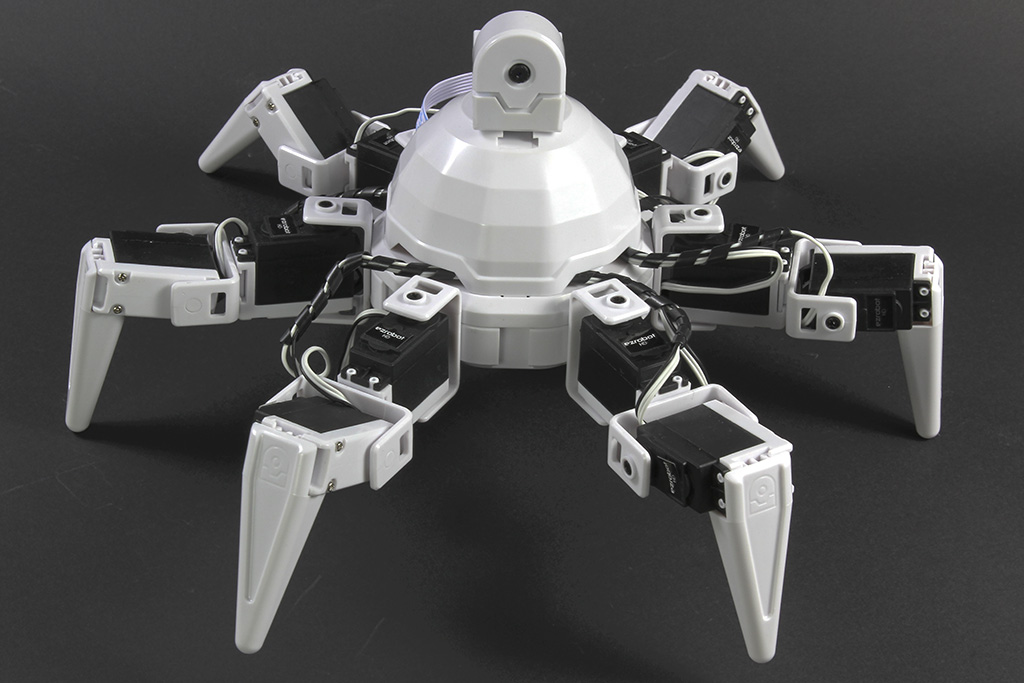
Six Hexapod by EZ-Robot


The Synthiam ARC Six Hexapod (often just called “Six”) is a beginner-friendly robot kit and controller platform originally invented in Canada. It’s built from EZ-Bits (snap-together robot parts), and it’s designed to help you learn robotics without needing to be an expert in electronics or programming.
“Hexapod” means the robot has six legs. Six is designed for walking, turning, and doing stable movements on different surfaces.
What’s Inside (Beginner Overview)
-
6 legs with 12 degrees of freedom (DOF)
- “Degrees of freedom” means how many joints can move independently. Six has 12 moving joints total.
- These joints let the robot lift legs, step forward/back, and shift its weight to stay balanced.
-
12 heavy-duty servo motors
- A servo is a motor that moves to a specific angle (for example: 0° to 180°).
- Each servo controls one joint, so the robot can make coordinated leg movements.
-
EZ-B microcontroller (WiFi-enabled)
- The EZ-B is the “brain” that sends signals to the servos and accessories.
- WiFi lets you control the robot wirelessly from your computer (and depending on your setup, other devices).
-
Powered movement
- Because the joints are servo-driven, Six can do smooth, dynamic motions—walking, turning, and posing.
The video below shows Six in action:
- How servos work (angles and direction)
- How the EZ-B connects over WiFi
- How to test one leg or one servo at a time before trying full walking movements
Where to Buy
EZ-Robot products can be purchased directly from the EZ-Robot online store, and they may also be available through other online and local retailers. The link below goes to the product page at EZ-Robot:
Before You Buy (Quick Checklist)
- Computer & software: Make sure you can run Synthiam ARC on your computer.
- Workspace: You’ll want a small table area for assembly and testing.
- Power needs: Servos require adequate power—use the recommended battery/power solution for the kit.
- Learning approach: Build and test in stages (one leg, then multiple legs, then full walking).
Diagnosing a Damaged EZB v4
The EZB v4 uses two main circuit boards that work together during startup. The top board contains the communication processor and Wi-Fi antenna. The bottom board contains the I/O processor, which is responsible for handling hardware functions such as port control and startup audio.
When the EZB v4 powers on, the communication processor initializes first and then sends startup commands to the I/O processor. Once the I/O processor responds correctly, the EZB can complete its startup sequence, including playing the startup sound.
What It Means When the Startup Sound Does Not Play
If the startup sound does not play, the speaker may appear to be the problem, but that is usually not the cause. In many cases, the missing sound is a symptom that the lower I/O processor is not responding properly.
During connection, the communication processor accepts the incoming connection and performs the initial EZB protocol handshake. After that, it passes control to the I/O processor, which must return its firmware ID. This firmware ID is stored internally in the I/O processor and is required for the connection sequence to continue.
If the connection log stops at the firmware ID request and no firmware ID is returned, that indicates the I/O processor is not responding. This is a strong sign that the bottom board has been damaged.
Why the Camera May Still Work
In some cases, the camera may still function even when the EZB cannot complete a full connection. This is because the communication processor on the top board handles the camera video stream. A working camera does not confirm that the entire EZB is healthy. It only confirms that the communication board is still operating.
Common Cause of This Failure
The most common cause of this type of failure is electrical damage to the I/O system. This can happen if I/O pins are shorted, overloaded, or exposed to excessive voltage or current. Although the EZB v4 includes protection on its I/O circuitry, that protection has limits and cannot prevent all damage under severe conditions.
In these cases, the communication board may continue working while the lower I/O board becomes permanently damaged. This results in symptoms such as missing startup audio, incomplete connection attempts, and failure to return the firmware ID during initialization.
