Uses Kinect v1 as a depth sensor for obstacle scans, floor-drop detection, vision range measurement, tilt/LED control, and simulated testing across platforms.
 Windows
 ARM
ARM
 Linux
Linux
 MacOS
MacOS
How to add the Kinect Xbox 360 Depth Mapping robot skill
- Load the most recent release of ARCx on a compatible operating system (Get ARCx).
- Press the + Skills menu from the top menu bar in ARCx.
- Choose any of these category tabs, the robot skill appears in each of them: Camera, Infrared Distance, Navigation.
- Press the Kinect Xbox 360 Depth Mapping icon to add the robot skill to your project.
Don't have a robot yet?
Follow the Getting Started Guide to build a robot and use the Kinect Xbox 360 Depth Mapping robot skill.
How to use the Kinect Xbox 360 Depth Mapping robot skill
Turns a Microsoft Xbox 360 Kinect (the original Kinect v1, models 1414 and 1473, and the Kinect for Windows v1) into a depth sensor for your robot. The Kinect's depth camera becomes an obstacle scan for the Navigation Messaging System (NMS), with the floor removed by height and drops in the floor found, so a navigator such as Another Navigator can map and avoid things a lidar would miss, like the edge of a table. The colour (or infrared) camera and a false-colour depth picture become video sources for the other camera skills, and every face, colour, glyph or object those skills detect on the colour video gets its real distance measured from the depth. The tilt motor, the LED and the accelerometer are yours to use from the window, scripts, a Custom UI widget or an AI.
It runs on Windows, Linux (x64 and ARM64) and macOS. There is also a simulated Kinect in a simulated room, so a project, its navigation and its scripts can be built and tried before the Kinect arrives.
What you need
- An Xbox 360 Kinect with its power supply and USB adapter. The Kinect cannot run from USB power alone; an Xbox 360 S/E model 1473 needs the same adapter.
- A driver. The skill talks to the Kinect through one of two drivers:
| Driver | Platforms | What it needs |
|---|---|---|
| libfreenect (OpenKinect) | Windows x64, Linux x64 and ARM64, macOS | Shipped with the skill for Windows and Linux. On macOS install it with Homebrew: brew install libfreenect. On Windows the Kinect needs the WinUSB driver (install it with Zadig on "Xbox NUI Camera" and "Xbox NUI Motor"), which replaces Microsoft's driver. On Linux install the udev rule the configuration shows, once. |
| Kinect SDK 1.8 | Windows only | Microsoft's Kinect for Windows SDK or runtime 1.8, which installs Microsoft's driver. Nothing else. |
Choosing on Windows. The two Windows drivers cannot share a Kinect: libfreenect needs WinUSB on the Kinect, and the Kinect SDK needs Microsoft's driver. If you already use Microsoft's driver (other Kinect programs, Kinect Studio), choose the Kinect SDK. If you want the same behaviour as on Linux and macOS, colour-aligned depth (so vision detections are measured) and LED control, switch the Kinect to WinUSB with Zadig and choose libfreenect. Automatic picks the Kinect SDK when it sees a Kinect and libfreenect otherwise. To go back to Microsoft's driver, uninstall the WinUSB device in Device Manager (tick "delete the driver") and replug the Kinect.
| libfreenect | Kinect SDK 1.8 | |
|---|---|---|
| Depth 640x480, 30 fps | Yes | Yes |
| Depth lined up with the colour picture | Yes | No |
| Colour or infrared picture | Yes | Yes |
| Tilt motor and accelerometer | Yes (model 1473 needs its audio firmware, below) | Yes |
| LED | Yes | No |
| Near mode (Kinect for Windows only) | Yes | Yes |
Model 1473 and Kinect for Windows under libfreenect. These route the tilt motor, LED and accelerometer through the Kinect's audio chip, which needs Microsoft's audio firmware (audios.bin) uploaded first. libfreenect's fwfetcher.py script downloads it; enter its path in the configuration. Without it the depth and colour still work, and the skill says so in its log. The original model 1414 never needs it.
The window
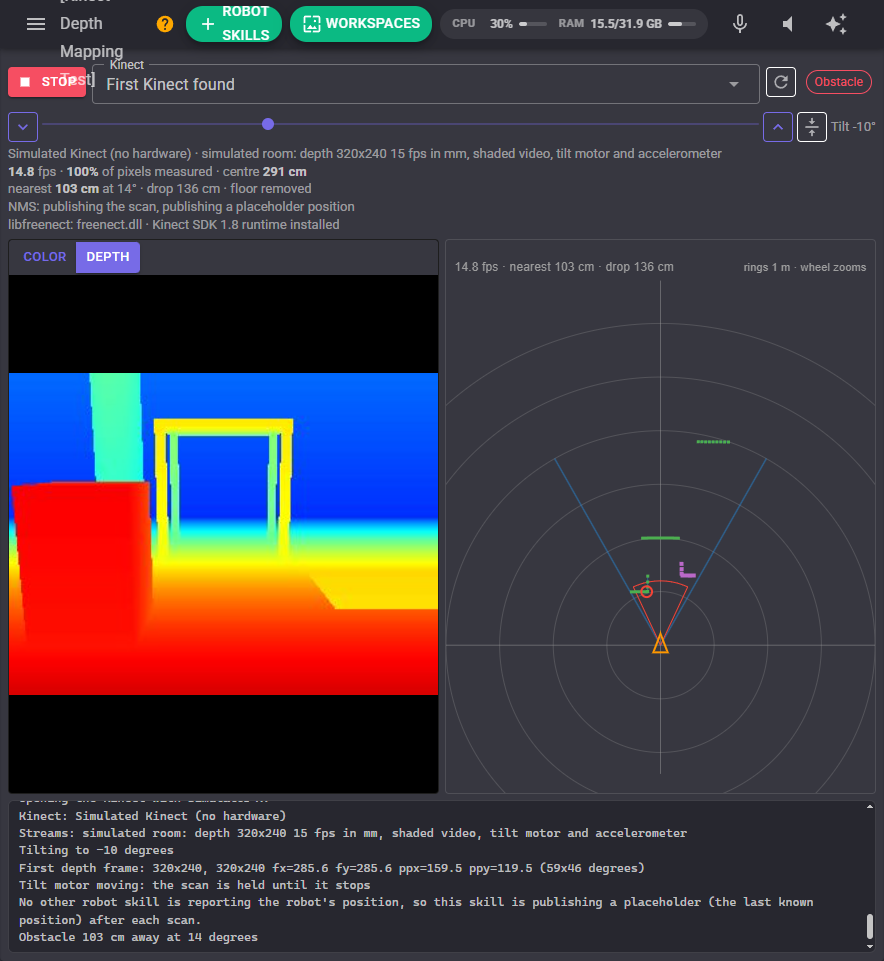
- Start / Stop opens and closes the Kinect. Kinect chooses which one (or the simulated one); the refresh button looks again.
- The tilt motor: the arrows tilt 5 degrees down or up, the slider goes to any angle from -27 (looking down) to 27, and the level button returns to 0. The angle on the right is what the Kinect measures from gravity. While the motor moves, the scan is held, because nobody knows how far the Kinect is looking down until it stops.
- The readouts: frames a second, how much of the picture has depth, the distance to whatever the middle of the picture sees, the nearest obstacle and drop, and what is being sent to the NMS.
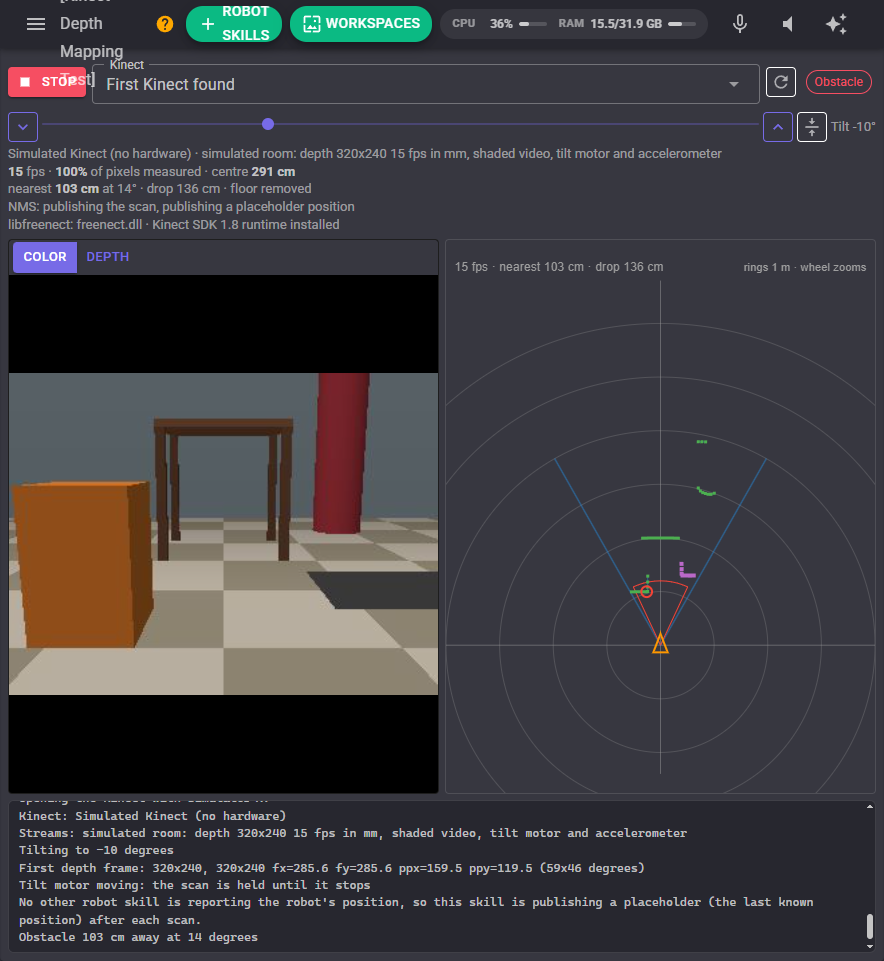
- The picture: the colour (or infrared) camera, or the depth coloured near to far. The detection area, when it is smaller than the whole picture, is outlined in pink.
- The scan view: a top-down view of the robot (the orange triangle), what the Kinect can see (the blue lines), the nearest obstacle in each degree (green, joined along surfaces), drops in the floor (purple), and the obstacle zone (orange, red with something in it). The mouse wheel zooms; a click says how far away the nearest thing is in that direction.
How the scan is made
Every depth pixel is placed in the robot's frame from where the Kinect is mounted: how far ahead, how far to the left, how high off the floor. With the mount height set, anything lower than the lowest obstacle height is the floor and is dropped, anything higher than the highest obstacle height (a table top the robot passes under, the ceiling) is dropped too, and the nearest of what is left in each slice of the view becomes the scan. Points seen below the floor are drops (stairs going down, a ledge), reported where the floor ends.
Without a mount height the skill cannot tell the floor from an obstacle and reports everything inside the detection area, as the ARC version did. That is what the detection area is for: a horizontal band across the depth picture at the height of the obstacles that matter keeps the floor and the ceiling out. With the mount height set, the whole picture can be used.
The tilt comes from the tilt motor, which measures its own angle from gravity, so moving the motor never confuses the floor removal (on a robot standing level). Choose "Typed in" when the motor is not available.
The Kinect cannot see closer than about 50 to 80 cm, and its depth error grows with distance (about 1 cm at 1 m, 7 cm at 4 m). Give a robot a bumper or an ultrasonic sensor for the last half metre.
Configuration
Kinect
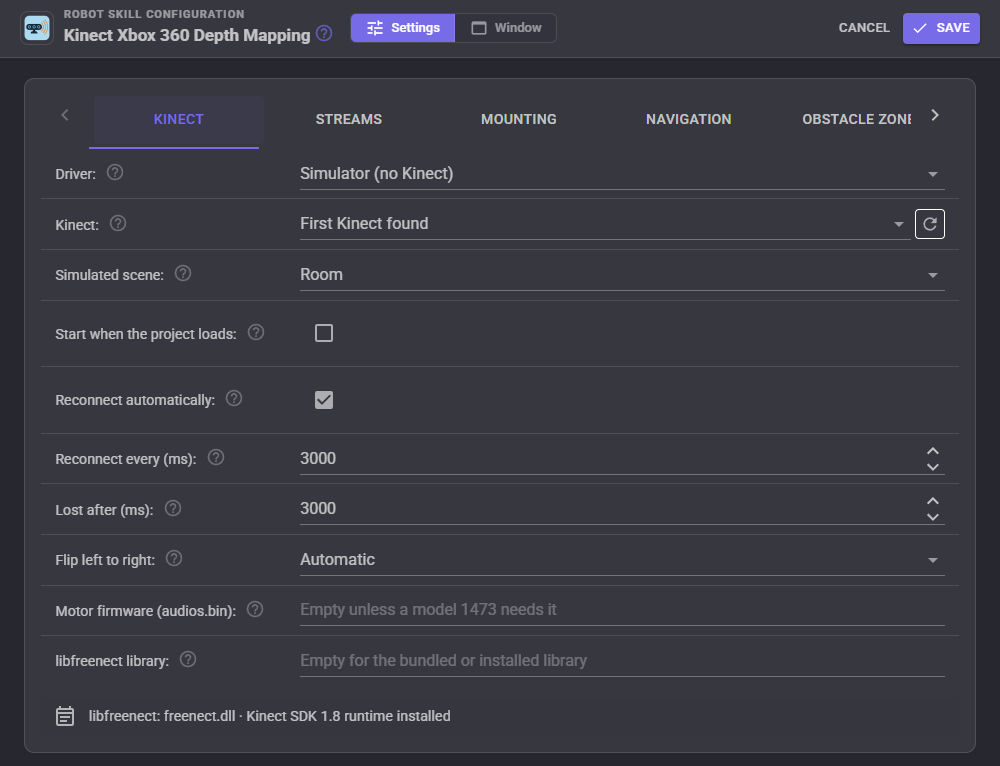
| Setting | What it does |
|---|---|
| Driver | Automatic, libfreenect, Kinect SDK 1.8 or Simulator. |
| Kinect | Which Kinect, when there is more than one. |
| Simulated scene | The simulator's room (a box, a table, a stairwell going down, a person walking across) or a corridor. The simulated Kinect sits where the Mounting tab says and its tilt motor works. |
| Start when the project loads | Open the Kinect as soon as the project has loaded. |
| Reconnect automatically, Reconnect every, Lost after | Keep trying when the Kinect is unplugged, loses power or cannot be opened. |
| Flip left to right | The Kinect SDK mirrors its pictures; Automatic flips them so the left of the picture is the robot's left. |
| Motor firmware (audios.bin) | Only for a model 1473 or a Kinect for Windows under libfreenect, for the motor, LED and accelerometer. |
| libfreenect library | Another libfreenect to use instead of the shipped or installed one. Needs ARCx restarted. |
Streams
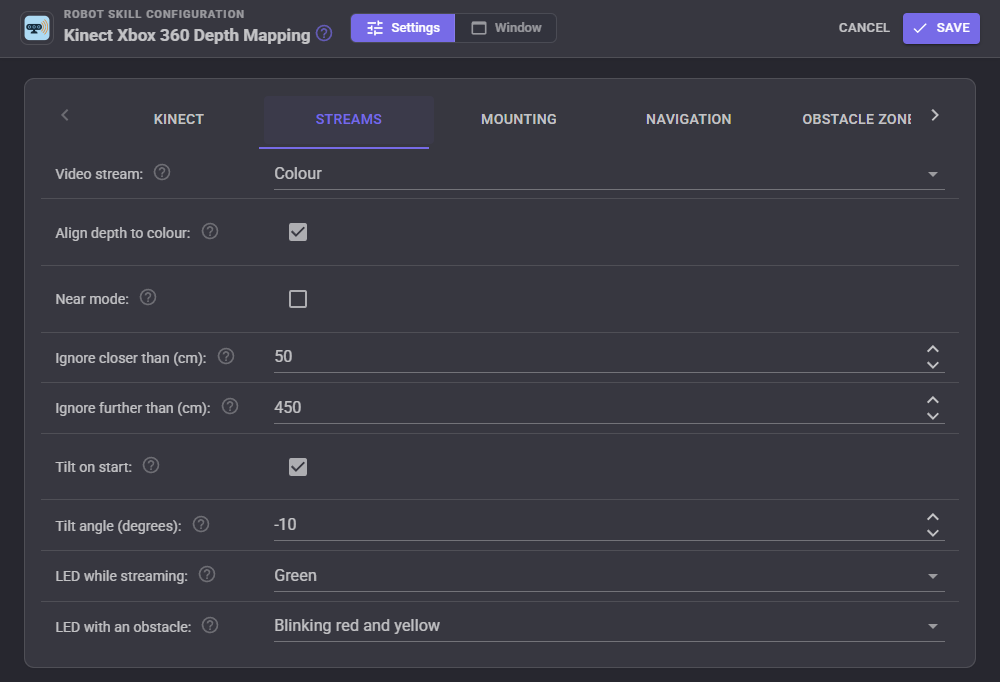
| Setting | What it does |
|---|---|
| Video stream | Colour, infrared (sees in the dark, with the Kinect's own dot pattern on everything) or off. The Kinect sends one at a time. |
| Align depth to colour | Line the depth up with the colour picture (libfreenect), so vision detections on the colour video are measured. |
| Near mode | 40 cm to 3 m, on a Kinect for Windows only. |
| Ignore closer than, Ignore further than | Depth outside this range is dropped. |
| Tilt on start, Tilt angle | Move the tilt motor to an angle each time the Kinect starts. |
| LED while streaming, LED with an obstacle | The light on the front, and what it shows while something is inside the obstacle zone (libfreenect and the simulator). |
Mounting
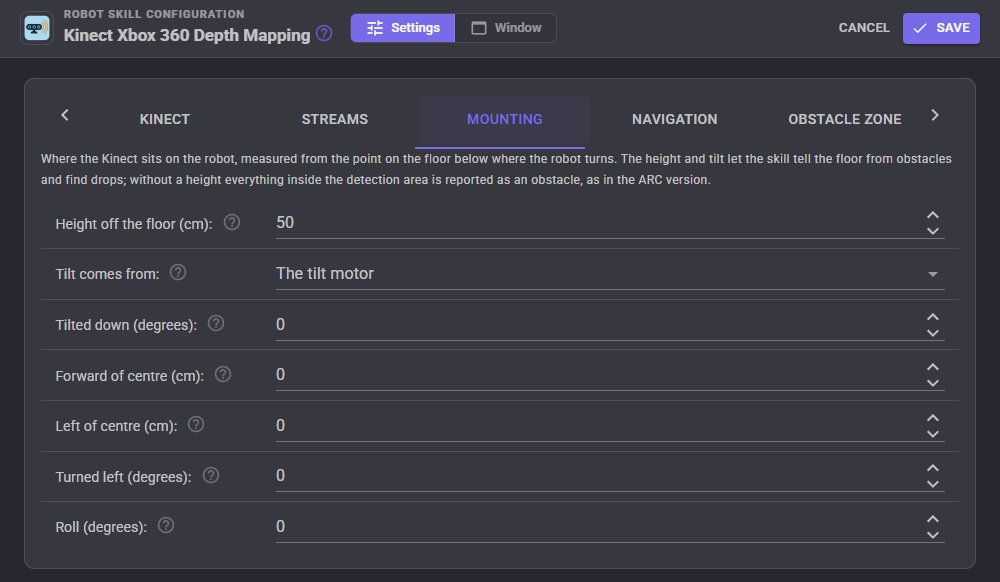
Where the Kinect sits, measured from the point on the floor below where the robot turns: height off the floor (to its cameras), forward and left of that point, which way it faces, and its roll. The tilt comes from the tilt motor or is typed in.
Navigation
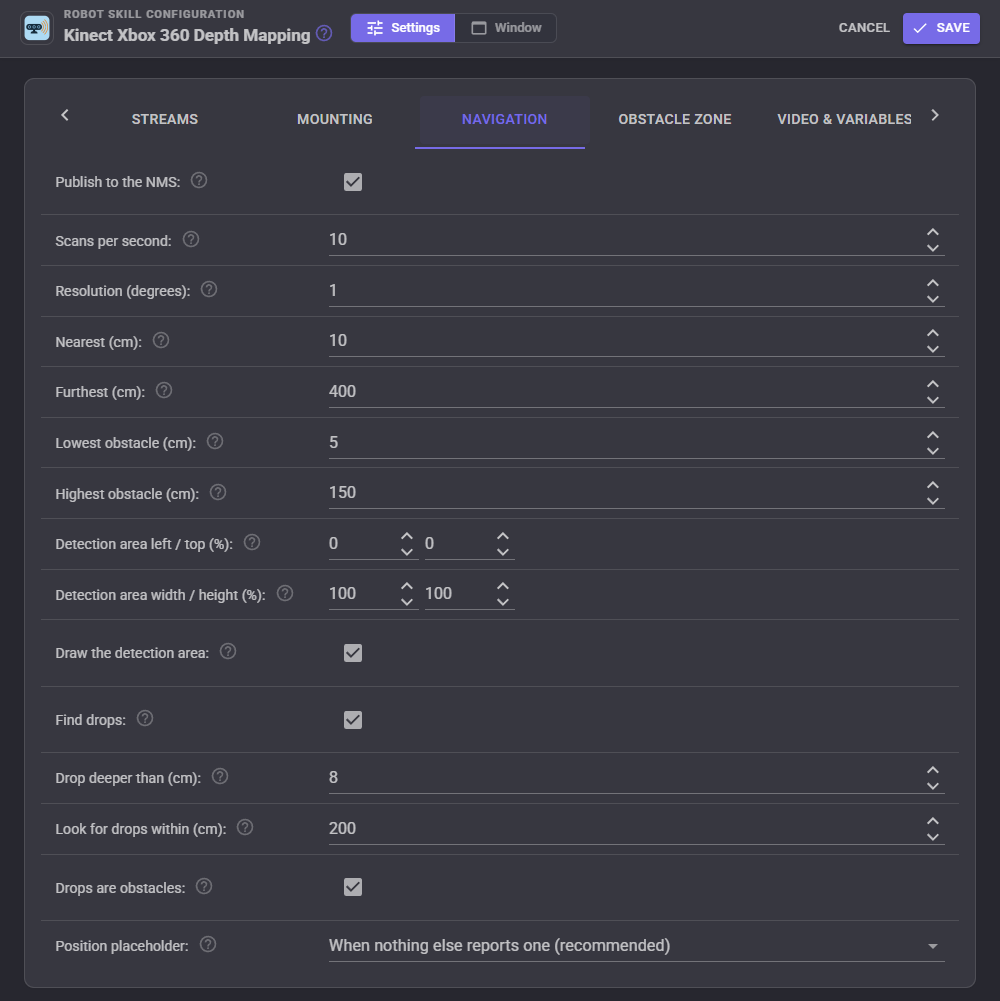
| Setting | What it does |
|---|---|
| Publish to the NMS, Scans per second | Send the scan to the navigation messaging system, at most this often. |
| Resolution | Degrees per reading. |
| Nearest, Furthest | The scan's range along the floor. |
| Lowest obstacle, Highest obstacle | What counts as an obstacle when the mount height is set. |
| Detection area | The part of the depth picture the scan is made from, in percent: left, top, width and height. |
| Find drops, Drop deeper than, Look for drops within, Drops are obstacles | Drop detection, and whether drops go to the NMS as obstacles so a navigator steers round them. |
| Position placeholder | A navigator only takes scans when the robot's position is reported. With nothing else reporting one, the skill repeats the last known position after each scan, and stands aside when another skill reports positions. |
Obstacle zone
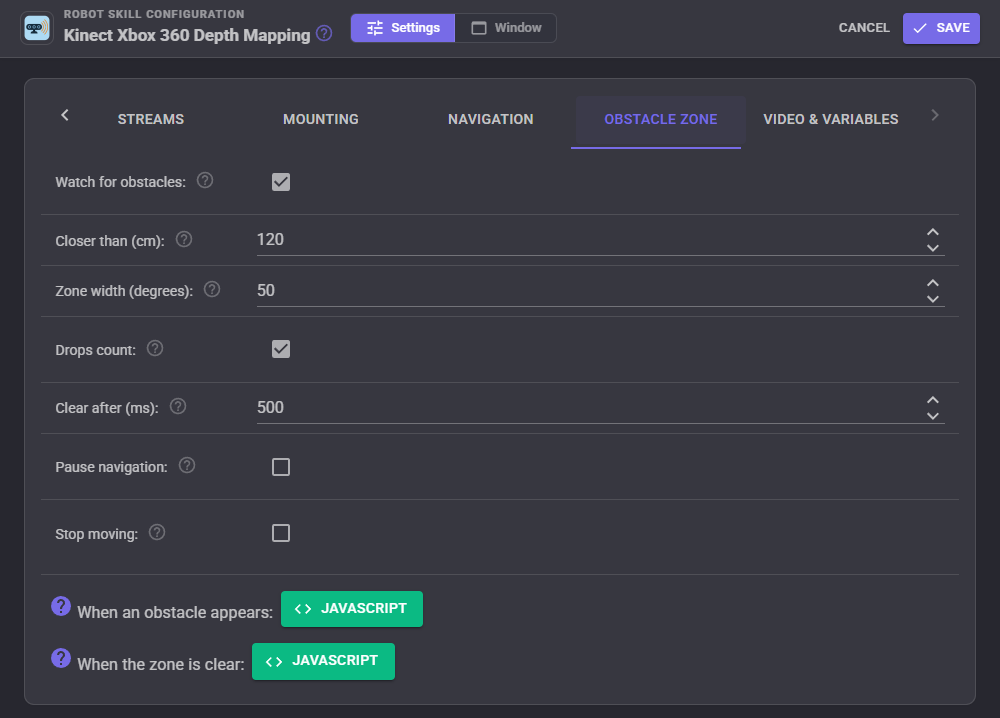
Watch the area straight ahead: anything closer than the distance inside the zone's width is an obstacle. The skill can stop the robot, pause a navigation and carry on once the zone is clear, flash the LED, and run a script when something appears and another when the zone is clear again. The ObstacleDistance and ObstacleAngle variables say where it was.
Video & variables
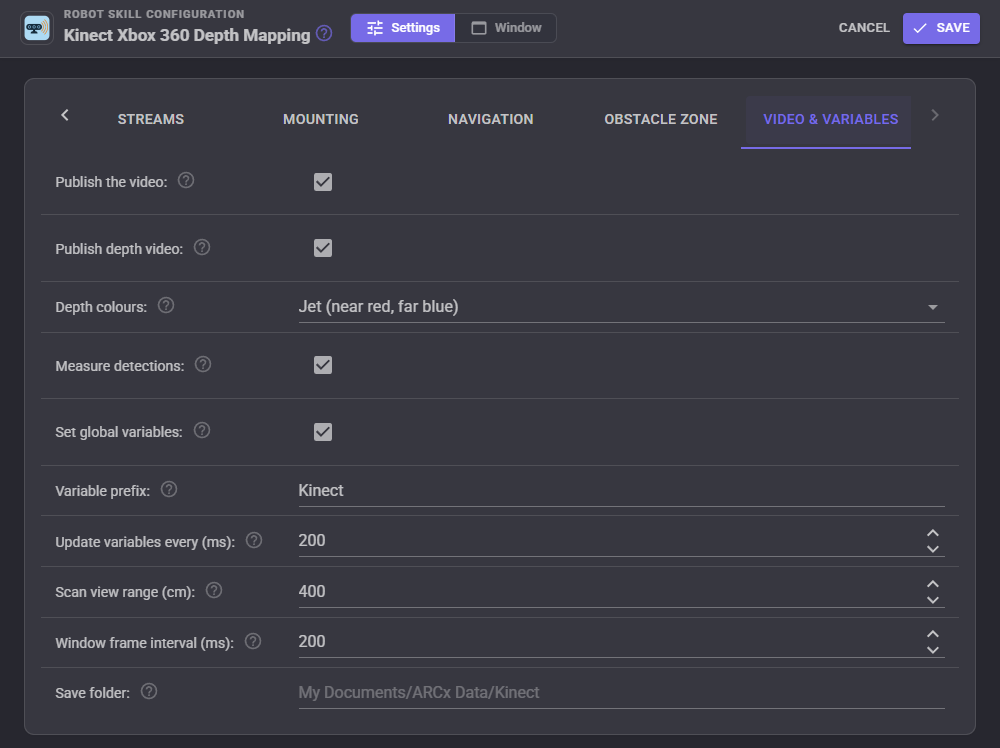
The video sources are named after the window title: "Kinect Xbox 360 Depth Mapping Color" (or "... Infrared") and "Kinect Xbox 360 Depth Mapping Depth". The depth colours can be Jet, Turbo, Inferno, Viridis, Rainbow or Bone. Measure detections gives every detection on the colour video its distance and position (DistanceM, ForwardM, LeftM, HeightM), which Vision Detection Tracking Script puts in its Object variables; it needs the depth aligned to colour (libfreenect) or the simulator.
Global variables
With the prefix Kinect (change it for a second Kinect), distances in metres and angles in radians counter-clockwise from straight ahead (positive is left):
| Variable | Value |
|---|---|
| $KinectIsRunning | True while streaming |
| $KinectNearestDistance, $KinectNearestAngle | The nearest obstacle |
| $KinectFrontDistance | Nearest within 10 degrees of straight ahead |
| $KinectLeftDistance, $KinectRightDistance | Nearest 10 to 30 degrees to either side |
| $KinectCenterDistance | Straight-line distance to what the middle of the picture sees |
| $KinectCliff, $KinectCliffDistance, $KinectCliffAngle | A drop in the floor |
| $KinectObstacle, $KinectObstacleDistance, $KinectObstacleAngle | The obstacle zone |
| $KinectTiltDegrees | The tilt motor's angle in degrees above level |
| $KinectAccelX, $KinectAccelY, $KinectAccelZ | The accelerometer in m/s, the Kinect's own axes (Y is about 9.8 when level) |
| $KinectFPS, $KinectValidPercent | Frame rate and how much of the picture has depth |
Scripts, AI and the Custom UI
Scripts reach everything through control commands: distances in any direction or sector, a point of the picture measured in the robot's frame, the tilt motor, the LED, the detection area, point clouds and the list of Kinects. For example, in JavaScript:
// Look down at the floor ahead, then report what is closest
controlCommand("Kinect Xbox 360 Depth Mapping", "SetTilt", -15);
sleep(2000);
var front = getVar("$KinectFrontDistance");
if (front > 0 && front < 1.0)
  Audio.say("Something is " + Math.round(front * 100) + " centimetres ahead");
AI clients connected to ARCx's MCP server get four tools: a sector summary of what the Kinect sees, measuring a point of the picture, tilting the Kinect, and saving a point cloud. Saved point clouds (.ply, in metres in the robot's frame, coloured when the depth is aligned to colour) open in MeshLab, CloudCompare and Blender.
The Kinect view widget puts the colour or depth picture, or the top-down scan, on your own Custom UI screens with a start/stop button, tilt buttons and the nearest distance.
One Kinect, one robot skill
A Kinect can be opened by one program, and one robot skill, at a time. Kinect Xbox 360 Depth Mapping and Kinect Body Control each open the Kinect themselves, so with both in a project whichever starts first owns it and the other reports that the Kinect is in use (under the Kinect SDK only one program may have its depth stream; under libfreenect the second cannot claim the USB device). Use one Kinect per skill, or keep only one of them running. The depth this skill shares through ARCx (the depth sensor, the scan, the video sources and the measured detections) is available to every other skill in the project without opening the Kinect again.
Troubleshooting
- No Kinect found: check the Kinect's own power supply; USB alone cannot run it. On Windows, Device Manager shows which driver it has: "Kinect for Windows" devices are Microsoft's (use the Kinect SDK driver), "Xbox NUI" devices under "Universal Serial Bus devices" with WinUSB are libfreenect's. On Linux, install the udev rule from the Kinect tab and replug.
- libfreenect did not load: on macOS run
brew install libfreenect; on Linuxsudo apt install libfreenect0.5t64 libusb-1.0-0installs it system wide if the shipped one cannot load. - Obstacles on the left show on the right: change Flip left to right.
- The floor shows as obstacles: set the mount height, and check the lowest obstacle height. Without a mount height, narrow the detection area to a band at the robot's height.
- No tilt motor: a model 1473 or Kinect for Windows under libfreenect needs its audio firmware; or set the tilt source to Typed in.
Control Commands for the Kinect Xbox 360 Depth Mapping robot skill
There are Control Commands available for this robot skill which allows the skill to be controlled programmatically from scripts or other robot skills. These commands enable you to automate actions, respond to sensor inputs, and integrate the robot skill with other systems or custom interfaces. If you're new to the concept of Control Commands, we have a comprehensive manual available here that explains how to use them, provides examples to get you started and make the most of this powerful feature.
Control Command ManualThis robot skill has 22 control commands, listed below. Send them from a JavaScript or Python script, from Blockly, or from another robot skill.
The first value is always the window title, which is the name in the title bar of the robot skill on your workspace. It starts out as Kinect Xbox 360 Depth Mapping, which is what every example below uses. If you rename the robot skill, or add a second copy of it to the project, use the title as it appears on that window instead.
ControlCommand() can be shortened to CC(), and both spellings work in JavaScript and in Python. The examples are JavaScript; Python is the same call, except that true and false are written True and False.
GetAccelerometer
The Kinect's accelerometer as [x, y, z] in m/s, in the Kinect's own axes (y is about 9.8 when it is level). [0, 0, 0] when the motor and accelerometer are not available.
Syntax
ControlCommand("Kinect Xbox 360 Depth Mapping", "GetAccelerometer")
Returns: Array of Float
Example
var result = ControlCommand("Kinect Xbox 360 Depth Mapping", "GetAccelerometer");
GetCenterDistance
The straight-line distance in metres from the Kinect to whatever the middle of its picture sees. 0 when there is no reading there.
Syntax
ControlCommand("Kinect Xbox 360 Depth Mapping", "GetCenterDistance")
Returns: Float [1.5e45 to 3.4e38]
Example
var result = ControlCommand("Kinect Xbox 360 Depth Mapping", "GetCenterDistance");
GetDeviceInfo
The Kinect, the driver that opened it, its streams and the drivers this computer has.
Syntax
ControlCommand("Kinect Xbox 360 Depth Mapping", "GetDeviceInfo")
Returns: String
Example
var result = ControlCommand("Kinect Xbox 360 Depth Mapping", "GetDeviceInfo");
GetDistance
The distance in metres along the floor from the robot's centre to the nearest obstacle in a direction, from the latest depth scan. angle is in radians counter-clockwise from straight ahead (0 ahead, positive left, negative right). 0 when nothing is seen there or the direction is outside the Kinect's 57 degree view.
Syntax
ControlCommand("Kinect Xbox 360 Depth Mapping", "GetDistance", (Number)angle)
Parameters
| # | Name | Type | What to pass |
|---|---|---|---|
| 1 | angle | Number | A number, without quotes |
Returns: Float [1.5e45 to 3.4e38]
Example
var result = ControlCommand("Kinect Xbox 360 Depth Mapping", "GetDistance", 0);
GetDistanceAtPixel
The straight-line distance in metres from the Kinect to what a point of the depth picture sees. x and y are fractions of the picture's width and height from the top left (0.5, 0.5 is the middle). 0 when there is no reading there.
Syntax
ControlCommand("Kinect Xbox 360 Depth Mapping", "GetDistanceAtPixel", (Number)x, (Number)y)
Parameters
| # | Name | Type | What to pass |
|---|---|---|---|
| 1 | x | Number | A number, without quotes |
| 2 | y | Number | A number, without quotes |
Returns: Float [1.5e45 to 3.4e38]
Example
var result = ControlCommand("Kinect Xbox 360 Depth Mapping", "GetDistanceAtPixel", 0, 0);
GetNearest
The nearest obstacle the Kinect sees as [distance in metres along the floor, direction in radians counter-clockwise from straight ahead]. [0, 0] when nothing is seen.
Syntax
ControlCommand("Kinect Xbox 360 Depth Mapping", "GetNearest")
Returns: Array of Float
Example
var result = ControlCommand("Kinect Xbox 360 Depth Mapping", "GetNearest");
GetPointAtPixel
Where the thing a point of the depth picture sees is, as [forward, left, height] in metres from the robot's centre on the floor (+forward ahead, +left to the robot's left, height off the floor). x and y are fractions of the picture from the top left. [0, 0, 0] when there is no reading there.
Syntax
ControlCommand("Kinect Xbox 360 Depth Mapping", "GetPointAtPixel", (Number)x, (Number)y)
Parameters
| # | Name | Type | What to pass |
|---|---|---|---|
| 1 | x | Number | A number, without quotes |
| 2 | y | Number | A number, without quotes |
Returns: Array of Float
Example
var result = ControlCommand("Kinect Xbox 360 Depth Mapping", "GetPointAtPixel", 0, 0);
GetSectorDistance
The distance in metres to the nearest obstacle between two directions, going counter-clockwise from startAngle to endAngle, in radians from straight ahead (-0.35 to 0.35 is the 40 degrees around straight ahead). 0 when nothing is seen there.
Syntax
ControlCommand("Kinect Xbox 360 Depth Mapping", "GetSectorDistance", (Number)startAngle, (Number)endAngle)
Parameters
| # | Name | Type | What to pass |
|---|---|---|---|
| 1 | startAngle | Number | A number, without quotes |
| 2 | endAngle | Number | A number, without quotes |
Returns: Float [1.5e45 to 3.4e38]
Example
var result = ControlCommand("Kinect Xbox 360 Depth Mapping", "GetSectorDistance", 0, 0);
GetTilt
The tilt motor's angle in degrees above level (negative looking down), which the Kinect measures from gravity. While the motor is moving, the angle it was asked for.
Syntax
ControlCommand("Kinect Xbox 360 Depth Mapping", "GetTilt")
Returns: Double [5.0e324 to 1.7e308]
Example
var result = ControlCommand("Kinect Xbox 360 Depth Mapping", "GetTilt");
IsCliffDetected
Whether the Kinect sees a drop in the floor (stairs, a ledge) right now. Needs drop detection turned on and the mount height set.
Syntax
ControlCommand("Kinect Xbox 360 Depth Mapping", "IsCliffDetected")
Returns: Boolean [true or false]
Example
var result = ControlCommand("Kinect Xbox 360 Depth Mapping", "IsCliffDetected");
IsObstacleDetected
Whether something is inside the obstacle zone right now. Always false when the obstacle zone is turned off.
Syntax
ControlCommand("Kinect Xbox 360 Depth Mapping", "IsObstacleDetected")
Returns: Boolean [true or false]
Example
var result = ControlCommand("Kinect Xbox 360 Depth Mapping", "IsObstacleDetected");
IsRunning
Whether the skill is running (connecting, streaming or waiting to reconnect).
Syntax
ControlCommand("Kinect Xbox 360 Depth Mapping", "IsRunning")
Returns: Boolean [true or false]
Example
var result = ControlCommand("Kinect Xbox 360 Depth Mapping", "IsRunning");
ListKinects
The Kinects connected to this computer, through every driver it has, plus the simulator: one "name [id]" per item. The id goes in the configuration's DeviceId.
Syntax
ControlCommand("Kinect Xbox 360 Depth Mapping", "ListKinects")
Returns: Array of String
Example
var result = ControlCommand("Kinect Xbox 360 Depth Mapping", "ListKinects");
SavePointCloud
Save the next depth frame as a 3D point cloud (.ply, opens in MeshLab, CloudCompare, Blender), in metres in the robot's frame, coloured when the depth is aligned to colour. filename is optional: empty saves a dated file in the save folder. Returns the file's full path.
Syntax
ControlCommand("Kinect Xbox 360 Depth Mapping", "SavePointCloud", (String)filename)
Parameters
| # | Name | Type | What to pass |
|---|---|---|---|
| 1 | filename | Text | Your text, in quotes |
Returns: String
Example
var result = ControlCommand("Kinect Xbox 360 Depth Mapping", "SavePointCloud", "filename");
SetDetectionArea
Set the detection area (the part of the depth picture the scan is made from) in percent of the picture: left, top, width and height. 0, 0, 100, 100 is the whole picture. A horizontal band at the robot's height is the ARC version's way to ignore the floor and ceiling.
Syntax
ControlCommand("Kinect Xbox 360 Depth Mapping", "SetDetectionArea", (Number)left, (Number)top, (Number)width, (Number)height)
Parameters
| # | Name | Type | What to pass |
|---|---|---|---|
| 1 | left | Number | A number, without quotes |
| 2 | top | Number | A number, without quotes |
| 3 | width | Number | A number, without quotes |
| 4 | height | Number | A number, without quotes |
Returns: Boolean [true or false]
Example
var result = ControlCommand("Kinect Xbox 360 Depth Mapping", "SetDetectionArea", 0, 0, 0, 0);
SetLed
Set the light on the front of the Kinect: Off, Green, Red, Yellow, BlinkGreen or BlinkRedYellow. libfreenect and the simulator only (the Kinect SDK cannot). Returns false when it could not be set.
Syntax
ControlCommand("Kinect Xbox 360 Depth Mapping", "SetLed", (String)color)
Parameters
| # | Name | Type | What to pass |
|---|---|---|---|
| 1 | color | Text | Your text, in quotes |
Returns: Boolean [true or false]
Example
var result = ControlCommand("Kinect Xbox 360 Depth Mapping", "SetLed", "color");
SetPublishToNMS
Turn sending the depth scan to the Navigation Messaging System on or off. Returns the new setting.
Syntax
ControlCommand("Kinect Xbox 360 Depth Mapping", "SetPublishToNMS", (Bool)publish)
Parameters
| # | Name | Type | What to pass |
|---|---|---|---|
| 1 | publish | True or false | true or false, without quotes |
Returns: Boolean [true or false]
Example
var result = ControlCommand("Kinect Xbox 360 Depth Mapping", "SetPublishToNMS", true);
SetTilt
Move the Kinect's tilt motor to an angle in degrees above level, -27 (looking down) to 27 (looking up). The motor takes a second or two and is moved at most once a second. Returns the angle asked for.
Syntax
ControlCommand("Kinect Xbox 360 Depth Mapping", "SetTilt", (Number)degrees)
Parameters
| # | Name | Type | What to pass |
|---|---|---|---|
| 1 | degrees | Number | A number, without quotes |
Returns: Double [5.0e324 to 1.7e308]
Example
var result = ControlCommand("Kinect Xbox 360 Depth Mapping", "SetTilt", 0);
Start
Open the Kinect and start streaming. Returns false if it was already running.
Syntax
ControlCommand("Kinect Xbox 360 Depth Mapping", "Start")
Returns: Boolean [true or false]
Example
var result = ControlCommand("Kinect Xbox 360 Depth Mapping", "Start");
Stop
Stop streaming and close the Kinect. Returns false if it was not running.
Syntax
ControlCommand("Kinect Xbox 360 Depth Mapping", "Stop")
Returns: Boolean [true or false]
Example
var result = ControlCommand("Kinect Xbox 360 Depth Mapping", "Stop");
TiltDown
Tilt the Kinect down by a number of degrees (5 when not given). Returns the angle asked for.
Syntax
ControlCommand("Kinect Xbox 360 Depth Mapping", "TiltDown", (Number)degrees)
Parameters
| # | Name | Type | What to pass |
|---|---|---|---|
| 1 | degrees | Number | A number, without quotes |
Returns: Double [5.0e324 to 1.7e308]
Example
var result = ControlCommand("Kinect Xbox 360 Depth Mapping", "TiltDown", 0);
TiltUp
Tilt the Kinect up by a number of degrees (5 when not given). Returns the angle asked for.
Syntax
ControlCommand("Kinect Xbox 360 Depth Mapping", "TiltUp", (Number)degrees)
Parameters
| # | Name | Type | What to pass |
|---|---|---|---|
| 1 | degrees | Number | A number, without quotes |
Returns: Double [5.0e324 to 1.7e308]
Example
var result = ControlCommand("Kinect Xbox 360 Depth Mapping", "TiltUp", 0);
This list is read out of the robot skill itself each time its package is uploaded, so it matches the published version (v2).



This robot skill has been updated to v1.
What has changed
initial release
This robot skill has been updated to v2.
What has changed
updated to use some new ARCx UI features for improved performance.