
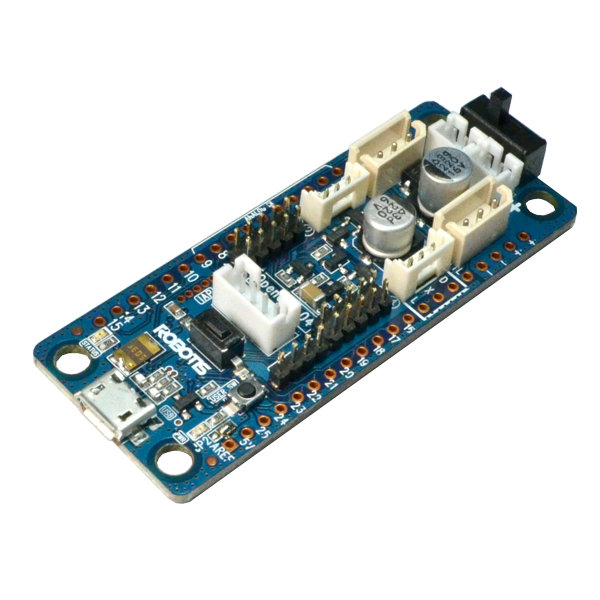
Opencm 9.04 by Robotis
Firmware

Drive Dynamixel servos from a web browser
The ROBOTIS OpenCM 9.04 is a small open-source controller made for Dynamixel smart servos. With Synthiam's EZB firmware it becomes an EZ-B compatible board, and ARCx's Dynamixel Servo Driver turns every servo on the chain into a normal Synthiam servo for animations, joysticks, scripts and AI.
How the OpenCM 9.04 works with Synthiam. Flash the DJs OpenCM 9.04 Firmware (in the Firmware section below) and the board speaks the EZB protocol over USB at 921,600 baud. In ARCx, the Ezb Connection skill connects to its serial port, and the Dynamixel Servo Driver sends servo commands through the board's Dynamixel UART. In ARC, use the EZB Connection and Dynamixel skills. We recommend ARCx: it runs on Windows, Linux and Raspberry Pi and is used from any web browser.
What is the OpenCM 9.04?
The OpenCM 9.04 is a small, open-source microcontroller board from ROBOTIS with a 32-bit ARM Cortex-M3 processor. It is designed around Dynamixel smart servos, which talk to the board over a TTL serial bus: several servos share one data line in a daisy chain, each with its own ID.
With Synthiam's firmware it acts as a robot brain interface that ARC and ARCx send commands to: move a servo, read a sensor, run a behavior. The same board is the controller inside the ROBOTIS MINI (Darwin Mini) humanoid, which Synthiam controls with this firmware.
OpenCM9.04-B vs OpenCM9.04-C. The C version is the same as the B version except that the two standard TTL connectors (used for the AX series) were replaced with XL-type TTL connectors (used for the XL-320). Both B and C versions are supported by the Synthiam firmware.
OpenCM 9.04 at a glance
| Type | Open-source microcontroller board for Dynamixel servos |
|---|---|
| Maker | ROBOTIS |
| Processor | STM32F103CB, 32-bit ARM Cortex-M3, 72 MHz |
| Memory | 128 KB flash, 20 KB SRAM |
| Supply voltage | 5 V to 16 V |
| Connection to Synthiam | USB (micro-B) at 921,600 baud; Bluetooth optional |
| Servo bus | Dynamixel TTL |
| Synthiam uses it for | Dynamixel servos, plus digital, PWM and ADC ports |
| Website | ROBOTIS store · e-Manual |
What you can do with an OpenCM 9.04 in Synthiam
Dynamixel servos
Each servo maps to a Synthiam virtual port (V0, V1...). Read position, temperature, voltage and load, scan the bus, change IDs and reboot a servo that shut down.
Poses and animations
Build walking gaits and gestures in Auto Position or on a timeline in Servo Animation. Several servos move together in one sync-write packet.
Board I/O
Digital read/write, PWM duty from 0 to 100%, hobby servos on digital ports and 10-bit analog inputs, all from robot skills and scripts.
Joysticks and controllers
Move servos from an on-screen pad, a gamepad or a MIDI controller. Servo Pad is a quick way to pose a robot by hand.
Blockly, JavaScript and Python
Program behaviors visually or in code. Scripts move Dynamixel servos with the same Servo.setPosition() they use for any other servo.
AI and voice
Speech recognition and text to speech on the computer, AI chat robot skills, and ARCx's MCP server so AI agents can move the robot.
Dynamixel connectors, UARTs and firmware settings
XL-320 servos (XL-type 3-pin connectors)
The XL-type 3-pin connectors are designed for the Dynamixel XL-320. On an OpenCM9.04-C these are the connectors you will usually use.
- Connect XL-320 servos directly to the board.
- Control them with the Dynamixel skill on UART 0.
AX / MX servos (Molex-style connectors)
For AX and many MX series servos with Molex-style TTL connectors, you typically need the OpenCM Expansion Board to plug them in easily.
- Add the Expansion Board to get the compatible ports.
- Connect AX/MX servos through it and use UART 2.
A UART is a built-in serial channel on the controller. Synthiam sends servo commands through that channel, and the servos answer on the same line. Pick the UART in the Dynamixel skill to match how your servos are connected:
| Synthiam UART | OpenCM serial port | Used for |
|---|---|---|
| UART 0 | Serial1 | The board's own Dynamixel TTL connectors. Use this when the OpenCM 9.04 is used by itself (no expansion board). |
| UART 1 | Serial2 | The 4-pin communication port, where a Bluetooth module connects. |
| UART 2 | Serial3 | The OpenCM Expansion Board Dynamixel ports. Firmware version 4 added a receive buffer for this port. |
Settings in the firmware
These lines near the top of the firmware's .ino file decide how the board talks to Synthiam:
#define _PortCnt 26
#define _AnalogPorts 10
#define _FIRMWARE_ID 0x00000007
#define _BAUD_RATE 921600
#define COMMUNICATION_PORT Serial
_PortCnt and _AnalogPorts are the digital and analog port counts, and COMMUNICATION_PORT Serial is the USB port. Most Arduino-style boards run at 9600 baud, so remember to set 921,600 in the connection settings. To connect over Bluetooth instead,
change COMMUNICATION_PORT to Serial2 and _BAUD_RATE to 9600 (or whatever your Bluetooth module uses); see the
Darwin Mini page for the steps.
| Firmware capability | Detail |
|---|---|
| Connection | Native USB, 921,600 baud |
| Digital I/O | Read and write; PWM duty 0-100% |
| Hobby servos | PWM servos on digital ports, with release |
| Analog inputs | 10-bit (0-1023), scaled for Synthiam; Ax ports also work as digital ports |
| Hardware UARTs | Receive buffering, adjustable baud rate |
| Dynamixel | Through UART 0 or UART 2 with the Dynamixel skill |
ROBOTIS documents the board's own pins in the OpenCM 9.04 e-Manual: 26 GPIO, 10 analog inputs (A0-A9), PWM on pins 2-14, the user LED on pin 14 and the user button on pin 23.
Set up the OpenCM 9.04 with ARCx
- Identify your hardware. Is the board an OpenCM9.04-B or -C? Are the servos XL-320 or AX/MX? XL-320s plug into the XL-type 3-pin ports; AX/MX servos go through the OpenCM Expansion Board.
- Install the firmware. Install the Arduino IDE and the ROBOTIS OpenCM tools for it (see the ROBOTIS e-Manual), download the firmware from the Firmware section below, then compile and upload it with the firmware upload tutorial.
- Power the servos. Dynamixel servos need their own supply at their rated voltage; USB alone is not enough to move them.
-
Connect from ARCx. Install ARCx and open the Ezb Connection configuration.
Select EZB 0, set Baud rate to
921600on the Connection tab and save. In the main window, pick the board's serial port and press connect.COM3 Windows (example) /dev/ttyACM0 Linux (example) Baud rate 921600 -
Add the Dynamixel Servo Driver. On its Bus tab choose EZB 0, port Hardware UART 0 (or Hardware UART 2 with the expansion board),
and the servos' baud rate: AX-12 and XL-320 servos ship at
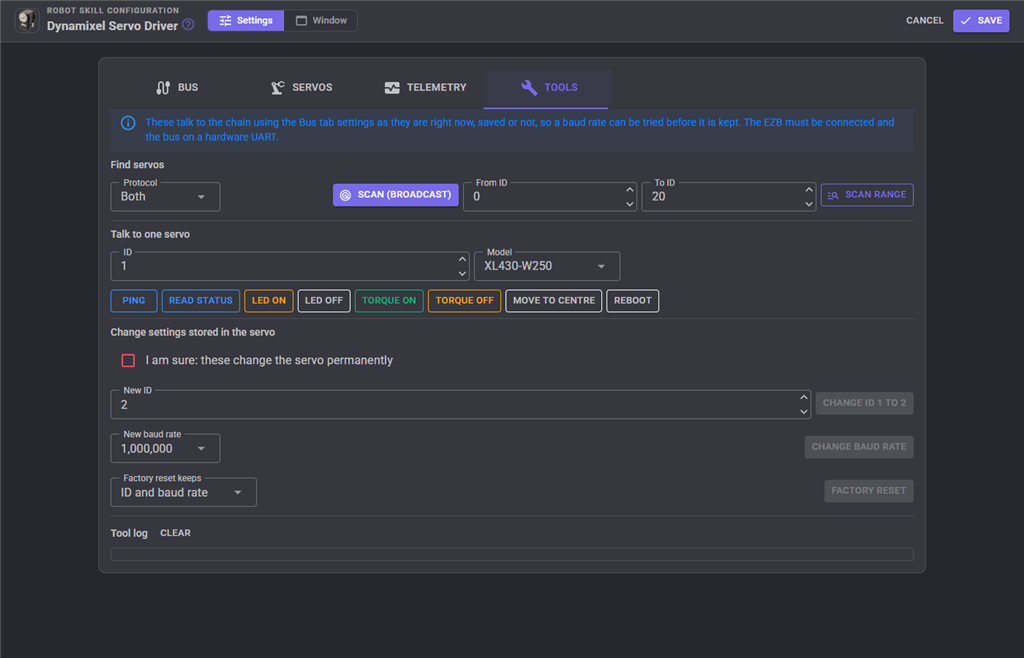
1000000. - Find and map the servos. Press Scan bus on the Tools tab, then add a row per servo on the Servos tab: the virtual port, the ID and the model.
- Test one servo first. Press Initialize, move a single servo from the Servo skill, check its direction and range, then connect the rest.
Using ARC? Add the EZB Connection skill, choose the COM port, set the baud rate to 921,600 and connect. Then add the Dynamixel skill and select UART 0 (or UART 2 with the expansion board).
Good to know
- Every servo on one bus must use the same baud rate and a different ID.
- The servo model setting chooses Dynamixel protocol 1.0 or 2.0 and the right control table, so set it correctly.
- On a hardware UART the driver can read positions, temperature and load as well as move servos (firmware version 2 and later).
Both work; ARCx is recommended
| ARCx Recommended | ARC | |
|---|---|---|
| Runs on | Windows 10/11 x64, Ubuntu 24.04 x64 and ARM64, including Raspberry Pi 4/5 | Windows |
| User interface | Any web browser, several people at once; closing the browser leaves the robot running | Windows desktop application |
| Board connection | Ezb Connection, USB serial at 921,600 | EZB Connection, USB serial at 921,600 |
| Dynamixel skill | Dynamixel Servo Driver: AX-12/18, MX-28/64/106, XL-320 and X series; any ID on any virtual port; telemetry; sync writes | Dynamixel: the long-established skill this board was first used with |
| AI agents | Built-in MCP server | Through robot skills |
When something does not work
Frequently asked questions
Serial2 at 9600). Once paired, the robot appears as a serial port.
This is proven in ARC; in ARCx it may work through the paired serial port but has not been tested yet.
Put your Dynamixel robot in a web browser
Flash the firmware, connect ARCx, and every Dynamixel servo becomes part of a Synthiam robot.

I suspect the expansion board doesn't use the digital pin in the code to control the direction of the uart. If you open the open cm arduino firmware that we created, there's some comments about the undocumented pin that controls the direction of the uart. Switches between tx and rx. If that pin isn't being connected to the expansion board, it won't work. If you can find documentation on how that expansion board works, then the code can be modified for it.
What is the reason for not using the open cm directly with the ax12 servos? (Removing the expansion board from the picture)
PS, you will notice robotis makes great servos, but they severely lack documentation and modular implementation. Getting stuff to work with their controllers is mostly luck.
Bummer on the complexity and yes...Robotis has been a challenging platform for both those reasons. Five or six years ago you had to trouble shoot all of the demo code, etc. But I have still enjoyed them. Meanwhile, I am using the Expansion board because I assumed that is the only way for me to connect to the OpenCM9 board - as it has no AX12A pins.
The good news is that my IoTiny is on the way. I may also splurge for my birthday and get JD and the smaller rover. I am turning 60 after all. LOL. :-)
Hi DJ,
Hope all is well. My PincherArm with Dynamixel (from Trossen) is working now with the Open CM thanks to all of your help. I have been working with the Auto Position control and had a couple of questions. I have reviewed the manual and the tutorials. First - the servo at the base of the arm that rotates the arm left and right does not move with the controls I have tried (Horizontal, Vertical and Auto.). It is connected and getting enough power - and you can ping it. All of the other joints work. Do you think that it could be the weight of the arm - maybe a torque strength issue? The servo does lie flat, but I wouldn't think that was a problem. (These are AX12As). It works with the other controllers and software so I think that the build is correct.
My other question is the speed of the servos. I set the Action speed as slow as it can go and testing each frame it is slower - but when I save and exit and then use the execute button it is very fast - which throws the weight of the arm forward.
All in all though...it is pretty cool so far....I am building a small robot to play with the IoTiny.
One more question - is there a way to set the movement limits on servos for the Auto Position Control?
Thanks again for your help. Vicki