
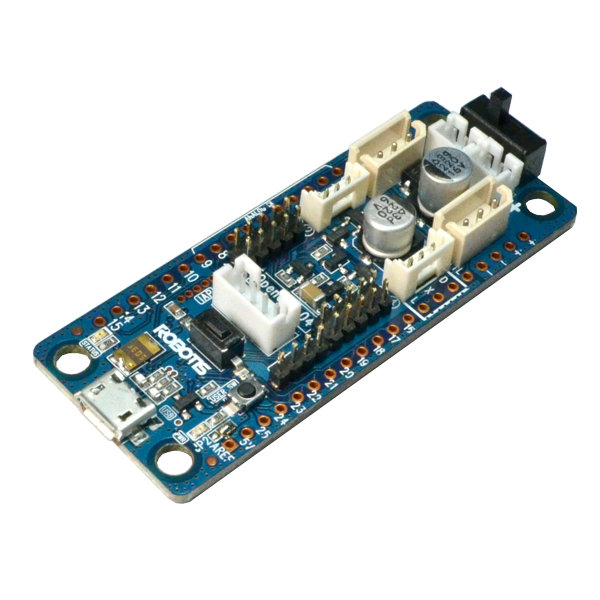
Opencm 9.04 by Robotis
Firmware
The Robotis OpenCM 9.04 is a small, open-source microcontroller board that can be used as an EZ-B compatible interface for Synthiam ARC (Autonomous Robot Control). ARC can talk to this board using the correct firmware, allowing ARC to control connected hardware such as Robotis DYNAMIXEL servos.
The OpenCM9.04-C is the same as the OpenCM9.04-B except the two standard TTL connectors (commonly used for AX series) were replaced with XL-type TTL connectors (used for the XL-320). Both B and C versions are supported by this ARC-compatible firmware.
This controller is also used in the Robotis Bioloid Mini, which can be controlled by ARC when running the proper firmware.
Controller Specs (Beginner Friendly)
- Processor: 32-bit ARM Cortex-M3 microcontroller
- What it does: Acts like a “robot brain interface” that ARC can send commands to (for example: move a servo, read sensors, run robot behaviors).
- Servo communication: Uses TTL serial communication for DYNAMIXEL servos. (TTL is a type of low-voltage serial signaling used by many Robotis servos.)
DYNAMIXEL Servo Ports and Compatibility
OpenCM 9.04 can control DYNAMIXEL servos through its servo connectors using ARC’s DYNAMIXEL plugin. Which servo types you can plug in directly depends on the connectors you have:
The 3-pin XL-type connectors are designed for the DYNAMIXEL XL-320. If you have an OpenCM9.04-C, these XL-type connectors are commonly what you’ll use.
- Connect XL-320 servos directly to the board
- Control them in ARC using the DYNAMIXEL features in the plugin
For AX and many MX series servos that use Molex-style TTL connectors, you typically need the OpenCM Expansion Board to plug them in easily.
- Add the Expansion Board to get the compatible ports
- Then connect AX/MX servos through the Expansion Board
Robotis DYNAMIXEL Robot Skill (How ARC Talks to the Board)
Most users pair the OpenCM 9.04 with Robotis DYNAMIXEL servos. ARC communicates with DYNAMIXEL servos by sending commands through a specific UART (a hardware serial port) on the OpenCM board.
Which UART does ARC use?
- Using the OpenCM 9.04 board by itself (no expansion board): ARC uses UART #0
- Using the OpenCM Expansion Board: ARC uses UART #2
Common Setup Checklist (Quick Beginner Steps)
- Identify your board version: OpenCM9.04-B or OpenCM9.04-C
- Identify your servo type: XL-320 or AX/MX
-
Connect servos:
- XL-320: plug into the XL-type 3-pin ports
- AX/MX: use the OpenCM Expansion Board (recommended for correct connectors)
- In ARC, use the DYNAMIXEL plugin and select the correct port/UART behavior for your setup
- Test by moving one servo first before connecting many servos

I suspect the expansion board doesn't use the digital pin in the code to control the direction of the uart. If you open the open cm arduino firmware that we created, there's some comments about the undocumented pin that controls the direction of the uart. Switches between tx and rx. If that pin isn't being connected to the expansion board, it won't work. If you can find documentation on how that expansion board works, then the code can be modified for it.
What is the reason for not using the open cm directly with the ax12 servos? (Removing the expansion board from the picture)
PS, you will notice robotis makes great servos, but they severely lack documentation and modular implementation. Getting stuff to work with their controllers is mostly luck.
Bummer on the complexity and yes...Robotis has been a challenging platform for both those reasons. Five or six years ago you had to trouble shoot all of the demo code, etc. But I have still enjoyed them. Meanwhile, I am using the Expansion board because I assumed that is the only way for me to connect to the OpenCM9 board - as it has no AX12A pins.
The good news is that my IoTiny is on the way. I may also splurge for my birthday and get JD and the smaller rover. I am turning 60 after all. LOL. :-)
Hi DJ,
Hope all is well. My PincherArm with Dynamixel (from Trossen) is working now with the Open CM thanks to all of your help. I have been working with the Auto Position control and had a couple of questions. I have reviewed the manual and the tutorials. First - the servo at the base of the arm that rotates the arm left and right does not move with the controls I have tried (Horizontal, Vertical and Auto.). It is connected and getting enough power - and you can ping it. All of the other joints work. Do you think that it could be the weight of the arm - maybe a torque strength issue? The servo does lie flat, but I wouldn't think that was a problem. (These are AX12As). It works with the other controllers and software so I think that the build is correct.
My other question is the speed of the servos. I set the Action speed as slow as it can go and testing each frame it is slower - but when I save and exit and then use the execute button it is very fast - which throws the weight of the arm forward.
All in all though...it is pretty cool so far....I am building a small robot to play with the IoTiny.
One more question - is there a way to set the movement limits on servos for the Auto Position Control?
Thanks again for your help. Vicki