

 Proteusy
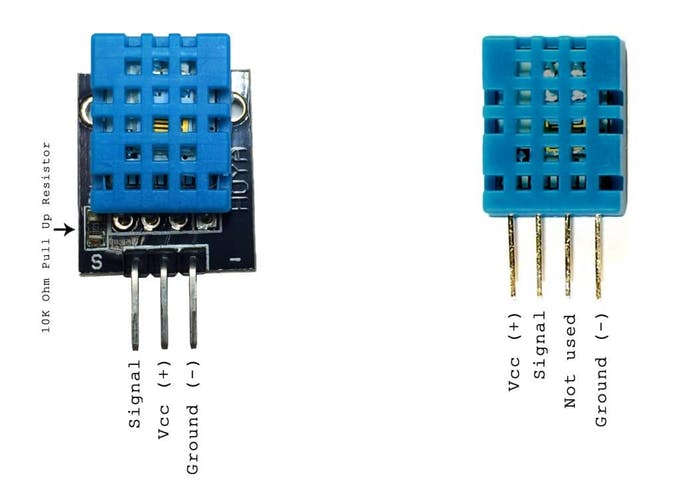
Read DHT11 temperature and humidity on Arduino (signal pin 4) using EZ-Genuino_DTH11_Uno firmware; exposes $Temp and $Humid variables.
Requires ARC
v1
(Updated 8/20/2021)
Compatible with:
 Windows
Windows
How to add the DHT11 Temp & Humidity Sensor robot skill
- Load the most recent release of ARC (Get ARC).
- Press the Project tab from the top menu bar in ARC.
- Press Add Robot Skill from the button ribbon bar in ARC.
- Choose the Misc category tab.
- Press the DHT11 Temp & Humidity Sensor icon to add the robot skill to your project.
Don't have a robot yet?
Follow the Getting Started Guide to build a robot and use the DHT11 Temp & Humidity Sensor robot skill.
How to use the DHT11 Temp & Humidity Sensor robot skill
You need to flash the DTH11 firmware to the Arduino. EZ-Genuino_DTH11_Uno.zip Use Pin 4 for signal. The variables $Temp and $Humid are created. Have fun!



Awesome! Gonna use this.
Comment câble le DHT11 pour le flasher? Merci
Je pense que vous demandez quel câble est necessaire pour flasher le firmware DTH11 sur l'Arduino depuis votre ordinateur portable ? Le câble à utiliser est un câble USB 2.0 de type A/B. Comme ça. J'espère que ça aide: https://store.arduino.cc/products/usb-2-0-cable-type-a-b?selectedStore=eu