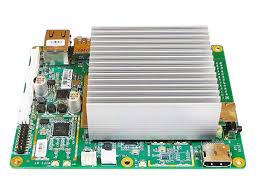
Atomic Pi by Team IoT
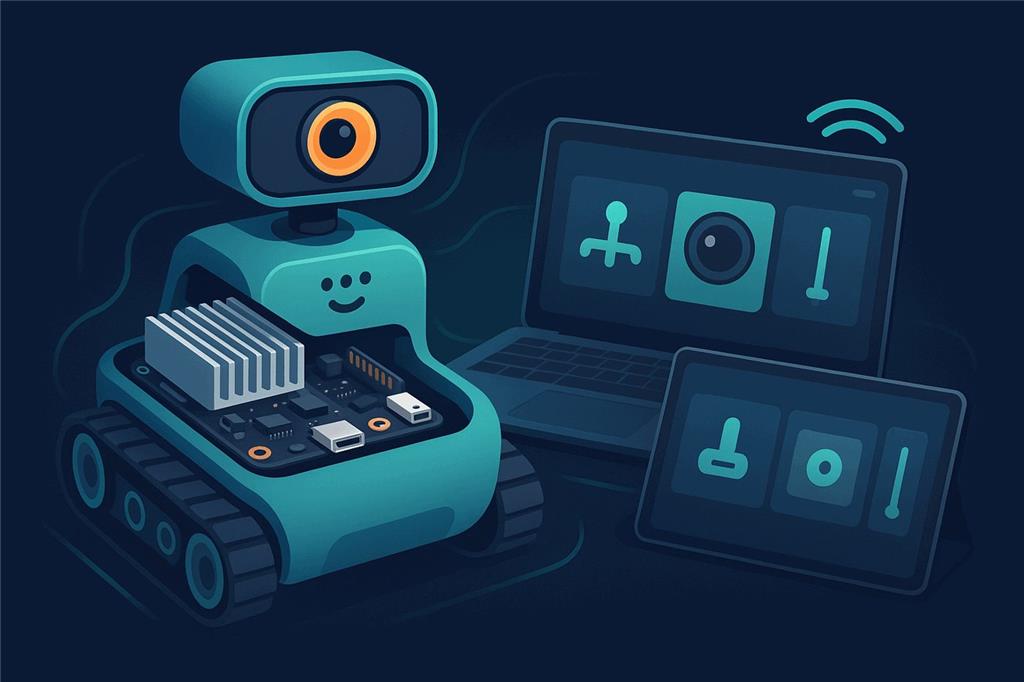
A tiny Intel computer you can bolt into a robot
The Atomic Pi is a low-cost x86 single-board computer with Wi-Fi, Ethernet and built-in storage. Install ARCx on Windows or Ubuntu 24.04 and it becomes your robot's brain, controlled from a web browser on any device.
How the Atomic Pi works with Synthiam. Unlike a microcontroller board, the Atomic Pi runs a full operating system, so it runs Synthiam software on the robot: ARCx on 64-bit Windows 10/11 or Ubuntu 24.04 LTS, or ARC on Windows. Think of it as the "brain computer", while an EZB controller (an EZ-B v4, IoTiny, or an Arduino or ESP32 with EZB firmware) handles servos and sensors. We recommend ARCx: headless on the robot, used from any browser.
What is the Atomic Pi?
The Atomic Pi is a small single-board computer (SBC) built around an Intel Atom processor. Because it is an x86 PC on a board, it runs Windows and Linux, and with them more advanced software than a microcontroller can: Synthiam ARCx, computer vision, speech recognition and other PC-like tasks, directly on the robot.
What you get
- Intel processor: PC-style performance in a small board
- 16 GB eMMC built-in storage, plus an SD card slot
- Wi-Fi and Bluetooth built in
- Gigabit Ethernet for reliable wired networking
- USB 3.0 for faster peripherals
- Real-time clock for logs and schedules
Robot-friendly extras
- Full HDMI port with audio
- A second audio output with an on-board class-D amplifier for speakers
- A 9-axis inertial sensor with compass (BNO055)
- A 26-pin header for power and GPIO
Atomic Pi at a glance
| Type | x86 single-board computer |
|---|---|
| Maker | Team IoT (sold by Ameridroid) |
| Processor | Intel Atom x5-Z8350 quad-core, up to 1.92 GHz |
| Memory / storage | 2 GB DDR3L; 16 GB eMMC and an SD slot |
| Connectivity | Dual-band 802.11ac Wi-Fi, Bluetooth 4.0, Gigabit Ethernet, USB 3.0, HDMI |
| Power | 5 V (typically 4-15 W) through the 26-pin header; no supply included |
| Synthiam uses it for | Running ARCx or ARC on board the robot |
| Website | ameridroid.com |
What you can do with it in Synthiam
Control from any browser
ARCx runs on the Atomic Pi; you use it from a phone, tablet or laptop on the network, several people at once.
Servos and sensors
An EZB controller over USB or Wi-Fi adds servos, PWM, digital and analog ports, I2C and UARTs.
Camera and vision
A USB camera with Camera Source (usb) for face, color, glyph and object tracking.
Voice and sound
Speech recognition and text to speech; the on-board amplifier can drive the robot's speakers.
AI agents
ARCx is an MCP server, so AI agents can see, drive and program the robot.
Scripts, Custom UI, remote
Blockly, JavaScript and Python; Custom UI control screens; and Exosphere for remote control and telepresence.
Set up ARCx on the Atomic Pi
- Install a 64-bit operating system. Windows 10 or 11 (64-bit) with the Atomic Pi drivers below, or Ubuntu 24.04 LTS (64-bit). With 2 GB of memory and 16 GB of storage, Ubuntu 24.04 Server leaves the most room for your project. ARC needs Windows.
- Install ARCx. Follow Install ARCx on Windows 64 or Install ARCx on Linux x64.
-
Open ARCx from another device. Start ARCx Server (Bind Any) on Windows, or on Ubuntu:
Then browse to./ARCx -b http://0.0.0.0:5000http://<atomic-pi-address>:5000. Browsing from another device, rather than opening a browser on the Atomic Pi, saves its memory for the robot. -
Connect an EZB controller. Add the Ezb Connection robot skill, enter the controller's port
(
COM3,/dev/ttyUSB0) or IP address and connect. On Ubuntu, add your user to thedialoutgroup first. - First test. Move a servo or drive with a movement panel, then add a camera and speech.
-
Run headless. Open the project at start-up (the Windows shortcut
-foption, or asystemdservice on Ubuntu) so the robot is ready when it powers on.
Atomic Pi drivers for Windows 10
After installing or reinstalling Windows 10 64-bit, some hardware, commonly Wi-Fi and audio, may not work right away because Windows does not find the Atomic Pi drivers by itself. These drivers are for Windows 10 x64 and may not work on other versions of Windows.
- On another computer, download the driver ZIP files and copy them to a USB thumb drive.
- Plug the thumb drive into the Atomic Pi.
- Unzip the files to a folder, for example
C:\AtomicPiDrivers\. - Run the included installer(s). If there is none, open Device Manager, right-click each device with a yellow warning icon, choose Update driver and point it at the unzipped folder.
- Restart Windows when finished, even if you are not prompted.
Both run on it; ARCx is recommended
ARCx Recommended
- 64-bit Windows 10/11 or Ubuntu 24.04 LTS.
- Headless; used from any web browser by several people at once.
- MCP for AI agents; robot skills from the Synthiam store.
ARC
- Windows desktop application.
- Viewed on an HDMI monitor or through remote desktop software.
- A good choice if you already have ARC projects.
On Windows, 16 GB is enough for a basic setup but fills quickly. Our Tips to Make a Robot guide covers freeing storage space, improving performance, powering the board correctly (robots often need a stable regulator or battery setup) and running headless with Remote Desktop or similar tools.
When something does not work
-b http://0.0.0.0:5000 (Ubuntu), browse to the board's IP address rather than 127.0.0.1, and allow port 5000 through the firewall.
Frequently asked questions
Make the Atomic Pi your robot's brain
Install ARCx on Windows or Ubuntu, connect an EZB controller, and control your robot from any browser.
I'm no expert but... This sounds like a driver issue or a device install problem. I did install Win 10 on a Rock Pi X and had several problems. One of the troubleshooting steps I was led to was to look in the Windows Device Manager. Look through the list of everything in there for any explanation points or odd tags. That will tell you exactly which device or driver is causing the issues.
Are there any instructions in the driver pack about installing with safe mode or driver signing disabled? Usually, there's a readme.txt or something.
I remember having a few challenges with the atomic pi that I put in my Apple ][. I believe it was also related to video trouble.
There was a xml file that opened a website with basic instructions, but nothing that suggested troubleshooting. I did try a couple times putting it in safe mode and using the driver backup program included with the software pack and it still did not work. Just for fun I downloaded the software pack on my working laptop and ran the driver backup program included and it opened without any issues. So I believe there is some kind of dependency that is removed from the Atomic Pi Win 10 iso linked to download on the synthiam website. I tried checking for corrupted files and everything came back clean. At this point in troubleshooting I believe it is the ISO itself missing a dependency that the Driver Backup utility needs to run. @DJ Sures , I know your busy, but do you mind doing a quick install on usb or sd card and see if it allows you to run the Driver backup tool? This way we can clear up if there is something missing from the Win 10 lite for ARC ISO that is on the page for everyone to download. This could prevent frustration from any users trying to get the atomic pi working for use with synthiam.
@dave schulpius
You have an Atomic Pi right? Do you mind downloading the Win 10 For ARC iso on this page and try installing the drivers package? If you don’t already have a ISO to USB burner download Rufus from CNET Downloads. That way I have another person to confirm the problem. Thank You for your time!
Hi jstarne1, Sorry old friend, I would love to help but I don't have an Atomic Pi. I'm running a Rock Pi X.