
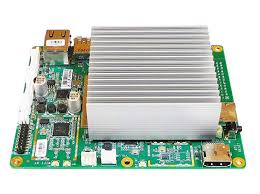
Atomic Pi by Team IoT
The Atomic Pi is a small computer (an SBC, or Single Board Computer) that can be mounted inside a robot. Unlike a typical microcontroller board, an SBC runs a full operating system (such as Windows 10), which means you can run more advanced software like Synthiam ARC, computer vision, speech recognition, and other “PC-like” tasks directly on the robot.
What You Get (Quick Overview)
- Intel processor (PC-style performance in a small board)
- 16 GB eMMC storage (built-in flash drive for Windows + ARC)
- Wi-Fi and Bluetooth built in
- Ethernet port for reliable wired networking
- USB 3.0 for faster peripherals
- Real-time clock (RTC) for keeping time (helpful for logs/scheduling)
Drivers
After installing (or re-installing) Windows 10 64-bit on the Atomic Pi, you may notice that some hardware features do not work right away—common examples are Wi-Fi, audio, or other onboard components. This happens because Windows may not automatically find the correct Atomic Pi drivers.
How to Install the Drivers (Beginner Steps)
- On another computer, download the driver ZIP file(s) below.
- Copy the ZIP file(s) to a USB thumb drive.
- Plug the USB thumb drive into the Atomic Pi.
-
Unzip the downloaded file(s) to a folder (for example:
C:\AtomicPiDrivers\). -
Run the included installer(s), or if there is no installer:
- Open Device Manager
- Find any devices with a yellow warning icon
- Right-click the device → Update driver → choose the unzipped folder
- Restart Windows when finished (recommended even if you are not prompted).
Atomic Pi Windows 10 x64 System Drivers
Use this for general Atomic Pi hardware support (chipset and system devices).
Atomic Pi WiFi Drivers
Installs Wi-Fi drivers; also enables 5 GHz for improved speed and range (when supported by your router).
Installation Tips & Performance for SBCs
Single-board computers are compact, but they have some unique setup considerations—especially for robots. For example, it’s common to:
- Free up storage space (16 GB is enough for a basic setup, but Windows can fill it quickly)
- Improve performance (Windows settings, startup apps, and updates can slow things down)
- Power the SBC correctly (robots often need a stable regulator or battery setup)
- Run headless (no monitor/keyboard/mouse on the robot) using Remote Desktop or similar tools
Follow our step-by-step guide here:
View SBC Installation & Performance Tips- No Wi-Fi networks appear: Install the Wi-Fi driver above, then reboot.
- Drivers won’t install: Make sure you unzipped the files first (don’t run installers from inside the ZIP).
- Low disk space: See the performance tips guide to safely free space and reduce Windows bloat.

I'm no expert but... This sounds like a driver issue or a device install problem. I did install Win 10 on a Rock Pi X and had several problems. One of the troubleshooting steps I was led to was to look in the Windows Device Manager. Look through the list of everything in there for any explanation points or odd tags. That will tell you exactly which device or driver is causing the issues.
Are there any instructions in the driver pack about installing with safe mode or driver signing disabled? Usually, there's a readme.txt or something.
I remember having a few challenges with the atomic pi that I put in my Apple ][. I believe it was also related to video trouble.
There was a xml file that opened a website with basic instructions, but nothing that suggested troubleshooting. I did try a couple times putting it in safe mode and using the driver backup program included with the software pack and it still did not work. Just for fun I downloaded the software pack on my working laptop and ran the driver backup program included and it opened without any issues. So I believe there is some kind of dependency that is removed from the Atomic Pi Win 10 iso linked to download on the synthiam website. I tried checking for corrupted files and everything came back clean. At this point in troubleshooting I believe it is the ISO itself missing a dependency that the Driver Backup utility needs to run. @DJ Sures , I know your busy, but do you mind doing a quick install on usb or sd card and see if it allows you to run the Driver backup tool? This way we can clear up if there is something missing from the Win 10 lite for ARC ISO that is on the page for everyone to download. This could prevent frustration from any users trying to get the atomic pi working for use with synthiam.
@dave schulpius
You have an Atomic Pi right? Do you mind downloading the Win 10 For ARC iso on this page and try installing the drivers package? If you don’t already have a ISO to USB burner download Rufus from CNET Downloads. That way I have another person to confirm the problem. Thank You for your time!
Hi jstarne1, Sorry old friend, I would love to help but I don't have an Atomic Pi. I'm running a Rock Pi X.