
Controls Kangaroo x2/Sabertooth motor axes as ARCx virtual servos with homing, limit switches, stalls, readback, and smooth motion.
 Windows
 ARM
ARM
 Linux
Linux
 MacOS
MacOS
How to add the Sabertooth Kangaroo Servo robot skill
- Load the most recent release of ARCx on a compatible operating system (Get ARCx).
- Press the + Skills menu from the top menu bar in ARCx.
- Choose the Servo category tab.
- Press the Sabertooth Kangaroo Servo icon to add the robot skill to your project.
Don't have a robot yet?
Follow the Getting Started Guide to build a robot and use the Sabertooth Kangaroo Servo robot skill.
How to use the Sabertooth Kangaroo Servo robot skill
Turns a motor with an encoder or a potentiometer into an ARCx servo, using a Dimension Engineering Kangaroo x2 motion controller and the Sabertooth motor driver it sits on. Each of the Kangaroo's two channels becomes one ARCx virtual servo port (V0 to V255), so anything in ARCx that moves a servo - a servo slider, Auto Position, a script, a joystick, camera tracking, the kinematics service - moves the motor.
This is how a robot gets servos far bigger than hobby servos: a shoulder lifting an arm, a lead screw, a turret, a winch. The Kangaroo runs the position loop itself and holds the motor where it was told, and the skill adds what a heavy servo needs around it: limit switches, homing, smooth acceleration, a stall timeout, release when idle, and the real position read back from the Kangaroo.
Several Kangaroo and Sabertooth pairs can share one serial line, each with its own packet serial address, so one UART can drive many servos.
Requirements
- A Kangaroo x2 mounted on a Sabertooth motor driver, with each motor's feedback (a quadrature encoder, or a potentiometer) wired to the Kangaroo channel that drives it.
- The Kangaroo's DIP switches set for serial mode with independent channels (not mixed mode) and for the kind of feedback fitted, and the Kangaroo tuned for the mechanism with its TUNE button or Dimension Engineering's DEScribe software.
- One of: an EZ-B v4 hardware UART, any EZB digital port, a serial port on the computer (a USB to TTL serial adapter), or a serial to network bridge on the robot (an ESP32 or ESP8266 running ESP-Link, or ser2net).
- A common ground between whatever sends the commands and the Kangaroo's 0V terminal.
- Optional: limit switches on EZB digital inputs, on any EZB.
Tune the Kangaroo before anything else. Tuning is what teaches it how its motor and feedback respond, and a Kangaroo that has not been tuned cannot hold a position. The Kangaroo setup tab of the configuration has the order to do things in.
Packet Serial
The skill speaks the Kangaroo's Packet Serial. Every command and every reply is a short binary packet ending in a CRC-14 checksum, so a byte that motor noise damages is thrown away instead of becoming a wrong position. Every packet starts with the packet serial address of the Kangaroo it is for, which is how several Kangaroos share one line.
Each Kangaroo's packet serial address is 128 and its baud rate 9600 unless they were changed with DEScribe. Give every Kangaroo on a line its own address, and the same baud rate as the skill. Kangaroos on a second serial line need a second copy of this skill.
Wiring
| Connection | Wire to every Kangaroo's S1 | Wire the Kangaroo's S2 to | Reads back |
|---|---|---|---|
| EZB hardware UART | The UART's TX pin | The UART's RX pin | Yes |
| EZB software serial | Any EZB digital port's signal pin | Nothing | No |
| Serial port on this computer | The adapter's TX pin | The adapter's RX pin | Yes |
| Serial bridge over TCP | The bridge's TX pin | The bridge's RX pin | Yes |
Always connect ground: the EZB's (or adapter's) GND to the Kangaroo's 0V, even when the two run from different batteries. A missing ground is the most common reason a Kangaroo ignores everything it is sent. Several Kangaroos can share the TX line; check the Kangaroo manual before joining several S2 outputs on one receive pin.
A connection that reads back hears the Kangaroos' replies, which is what gives the real position in the window, homing onto a limit switch, the stall timeout, Kangaroo error reporting and most of the Tune & Test tools. EZB software serial can only transmit: the servos move, and the Kangaroo still holds each one where it was sent, but nothing else on that list works.
For a serial bridge over TCP, set the bridge's own baud rate to match the Kangaroos; the skill only sends and receives bytes over the network.
The window
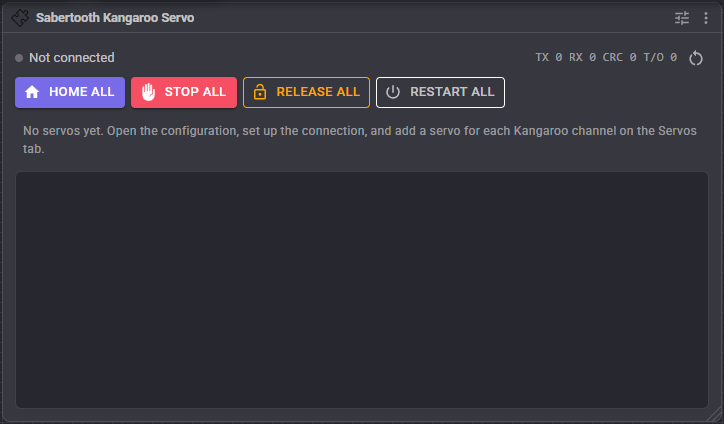
- Status - the green dot is lit while the link to the Kangaroos is open, with how it is connected. When the link cannot be opened it says why, and the skill keeps trying every two seconds. While the configuration's tools are using the serial port, it says so.
- TX RX CRC T/O - packets sent, replies received, replies thrown away for a bad checksum, and requests that went unanswered. A rising CRC count means electrical noise on the serial line; a rising T/O count means a Kangaroo is not answering. The button beside them resets the counts.
- Home all - homes every servo that has a homing mode. The motors move.
- Stop all - stops every servo where it is and keeps holding it there. It also stops homing.
- Release all - powers every Kangaroo channel down, so the motors freewheel. The next move from ARCx powers a servo up again.
- Restart all - starts every Kangaroo channel again and sends each servo its last position. Use it after a control error (E3), or when a Kangaroo was switched on after ARCx connected to it.
- Servo table - one row per servo:
- Servo - its port and name, and the Kangaroo address and channel it is on.
- Target - the ARCx position it was sent to, with the same position in Kangaroo units (and display units, when set) underneath. For a speed servo, the speed it was sent.
- Actual - where the servo really is, read from the Kangaroo and mapped back to an ARCx position, with the Kangaroo units underneath. For a speed servo, its measured speed when Read speeds too is on.
- Range - a bar from the minimum position on the left to the maximum on the right. The faint mark is where the servo was sent, the solid mark is where it really is. For a speed servo, the bar fills right for forward and left for reverse.
- Limits - L and H light up while the low or high end limit switch is pressed. They are faded when that switch is not fitted.
- State - what the servo is doing: Idle (no position from ARCx yet), Moving, In position, Not homed, Homing, Released, Stalled, At limit, Stopped or Running (speed servos), No reply, or a Kangaroo error.
- Buttons - Home (only for a servo with a homing mode, orange when it still needs homing), move to the centre of the ARCx range, stop and hold, restart the channel, and release.
- Log - what the skill has done: connections, homing, stalls, limit switches, Kangaroo errors.
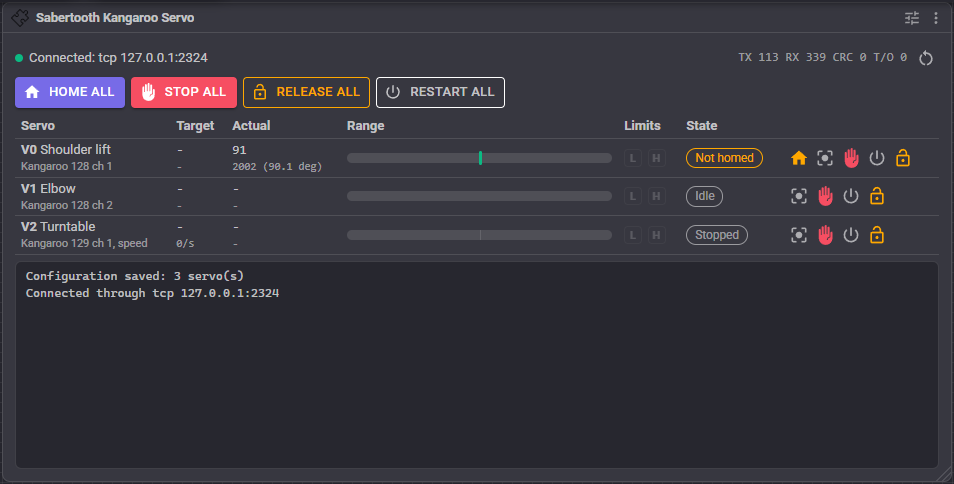
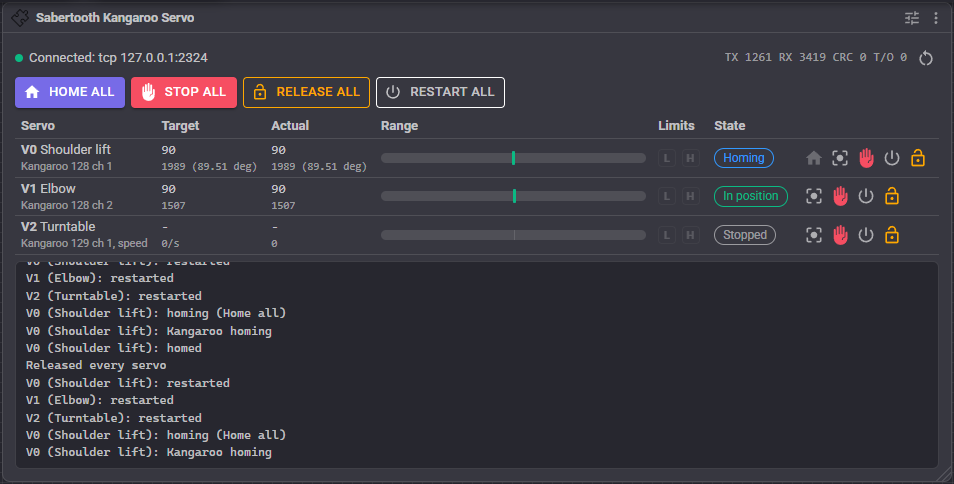
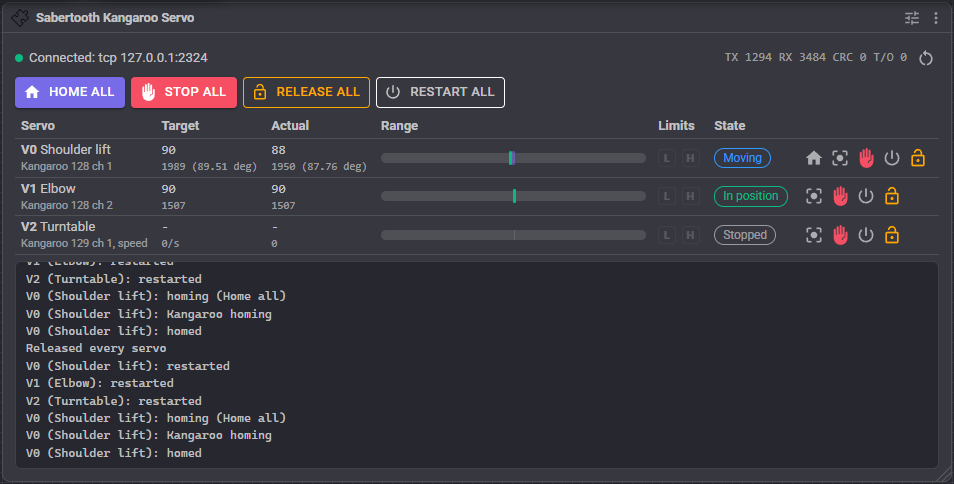
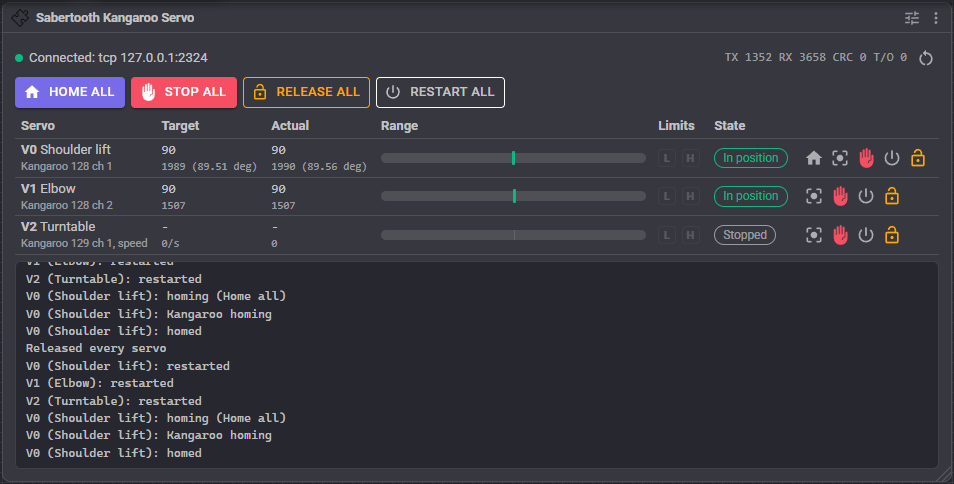
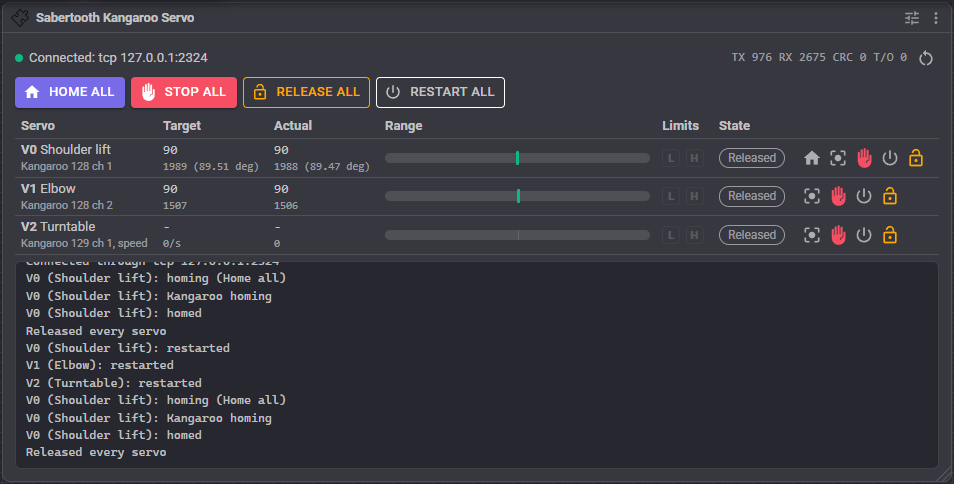
The real position is read only on a connection that reads back, with Read positions every above 0. A dash means nothing has been read yet. Readings pause while a servo is homing, so the Actual column catches up when homing finishes.
How ARCx values map
Position mode is a servo held at a position. ARCx positions run from 1 to the project's maximum servo position (180 by default), and that range is spread evenly over the servo's Minimum position to Maximum position, in Kangaroo units: encoder lines or potentiometer counts, unless units were set in the Kangaroo with DEScribe. Invert reverses it, so the lowest ARCx position goes to the maximum position. ARCx's own min, max and fine tune limits for the port apply first, as for any servo.
Speed mode is continuous rotation, for winches, conveyors and turntables. The centre of the ARCx range is stopped, and either end is the Maximum speed in that direction. Positions within the Stopped zone either side of the centre also mean stopped, so a joystick or slider resting near the middle does not make the motor creep. Just outside the stopped zone the motor runs at the Minimum speed.
Velocity sets how fast a position servo travels. ARCx velocity 0 (the fastest, and the default) is the Maximum speed, the Slowest ARCx velocity (20, as for PWM servos) is the Minimum speed, and in between is in between. With a maximum speed of 0, the Kangaroo's own tuned speed is used and ARCx velocities are ignored.
Acceleration gives a heavy load smooth starts and stops. With an Acceleration set (and a maximum speed), the skill plays out a trapezoidal move itself: it speeds up at that rate, cruises, and slows down to arrive at the target, sending the Kangaroo a stream of positions along the way. An ARCx acceleration above 0 for the port is a percentage of the configured one, so 50 is half as brisk. A new position that arrives mid move turns the profile towards it without stopping first. With an acceleration of 0, each move is sent in one go and the acceleration is left to the Kangaroo's tuning.
Release powers the Kangaroo channel down so the motor freewheels. The next move powers it up again.
Reading the real position - any robot skill or script that asks ARCx for a servo's real position gets the Kangaroo's, mapped back to the ARCx range, so it knows where a heavy joint really is rather than where it was last sent.
Deadband stops chatter. A new position within that many Kangaroo units of the last one sent is not sent at all, so a jittery input such as a joystick or camera tracking does not keep nudging a heavy motor.
Display unit shows positions in degrees, millimetres or anything else. Enter the unit's name and how many Kangaroo units make one; the window, the global variables and the scripts then also work in that unit.
Limit switches
Each servo can have a low end switch (the end the Kangaroo position decreases towards) and a high end switch (the end it increases towards), on EZB digital inputs on any EZB. They are read every Read limit switches every milliseconds.
When a switch closes while the motor moves towards it, the motor is stopped and held, or powered down, as When a switch closes says. Either way, moves further towards that switch are refused until it opens again, and moves away from it are allowed, so the servo can always be driven back off its switch.
Pressed when low with a normally closed switch to ground is the safer choice: a broken wire then reads as pressed and stops the servo too. A switch that cannot be read (its EZB is not connected) stops a tool's move as if it were pressed.
A switch is only as quick as its reading interval and the EZB's round trip, so near the ends of a fast axis use a lower speed, especially with a WiFi EZB.
Homing
An encoder only counts from where it was switched on, so a servo with an encoder usually needs to find a reference position after power up. Homing sets how:
- None - no homing. Right for a potentiometer, which always knows where it is, or an encoder that is always switched on in the same place.
- Kangaroo home - the Kangaroo's own home command, done the way the Kangaroo was tuned (limit switch or mechanical stop tuning). The Kangaroo zeroes itself.
- Low end switch / High end switch - the skill drives slowly onto that limit switch at the Homing speed until it closes. That spot becomes the Home position, and the servo backs off the switch by Back off by so it is not left pressed. These need a connection that reads back.
With Refuse moves until homed on (the default), a servo with a homing mode ignores moves until it has been homed, so it can never go somewhere based on a position it does not know. The window shows it as Not homed with an orange Home button. The last position ARCx sent meanwhile is carried out as soon as homing finishes, so an init script that moves the servo before homing is not lost.
Home from the window (one servo or all of them), from a script, or automatically with Home when connected. That one moves the motor without being asked as soon as the project loads, so only use it where that is safe. Homing gives up and stops the motor after the Homing timeout. Opening the configuration stops any homing that is running.
Safety
- The panic button powers every servo down at once and stops any homing.
- Stall timeout - when a position servo has not reached its target this long after being sent there, it is reported as Stalled, and On a stall or control error holds it or powers it down. It catches a jam or an overload. It needs a connection that reads back. The timer starts again whenever the skill itself resends the position, such as after homing or a restart.
- Kangaroo control error (E3) - the Kangaroo reports it when the motor or its feedback is wired wrong, the load is jammed or too heavy, or it needs tuning again. The same fault action applies. It is never cleared by itself: fix the cause, then press Restart.
- Release when idle powers a servo down once it has sat at its target this many seconds without a new move, to save power and heat. It suits a self locking load such as a lead screw or a worm gear. The next move powers it up again.
- A lost link (an unplugged USB adapter, a TCP bridge that drops, an EZB that disconnects) is logged and retried every two seconds. A Kangaroo that was switched off meanwhile reports that its channel is not started (E1), and the skill starts it again by itself before the next move.
- Resend every sends each servo's last command again on an interval even when nothing changed, so a command lost to noise is corrected.
- Kangaroo serial timeout (experimental) tells each Kangaroo channel to stop by itself when it hears nothing for that long, so a heavy servo stops if ARCx or the link dies. The position readings or the resend interval keep it fed, so set it well above both. The command has not been tried on hardware yet. 0 leaves the Kangaroo as it was set in DEScribe.
- Power down when closing releases every servo when the skill is removed or the project closes. Off (the default) leaves each Kangaroo holding its last position.
Tune & Test
The Tune & Test tab works on one servo at a time, chosen at the top, with the settings on the configuration page as they are, before they are saved. The tools take the serial port while they run, so the skill's own link stands aside, and servos stay wherever the tools leave them until ARCx moves them again.
These tools move the motor. Keep clear of the mechanism and be ready to cut the power. Limit switches are watched during every move.
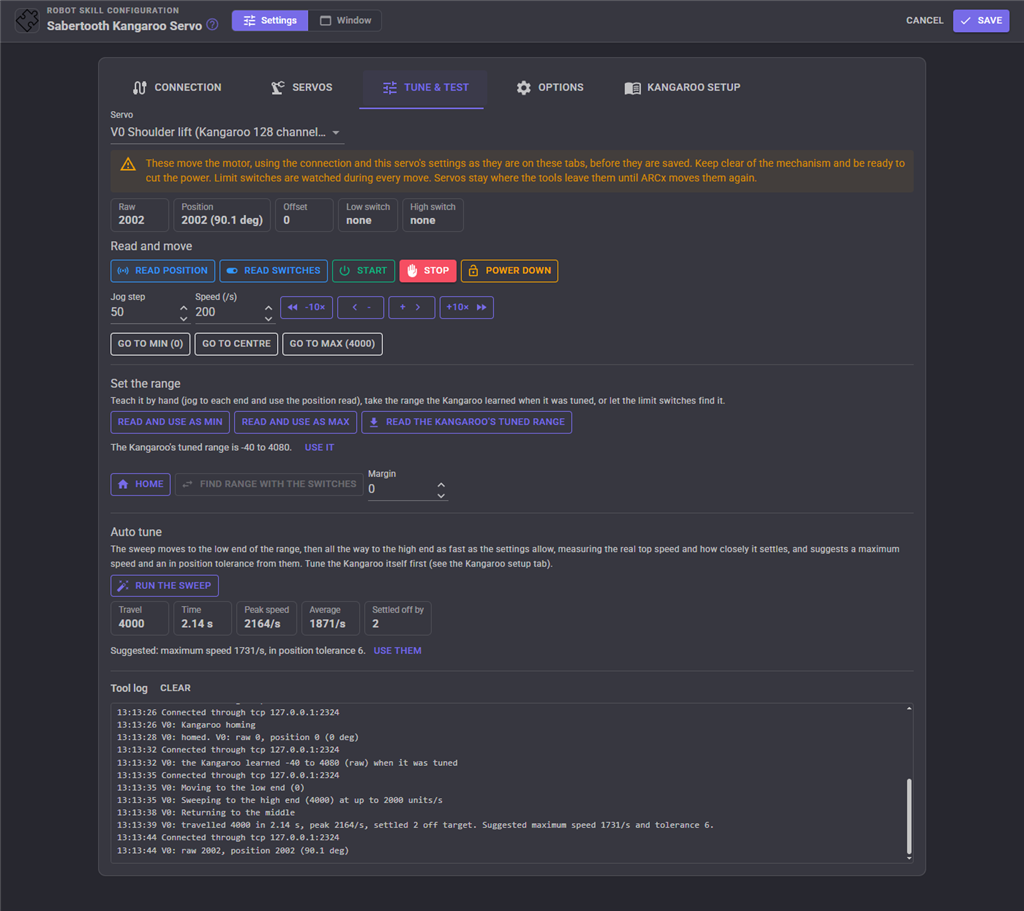
- Readings - the raw Kangaroo position, the position relative to home (what the minimum and maximum positions are written in), the homing offset, and both limit switches as last read.
- Read position, Read switches, Start, Stop, Power down - read and drive the channel directly.
- Jog - move by the Jog step (or ten times it) at the Speed given.
- Go to min, Go to centre, Go to max - move to the range as it is set now.
- Set the range - three ways: jog to each end and use Read and use as min and Read and use as max; Read the Kangaroo's tuned range, which asks the Kangaroo for the range it learned when it was tuned and offers Use it; or Find range with the switches, which drives onto both limit switches and offers the range between them less the Margin.
- Home - homes the servo the way it is set up, so the range is measured from the same place the servo will use.
- Run the sweep - moves to the low end of the range, then all the way to the high end as fast as the settings allow, and measures the travel, the time, the peak and average speed and how closely it settled. It suggests a Maximum speed (80% of the measured peak) and an In position tolerance, and Use them puts them into the servo's settings.
- Tool log - everything the tools did.
Only Start, Stop and Power down work on a transmit-only connection.
Global variables
With Set variables on, every reading sets these for each servo. The names start with the Variable prefix and the port, here Kangaroo and V0:
| Variable | Meaning |
|---|---|
$KangarooV0Position |
The real position, as an ARCx servo position |
$KangarooV0Raw |
The real position in Kangaroo units, relative to home |
$KangarooV0Units |
The real position in the display unit, when one is set |
$KangarooV0Speed |
The measured speed, when speeds are read |
$KangarooV0Target |
The position it was sent to |
$KangarooV0Moving |
Whether it is still on its way to its target |
$KangarooV0InPosition |
Whether it is within its tolerance of its target |
$KangarooV0Error |
The Kangaroo error code, 0 for none |
$KangarooV0Homed |
Whether it is homed (always true without a homing mode) |
$KangarooV0LowLimit |
Whether the low end limit switch is pressed |
$KangarooV0HighLimit |
Whether the high end limit switch is pressed |
$KangarooV0Online |
Whether the Kangaroo channel answered its last reading |
Scripts can also home a servo, wait until it arrives, read its real position in ARCx, raw or display units, and move it to a raw position or a position in display units at a given speed.
Configuration
The configuration has five tabs.
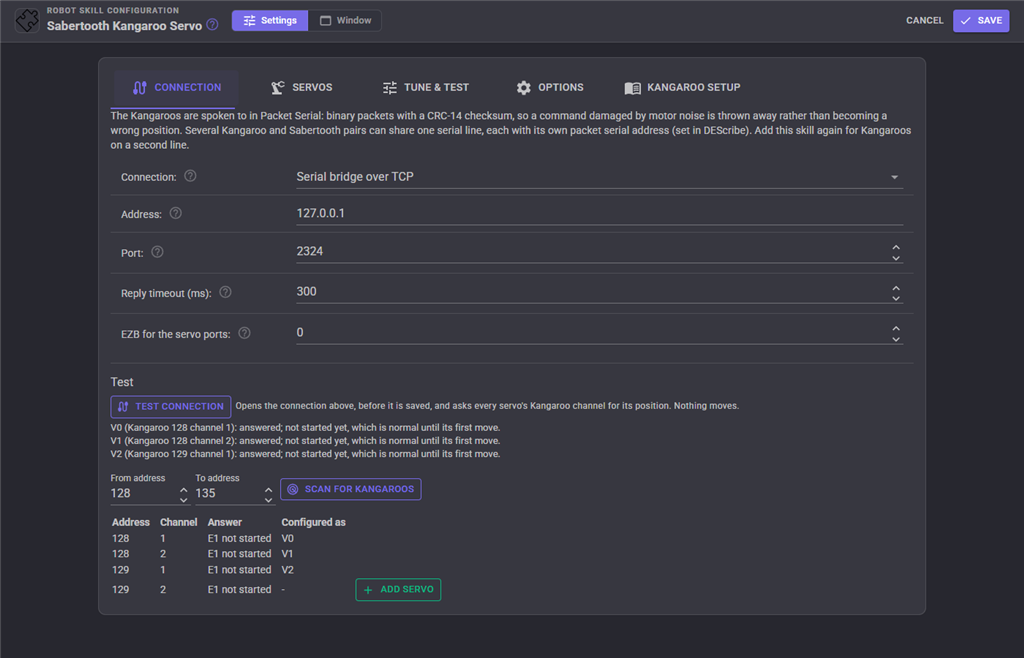
Connection - how the Kangaroos are connected, the baud rate, the reply timeout, which EZB's virtual servo ports the skill answers to, and the test and scan tools.
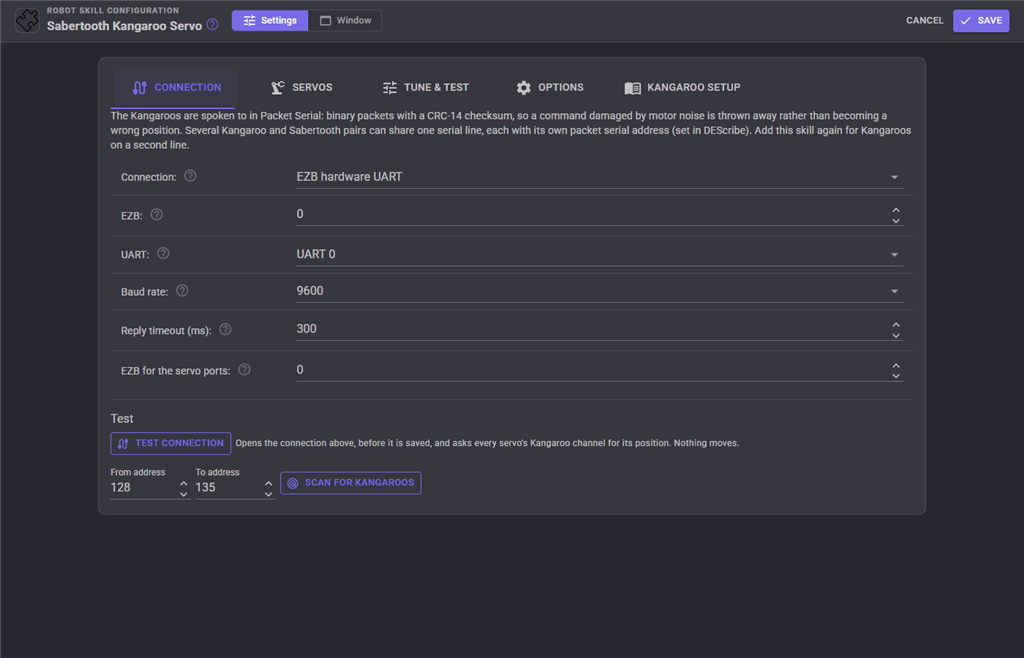
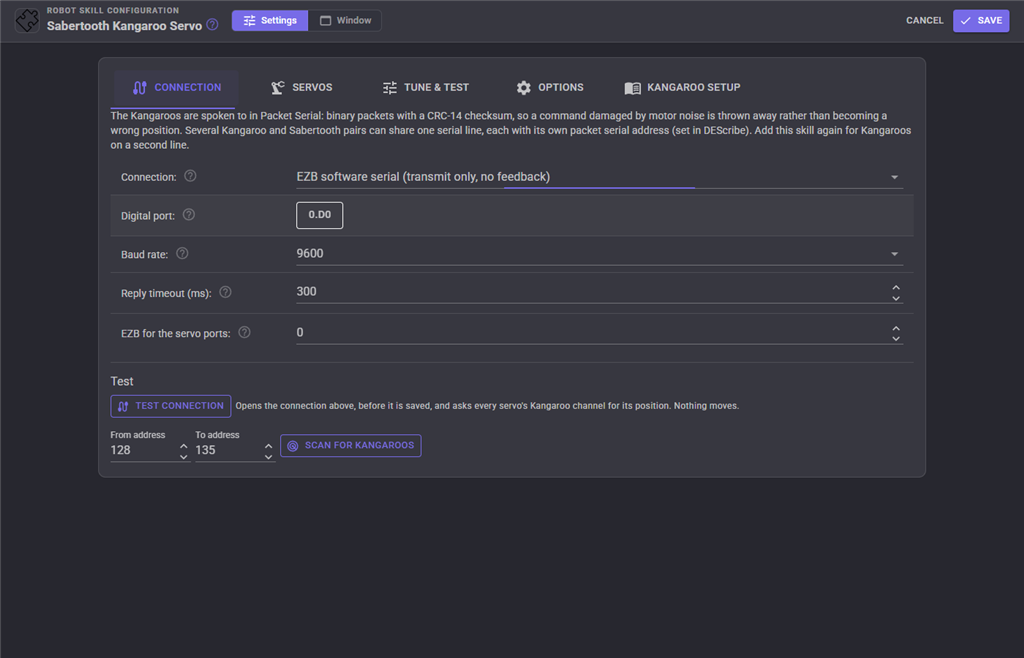
Test connection opens the connection and asks every servo's Kangaroo channel for its position. Nothing moves. An answer proves both directions of the wiring, the baud rate and the address; "not started yet" is normal until a servo's first move. Scan for Kangaroos asks both channels of every address in the range given, one address at a time, lists each one that answered and what it is configured as, and Add servo adds a channel that is not set up yet.
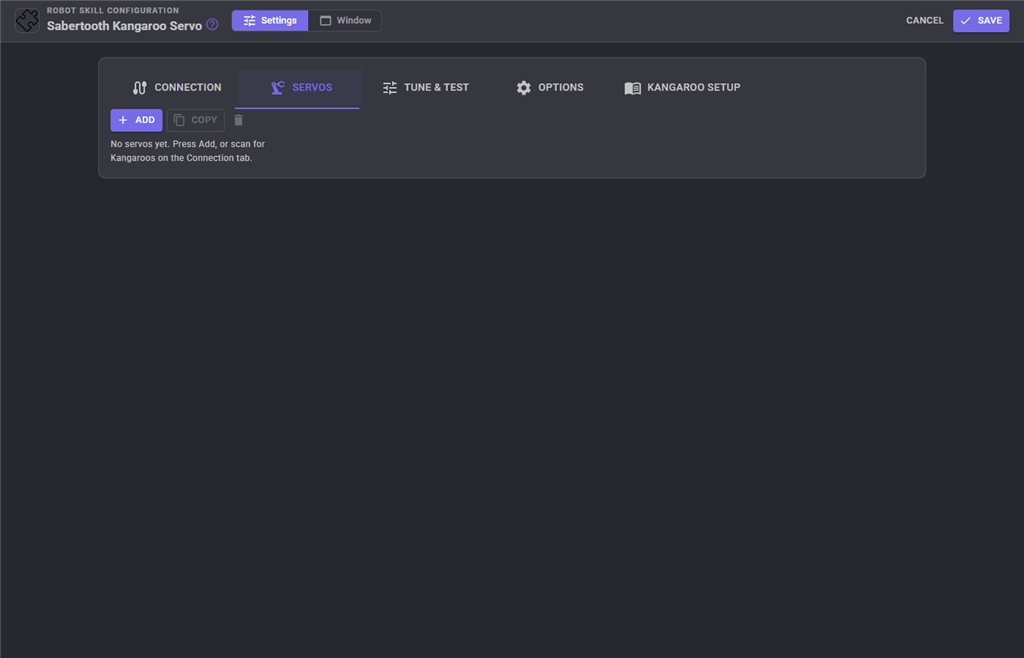
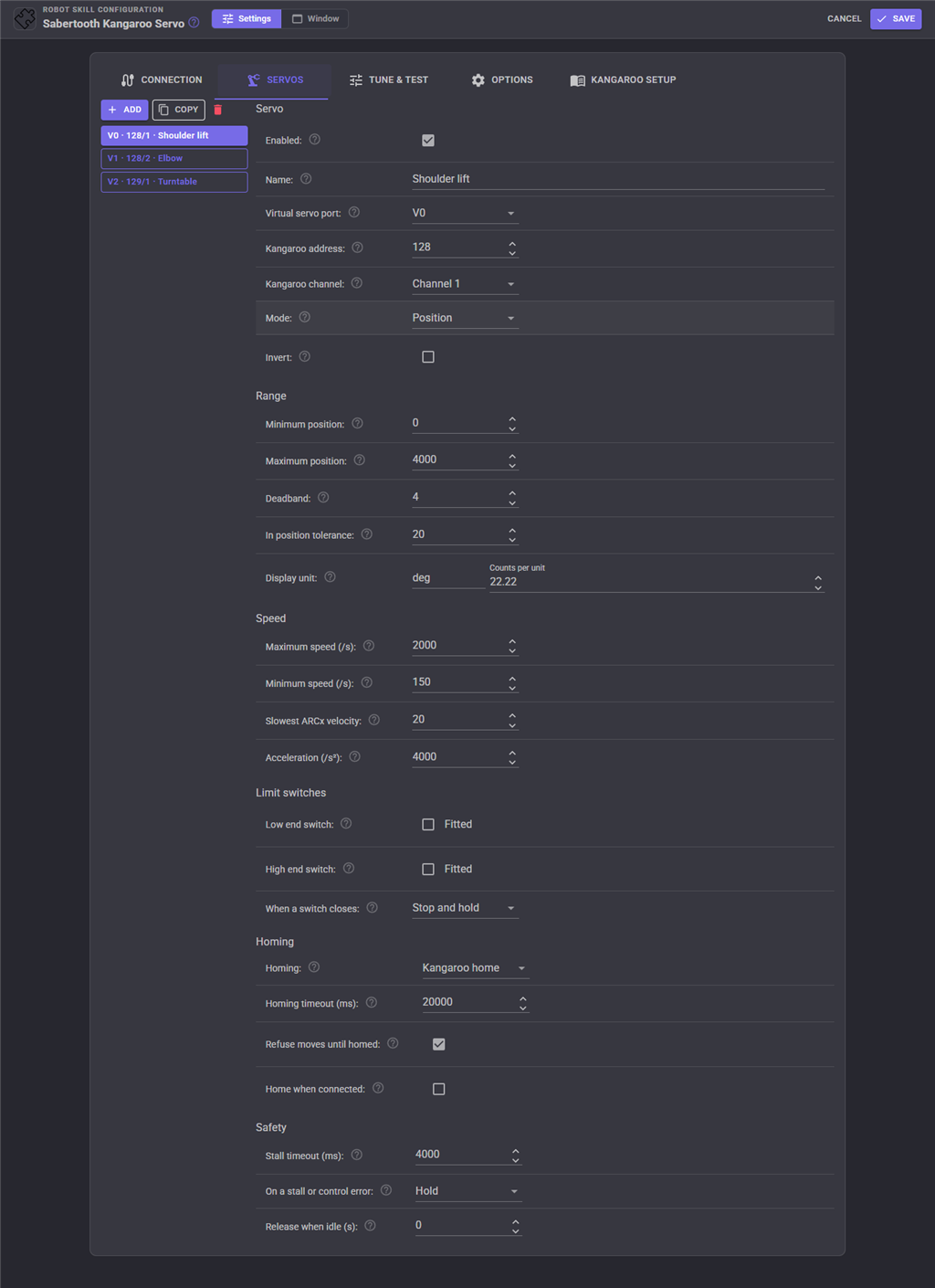
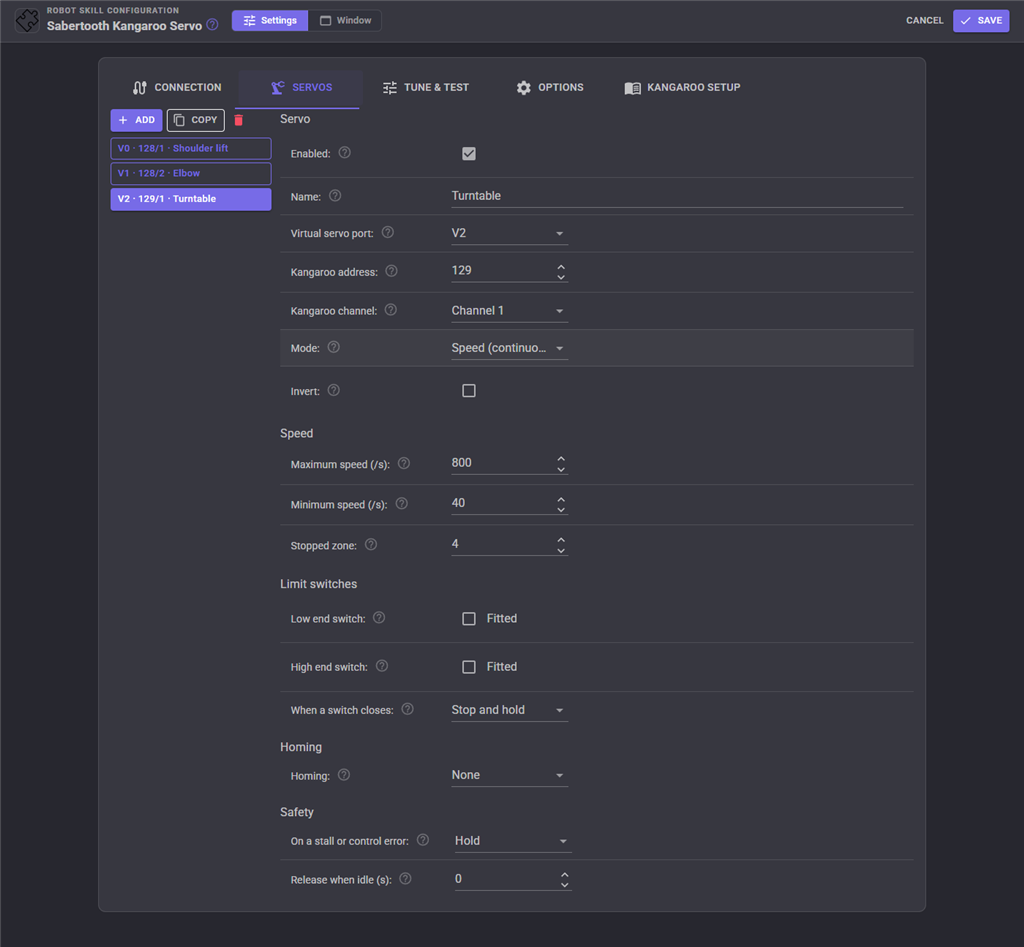
Servos - the list of servos on the left, with Add, Copy and remove. Pick one to edit it on the right. Warnings at the top point out two servos on the same port or the same Kangaroo channel, a range whose minimum and maximum are the same, and an acceleration without a maximum speed.
Tune & Test - see above.
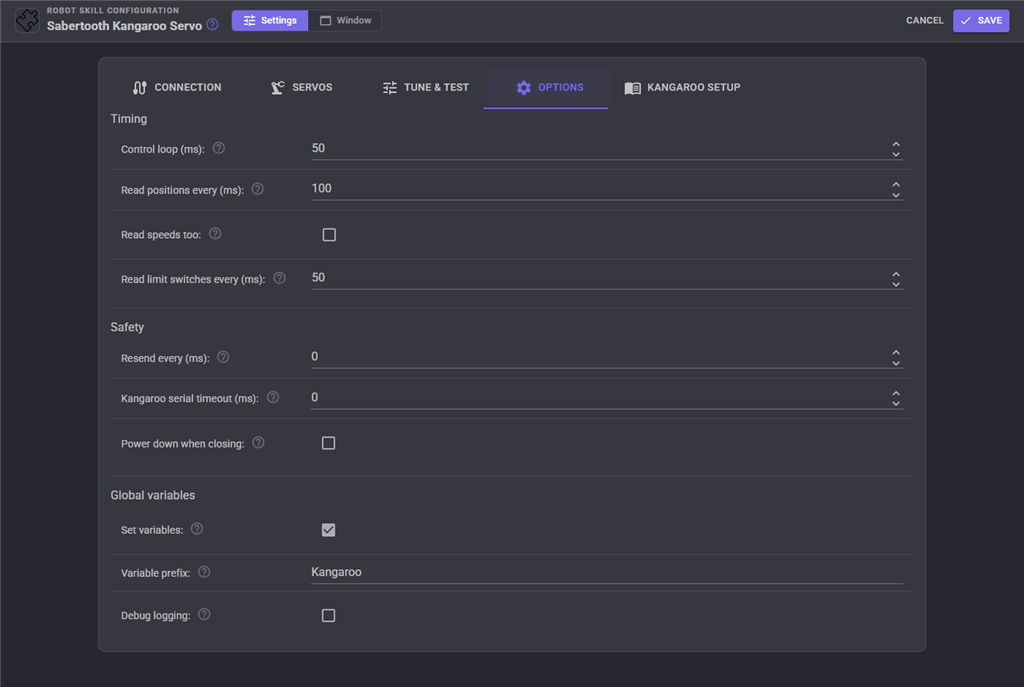
Options - timing, safety and global variable settings shared by every servo.
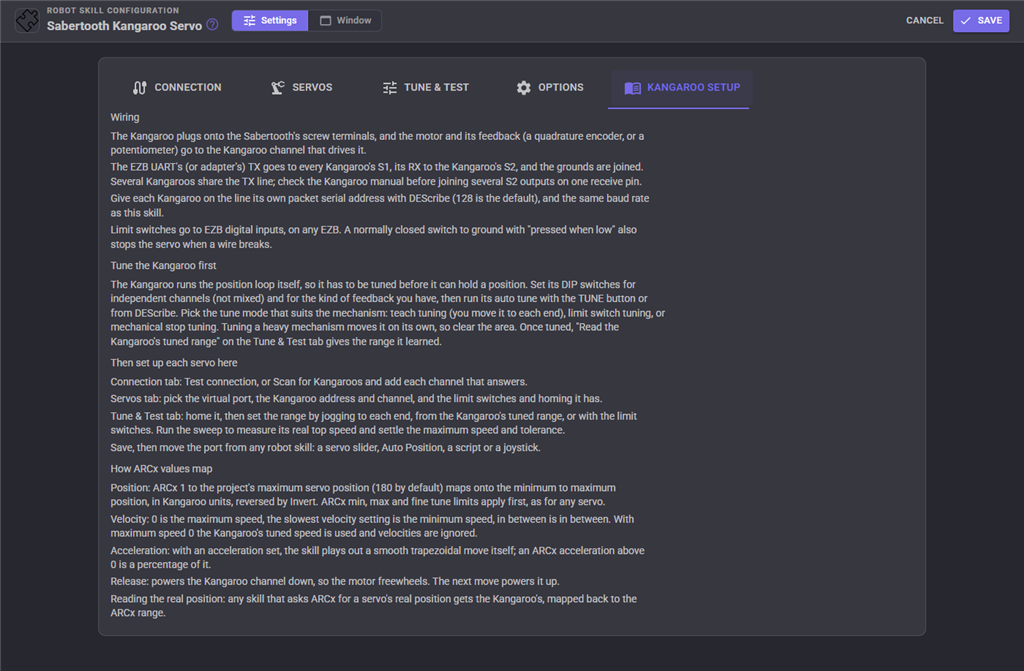
Kangaroo setup - wiring notes, tuning the Kangaroo, the order to set up each servo in, and how ARCx values map.
| Setting | Meaning |
|---|---|
| Connection | EZB hardware UART, EZB software serial, a serial port on this computer, or a serial bridge over TCP. |
| EZB / UART | Which EZB (0 is the first) and which of its hardware UARTs (0, 1 or 2). |
| Serial port | The computer's port, i.e. COM3 or /dev/ttyUSB0. The refresh button looks again. |
| Digital port | The EZB port used for software serial. |
| Baud rate | Must match every Kangaroo on the line. 9600 unless changed with DEScribe. A faster rate leaves room for more servos, smoother motion profiles and faster readings. |
| Address / Port | The TCP serial bridge's address and port. ESP-Link uses 23. |
| Reply timeout (ms) | How long to wait for a Kangaroo to answer. Each answer takes about 15 ms on the wire at 9600 baud; a WiFi EZB adds its own round trips. |
| EZB for the servo ports | The EZB whose virtual servo ports (V0 to V255) this skill answers to. |
| Enabled | Off parks the servo: its settings are kept but its port does nothing. |
| Name | A name to recognise it by in the window and the log. Optional. |
| Virtual servo port | The port other robot skills move to drive this motor. |
| Kangaroo address | The packet serial address of the Kangaroo the motor is on, 128 to 255. |
| Kangaroo channel | The channel (1 or 2) the motor and its feedback are wired to. |
| Mode | Position (a servo) or Speed (continuous rotation). |
| Invert | Reverse the direction. |
| Minimum / Maximum position | The Kangaroo positions, relative to home, that the lowest and highest ARCx positions move to. |
| Deadband | Moves within this many units of the last one sent are not sent. 0 sends every change. |
| In position tolerance | How close the real position must be to the target to count as arrived. |
| Display unit / Counts per unit | A unit name and how many Kangaroo units make one. 0 shows Kangaroo units only. |
| Maximum speed (/s) | Position mode: the speed for ARCx velocity 0, 0 to use the Kangaroo's tuning. Speed mode: the speed at either end, above 0. |
| Minimum speed (/s) | Position mode: the speed for the slowest ARCx velocity. Speed mode: the speed just outside the stopped zone. |
| Slowest ARCx velocity | The ARCx velocity that means the minimum speed. 20 matches PWM servos. |
| Acceleration (/s) | The motion profile's acceleration. Needs a maximum speed. 0 leaves it to the Kangaroo. |
| Stopped zone | Speed mode: ARCx positions either side of the centre that mean stopped. |
| Low / High end switch | Whether the switch is fitted, its EZB digital port, and whether pressed reads high or low. |
| When a switch closes | Stop and hold, or power down. |
| Homing | None, Kangaroo home, Low end switch or High end switch. |
| Homing speed (/s) | How fast to drive onto a switch when homing or finding the range. |
| Home position | The position the spot where the switch closes is given. Usually 0, or a little outside the range. |
| Back off by | How far to move back off the switch after homing. |
| Homing timeout (ms) | How long homing may take before it is given up. |
| Refuse moves until homed | Ignore moves until the servo has been homed. |
| Home when connected | Home by itself as soon as the link opens. The motor moves on its own. |
| Stall timeout (ms) | Report a stall when the servo has not arrived this long after being sent. 0 is off. |
| On a stall or control error | Hold, or power down. |
| Release when idle (s) | Power down after this long at the target without a new move. 0 holds forever. |
| Control loop (ms) | How often motion profiles step, failed moves are resent and the idle release is checked. 50 suits most robots. |
| Read positions every (ms) | How often every servo's real position is read. Each servo takes about 25 ms of the line per reading at 9600 baud. 0 turns it off. |
| Read speeds too | Read each servo's speed with its position. Doubles the traffic. |
| Read limit switches every (ms) | How often the limit switches are read. |
| Resend every (ms) | Send each servo's last command again on this interval. 0 sends only on a change. |
| Kangaroo serial timeout (ms) | Experimental. Have each Kangaroo channel stop by itself when it hears nothing for this long. 0 leaves it as set in DEScribe. |
| Power down when closing | Release every servo when the skill is removed or the project closes. |
| Set variables / Variable prefix | Publish each servo's state as global variables, and the start of their names. |
| Debug logging | Write every command sent to the log. Useful while wiring up, noisy afterwards. |
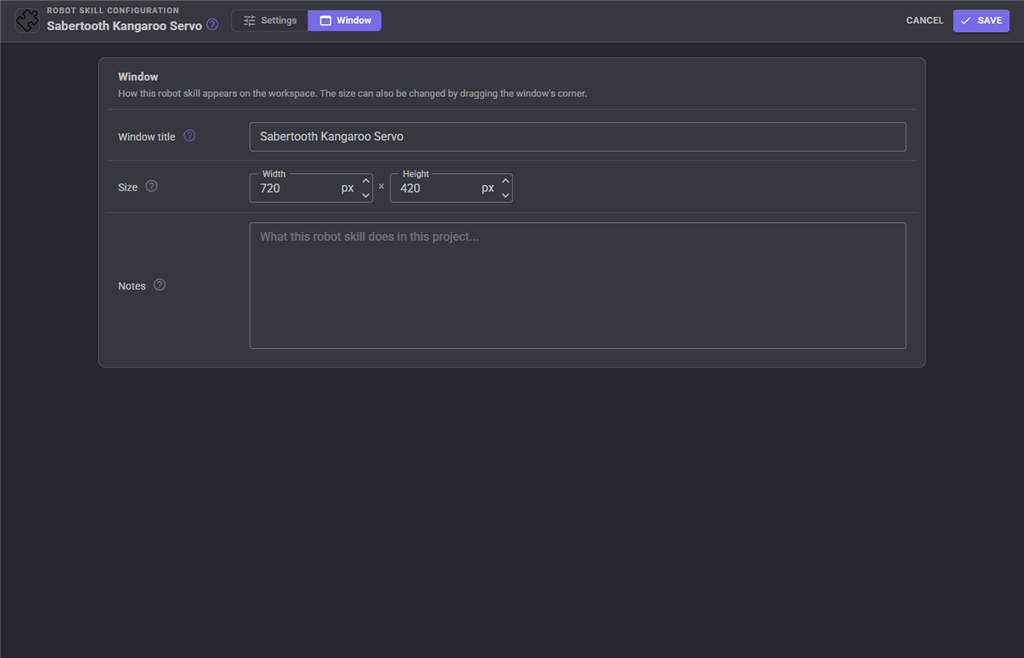
The Window tab sets the robot skill's window title, its size on the workspace and notes about what it does in this project.
Custom UI widget
The skill offers a Kangaroo servo widget for your own Custom UI screens: one servo's caption and state, a bar across its range with where it was sent and where it really is (or its speed, for a speed servo), its limit switches, and optional Home, Stop and Release buttons. Put one per heavy joint beside the controls that move it.
| Widget setting | Meaning |
|---|---|
| Port | The virtual servo port of the servo to show, such as V0. |
| Caption | A label, or empty for the servo's name. |
| ShowButtons | true or false, whether the Home, Stop and Release buttons are shown. |
Troubleshooting
| Symptom | Cause |
|---|---|
| Nothing moves and the status says connected | The baud rate or packet serial address does not match the Kangaroo, ground is not connected, the TX/RX wires are swapped (ARCx's TX goes to S1), or the Kangaroo's DIP switches are not in serial mode. Run the connection test. |
| The connection test or scan gets no answer | S2 is not wired to the receive pin, or one of the causes above. On EZB software serial there can be no answer. |
| The status says it cannot open the connection | The EZB is not connected, the serial port is in use by another program or unplugged, or the TCP bridge is not reachable. The skill keeps retrying every two seconds. |
| A servo does not move and says Not homed | It has a homing mode and Refuse moves until homed is on. Press Home. |
| Kangaroo error E2, not homed | The Kangaroo was tuned to need a home before it moves. Set the servo's homing to Kangaroo home and press Home. |
| Kangaroo error E3, control error | The motor or its feedback is wired wrong, the load is jammed or too heavy, or the Kangaroo needs tuning again. Fix the cause, then press Restart. |
| Kangaroo error E4, wrong mode | The Kangaroo is in mixed mode. Set its DIP switches for independent channels. |
| Kangaroo error E6, serial timeout | Nothing reached the Kangaroo within its serial timeout. Read positions more often, or set Resend every well inside that timeout. |
| The servo goes the wrong way | Tick Invert, or swap the minimum and maximum positions. |
| The servo stops short and says Stalled | The load is jammed or too heavy, the maximum speed is higher than the motor can reach (run the sweep), or the stall timeout is too short for the move. |
| The servo hunts or never says In position | Raise the In position tolerance (the sweep suggests one), or tune the Kangaroo again. |
| A heavy servo jerks when it starts | Set a Maximum speed and an Acceleration. |
| The motor chatters when moved by a joystick or tracking | Raise the Deadband. |
| A speed servo creeps when the slider is in the middle | Raise the Stopped zone. |
| The CRC count keeps rising | Electrical noise on the serial line. Shorten and twist the signal wires with ground, keep them away from the motor wires, or lower the baud rate. |
| The servo moved after it was released | It is not self locking; leave Release when idle at 0. |
Control Commands for the Sabertooth Kangaroo Servo robot skill
There are Control Commands available for this robot skill which allows the skill to be controlled programmatically from scripts or other robot skills. These commands enable you to automate actions, respond to sensor inputs, and integrate the robot skill with other systems or custom interfaces. If you're new to the concept of Control Commands, we have a comprehensive manual available here that explains how to use them, provides examples to get you started and make the most of this powerful feature.
Control Command ManualThis robot skill has 28 control commands, listed below. Send them from a JavaScript or Python script, from Blockly, or from another robot skill.
The first value is always the window title, which is the name in the title bar of the robot skill on your workspace. It starts out as Sabertooth Kangaroo Servo, which is what every example below uses. If you rename the robot skill, or add a second copy of it to the project, use the title as it appears on that window instead.
ControlCommand() can be shortened to CC(), and both spellings work in JavaScript and in Python. The examples are JavaScript; Python is the same call, except that true and false are written True and False.
FindRange
Drive slowly onto the low end limit switch, then the high end one, and return where they are as [low, high] in Kangaroo units relative to home. The motor moves. Needs both switches. Does not change the configuration; see SetRange
Syntax
ControlCommand("Sabertooth Kangaroo Servo", "FindRange", (String)servoPort)
Parameters
| # | Name | Type | What to pass |
|---|---|---|---|
| 1 | servoPort | Text | Your text, in quotes |
Returns: Array of Integer
Example
var result = ControlCommand("Sabertooth Kangaroo Servo", "FindRange", "servoPort");
GetError
The error the Kangaroo reports for the servo, such as E3 control error, or an empty string when there is none
Syntax
ControlCommand("Sabertooth Kangaroo Servo", "GetError", (String)servoPort)
Parameters
| # | Name | Type | What to pass |
|---|---|---|---|
| 1 | servoPort | Text | Your text, in quotes |
Returns: String
Example
var result = ControlCommand("Sabertooth Kangaroo Servo", "GetError", "servoPort");
GetKangarooRange
The minimum and maximum positions the Kangaroo learned when it was tuned, in Kangaroo units relative to home, as [min, max]
Syntax
ControlCommand("Sabertooth Kangaroo Servo", "GetKangarooRange", (String)servoPort)
Parameters
| # | Name | Type | What to pass |
|---|---|---|---|
| 1 | servoPort | Text | Your text, in quotes |
Returns: Array of Integer
Example
var result = ControlCommand("Sabertooth Kangaroo Servo", "GetKangarooRange", "servoPort");
GetLimitSwitch
Whether the servo's low or high end limit switch is pressed, read now. which is low or high
Syntax
ControlCommand("Sabertooth Kangaroo Servo", "GetLimitSwitch", (String)servoPort, (String)which)
Parameters
| # | Name | Type | What to pass |
|---|---|---|---|
| 1 | servoPort | Text | Your text, in quotes |
| 2 | which | Text | Your text, in quotes |
Returns: Boolean [true or false]
Example
var result = ControlCommand("Sabertooth Kangaroo Servo", "GetLimitSwitch", "servoPort", "which");
GetPosition
The servo's real position read from the Kangaroo, in the ARCx servo position range like any other servo
Syntax
ControlCommand("Sabertooth Kangaroo Servo", "GetPosition", (String)servoPort)
Parameters
| # | Name | Type | What to pass |
|---|---|---|---|
| 1 | servoPort | Text | Your text, in quotes |
Returns: Integer [-2,147,483,648 to 2,147,483,647]
Example
var result = ControlCommand("Sabertooth Kangaroo Servo", "GetPosition", "servoPort");
GetPositionUnits
The servo's real position in the unit set in the configuration (degrees, millimetres...). Needs counts per unit to be set
Syntax
ControlCommand("Sabertooth Kangaroo Servo", "GetPositionUnits", (String)servoPort)
Parameters
| # | Name | Type | What to pass |
|---|---|---|---|
| 1 | servoPort | Text | Your text, in quotes |
Returns: Double [5.0e324 to 1.7e308]
Example
var result = ControlCommand("Sabertooth Kangaroo Servo", "GetPositionUnits", "servoPort");
GetRawPosition
The servo's real position in Kangaroo units (encoder lines or potentiometer counts), relative to home
Syntax
ControlCommand("Sabertooth Kangaroo Servo", "GetRawPosition", (String)servoPort)
Parameters
| # | Name | Type | What to pass |
|---|---|---|---|
| 1 | servoPort | Text | Your text, in quotes |
Returns: Integer [-2,147,483,648 to 2,147,483,647]
Example
var result = ControlCommand("Sabertooth Kangaroo Servo", "GetRawPosition", "servoPort");
GetServoPorts
The virtual servo ports configured as Kangaroo servos, as strings such as V1
Syntax
ControlCommand("Sabertooth Kangaroo Servo", "GetServoPorts")
Returns: Array of String
Example
var result = ControlCommand("Sabertooth Kangaroo Servo", "GetServoPorts");
GetSpeed
The servo's real speed read from the Kangaroo, in Kangaroo units per second, positive towards higher positions
Syntax
ControlCommand("Sabertooth Kangaroo Servo", "GetSpeed", (String)servoPort)
Parameters
| # | Name | Type | What to pass |
|---|---|---|---|
| 1 | servoPort | Text | Your text, in quotes |
Returns: Integer [-2,147,483,648 to 2,147,483,647]
Example
var result = ControlCommand("Sabertooth Kangaroo Servo", "GetSpeed", "servoPort");
GetStatus
A one line description of the servo's state: In position, Moving, Released, Not homed, At limit, Stalled, an error...
Syntax
ControlCommand("Sabertooth Kangaroo Servo", "GetStatus", (String)servoPort)
Parameters
| # | Name | Type | What to pass |
|---|---|---|---|
| 1 | servoPort | Text | Your text, in quotes |
Returns: String
Example
var result = ControlCommand("Sabertooth Kangaroo Servo", "GetStatus", "servoPort");
GetTargetPosition
The ARCx position the servo was last moved to, -1 before the first move
Syntax
ControlCommand("Sabertooth Kangaroo Servo", "GetTargetPosition", (String)servoPort)
Parameters
| # | Name | Type | What to pass |
|---|---|---|---|
| 1 | servoPort | Text | Your text, in quotes |
Returns: Integer [-2,147,483,648 to 2,147,483,647]
Example
var result = ControlCommand("Sabertooth Kangaroo Servo", "GetTargetPosition", "servoPort");
Home
Home the servo on the virtual port (for example v1) by its homing mode, waiting until it is done. The motor moves. Returns true when it is homed
Syntax
ControlCommand("Sabertooth Kangaroo Servo", "Home", (String)servoPort)
Parameters
| # | Name | Type | What to pass |
|---|---|---|---|
| 1 | servoPort | Text | Your text, in quotes |
Returns: Boolean [true or false]
Example
var result = ControlCommand("Sabertooth Kangaroo Servo", "Home", "servoPort");
HomeAll
Home every servo that has a homing mode, one after another, waiting until all are done. Returns true when every one homed
Syntax
ControlCommand("Sabertooth Kangaroo Servo", "HomeAll")
Returns: Boolean [true or false]
Example
var result = ControlCommand("Sabertooth Kangaroo Servo", "HomeAll");
IsConnected
Whether the serial link to the Kangaroos is open
Syntax
ControlCommand("Sabertooth Kangaroo Servo", "IsConnected")
Returns: Boolean [true or false]
Example
var result = ControlCommand("Sabertooth Kangaroo Servo", "IsConnected");
IsHomed
Whether the servo is homed. Always true for a servo without a homing mode
Syntax
ControlCommand("Sabertooth Kangaroo Servo", "IsHomed", (String)servoPort)
Parameters
| # | Name | Type | What to pass |
|---|---|---|---|
| 1 | servoPort | Text | Your text, in quotes |
Returns: Boolean [true or false]
Example
var result = ControlCommand("Sabertooth Kangaroo Servo", "IsHomed", "servoPort");
IsInPosition
Whether the servo's real position is within its tolerance of its target
Syntax
ControlCommand("Sabertooth Kangaroo Servo", "IsInPosition", (String)servoPort)
Parameters
| # | Name | Type | What to pass |
|---|---|---|---|
| 1 | servoPort | Text | Your text, in quotes |
Returns: Boolean [true or false]
Example
var result = ControlCommand("Sabertooth Kangaroo Servo", "IsInPosition", "servoPort");
IsMoving
Whether the servo is still on its way to its target (or running, for a speed servo)
Syntax
ControlCommand("Sabertooth Kangaroo Servo", "IsMoving", (String)servoPort)
Parameters
| # | Name | Type | What to pass |
|---|---|---|---|
| 1 | servoPort | Text | Your text, in quotes |
Returns: Boolean [true or false]
Example
var result = ControlCommand("Sabertooth Kangaroo Servo", "IsMoving", "servoPort");
MoveRaw
Move to a position in Kangaroo units relative to home, bypassing the ARCx mapping but not the range or the limit switches. speed is the speed limit in units per second; 0 uses the servo's own
Syntax
ControlCommand("Sabertooth Kangaroo Servo", "MoveRaw", (String)servoPort, (Number)position, (Number)speed)
Parameters
| # | Name | Type | What to pass |
|---|---|---|---|
| 1 | servoPort | Text | Your text, in quotes |
| 2 | position | Number | A number, without quotes |
| 3 | speed | Number | A number, without quotes |
Returns: Boolean [true or false]
Example
var result = ControlCommand("Sabertooth Kangaroo Servo", "MoveRaw", "servoPort", 0, 0);
MoveUnits
Move to a position in the unit set in the configuration (degrees, millimetres...), relative to home. speed is in units per second; 0 uses the servo's own
Syntax
ControlCommand("Sabertooth Kangaroo Servo", "MoveUnits", (String)servoPort, (Number)position, (Number)speed)
Parameters
| # | Name | Type | What to pass |
|---|---|---|---|
| 1 | servoPort | Text | Your text, in quotes |
| 2 | position | Number | A number, without quotes |
| 3 | speed | Number | A number, without quotes |
Returns: Boolean [true or false]
Example
var result = ControlCommand("Sabertooth Kangaroo Servo", "MoveUnits", "servoPort", 0, 0);
Release
Release the servo (power the Kangaroo channel down, so the motor freewheels), the same as releasing the ARCx port. The next move powers it up again
Syntax
ControlCommand("Sabertooth Kangaroo Servo", "Release", (String)servoPort)
Parameters
| # | Name | Type | What to pass |
|---|---|---|---|
| 1 | servoPort | Text | Your text, in quotes |
Returns: Boolean [true or false]
Example
var result = ControlCommand("Sabertooth Kangaroo Servo", "Release", "servoPort");
ReleaseAll
Release every servo
Syntax
ControlCommand("Sabertooth Kangaroo Servo", "ReleaseAll")
Returns: Boolean [true or false]
Example
var result = ControlCommand("Sabertooth Kangaroo Servo", "ReleaseAll");
Restart
Start the Kangaroo channel again and send it the last ARCx position, after a control error (E3) or a Kangaroo that was power cycled
Syntax
ControlCommand("Sabertooth Kangaroo Servo", "Restart", (String)servoPort)
Parameters
| # | Name | Type | What to pass |
|---|---|---|---|
| 1 | servoPort | Text | Your text, in quotes |
Returns: Boolean [true or false]
Example
var result = ControlCommand("Sabertooth Kangaroo Servo", "Restart", "servoPort");
RestartAll
Restart every servo
Syntax
ControlCommand("Sabertooth Kangaroo Servo", "RestartAll")
Returns: Boolean [true or false]
Example
var result = ControlCommand("Sabertooth Kangaroo Servo", "RestartAll");
SetRange
Set the Kangaroo positions the lowest and highest ARCx positions map to, and save them in the configuration
Syntax
ControlCommand("Sabertooth Kangaroo Servo", "SetRange", (String)servoPort, (Number)min, (Number)max)
Parameters
| # | Name | Type | What to pass |
|---|---|---|---|
| 1 | servoPort | Text | Your text, in quotes |
| 2 | min | Number | A number, without quotes |
| 3 | max | Number | A number, without quotes |
Returns: Boolean [true or false]
Example
var result = ControlCommand("Sabertooth Kangaroo Servo", "SetRange", "servoPort", 0, 0);
SetSpeedRaw
Run the motor at a speed in Kangaroo units per second (negative is towards lower positions, 0 stops), bypassing the ARCx mapping but not the limit switches. It keeps running until moved or stopped
Syntax
ControlCommand("Sabertooth Kangaroo Servo", "SetSpeedRaw", (String)servoPort, (Number)speed)
Parameters
| # | Name | Type | What to pass |
|---|---|---|---|
| 1 | servoPort | Text | Your text, in quotes |
| 2 | speed | Number | A number, without quotes |
Returns: Boolean [true or false]
Example
var result = ControlCommand("Sabertooth Kangaroo Servo", "SetSpeedRaw", "servoPort", 0);
Stop
Stop the servo where it is and keep holding it. Also stops homing
Syntax
ControlCommand("Sabertooth Kangaroo Servo", "Stop", (String)servoPort)
Parameters
| # | Name | Type | What to pass |
|---|---|---|---|
| 1 | servoPort | Text | Your text, in quotes |
Returns: Boolean [true or false]
Example
var result = ControlCommand("Sabertooth Kangaroo Servo", "Stop", "servoPort");
StopAll
Stop every servo where it is and keep holding them
Syntax
ControlCommand("Sabertooth Kangaroo Servo", "StopAll")
Returns: Boolean [true or false]
Example
var result = ControlCommand("Sabertooth Kangaroo Servo", "StopAll");
WaitForMove
Wait until the servo reaches its target, up to timeoutMS milliseconds. Returns false when it timed out, stalled, was released or was stopped by a limit switch
Syntax
ControlCommand("Sabertooth Kangaroo Servo", "WaitForMove", (String)servoPort, (Number)timeoutMS)
Parameters
| # | Name | Type | What to pass |
|---|---|---|---|
| 1 | servoPort | Text | Your text, in quotes |
| 2 | timeoutMS | Number | A number, without quotes |
Returns: Boolean [true or false]
Example
var result = ControlCommand("Sabertooth Kangaroo Servo", "WaitForMove", "servoPort", 0);
This list is read out of the robot skill itself each time its package is uploaded, so it matches the published version (v3).




This robot skill has been updated to v2.
What has changed
first release
This robot skill has been updated to v3.
What has changed
updated to use some new ARCx UI features for improved performance.