

Control LewanSoul/Hiwonder bus servos from ARCx virtual ports with UART, digital port, or BusLinker support and telemetry.
 Windows
 ARM
ARM
 Linux
Linux
 MacOS
MacOS
How to add the Lewansoul Servo Driver robot skill
- Load the most recent release of ARCx on a compatible operating system (Get ARCx).
- Press the + Skills menu from the top menu bar in ARCx.
- Choose the Servo category tab.
- Press the Lewansoul Servo Driver icon to add the robot skill to your project.
Don't have a robot yet?
Follow the Getting Started Guide to build a robot and use the Lewansoul Servo Driver robot skill.
How to use the Lewansoul Servo Driver robot skill
Drives LewanSoul (Hiwonder) serial bus servos from ARCx's virtual servo ports, over an EZB hardware UART, an EZB digital port, or a BusLinker debug board on a COM port of the ARCx computer.
Once configured, a LewanSoul servo behaves like any other servo in ARCx: Auto Position, the servo skill, Servo.setPosition(), the Kinematics Service and everything else move virtual port V1, and this skill turns that into the right packet on the bus.
Works with the LX series bus servos and the others that speak the same protocol: LX-15D, LX-16A, LX-224, LX-224HV, LX-225 and the HTS/HX bus servos. They all share one half duplex signal wire at 115200 bps and a position range of 0 to 1000 over 240 degrees.
Tested against the protocol (every packet checked byte for byte, and the parser checked against replies captured from a real LX-16A) but not yet against a servo on a real bus. Treat the first bring-up with care.
Requirements
- LewanSoul servos daisy chained on one bus, each with a different ID. Every servo ships as ID 1, so new servos have to be given their own IDs one at a time (the Tools tab does it).
- Power for the servos at their own voltage (6 to 8.4 V for the LX-16A). They do not run from the EZB's logic supply.
- A way to talk to the bus:
- an EZB hardware UART through a half duplex circuit that joins TX and RX to the servo signal wire, or
- a LewanSoul BusLinker debug board (or any USB to TTL half duplex adapter) plugged into the ARCx computer, or
- an EZB digital port, which can move servos but cannot read anything back.
Mapping ports to IDs
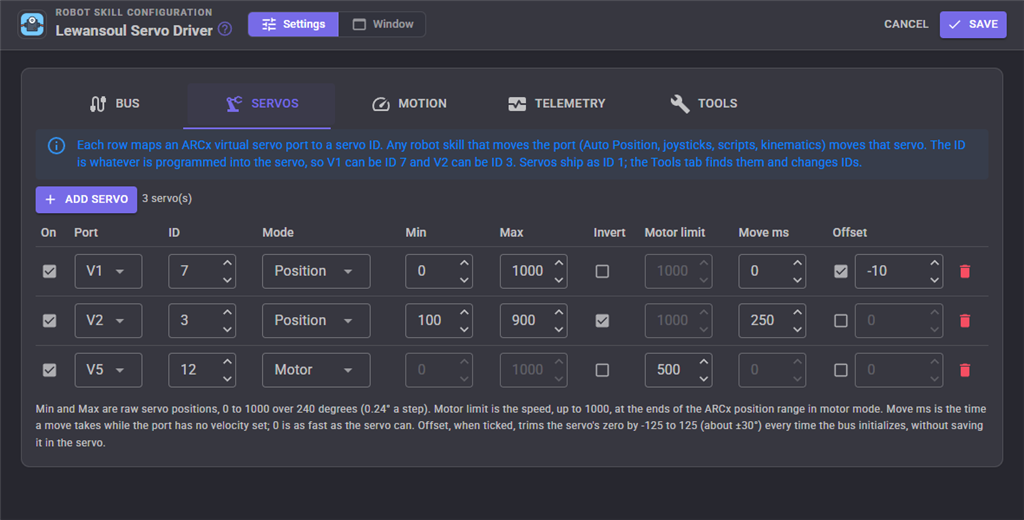
Each entry maps one ARCx virtual port (V0 to V255) to a servo ID. The ID does not have to match the port number: V3 can drive ID 17. Other skills only ever see the virtual port.
| Setting | Meaning | Default |
|---|---|---|
| On | A disabled entry is kept but ignored, so a servo can be parked without losing its settings. | on |
| Port | The ARCx virtual servo port other skills move. | V1 |
| ID | The servo ID (0 to 253) programmed into the servo. | 1 |
| Mode | Position moves between the min and max. Motor spins continuously, with the ARCx position choosing the direction and speed: the lowest position is full speed backwards, the centre is stopped and the highest is full speed forwards. | Position |
| Min / Max | The raw servo positions (0 to 1000, 0.24 a step) the lowest and highest ARCx positions map to. | 0 / 1000 |
| Invert | Reverse the direction, for a mirrored mounting. | off |
| Motor limit | Motor mode: the speed (up to 1000) at the ends of the ARCx position range. | 1000 |
| Move ms | The time a position move takes while the port has no velocity set. 0 is as fast as the servo can, which is what the ARC plugin always did. | 0 |
| Offset | When ticked, the angle offset (-125 to 125, about 30) sent to the servo every time the bus initializes. It trims the servo's zero without saving anything in the servo. | off, 0 |
Bus settings
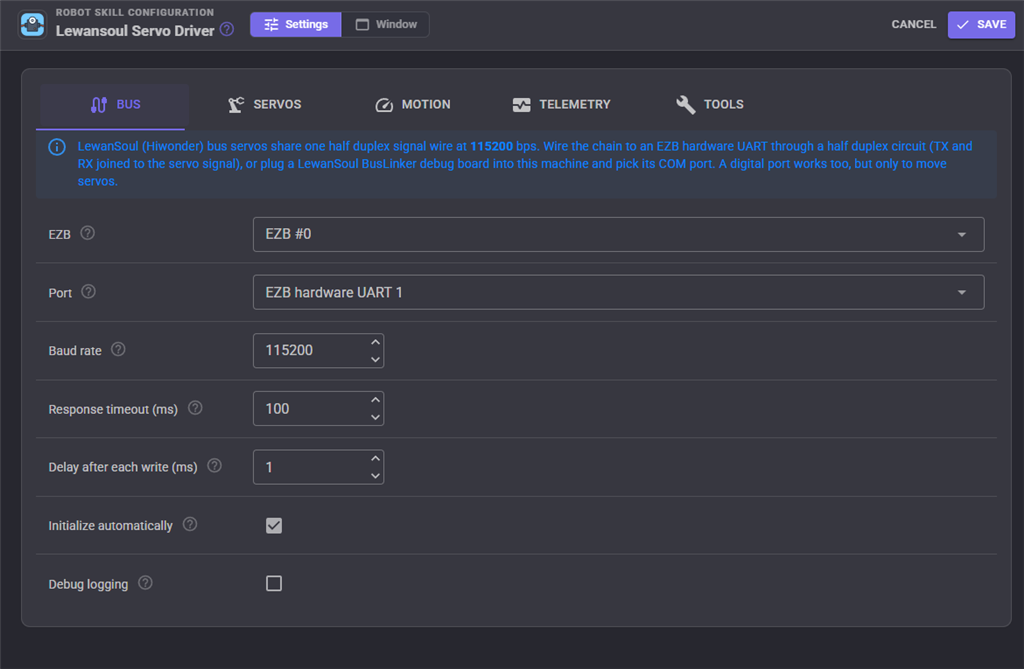
| Setting | Meaning | Default |
|---|---|---|
| EZB | The EZB whose virtual ports this skill answers to. For a UART or digital port it is also the EZB the bus is wired to. | EZB #0 |
| Port | EZB hardware UART 0, 1 or 2, EZB digital port (transmit only), or COM port on this machine for a BusLinker or USB adapter. A UART or COM port can read servos; a digital port only moves them. | UART 1 |
| Digital port | The port to transmit from, when the port is a digital port. | D0 |
| COM port | The BusLinker's or adapter's serial port, when the port is a COM port. The refresh button looks again after plugging one in. | - |
| Baud rate | LewanSoul servos always talk at 115200. Change it only for a controller that translates. | 115200 |
| Response timeout (ms) | How long a read waits for the servo to answer. A bus scan waits this long for every ID that is not there. | 100 |
| Delay after each write (ms) | A pause after every write, so the servos act before the next one arrives. | 1 |
| Initialize automatically | Open the port and put each servo into its mode when the EZB connects, or when the project loads for a COM port. | on |
| Debug logging | Write every packet sent and received to the log as hex. Useful while wiring a chain, noisy once it works. | off |
A half duplex bus wired to a full duplex UART hears its own transmissions. The skill expects that echo and ignores it, so the same wiring works with and without it.
Speed and move time
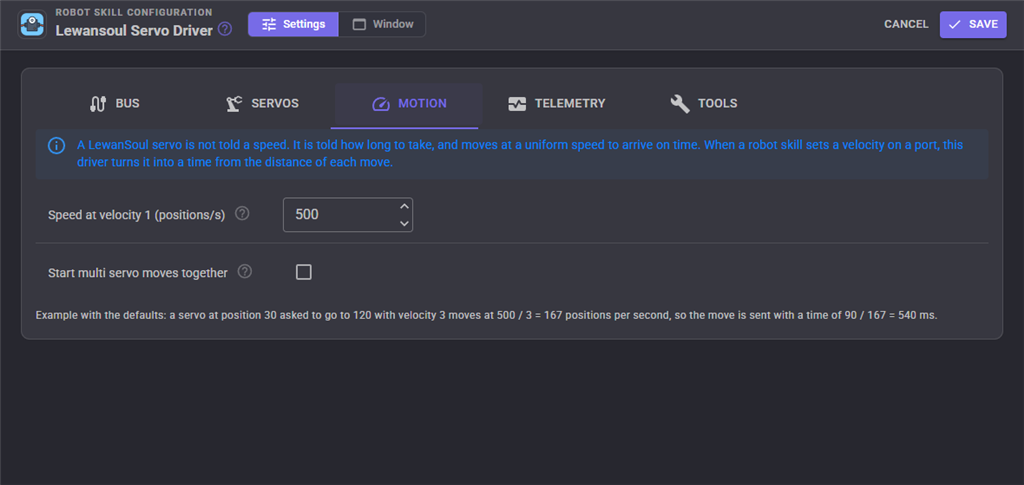
A LewanSoul servo is never told a speed. Every move carries a time to arrive in (0 to 30 seconds), and the servo moves at a uniform speed to arrive on time. The skill works the time out for you:
- With velocity 0 on the port (the default), each move uses the servo's Move ms.
- With a velocity set on the port, by Auto Position, a script's
Servo.setVelocity()or any other skill, the velocity becomes a speed of Speed at velocity 1 divided by the velocity, in ARCx positions per second. The move time is the distance from the last position over that speed. With the default 500, a servo at position 30 asked to go to 120 with velocity 3 moves at 167 positions a second and is sent a time of 540 ms. Higher velocities are slower, as they are for PWM servos.
Start multi servo moves together changes how a move of several servos at once (an Auto Position frame, a kinematics pose) is sent. Normally each servo gets its own move, one after another down the chain in a single write. With this on, each servo gets a held move and one broadcast start then releases them all at the same instant.
Acceleration is not something these servos have, so a velocity is the only thing the skill takes from a port besides its position.
Telemetry
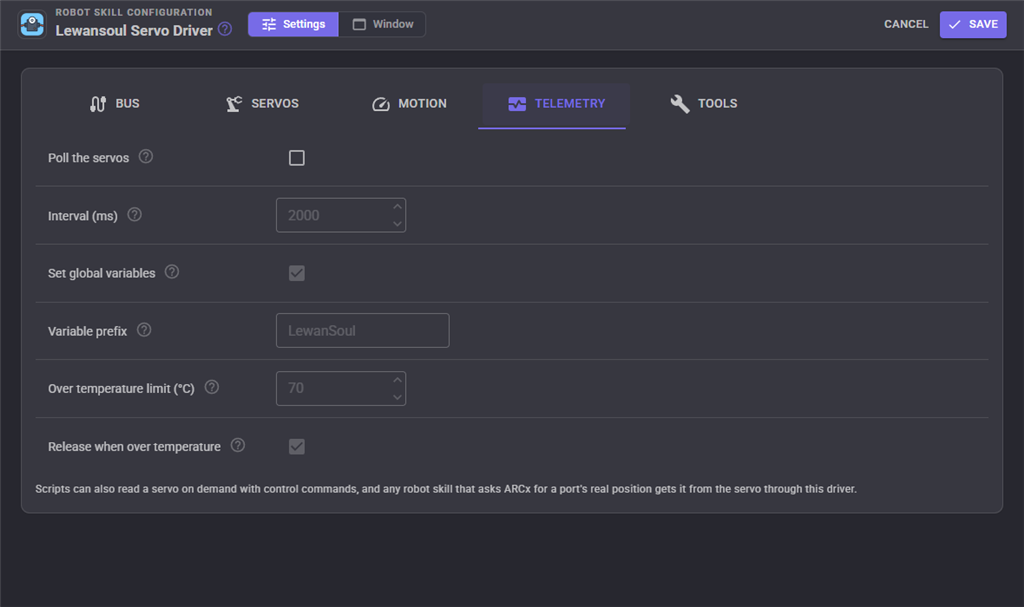
Background polling of every enabled servo's position, temperature and voltage. It needs a UART or COM port, and it is off by default because every poll is bus traffic that competes with movement (three reads per servo per pass).
| Setting | Meaning | Default |
|---|---|---|
| Poll the servos | Turn polling on. | off |
| Interval (ms) | How often a full pass starts. A pass that takes longer simply runs back to back. | 1000 |
| Set global variables | Publish each reading as script variables. | on |
| Variable prefix | The start of every variable name. | LewanSoul |
| Over temperature limit (C) | A servo reaching this temperature is reported in the log. 0 turns the check off. Keep it below the servo's own limit (85C from the factory), above which the servo unloads itself. | 70 |
| Release when over temperature | Unload a servo that reaches the limit so it can cool. The next move loads it again. | on |
With the default prefix, port V1 publishes LewanSoulV1Position (raw, 0 to 1000), LewanSoulV1Degrees (0 to 240), LewanSoulV1Temperature, LewanSoulV1Voltage and LewanSoulV1Online.
Any skill or script that asks ARCx for a port's real position (Servo.getPositionRealtime()) gets it read from the servo through this skill, whether polling is on or not.
The window
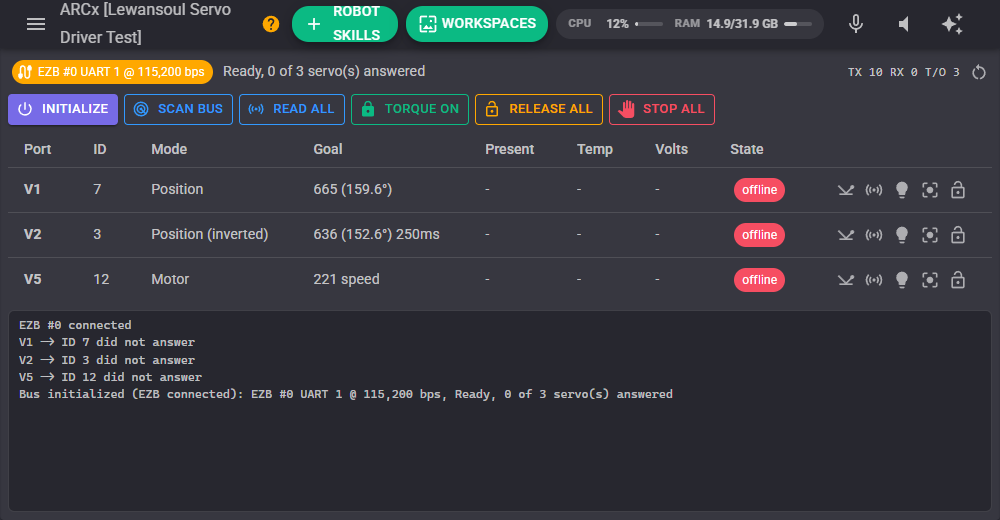
- The bus, whether it initialized and how many servos answered, and counters for packets sent, replies received and timeouts.
- Initialize: open the port, put every servo into its mode and check which ones answer.
- Scan bus: ask every ID from 0 to 253 for its ID and list the servos that answer, configured or not. It takes up to one response timeout per missing ID, so it can be stopped part way.
- Read all: read position, temperature and voltage once.
- Torque on, Release all and Stop all (every servo stops where it is, part way through a move, and every motor mode servo stops spinning).
- A row per configured servo with its last goal, live readings and state, and buttons to ping it, read it, toggle its LED (handy for finding which servo on the robot is which), move it to the centre through its ARCx port, and release it.
The skill also offers a Servo telemetry widget for Custom UI screens: a compact table of the servos with their goal, position, temperature and voltage.
Tools tab
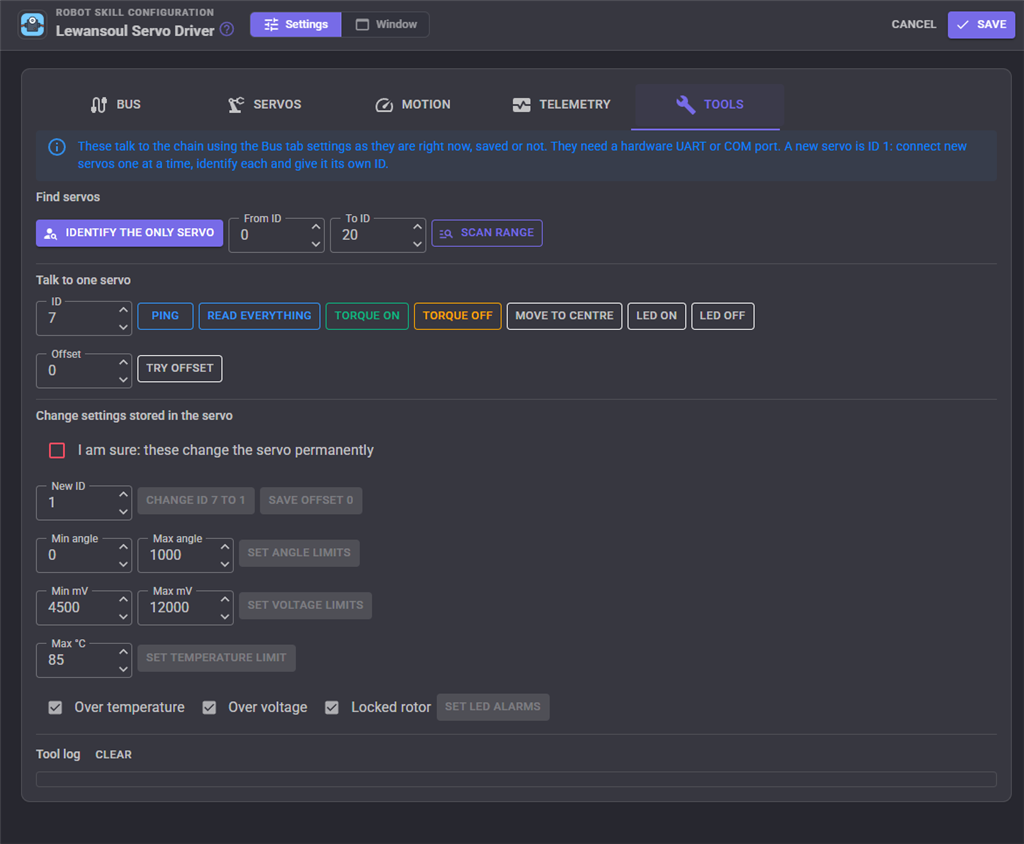
The tools use the Bus tab settings as they are on screen, saved or not, so a COM port can be tried before it is kept.
- Identify the only servo asks "whoever you are, what is your ID?". Only one servo may be connected for this: with two, both answer at once. This is how a new servo (always ID 1) or a servo of unknown ID is found.
- Scan range asks each ID in a range, for a bus with several servos.
- Talk to one servo pings it, reads everything it reports (position, temperature, voltage, mode, torque, offset, angle, voltage and temperature limits, LED and LED alarms), turns its torque or LED on and off, moves it to the centre, and tries an angle offset without saving it.
- Change settings stored in the servo writes settings the servo keeps through power off: its ID, the angle offset, the angle limits it will not move beyond, the voltage limits and max temperature outside which it unloads itself, and which faults flash its LED. Tick I am sure first.
To set up a new robot, connect the servos one at a time: identify the servo, change its ID, add it to the Servos tab, and plug in the next one.
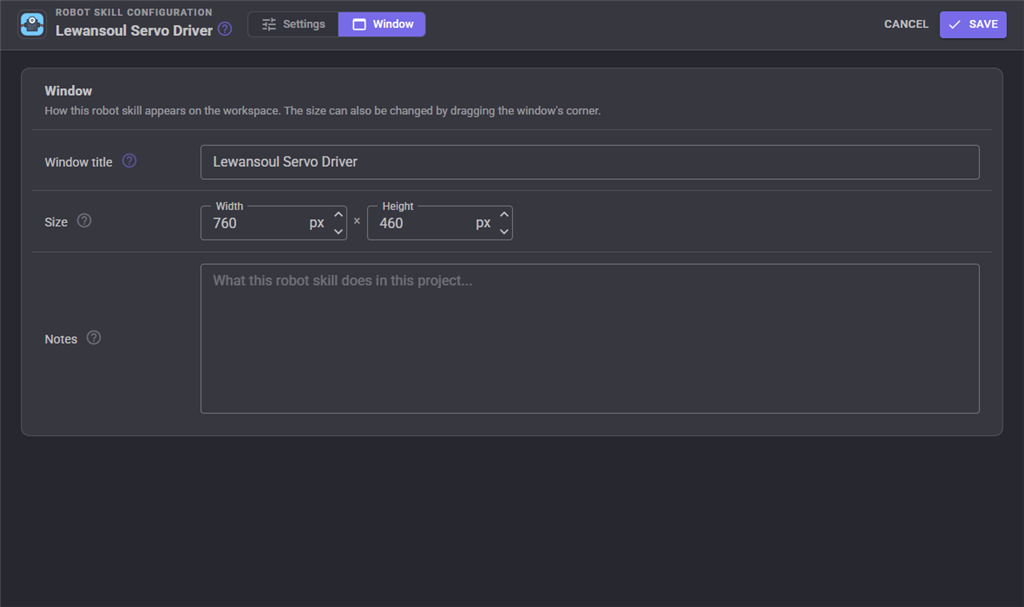
The Window tab sets the robot skill's window title, its size on the workspace and notes about what it does in this project.
Scripts from the ARC plugin
Scripts written for the ARC LewanSoul plugin keep working: its SetContinuousSpeed, SetToServoMode and SetToContinuousMode control commands do the same here. The ARC plugin listened to every port ticked in its list as servo ID = port number; here each port names its own ID, so add an entry per servo with the ID equal to the port number to match an old project.
Troubleshooting
| Symptom | Cause |
|---|---|
| Nothing answers a scan or identify | The servo signal is not reaching the EZB's RX (the half duplex circuit), the servos are not powered, the wrong UART is chosen, or the port is a digital port, which cannot receive. |
| Identify returns nothing with several servos connected | They all answer at once and garble each other. Connect one at a time. |
| Servos move but cannot be read | The bus is on a digital port, which is transmit only. Move it to a hardware UART or a BusLinker. |
| Two servos move together | They share an ID. New servos are all ID 1. |
| A servo moves the wrong way or not the whole range | Check Invert, Min and Max, and the angle limits stored in the servo (Read everything on the Tools tab). |
| A servo stops holding and goes limp | It went over its voltage or temperature limit and unloaded itself. The next move loads it again once the fault has cleared. |
| Moves are slower than expected | A velocity is set on the port. Velocity 0 uses the servo's Move ms instead. |
| Response timeouts in the counters | Raise Response timeout (an EZB over WiFi needs more than a BusLinker), and check the wiring. |
Control Commands for the Lewansoul Servo Driver robot skill
There are Control Commands available for this robot skill which allows the skill to be controlled programmatically from scripts or other robot skills. These commands enable you to automate actions, respond to sensor inputs, and integrate the robot skill with other systems or custom interfaces. If you're new to the concept of Control Commands, we have a comprehensive manual available here that explains how to use them, provides examples to get you started and make the most of this powerful feature.
Control Command ManualThis robot skill has 38 control commands, listed below. Send them from a JavaScript or Python script, from Blockly, or from another robot skill.
The first value is always the window title, which is the name in the title bar of the robot skill on your workspace. It starts out as Lewansoul servo Driver, which is what every example below uses. If you rename the robot skill, or add a second copy of it to the project, use the title as it appears on that window instead.
ControlCommand() can be shortened to CC(), and both spellings work in JavaScript and in Python. The examples are JavaScript; Python is the same call, except that true and false are written True and False.
ChangeID
Program a new servo ID (0 to 253) into the servo and update the configuration entry to match
Syntax
ControlCommand("Lewansoul servo Driver", "ChangeID", (String)servoPort, (Number)newId)
Parameters
| # | Name | Type | What to pass |
|---|---|---|---|
| 1 | servoPort | Text | Your text, in quotes |
| 2 | newId | Number | A number, without quotes |
Returns: Boolean [true or false]
Example
var result = ControlCommand("Lewansoul servo Driver", "ChangeID", "servoPort", 0);
GetAngleLimits
The angle limits stored in the servo as [min, max] raw positions
Syntax
ControlCommand("Lewansoul servo Driver", "GetAngleLimits", (String)servoPort)
Parameters
| # | Name | Type | What to pass |
|---|---|---|---|
| 1 | servoPort | Text | Your text, in quotes |
Returns: Array of Integer
Example
var result = ControlCommand("Lewansoul servo Driver", "GetAngleLimits", "servoPort");
GetAngleOffset
The angle offset the servo reports, -125 to 125
Syntax
ControlCommand("Lewansoul servo Driver", "GetAngleOffset", (String)servoPort)
Parameters
| # | Name | Type | What to pass |
|---|---|---|---|
| 1 | servoPort | Text | Your text, in quotes |
Returns: Integer [-2,147,483,648 to 2,147,483,647]
Example
var result = ControlCommand("Lewansoul servo Driver", "GetAngleOffset", "servoPort");
GetBusStatus
A one line description of the bus and whether it initialized
Syntax
ControlCommand("Lewansoul servo Driver", "GetBusStatus")
Returns: String
Example
var result = ControlCommand("Lewansoul servo Driver", "GetBusStatus");
GetLEDAlarms
The LED fault alarm mask stored in the servo: 1 over temperature, 2 over voltage, 4 locked rotor
Syntax
ControlCommand("Lewansoul servo Driver", "GetLEDAlarms", (String)servoPort)
Parameters
| # | Name | Type | What to pass |
|---|---|---|---|
| 1 | servoPort | Text | Your text, in quotes |
Returns: Integer [-2,147,483,648 to 2,147,483,647]
Example
var result = ControlCommand("Lewansoul servo Driver", "GetLEDAlarms", "servoPort");
GetMode
The mode the servo reports: Position or Motor
Syntax
ControlCommand("Lewansoul servo Driver", "GetMode", (String)servoPort)
Parameters
| # | Name | Type | What to pass |
|---|---|---|---|
| 1 | servoPort | Text | Your text, in quotes |
Returns: String
Example
var result = ControlCommand("Lewansoul servo Driver", "GetMode", "servoPort");
GetPresentPosition
The servo's real position read back from it, scaled to the ARCx servo position range like any other servo
Syntax
ControlCommand("Lewansoul servo Driver", "GetPresentPosition", (String)servoPort)
Parameters
| # | Name | Type | What to pass |
|---|---|---|---|
| 1 | servoPort | Text | Your text, in quotes |
Returns: Integer [-2,147,483,648 to 2,147,483,647]
Example
var result = ControlCommand("Lewansoul servo Driver", "GetPresentPosition", "servoPort");
GetPresentPositionDegrees
The servo's real position in degrees, 0 to 240
Syntax
ControlCommand("Lewansoul servo Driver", "GetPresentPositionDegrees", (String)servoPort)
Parameters
| # | Name | Type | What to pass |
|---|---|---|---|
| 1 | servoPort | Text | Your text, in quotes |
Returns: Double [5.0e324 to 1.7e308]
Example
var result = ControlCommand("Lewansoul servo Driver", "GetPresentPositionDegrees", "servoPort");
GetPresentPositionRaw
The servo's real position as the raw value, 0 to 1000 over 240 degrees (slightly below 0 is possible with an offset)
Syntax
ControlCommand("Lewansoul servo Driver", "GetPresentPositionRaw", (String)servoPort)
Parameters
| # | Name | Type | What to pass |
|---|---|---|---|
| 1 | servoPort | Text | Your text, in quotes |
Returns: Integer [-2,147,483,648 to 2,147,483,647]
Example
var result = ControlCommand("Lewansoul servo Driver", "GetPresentPositionRaw", "servoPort");
GetServoPorts
The virtual servo ports configured as LewanSoul servos, as strings such as V1
Syntax
ControlCommand("Lewansoul servo Driver", "GetServoPorts")
Returns: Array of String
Example
var result = ControlCommand("Lewansoul servo Driver", "GetServoPorts");
GetSettings
One line describing every setting the servo reports: mode, torque, offset, angle, voltage and temperature limits, LED and LED alarms
Syntax
ControlCommand("Lewansoul servo Driver", "GetSettings", (String)servoPort)
Parameters
| # | Name | Type | What to pass |
|---|---|---|---|
| 1 | servoPort | Text | Your text, in quotes |
Returns: String
Example
var result = ControlCommand("Lewansoul servo Driver", "GetSettings", "servoPort");
GetTemperature
The servo's internal temperature in degrees Celsius
Syntax
ControlCommand("Lewansoul servo Driver", "GetTemperature", (String)servoPort)
Parameters
| # | Name | Type | What to pass |
|---|---|---|---|
| 1 | servoPort | Text | Your text, in quotes |
Returns: Integer [-2,147,483,648 to 2,147,483,647]
Example
var result = ControlCommand("Lewansoul servo Driver", "GetTemperature", "servoPort");
GetTemperatureLimit
The max temperature limit stored in the servo in degrees Celsius
Syntax
ControlCommand("Lewansoul servo Driver", "GetTemperatureLimit", (String)servoPort)
Parameters
| # | Name | Type | What to pass |
|---|---|---|---|
| 1 | servoPort | Text | Your text, in quotes |
Returns: Integer [-2,147,483,648 to 2,147,483,647]
Example
var result = ControlCommand("Lewansoul servo Driver", "GetTemperatureLimit", "servoPort");
GetVoltage
The servo's supply voltage in volts
Syntax
ControlCommand("Lewansoul servo Driver", "GetVoltage", (String)servoPort)
Parameters
| # | Name | Type | What to pass |
|---|---|---|---|
| 1 | servoPort | Text | Your text, in quotes |
Returns: Double [5.0e324 to 1.7e308]
Example
var result = ControlCommand("Lewansoul servo Driver", "GetVoltage", "servoPort");
GetVoltageLimits
The voltage window stored in the servo as [min, max] millivolts
Syntax
ControlCommand("Lewansoul servo Driver", "GetVoltageLimits", (String)servoPort)
Parameters
| # | Name | Type | What to pass |
|---|---|---|---|
| 1 | servoPort | Text | Your text, in quotes |
Returns: Array of Integer
Example
var result = ControlCommand("Lewansoul servo Driver", "GetVoltageLimits", "servoPort");
IdentifyServo
With exactly one servo connected, return its ID (-1 when nothing answers). Uses the broadcast ID read
Syntax
ControlCommand("Lewansoul servo Driver", "IdentifyServo")
Returns: Integer [-2,147,483,648 to 2,147,483,647]
Example
var result = ControlCommand("Lewansoul servo Driver", "IdentifyServo");
InitializeBus
Open the port and put every servo into its configured mode, as happens when the EZB connects
Syntax
ControlCommand("Lewansoul servo Driver", "InitializeBus")
Returns: Boolean [true or false]
Example
var result = ControlCommand("Lewansoul servo Driver", "InitializeBus");
IsTorqueEnabled
Whether the servo's motor is loaded (holding), read from the servo
Syntax
ControlCommand("Lewansoul servo Driver", "IsTorqueEnabled", (String)servoPort)
Parameters
| # | Name | Type | What to pass |
|---|---|---|---|
| 1 | servoPort | Text | Your text, in quotes |
Returns: Boolean [true or false]
Example
var result = ControlCommand("Lewansoul servo Driver", "IsTorqueEnabled", "servoPort");
Ping
Ask the servo for its ID. Returns true when it answers, false when it does not. Needs a hardware UART or COM port
Syntax
ControlCommand("Lewansoul servo Driver", "Ping", (String)servoPort)
Parameters
| # | Name | Type | What to pass |
|---|---|---|---|
| 1 | servoPort | Text | Your text, in quotes |
Returns: Boolean [true or false]
Example
var result = ControlCommand("Lewansoul servo Driver", "Ping", "servoPort");
ReleaseAll
Release (unload) every configured servo
Syntax
ControlCommand("Lewansoul servo Driver", "ReleaseAll")
Returns: Boolean [true or false]
Example
var result = ControlCommand("Lewansoul servo Driver", "ReleaseAll");
ScanBus
Ask each ID from first to last (default 0 to 253) for its ID and return a line per servo that answered. Takes up to one response timeout per ID
Syntax
ControlCommand("Lewansoul servo Driver", "ScanBus", (Number)first, (Number)last)
Parameters
| # | Name | Type | What to pass |
|---|---|---|---|
| 1 | first | Number | A number, without quotes |
| 2 | last | Number | A number, without quotes |
Returns: Array of String
Example
var result = ControlCommand("Lewansoul servo Driver", "ScanBus", 0, 0);
SetAngleLimits
Store the raw positions (0 to 1000) the servo will not move beyond. Kept through power down
Syntax
ControlCommand("Lewansoul servo Driver", "SetAngleLimits", (String)servoPort, (Number)min, (Number)max)
Parameters
| # | Name | Type | What to pass |
|---|---|---|---|
| 1 | servoPort | Text | Your text, in quotes |
| 2 | min | Number | A number, without quotes |
| 3 | max | Number | A number, without quotes |
Returns: Boolean [true or false]
Example
var result = ControlCommand("Lewansoul servo Driver", "SetAngleLimits", "servoPort", 0, 0);
SetAngleOffset
Trim the servo's zero by -125 to 125 (about -30 to 30 degrees). The servo moves at once. save true keeps it through power down
Syntax
ControlCommand("Lewansoul servo Driver", "SetAngleOffset", (String)servoPort, (Number)offset, (Bool)save)
Parameters
| # | Name | Type | What to pass |
|---|---|---|---|
| 1 | servoPort | Text | Your text, in quotes |
| 2 | offset | Number | A number, without quotes |
| 3 | save | True or false | true or false, without quotes |
Returns: Boolean [true or false]
Example
var result = ControlCommand("Lewansoul servo Driver", "SetAngleOffset", "servoPort", 0, true);
SetContinuousSpeed
The same as SetMotorSpeed, kept for scripts written for the ARC LewanSoul plugin
Syntax
ControlCommand("Lewansoul servo Driver", "SetContinuousSpeed", (String)servoPort, (Number)speed)
Parameters
| # | Name | Type | What to pass |
|---|---|---|---|
| 1 | servoPort | Text | Your text, in quotes |
| 2 | speed | Number | A number, without quotes |
Returns: Boolean [true or false]
Example
var result = ControlCommand("Lewansoul servo Driver", "SetContinuousSpeed", "servoPort", 0);
SetLED
Turn the LED of the servo on the virtual servo port (for example v1, or id:5 to address by servo ID) on or off
Syntax
ControlCommand("Lewansoul servo Driver", "SetLED", (String)servoPort, (Bool)on)
Parameters
| # | Name | Type | What to pass |
|---|---|---|---|
| 1 | servoPort | Text | Your text, in quotes |
| 2 | on | True or false | true or false, without quotes |
Returns: Boolean [true or false]
Example
var result = ControlCommand("Lewansoul servo Driver", "SetLED", "servoPort", true);
SetLEDAlarms
Which faults flash the LED, as a sum: 1 over temperature, 2 over voltage, 4 locked rotor (0 to 7). Kept through power down
Syntax
ControlCommand("Lewansoul servo Driver", "SetLEDAlarms", (String)servoPort, (Number)mask)
Parameters
| # | Name | Type | What to pass |
|---|---|---|---|
| 1 | servoPort | Text | Your text, in quotes |
| 2 | mask | Number | A number, without quotes |
Returns: Boolean [true or false]
Example
var result = ControlCommand("Lewansoul servo Driver", "SetLEDAlarms", "servoPort", 0);
SetMode
Switch the servo between Position and Motor (continuous rotation) mode and remember it in the configuration
Syntax
ControlCommand("Lewansoul servo Driver", "SetMode", (String)servoPort, (String)Position|Motor)
Parameters
| # | Name | Type | What to pass |
|---|---|---|---|
| 1 | servoPort | Text | Your text, in quotes |
| 2 | Position|Motor | Text | Your text, in quotes |
Returns: Boolean [true or false]
Example
var result = ControlCommand("Lewansoul servo Driver", "SetMode", "servoPort", "Position|Motor");
SetMotorSpeed
Spin in motor mode at a signed speed from -1000 to 1000, 0 stops. Switches the servo to motor mode if it is not already. Bypasses the ARCx position mapping
Syntax
ControlCommand("Lewansoul servo Driver", "SetMotorSpeed", (String)servoPort, (Number)speed)
Parameters
| # | Name | Type | What to pass |
|---|---|---|---|
| 1 | servoPort | Text | Your text, in quotes |
| 2 | speed | Number | A number, without quotes |
Returns: Boolean [true or false]
Example
var result = ControlCommand("Lewansoul servo Driver", "SetMotorSpeed", "servoPort", 0);
SetMoveTime
The move time in milliseconds (0 to 30000) used for this servo's moves while the port's velocity is 0, and remember it in the configuration
Syntax
ControlCommand("Lewansoul servo Driver", "SetMoveTime", (String)servoPort, (Number)timeMs)
Parameters
| # | Name | Type | What to pass |
|---|---|---|---|
| 1 | servoPort | Text | Your text, in quotes |
| 2 | timeMs | Number | A number, without quotes |
Returns: Boolean [true or false]
Example
var result = ControlCommand("Lewansoul servo Driver", "SetMoveTime", "servoPort", 0);
SetPositionRaw
Move to a raw position (0 to 1000 over 240 degrees) in timeMs milliseconds (0 to 30000, 0 is as fast as possible). Bypasses the ARCx position mapping
Syntax
ControlCommand("Lewansoul servo Driver", "SetPositionRaw", (String)servoPort, (Number)position, (Number)timeMs)
Parameters
| # | Name | Type | What to pass |
|---|---|---|---|
| 1 | servoPort | Text | Your text, in quotes |
| 2 | position | Number | A number, without quotes |
| 3 | timeMs | Number | A number, without quotes |
Returns: Boolean [true or false]
Example
var result = ControlCommand("Lewansoul servo Driver", "SetPositionRaw", "servoPort", 0, 0);
SetTemperatureLimit
Store the internal temperature (50 to 100 C) above which the servo unloads until it cools. Kept through power down
Syntax
ControlCommand("Lewansoul servo Driver", "SetTemperatureLimit", (String)servoPort, (Number)celsius)
Parameters
| # | Name | Type | What to pass |
|---|---|---|---|
| 1 | servoPort | Text | Your text, in quotes |
| 2 | celsius | Number | A number, without quotes |
Returns: Boolean [true or false]
Example
var result = ControlCommand("Lewansoul servo Driver", "SetTemperatureLimit", "servoPort", 0);
SetToContinuousMode
The same as SetMode Motor, kept for scripts written for the ARC LewanSoul plugin
Syntax
ControlCommand("Lewansoul servo Driver", "SetToContinuousMode", (String)servoPort)
Parameters
| # | Name | Type | What to pass |
|---|---|---|---|
| 1 | servoPort | Text | Your text, in quotes |
Returns: Boolean [true or false]
Example
var result = ControlCommand("Lewansoul servo Driver", "SetToContinuousMode", "servoPort");
SetToServoMode
The same as SetMode Position, kept for scripts written for the ARC LewanSoul plugin
Syntax
ControlCommand("Lewansoul servo Driver", "SetToServoMode", (String)servoPort)
Parameters
| # | Name | Type | What to pass |
|---|---|---|---|
| 1 | servoPort | Text | Your text, in quotes |
Returns: Boolean [true or false]
Example
var result = ControlCommand("Lewansoul servo Driver", "SetToServoMode", "servoPort");
SetVoltageLimits
Store the supply voltage window in millivolts (4500 to 12000). Outside it the servo unloads. Kept through power down
Syntax
ControlCommand("Lewansoul servo Driver", "SetVoltageLimits", (String)servoPort, (Number)minMillivolts, (Number)maxMillivolts)
Parameters
| # | Name | Type | What to pass |
|---|---|---|---|
| 1 | servoPort | Text | Your text, in quotes |
| 2 | minMillivolts | Number | A number, without quotes |
| 3 | maxMillivolts | Number | A number, without quotes |
Returns: Boolean [true or false]
Example
var result = ControlCommand("Lewansoul servo Driver", "SetVoltageLimits", "servoPort", 0, 0);
Stop
Stop the servo where it is, part way through a move. In motor mode, spin down to speed 0
Syntax
ControlCommand("Lewansoul servo Driver", "Stop", (String)servoPort)
Parameters
| # | Name | Type | What to pass |
|---|---|---|---|
| 1 | servoPort | Text | Your text, in quotes |
Returns: Boolean [true or false]
Example
var result = ControlCommand("Lewansoul servo Driver", "Stop", "servoPort");
StopAll
Stop every servo on the bus where it is (broadcast), and every motor mode servo at speed 0
Syntax
ControlCommand("Lewansoul servo Driver", "StopAll")
Returns: Boolean [true or false]
Example
var result = ControlCommand("Lewansoul servo Driver", "StopAll");
TorqueEnable
Load the motor (hold position) or unload it (free to move by hand). Off is the same as releasing the port
Syntax
ControlCommand("Lewansoul servo Driver", "TorqueEnable", (String)servoPort, (Bool)enabled)
Parameters
| # | Name | Type | What to pass |
|---|---|---|---|
| 1 | servoPort | Text | Your text, in quotes |
| 2 | enabled | True or false | true or false, without quotes |
Returns: Boolean [true or false]
Example
var result = ControlCommand("Lewansoul servo Driver", "TorqueEnable", "servoPort", true);
TorqueEnableAll
Load or unload every configured servo
Syntax
ControlCommand("Lewansoul servo Driver", "TorqueEnableAll", (Bool)enabled)
Parameters
| # | Name | Type | What to pass |
|---|---|---|---|
| 1 | enabled | True or false | true or false, without quotes |
Returns: Boolean [true or false]
Example
var result = ControlCommand("Lewansoul servo Driver", "TorqueEnableAll", true);
This list is read out of the robot skill itself each time its package is uploaded, so it matches the published version (v1).


This robot skill has been updated to v1.
What has changed
First ARCx release of the LewanSoul (Hiwonder) serial bus servo driver, ported from the ARC LewanSoul plugin.