

Queries NMS scan data for nearest obstacles, clear paths, open directions, zones, and pose without driving or mapping.
 Windows
 ARM
ARM
 Linux
Linux
 MacOS
MacOS
How to add the Nms Navigation Data Grabber robot skill
- Load the most recent release of ARCx on a compatible operating system (Get ARCx).
- Press the + Skills menu from the top menu bar in ARCx.
- Choose the Navigation category tab.
- Press the Nms Navigation Data Grabber icon to add the robot skill to your project.
Don't have a robot yet?
Follow the Getting Started Guide to build a robot and use the Nms Navigation Data Grabber robot skill.
How to use the Nms Navigation Data Grabber robot skill
The NMS Navigation Data Grabber answers questions about what the robot's distance sensors see. Any robot skill that publishes to the Navigation Messaging System (NMS) feeds it: a 360 degree lidar, a depth camera, an ultrasonic or infrared sensor on a sweeping servo. It keeps the newest reading in every direction around the robot and turns them into things a script, an AI or a person can use: how far away the closest thing is, whether the path ahead is clear for the robot's width, which way is the most open, and whether something has stepped into a watched area.
It draws no map and does not drive the robot: navigator robot skills do that. It exists so that scripts, AI and other robot skills can query the NMS data without every lidar or navigation robot skill having to offer these queries itself. It sits beside a navigator (or replaces one for simple wandering and obstacle avoidance) and lets your own scripts make decisions from the same data the navigator sees.
What it needs
- A robot skill that publishes scan data to the NMS, such as the RPLidar robot skill.
- A robot skill that publishes the robot's pose (position and heading). The NMS only hands scan data out when a pose arrives, so without a pose source nothing reaches this robot skill. Most lidar robot skills post a placeholder pose of their own when nothing else does, so a lidar on its own is usually enough. Wheel odometry, a tracking camera or a navigator also provide one.
If the window keeps saying Waiting for scan data from the NMS, one of the two is missing.
Directions and units
Everything follows the NMS and ROS conventions:
- 0 is straight ahead and angles grow to the robot's left (counter-clockwise). 90 is the robot's left, -90 its right, 180 behind it.
- Scripts use metres and radians. Control commands take and return metres and radians, and the global variables hold metres and radians. A quarter turn left is 1.5708, a quarter turn right is -1.5708.
- An ARC "from A to B" runs counter-clockwise from A to B. From -0.5 to 0.5 is the 57 in front of the robot. From 0.5 to -0.5 is everything except those 57. From -3.1416 to 3.1416 is all the way round.
- The window and the configuration use degrees and centimetres, because that is what people type and read.
- A range of 0 means nothing was detected in that direction.
Coming from ARC
The ARC version of this robot skill used centimetres and degrees growing clockwise (90 was the robot's right). Scripts written for it need converting: divide distances by 100, turn degrees into radians (multiply by 0.01745), and flip the sign of every angle. ARC's GetRangeAtDegree, GetLowestRangeBetweenDegrees and GetHighestRangeBetweenDegrees are now GetRangeAtAngle, GetNearestRangeBetweenAngles and GetFarthestRangeBetweenAngles. Because the ARC direction flipped too, ARC's ARC from 330 to 30 (the front) becomes -0.5236 to 0.5236.
How readings are kept
The circle around the robot is cut into slots (1 wide by default). Every frame from the NMS refreshes the slots its readings fall in, keeping the closest reading in each. A slot that no sensor refreshes within the Maximum Age is forgotten and becomes unknown. This is why a lidar's sweep that arrives split across several NMS frames, or a slow sensor that only reports a few directions at a time, still builds a complete picture.
A direction can be in one of three states:
- Detected: something is there, at a range.
- Clear: a sensor looked and reported nothing (a range of 0, or farther than Treat Farther As Clear).
- Unknown: no fresh reading. Unknown is never treated as clear. When there is no fresh data at all, every query that would answer "how far" or "is it clear" stops the script with an error instead of returning 0, so a sensor that died does not look like an empty room.
With Compensate For Motion on, each reading also remembers where it was on the map when it arrived. As the robot drives and turns, older readings are moved back into the robot's frame using the latest pose, so a reading taken just before a turn still points the right way.
The window
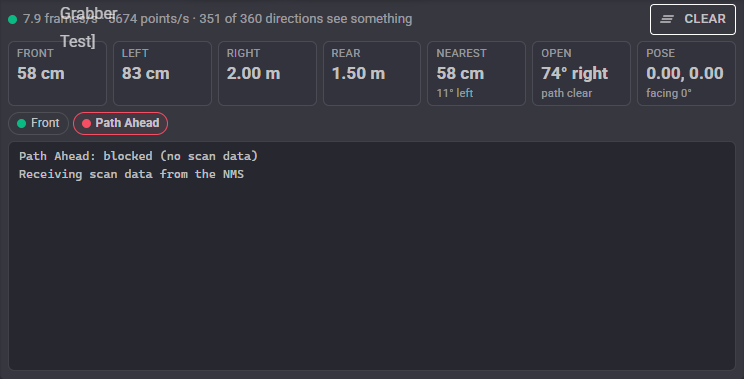
- Status: what is arriving, in frames and points per second, and how many directions currently see something. It turns amber when the data has gone stale.
- Clear: forgets every stored reading, for example after the robot has been picked up and put down somewhere else.
- Front, Left, Right, Rear: the closest reading in each sector. The sectors are Sector Width degrees wide (60 by default), centred on each direction.
- Nearest: the closest reading all the way round, and which way it is.
- Open: the most open direction in the front half of the robot, and how far its path reaches before something is in the way ("path clear" when nothing is).
- Pose: the robot's position in metres and its heading, from the NMS.
- Zone lamps: one per obstacle zone, red while it is blocked. Hover over one to see how many readings are inside.
- Log: the feed starting and stopping, and zones blocking and clearing.
Obstacle zones
A zone is an area around the robot that is checked on every update. While at least Readings to block readings are inside it, the zone is blocked; once it has been empty for Clear after, it is clear again. Each zone:
- publishes a true/false global variable (such as
$NMSZoneFront) that is true while it is blocked, - can run a script once when it becomes blocked and another when it becomes clear,
- can pause navigation while blocked: a navigator that is navigating is asked to pause, and asked to continue once every zone that paused it is clear,
- can be blocked while no scan data arrives, so a sensor that stops reporting stops the robot.
There are two shapes:
- Arc: a slice of the circle from one angle counter-clockwise to another, out to a distance. -30 to 30 within 50 cm is the area just in front of the robot.
- Corridor: a rectangle the robot's width (or a width you give) pointing in one direction, out to a distance. This is exactly the space the robot would drive through, so a corridor ahead does not trigger on a wall the robot is only passing alongside.
A new robot skill starts with one zone called Front: an ARC from -30 to 30 within 50 cm.
Configuration
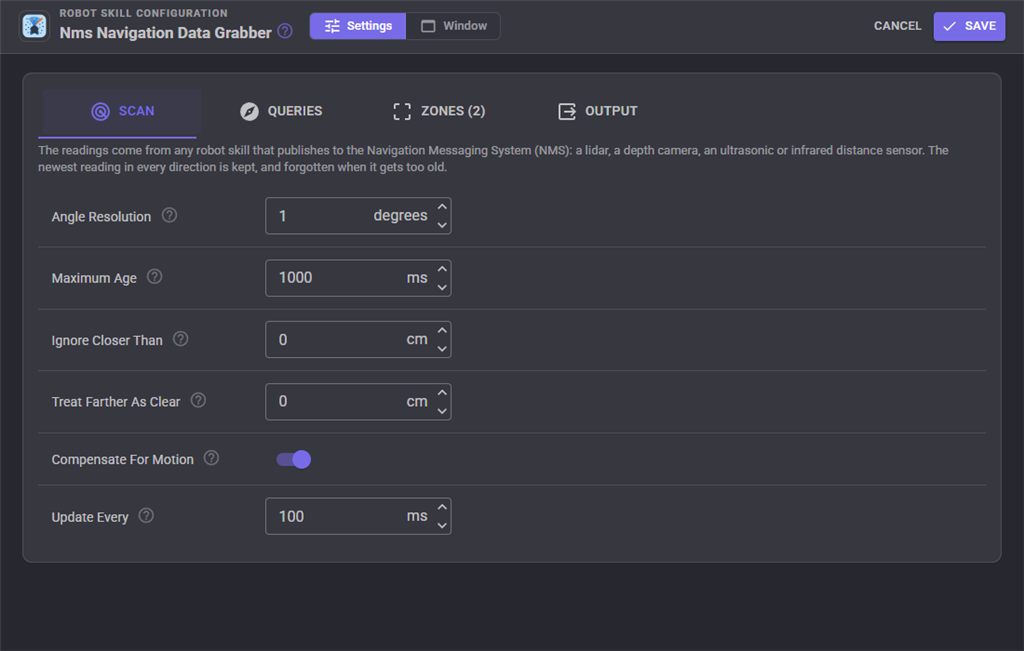
Scan
| Setting | What it does |
|---|---|
| Angle Resolution | The width of each direction slot. 1 suits most lidars; smaller keeps more detail from a dense sensor, larger smooths a sparse one. |
| Maximum Age | How long a reading is trusted before its direction becomes unknown. About a second suits a spinning lidar; a sensor on a sweeping servo needs as long as one sweep takes. |
| Ignore Closer Than | Readings closer than this are dropped, to hide parts of the robot the sensor sees. |
| Treat Farther As Clear | Readings farther than this count as nothing detected. 0 keeps every reading. |
| Compensate For Motion | Keep older readings in the right place as the robot moves, using the pose. Turn it off if the pose source is unreliable. |
| Update Every | How often the variables, zones and the window are updated. Control commands always use the newest data. |
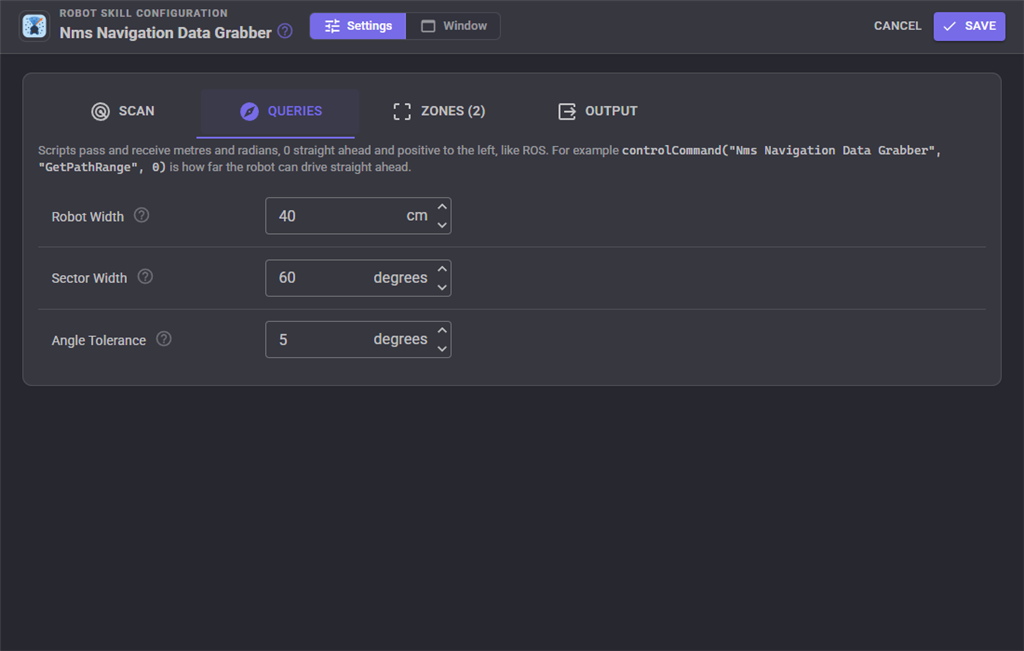
Queries
| Setting | What it does |
|---|---|
| Robot Width | The robot's width plus the clearance it needs. The path queries look for obstacles in a corridor this wide. |
| Sector Width | The width of the front, left, right and rear sectors. |
| Angle Tolerance | How far either side of a requested direction GetRangeAtAngle looks for a reading. |
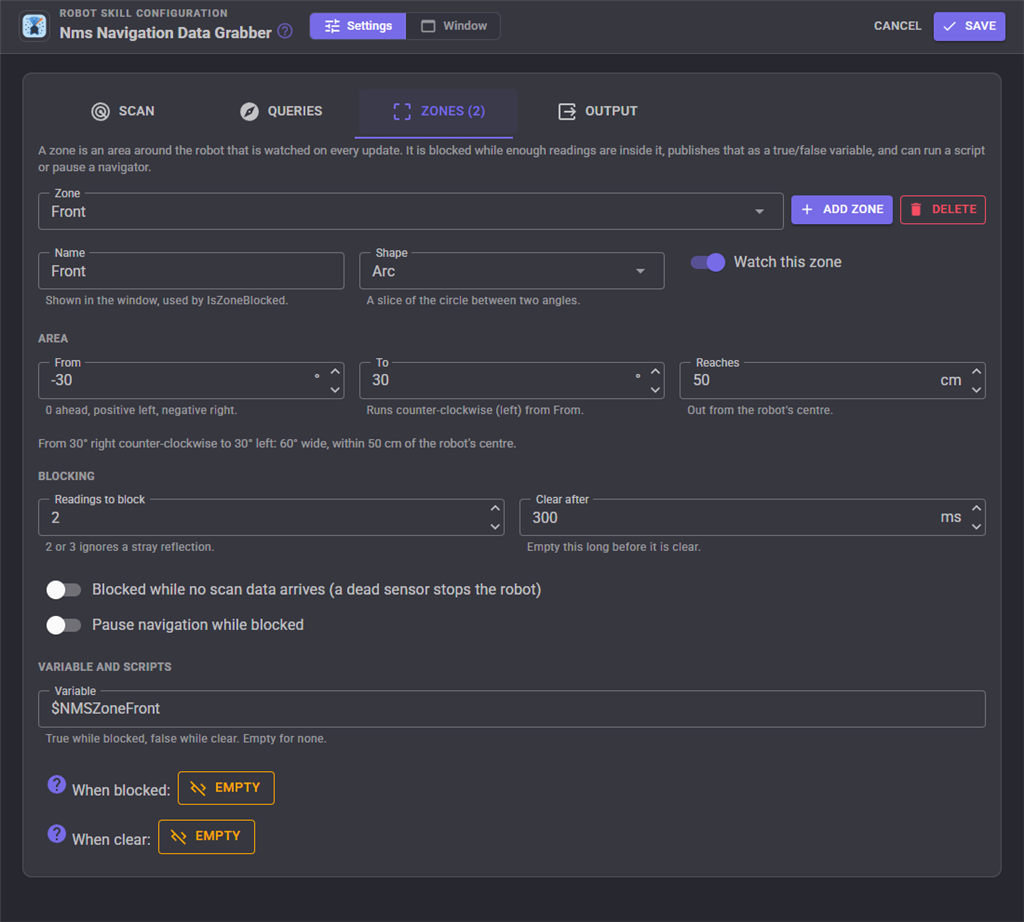
Zones
Pick a zone from the list to edit it, Add zone to make another, Delete to remove the selected one.
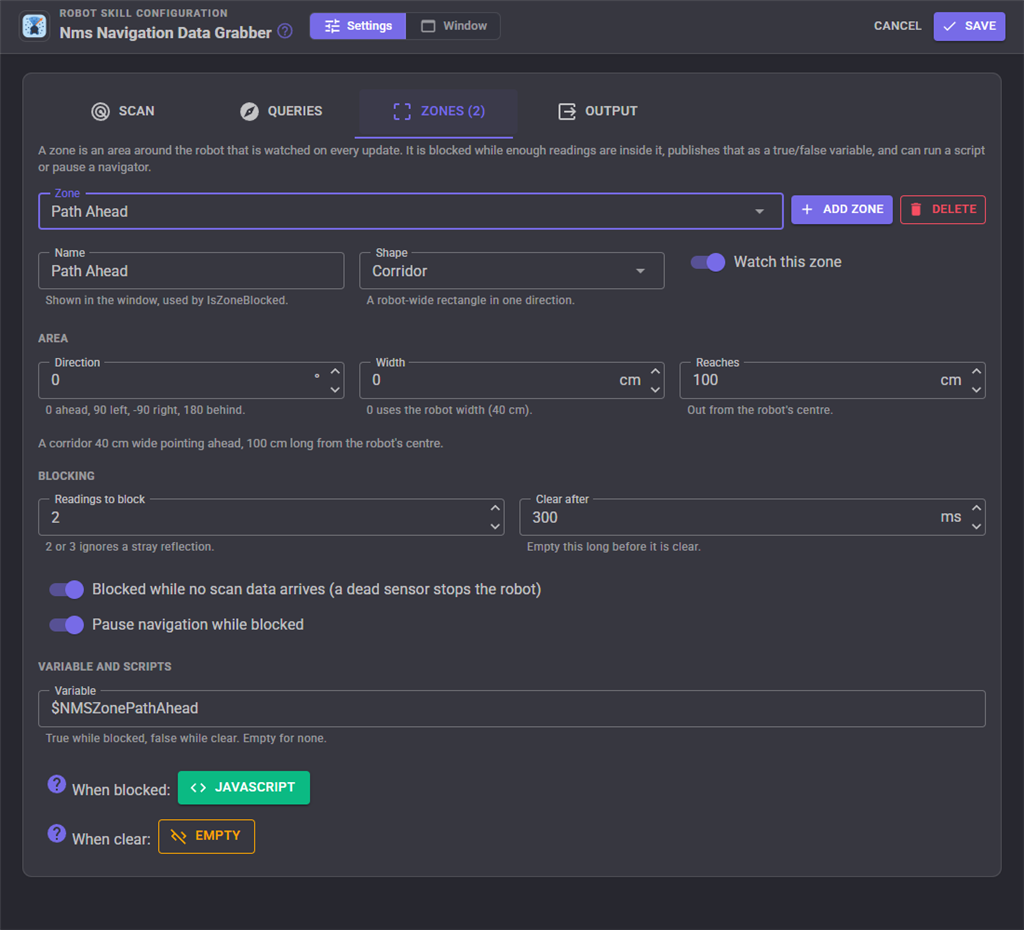
| Setting | What it does |
|---|---|
| Name | Shown in the window and used by the zone control commands. |
| Shape | Arc or Corridor. |
| Watch this zone | A zone that is not watched is never blocked. |
| From, To | Arc zones: the slice, counter-clockwise from From to To, in degrees. |
| Direction, Width | Corridor zones: which way it points and how wide it is (0 uses the robot width). |
| Reaches | How far out the zone goes from the robot's centre. |
| Readings to block | How many readings must be inside before it is blocked. 2 or 3 ignores a stray reflection. |
| Clear after | How long it must stay empty before it is clear again. |
| Blocked while no scan data arrives | A dead sensor counts as blocked. |
| Pause navigation while blocked | Pause a navigator while the zone is blocked. |
| Variable | The true/false variable. Empty for none. |
| When blocked, When clear | The scripts run on each change. |
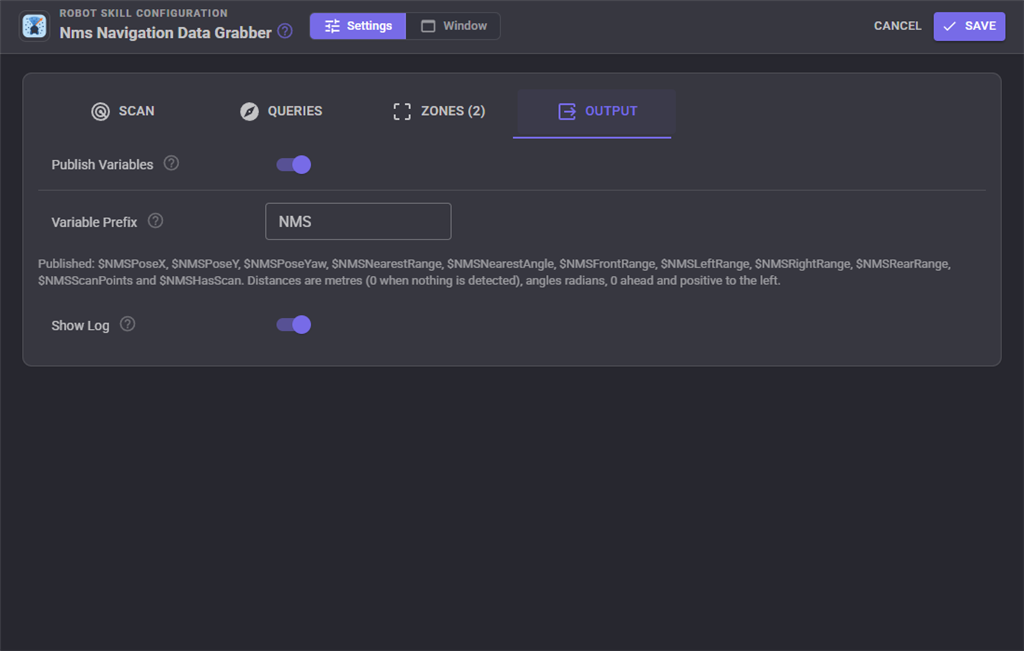
Output
| Setting | What it does |
|---|---|
| Publish Variables | Publish the readings as global variables (below). |
| Variable Prefix | The text every variable name starts with. Change it if the project has two of these robot skills. |
| Show Log | Show the log at the bottom of the window. |
Global variables
With the default prefix:
| Variable | Holds |
|---|---|
$NMSFrontRange, $NMSLeftRange, $NMSRightRange, $NMSRearRange |
The closest reading in each sector, metres. 0 when nothing is detected. |
$NMSNearestRange, $NMSNearestAngle |
The closest reading all the way round: metres, and radians. |
$NMSPoseX, $NMSPoseY, $NMSPoseYaw |
The robot's pose from the NMS: metres forward and left of where tracking began, and radians. |
$NMSScanPoints |
How many directions currently have a detection. |
$NMSHasScan |
True while fresh scan data is arriving. |
$NMSZoneFront (one per zone) |
True while that zone is blocked. |
Using it from a script
Stop when something is close in front, then turn towards the most open direction:
var  NMS = "Nms Navigation Data Grabber";

Movement.forward();

// Wait until something is within 40 cm in the 60 degrees in front
controlCommand(nms, "WaitForObstacle", -0.5236, 0.5236, 0.4, 0);
Movement.stop();

// Which way is most open, anywhere around the robot?
var angle = controlCommand(nms, "GetOpenAngle", -3.1416, 3.1416);
print("Turning " + Math.round(angle * 57.3) + " degrees");
Only drive forward if the robot fits through the next metre:
var  NMS = "Nms Navigation Data Grabber";

if (controlCommand(nms, "IsPathClear", 0, 1.0))
  Movement.forward();
else
  print("Something is within " + controlCommand(nms, "GetPathRange", 0) + " m of the path");
Read a sector without a control command:
if getVar("$NMSFrontRange") > 0 and getVar("$NMSFrontRange") < 0.3:
  print("Too close in front")
Head for a point on the map (in the pose's frame):
var  NMS = "Nms Navigation Data Grabber";
var turn = controlCommand(nms, "GetAngleToPoint", 2.0, 1.0);
var distance = controlCommand(nms, "GetDistanceToPoint", 2.0, 1.0);
The wait commands take a timeout in milliseconds and return false when it passes first; 0 waits until the script is stopped. HasScanData tells a script whether the other commands will answer before it asks.
Custom UI widget
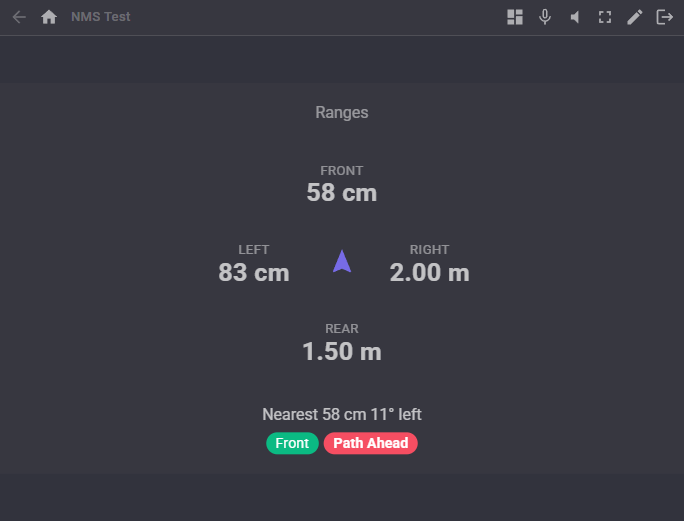
- NMS ranges and zones: the front, left, right and rear ranges around a robot symbol, the closest obstacle, and a lamp per zone.
For AI assistants
Through ARCx's MCP server the robot skill offers get_summary (everything the window shows, as JSON), get_scan (the readings in an arc), check_path (how far the robot can drive in a direction) and find_open_direction. They take degrees, which read more naturally to an AI, and answer in degrees and metres.
Control Commands for the Nms Navigation Data Grabber robot skill
There are Control Commands available for this robot skill which allows the skill to be controlled programmatically from scripts or other robot skills. These commands enable you to automate actions, respond to sensor inputs, and integrate the robot skill with other systems or custom interfaces. If you're new to the concept of Control Commands, we have a comprehensive manual available here that explains how to use them, provides examples to get you started and make the most of this powerful feature.
Control Command ManualThis robot skill has 24 control commands, listed below. Send them from a JavaScript or Python script, from Blockly, or from another robot skill.
The first value is always the window title, which is the name in the title bar of the robot skill on your workspace. It starts out as Nms Navigation Data Grabber, which is what every example below uses. If you rename the robot skill, or add a second copy of it to the project, use the title as it appears on that window instead.
ControlCommand() can be shortened to CC(), and both spellings work in JavaScript and in Python. The examples are JavaScript; Python is the same call, except that true and false are written True and False.
ClearScan
Forget every stored reading, for instance after the robot has been picked up and moved. Queries throw until the sensors report again.
Syntax
ControlCommand("Nms Navigation Data Grabber", "ClearScan")
Returns: Boolean [true or false]
Example
var result = ControlCommand("Nms Navigation Data Grabber", "ClearScan");
GetAngleToPoint
The direction in radians to a point on the NMS map (x, y in metres, the same frame as GetPose), relative to where the robot faces now: 0 straight ahead, positive to the left. Turn by this to face the point. Throws an error when no pose has been reported.
Syntax
ControlCommand("Nms Navigation Data Grabber", "GetAngleToPoint", (Number)x, (Number)y)
Parameters
| # | Name | Type | What to pass |
|---|---|---|---|
| 1 | x | Number | A number, without quotes |
| 2 | y | Number | A number, without quotes |
Returns: Double [5.0e324 to 1.7e308]
Example
var result = ControlCommand("Nms Navigation Data Grabber", "GetAngleToPoint", 0, 0);
GetAverageRangeBetweenAngles
The average distance in metres of everything detected in an arc, or 0 when nothing is detected there. Angles are radians, 0 straight ahead and positive to the left (counter-clockwise), and the ARC runs counter-clockwise from fromAngle to toAngle, so -0.5 to 0.5 is the 57 degrees in front and -3.1416 to 3.1416 is all the way round. Throws an error when no fresh scan data has arrived.
Syntax
ControlCommand("Nms Navigation Data Grabber", "GetAverageRangeBetweenAngles", (Number)fromAngle, (Number)toAngle)
Parameters
| # | Name | Type | What to pass |
|---|---|---|---|
| 1 | fromAngle | Number | A number, without quotes |
| 2 | toAngle | Number | A number, without quotes |
Returns: Double [5.0e324 to 1.7e308]
Example
var result = ControlCommand("Nms Navigation Data Grabber", "GetAverageRangeBetweenAngles", 0, 0);
GetBlockedZones
The names of the obstacle zones that are blocked right now; empty when none is.
Syntax
ControlCommand("Nms Navigation Data Grabber", "GetBlockedZones")
Returns: Array of String
Example
var result = ControlCommand("Nms Navigation Data Grabber", "GetBlockedZones");
GetDistanceToPoint
The distance in metres from the robot to a point on the NMS map (x, y in metres, the same frame as GetPose). Throws an error when no pose has been reported.
Syntax
ControlCommand("Nms Navigation Data Grabber", "GetDistanceToPoint", (Number)x, (Number)y)
Parameters
| # | Name | Type | What to pass |
|---|---|---|---|
| 1 | x | Number | A number, without quotes |
| 2 | y | Number | A number, without quotes |
Returns: Double [5.0e324 to 1.7e308]
Example
var result = ControlCommand("Nms Navigation Data Grabber", "GetDistanceToPoint", 0, 0);
GetFarthestAngleBetweenAngles
The direction in radians of the farthest thing detected in an arc, or 0 when nothing is detected there. Angles are radians, 0 straight ahead and positive to the left (counter-clockwise), and the ARC runs counter-clockwise from fromAngle to toAngle, so -0.5 to 0.5 is the 57 degrees in front and -3.1416 to 3.1416 is all the way round. Throws an error when no fresh scan data has arrived.
Syntax
ControlCommand("Nms Navigation Data Grabber", "GetFarthestAngleBetweenAngles", (Number)fromAngle, (Number)toAngle)
Parameters
| # | Name | Type | What to pass |
|---|---|---|---|
| 1 | fromAngle | Number | A number, without quotes |
| 2 | toAngle | Number | A number, without quotes |
Returns: Double [5.0e324 to 1.7e308]
Example
var result = ControlCommand("Nms Navigation Data Grabber", "GetFarthestAngleBetweenAngles", 0, 0);
GetFarthestRangeBetweenAngles
The distance in metres to the farthest thing detected in an arc, or 0 when nothing is detected there. Directions with nothing detected are ignored; GetOpenAngle finds the most open direction for driving. Angles are radians, 0 straight ahead and positive to the left (counter-clockwise), and the ARC runs counter-clockwise from fromAngle to toAngle, so -0.5 to 0.5 is the 57 degrees in front and -3.1416 to 3.1416 is all the way round. Throws an error when no fresh scan data has arrived.
Syntax
ControlCommand("Nms Navigation Data Grabber", "GetFarthestRangeBetweenAngles", (Number)fromAngle, (Number)toAngle)
Parameters
| # | Name | Type | What to pass |
|---|---|---|---|
| 1 | fromAngle | Number | A number, without quotes |
| 2 | toAngle | Number | A number, without quotes |
Returns: Double [5.0e324 to 1.7e308]
Example
var result = ControlCommand("Nms Navigation Data Grabber", "GetFarthestRangeBetweenAngles", 0, 0);
GetNavigationStatus
The NMS navigation status: "Navigating", "Paused" or "StoppedCancelled".
Syntax
ControlCommand("Nms Navigation Data Grabber", "GetNavigationStatus")
Returns: String
Example
var result = ControlCommand("Nms Navigation Data Grabber", "GetNavigationStatus");
GetNearestAngleBetweenAngles
The direction in radians of the closest thing detected in an arc, or 0 when nothing is detected there (check with GetNearestRangeBetweenAngles). Angles are radians, 0 straight ahead and positive to the left (counter-clockwise), and the ARC runs counter-clockwise from fromAngle to toAngle, so -0.5 to 0.5 is the 57 degrees in front and -3.1416 to 3.1416 is all the way round. Throws an error when no fresh scan data has arrived.
Syntax
ControlCommand("Nms Navigation Data Grabber", "GetNearestAngleBetweenAngles", (Number)fromAngle, (Number)toAngle)
Parameters
| # | Name | Type | What to pass |
|---|---|---|---|
| 1 | fromAngle | Number | A number, without quotes |
| 2 | toAngle | Number | A number, without quotes |
Returns: Double [5.0e324 to 1.7e308]
Example
var result = ControlCommand("Nms Navigation Data Grabber", "GetNearestAngleBetweenAngles", 0, 0);
GetNearestObstacle
The closest thing detected all the way round the robot, as [range, angle]: metres, and radians (0 straight ahead, positive to the left). [0, 0] when nothing is detected. Throws an error when no fresh scan data has arrived.
Syntax
ControlCommand("Nms Navigation Data Grabber", "GetNearestObstacle")
Returns: Array of Double
Example
var result = ControlCommand("Nms Navigation Data Grabber", "GetNearestObstacle");
GetNearestRangeBetweenAngles
The distance in metres to the closest thing detected in an arc, or 0 when nothing is detected there. Angles are radians, 0 straight ahead and positive to the left (counter-clockwise), and the ARC runs counter-clockwise from fromAngle to toAngle, so -0.5 to 0.5 is the 57 degrees in front and -3.1416 to 3.1416 is all the way round. Throws an error when no fresh scan data has arrived.
Syntax
ControlCommand("Nms Navigation Data Grabber", "GetNearestRangeBetweenAngles", (Number)fromAngle, (Number)toAngle)
Parameters
| # | Name | Type | What to pass |
|---|---|---|---|
| 1 | fromAngle | Number | A number, without quotes |
| 2 | toAngle | Number | A number, without quotes |
Returns: Double [5.0e324 to 1.7e308]
Example
var result = ControlCommand("Nms Navigation Data Grabber", "GetNearestRangeBetweenAngles", 0, 0);
GetOpenAngle
The most open direction in an arc, in radians: the one whose robot-wide path reaches farthest before anything is in the way. Of equally open directions, the one nearest the middle of the ARC wins. Use it to pick which way to turn. Angles are radians, 0 straight ahead and positive to the left (counter-clockwise), and the ARC runs counter-clockwise from fromAngle to toAngle, so -0.5 to 0.5 is the 57 degrees in front and -3.1416 to 3.1416 is all the way round. Throws an error when no fresh scan data has arrived.
Syntax
ControlCommand("Nms Navigation Data Grabber", "GetOpenAngle", (Number)fromAngle, (Number)toAngle)
Parameters
| # | Name | Type | What to pass |
|---|---|---|---|
| 1 | fromAngle | Number | A number, without quotes |
| 2 | toAngle | Number | A number, without quotes |
Returns: Double [5.0e324 to 1.7e308]
Example
var result = ControlCommand("Nms Navigation Data Grabber", "GetOpenAngle", 0, 0);
GetPathRange
How far in metres the robot could drive in a direction before something is in its way: the distance from the robot's centre to the first thing inside a corridor the robot's width (a setting) along that direction. 0 when nothing is in the corridor as far as the sensors see. The angle is radians, 0 straight ahead, positive to the left. Throws an error when no fresh scan data has arrived.
Syntax
ControlCommand("Nms Navigation Data Grabber", "GetPathRange", (Number)angle)
Parameters
| # | Name | Type | What to pass |
|---|---|---|---|
| 1 | angle | Number | A number, without quotes |
Returns: Double [5.0e324 to 1.7e308]
Example
var result = ControlCommand("Nms Navigation Data Grabber", "GetPathRange", 0);
GetPose
The robot's last pose reported to the NMS, as [x, y, yaw]: metres from where tracking began (x forward, y left) and radians counter-clockwise. [0, 0, 0] when no pose has been reported.
Syntax
ControlCommand("Nms Navigation Data Grabber", "GetPose")
Returns: Array of Double
Example
var result = ControlCommand("Nms Navigation Data Grabber", "GetPose");
GetRangeAtAngle
The distance in metres to what is detected in one direction (the nearest reported direction within the angle tolerance), or 0 when nothing is detected there. The angle is radians, 0 straight ahead, positive to the left. Throws an error when no fresh scan data has arrived.
Syntax
ControlCommand("Nms Navigation Data Grabber", "GetRangeAtAngle", (Number)angle)
Parameters
| # | Name | Type | What to pass |
|---|---|---|---|
| 1 | angle | Number | A number, without quotes |
Returns: Double [5.0e324 to 1.7e308]
Example
var result = ControlCommand("Nms Navigation Data Grabber", "GetRangeAtAngle", 0);
GetScanAge
Milliseconds since the last scan point arrived from the NMS, or -1 when none has.
Syntax
ControlCommand("Nms Navigation Data Grabber", "GetScanAge")
Returns: Integer [-2,147,483,648 to 2,147,483,647]
Example
var result = ControlCommand("Nms Navigation Data Grabber", "GetScanAge");
HasScanData
True when fresh scan data from the NMS is available, so the other commands will answer.
Syntax
ControlCommand("Nms Navigation Data Grabber", "HasScanData")
Returns: Boolean [true or false]
Example
var result = ControlCommand("Nms Navigation Data Grabber", "HasScanData");
IsObstacleBetweenAngles
True when anything is detected in an ARC closer than range metres. Angles are radians, 0 straight ahead and positive to the left (counter-clockwise), and the ARC runs counter-clockwise from fromAngle to toAngle, so -0.5 to 0.5 is the 57 degrees in front and -3.1416 to 3.1416 is all the way round. Throws an error when no fresh scan data has arrived.
Syntax
ControlCommand("Nms Navigation Data Grabber", "IsObstacleBetweenAngles", (Number)fromAngle, (Number)toAngle, (Number)range)
Parameters
| # | Name | Type | What to pass |
|---|---|---|---|
| 1 | fromAngle | Number | A number, without quotes |
| 2 | toAngle | Number | A number, without quotes |
| 3 | range | Number | A number, without quotes |
Returns: Boolean [true or false]
Example
var result = ControlCommand("Nms Navigation Data Grabber", "IsObstacleBetweenAngles", 0, 0, 0);
IsPathClear
True when the robot could drive distance metres in a direction without anything entering its robot-wide path. The angle is radians, 0 straight ahead, positive to the left. Throws an error when no fresh scan data has arrived.
Syntax
ControlCommand("Nms Navigation Data Grabber", "IsPathClear", (Number)angle, (Number)distance)
Parameters
| # | Name | Type | What to pass |
|---|---|---|---|
| 1 | angle | Number | A number, without quotes |
| 2 | distance | Number | A number, without quotes |
Returns: Boolean [true or false]
Example
var result = ControlCommand("Nms Navigation Data Grabber", "IsPathClear", 0, 0);
IsZoneBlocked
True while an obstacle zone (by its name, such as "Front", or its variable name) is blocked.
Syntax
ControlCommand("Nms Navigation Data Grabber", "IsZoneBlocked", (String)zone)
Parameters
| # | Name | Type | What to pass |
|---|---|---|---|
| 1 | zone | Text | Your text, in quotes |
Returns: Boolean [true or false]
Example
var result = ControlCommand("Nms Navigation Data Grabber", "IsZoneBlocked", "zone");
WaitForClear
Wait until nothing is detected in an ARC closer than range metres. Missing scan data never counts as clear. Returns true when the ARC is clear, false when timeoutMs passes first (0 waits until the script is stopped). Angles are radians, 0 straight ahead and positive to the left (counter-clockwise), and the ARC runs counter-clockwise from fromAngle to toAngle, so -0.5 to 0.5 is the 57 degrees in front and -3.1416 to 3.1416 is all the way round.
Syntax
ControlCommand("Nms Navigation Data Grabber", "WaitForClear", (Number)fromAngle, (Number)toAngle, (Number)range, (Number)timeoutMs)
Parameters
| # | Name | Type | What to pass |
|---|---|---|---|
| 1 | fromAngle | Number | A number, without quotes |
| 2 | toAngle | Number | A number, without quotes |
| 3 | range | Number | A number, without quotes |
| 4 | timeoutMs | Number | A number, without quotes |
Returns: Boolean [true or false]
Example
var result = ControlCommand("Nms Navigation Data Grabber", "WaitForClear", 0, 0, 0, 0);
WaitForObstacle
Wait until something is detected in an ARC closer than range metres. Returns true when it is, false when timeoutMs passes first (0 waits until the script is stopped). Angles are radians, 0 straight ahead and positive to the left (counter-clockwise), and the ARC runs counter-clockwise from fromAngle to toAngle, so -0.5 to 0.5 is the 57 degrees in front and -3.1416 to 3.1416 is all the way round.
Syntax
ControlCommand("Nms Navigation Data Grabber", "WaitForObstacle", (Number)fromAngle, (Number)toAngle, (Number)range, (Number)timeoutMs)
Parameters
| # | Name | Type | What to pass |
|---|---|---|---|
| 1 | fromAngle | Number | A number, without quotes |
| 2 | toAngle | Number | A number, without quotes |
| 3 | range | Number | A number, without quotes |
| 4 | timeoutMs | Number | A number, without quotes |
Returns: Boolean [true or false]
Example
var result = ControlCommand("Nms Navigation Data Grabber", "WaitForObstacle", 0, 0, 0, 0);
WaitForZoneBlocked
Wait until an obstacle zone (by its name) is blocked. Returns true when it is, false when timeoutMs passes first (0 waits until the script is stopped).
Syntax
ControlCommand("Nms Navigation Data Grabber", "WaitForZoneBlocked", (String)zone, (Number)timeoutMs)
Parameters
| # | Name | Type | What to pass |
|---|---|---|---|
| 1 | zone | Text | Your text, in quotes |
| 2 | timeoutMs | Number | A number, without quotes |
Returns: Boolean [true or false]
Example
var result = ControlCommand("Nms Navigation Data Grabber", "WaitForZoneBlocked", "zone", 0);
WaitForZoneClear
Wait until an obstacle zone (by its name) is clear. Returns true when it is, false when timeoutMs passes first (0 waits until the script is stopped).
Syntax
ControlCommand("Nms Navigation Data Grabber", "WaitForZoneClear", (String)zone, (Number)timeoutMs)
Parameters
| # | Name | Type | What to pass |
|---|---|---|---|
| 1 | zone | Text | Your text, in quotes |
| 2 | timeoutMs | Number | A number, without quotes |
Returns: Boolean [true or false]
Example
var result = ControlCommand("Nms Navigation Data Grabber", "WaitForZoneClear", "zone", 0);
This list is read out of the robot skill itself each time its package is uploaded, so it matches the published version (v1).



This robot skill has been updated to v1.
What has changed
initial release