Overview
ARC JavaScript Overview
ARC provides the JavaScript programming environment for custom code that connects and coordinates robot skills. The ARC JavaScript API implements the ECMA-262 (ECMA 5.1) language features and adds a library of ARC-specific objects and functions for interacting with hardware, the framework, and other skills.
The engine exposes several built-in objects and root-level commands (documented below). At the end of this article we describe how to create global user-defined objects and methods.
About JavaScript
JavaScript (often abbreviated JS) is a high-level, just-in-time compiled, multi-paradigm language that conforms to the ECMA 5.1 specification. It uses curly-brace syntax, dynamic typing, prototype-based objects, and first-class functions. Although JavaScript and Java share a similar name and some syntactic elements, they are distinct languages with different designs and runtime behaviors.
JavaScript was originally used in web browsers, but modern JavaScript engines are embedded in many software systems — including Synthiam ARC — to provide scripting, automation, and integration capabilities.
ARC JavaScript API
ARC extends the standard ECMA 5.1 runtime with types and helper objects for common robot tasks: reading sensors, controlling servos and motors, accessing serial ports, working with files, networking, and more. You can use these objects directly from any script in ARC to interact with the system and other skills.
Using IntelliSense (Code Completion)
IntelliSense makes it easier to discover available classes and methods in the ARC JavaScript environment. To view built-in ARC methods:
- Enable the IntelliSense checkbox in the code editor.
- Type a class name, press the dot (.), and then scroll through the available methods and properties suggested by IntelliSense.
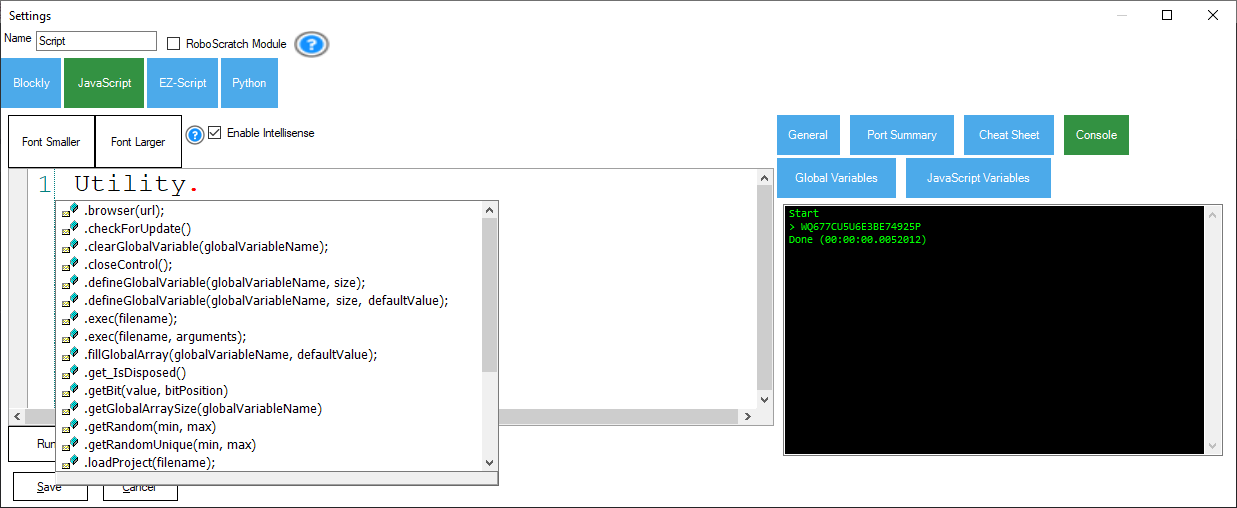
Common ARC classes you can try with IntelliSense include:
- ADC – EZB analog-to-digital converter functions
- Audio – streaming audio functions
- COM – local serial COM port functions
- Digital – EZB digital I/O functions
- EZB – EZB-specific utilities (voltage, connection checks, etc.)
- File – reading and writing local files
- I2C – EZB I2C helper functions
- Movement – movement panel controls for directions
- Net – networking functions
- Ping – EZB ultrasonic distance sensor functions
- PWM – pulse-width modulation on digital I/O pins
- Servo – EZB servo movement functions
- UART – EZB hardware UART and software serial functions
- Utility – miscellaneous utility functions
Supported ECMA 5.1 Classes
ARC supports the ECMA 5.1 built-in objects for working with strings, numbers, arrays, and other core features. For detailed documentation and examples, refer to the linked pages on MDN or W3Schools.
Root Commands
Root commands are global functions that do not belong to a specific class. They provide convenient access to ARC’s global variable storage and to control other robot skills and UI elements.
getVar(variableName, [defaultValue])
Retrieve a value from ARC’s public global variable storage. These variables are published by robot skills (Camera, Speech Recognition, Auto Position, etc.). If the variable does not exist, an optional default value can be returned.
Parameters
variableName– string name of the global variable (e.g. "$Direction")defaultValue– optional value returned if the variable does not exist
Returns The stored value (or the default).
// Get the current direction the robot is moving
var direction = getVar("$Direction");

// Get the value of $test; if it doesn't exist, return false
var testVar = getVar("$test", false);
setVar(variableName, value)
Store a value in ARC’s public global variable storage so other robot skills or scripts can access it via getVar(). Values passed with setVar may be serialized for storage.
Parameters
variableName– string name of the global variable (e.g. "$MyValue")value– the value to store (string, number, array, etc.)
// Set a value of 5 to be accessible by other robot skills
setVar("$MyValue", 5);
setVarObject(variableName, value)
Store a JavaScript object in global storage without serialization translation so that full objects (including functions, classes or multidimensional arrays) are preserved for other scripts that retrieve them.
Parameters
variableName– string name of the global variablevalue– the object to store
// Store a multidimensional array for other skills to access
var x = [[0, 1, 2], [3, 4, 5]];
setVarObject("$MyMatrix", x);
varExists(variableName)
Check whether a public global variable exists in ARC’s global storage.
Parameters
variableName– string name of the global variable
Returns boolean true if the variable exists, otherwise false.
// Print whether the variable exists
print(varExists("$MyValue"));
print(txt)
Write a value or message to the console output.
Parameters
txt– the value or string to print
// Print a string to the console output
print("Hello World");
sleep(timeMs)
Pause script execution for the specified number of milliseconds.
Parameters
timeMs– number of milliseconds to pause
// Print, pause for 5 seconds, then print again
print("Hello");
sleep(5000);
print(" World");
sleepRandom(minTimeMs, maxTimeMs)
Pause execution for a random duration between the specified minimum and maximum number of milliseconds.
Parameters
minTimeMs– minimum time in millisecondsmaxTimeMs– maximum time in milliseconds
// Print, pause for a random interval, then print again
print("Hello");
sleepRandom(1000, 5000);
print(" World");
controlCommand(controlName, command, [parameters])
Send a command to a named control or skill in the project. The control exposes commands that can be invoked by other scripts. The project cheat sheet lists available commands for interrogated controls.
// Start the Camera control and announce it
controlCommand("Camera", "StartCamera");
print("Camera has started");
showControl(controlName)
Display a user interface control and push it onto the display stack. This makes the specified control visible to the user.
// Show the Camera control
showControl("Camera");
closeControl(controlName)
Close the specified UI control and return to the previous control in the display stack. If no control name is provided, the currently displayed control will be closed.
// Close the active control
closeControl();
Variables and Scope
JavaScript variables declared in a script are private to the script engine's namespace. A variable created in one control’s JavaScript is not directly accessible from another control’s JavaScript. To share data between scripts and skills, use ARC’s global variable storage functions (getVar, setVar, setVarObject).
By convention, public variables can begin with a dollar sign ($) to indicate they are meant for global access. Blockly generates JavaScript and keeps variables private by default; prefixing variable names with $ makes them public.
JavaScript Constants
ARC defines some numeric constants that are globally available in the JavaScript environment. These constants are declared automatically and are numeric values (they do not require quotes when referenced).
D0 ... D23
V0 ... V99
ADC0 ... ADC7
Custom JavaScript Extensions
ARC allows you to extend the runtime with custom objects, methods, or entire classes. You can add functions or objects that become available to your scripts. A practical example of creating custom JavaScript extensions is available in the Create Robot Skill manual.
See the example documentation: Create Robot Skill — Custom JavaScript Extension