
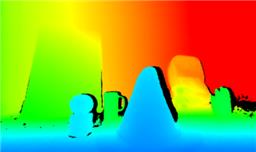
Converts Xbox 360 Kinect depth frames into NMS obstacle scans for ARC path planning, SLAM, and obstacle avoidance.
 Windows
How to add the Kinect Xbox 360 Depth Mapping robot skill
- Load the most recent release of ARC (Get ARC).
- Press the Project tab from the top menu bar in ARC.
- Press Add Robot Skill from the button ribbon bar in ARC.
- Choose the Navigation category tab.
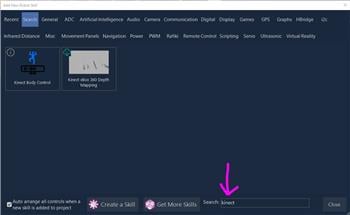
- Press the Kinect Xbox 360 Depth Mapping icon to add the robot skill to your project.
Don't have a robot yet?
Follow the Getting Started Guide to build a robot and use the Kinect Xbox 360 Depth Mapping robot skill.
How to use the Kinect Xbox 360 Depth Mapping robot skill
Turns a Microsoft Xbox 360 Kinect into an obstacle scanner for ARC's Navigation Messaging System (NMS). Each frame of the Kinect's depth stream is converted into a per-degree distance scan and published to the NMS, where it can be consumed by The Navigator, SLAM mappers, or any other NMS-aware navigation skill for path planning and obstacle avoidance.
Requirements
- A Microsoft Xbox 360 Kinect sensor connected via the Kinect power/USB adapter.
- The Microsoft Kinect for Windows SDK v1.8 installed on the PC running ARC.
If the SDK is not detected when the skill loads, the log in the skill window will display a message prompting you to install it. No sensor data will be processed until the SDK is present. Download from Microsoft:
- Kinect for Windows SDK v1.8: https://www.microsoft.com/en-us/download/details.aspx?id=40278
- Kinect for Windows Developer Toolkit v1.8: https://www.microsoft.com/en-us/download/details.aspx?id=40276
*Note: Restart ARC after installing the SDK.
How it works
- The Kinect's depth camera streams a 320×240 depth image at 30 Hz.
- Inside the configurable Detection Area (the pink rectangle overlaid on the live preview), every valid depth pixel is examined.
- For each image column inside the detection area, the nearest valid depth reading is kept.
- Each column is mapped to a degree bucket across the Kinect's ~57 horizontal field of view using pinhole-corrected geometry (column-to-angle mapping is precomputed at startup for speed and accuracy).
- Depth values are converted from millimeters to centimeters and published to the NMS as a 1D obstacle scan, on every frame.
Any column with no valid reading (pixels that are too near, too far, or flagged as unknown by the Kinect) reports float.MaxValue for that degree, which NMS consumers treat as "no obstacle."
Detection Area
Because the entire depth image is not needed for mapping, only a portion of it is processed. This prevents the robot from reacting to objects outside the size and height range that matters - for example, the floor directly under the robot, the ceiling above it, or parts of the robot's own chassis that sit inside the camera's view.
Configure the detection area with the four number selectors in the skill window:
| Setting | Meaning |
|---|---|
| Left | X coordinate of the left edge of the detection rectangle (0-320). |
| Top | Y coordinate of the top edge of the detection rectangle (0-240). |
| Width | Width of the detection rectangle in pixels. |
| Height | Height of the detection rectangle in pixels. |
Tune the pink box so it covers only the horizontal slice of the depth image that corresponds to the height range you want the robot to react to. A narrow horizontal strip at roughly the robot's chest height is a good starting point for most ground-based robots.
The rectangle is automatically clamped to the frame if any value is out of bounds - the skill will never crash from an oversized region.
Published data
The skill publishes to ARC.MessagingService.Navigation2DV1.Messenger.UpdateScan() using scan points with:
- Distance - nearest obstacle depth in centimeters for that angular bucket (or
float.MaxValueif no reading). - Intensity - fixed at 255 (the Kinect depth sensor does not report confidence per pixel in a form suitable for intensity).
- Heading - world-relative angle in degrees, with 0 pointing forward, measured clockwise. The scan covers roughly 331.5 through 28.5 (i.e. 28.5 around forward).
Any NMS-aware consumer in ARC (The Navigator, SLAM skills, etc.) can subscribe to this stream.
Audio
The skill also subscribes to the Kinect's beam-forming microphone array and logs the active sound-source direction and beam angle to the skill's log window. This is informational only - no audio data is published to NMS.
Tips
- Mount the Kinect as level as possible and at a height where the detection area will hit typical obstacles (chairs, walls, people) without picking up the floor or ceiling.
- If SLAM or The Navigator seems to "see" phantom obstacles above or below the robot, narrow the detection area's Height.
- If The Navigator can't see obstacles near the edges of the Kinect's view, widen the detection area (up to the full 320×240 frame).
- The Kinect's usable depth range is roughly 0.8 m to 4 m. Readings outside that range are reported by the sensor as unknown and are skipped.
Required Drivers
The SDK 1.8 can be installed from here, as you will need the libraries it includes: https://www.microsoft.com/en-ca/download/details.aspx?id=40278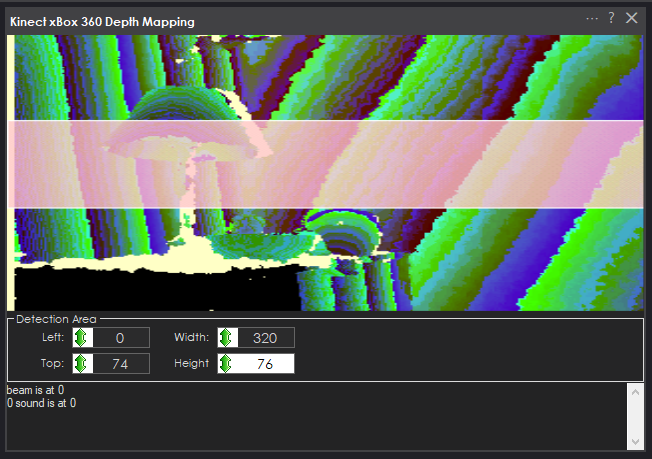




@DJ I have to disagree with you, having the pan/tilt would be highly advantageous!
You could map at different vertical levels or do mapping while in a stationary position. Say you have a robot that doesn’t move geographically (like an arm) but the environment changes around it, it would be very helpful to do a quick scan within the range of the Kinect sensor
The onboard motors can also help with the camera view itself (excluding the IR depth sensing). I would much rather use the motors inside the Kinect to look around instead of having to install my own servos.
Lastly, you could use the motors are they were originally intended as well! Use them for human body scanning with the Kinect Body Control skill.
Again, there's no way to identify the degrees for the NMS. Please read how the NMS works and there's some additional reading about the accuracy of angles for correct pose navigation.
I thought I was in a 70's disco. Think my kinect is really badly calibrated. Maybe needs a calabration checkerboard routine.
The Kinect has no calibration - as it’s a camera. And the camera has a lens. And the camera has a resolution. And that pixel resolution with the lens angle gives you angles of distances in degrees.
it’s not great for mapping, as you probably just discovered. What you’re experiencing are why these technologies are often abandoned for robotics. New technologies are being made to replace this old stuff.
the intel depth camera I think will be good. They have a lidar too. Might have to check those out one day
Nicolos Burrus had written some code to software calibrate the kinect with a checkerboard map to align the speckled laser depth image and camera, when you get it right it creates a fairly good 3D Slam. https://nicolas.burrus.name/index.php/Research/KinectCalibration looks like latest versions do auto calibration been years since I played with a kinect Hmm you have to cut and paste url or change https to http, looks like it changes to https when you click on it
Hmmm - I think that's for the first-generation Kinect, not the box 360 version
I know primesense had sold their chip in a number of devices (Asus xtion, eyeplay etc) but from a "Kinect" standpoint the XBOX 360 had the first Kinect version.