Rock Pi X by Radxa
If you’re looking for a small computer to run a robot, the Radxa ROCK Pi X is one of the best values we’ve seen for embedded computing. It’s a Single Board Computer (SBC), which means it’s a full computer (CPU, RAM, Wi‑Fi, USB, etc.) on one compact board. It’s similar in concept to the Up Board and LattePanda, but is typically more affordable.
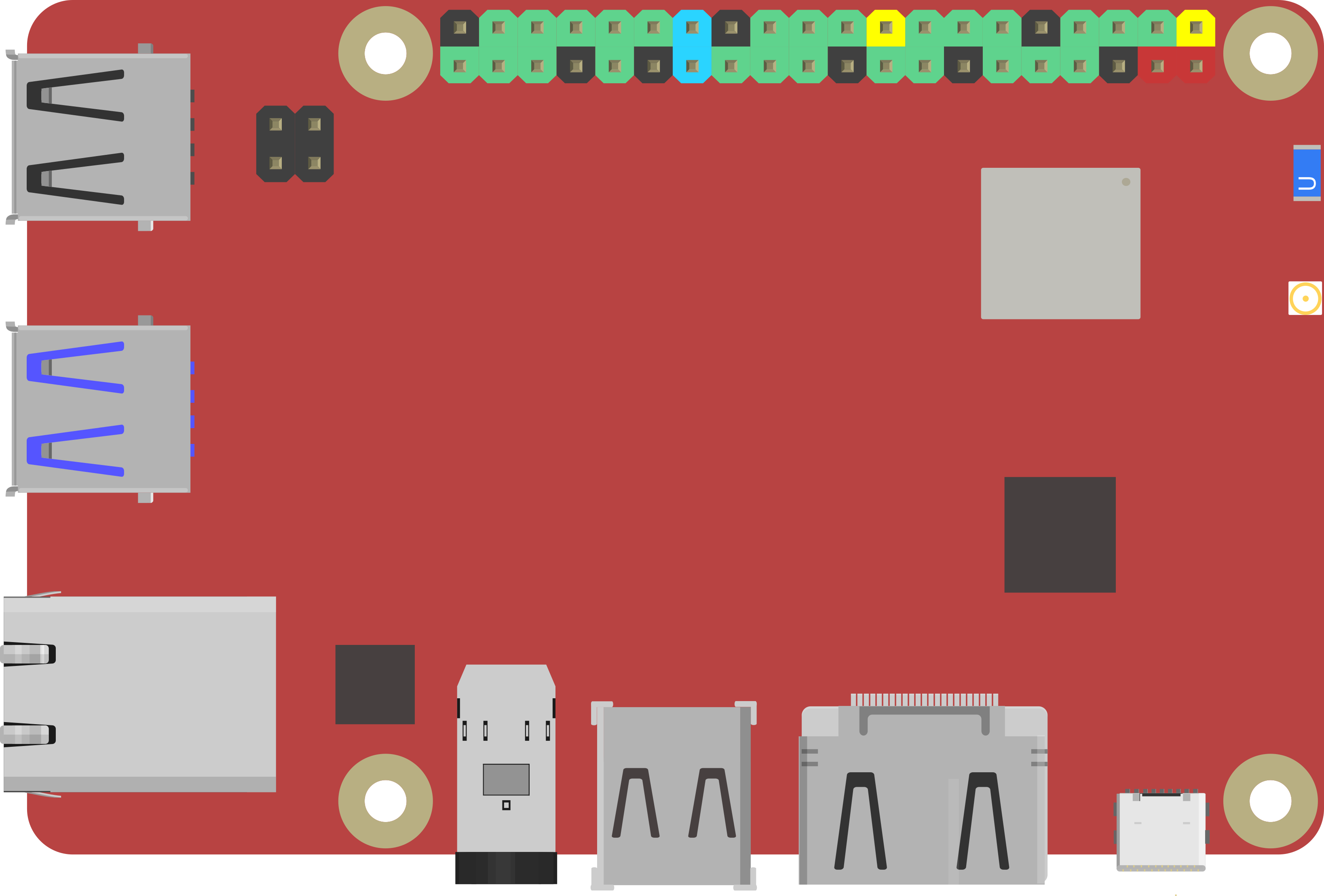
The board includes an HDMI port for a monitor/TV and a 3.5mm audio jack for speakers or a headset (audio + microphone). This makes it easy to set up on a workbench with a screen and keyboard, then later mount it inside a robot.
ROCK Pi X is Radxa’s first x86 SBC. “x86” is important because it’s the same family of processors used in most Windows PCs, which generally means great compatibility with Windows software and drivers.
Key Features (What They Mean)
- Intel Cherry Trail quad-core Z8350 processor: The “brain” of the board. Quad-core means it can handle multiple tasks at once (useful for robotics).
- 64-bit LPDDR3 RAM (up to 4GB): Working memory for Windows + ARC. More RAM usually means smoother multitasking.
- HDMI video up to 4K @ 30Hz: Can run high-resolution displays (4K), though robotics projects typically don’t need 4K.
- 3.5mm audio jack with mic support: Helpful for sound output, voice recognition, or microphone input.
- 802.11ac Wi‑Fi: Fast wireless networking.
- Bluetooth 4.2: Connect Bluetooth devices (keyboards, controllers, some sensors).
- USB ports: Connect accessories like cameras, keyboards, mice, storage, and many robot controllers.
- Gigabit Ethernet (GbE LAN): Reliable wired networking (often best for robot development and remote desktop).
- 40-pin color expansion header: Hardware expansion pins for add-ons (advanced use; not required to run ARC).
- Real-time clock (RTC): Helps keep time (useful for logging and scheduled tasks), especially if configured with a battery.
- USB PD and QC power support: Can be powered using compatible USB-C/charging standards (see power tips below).
Model A vs Model B (And RAM Options)
ROCK Pi X comes in Model A and Model B, and each model is available with 1GB, 2GB, or 4GB RAM options.
For the exact hardware differences between Model A and Model B, please refer to the manufacturer specifications for your specific board version.
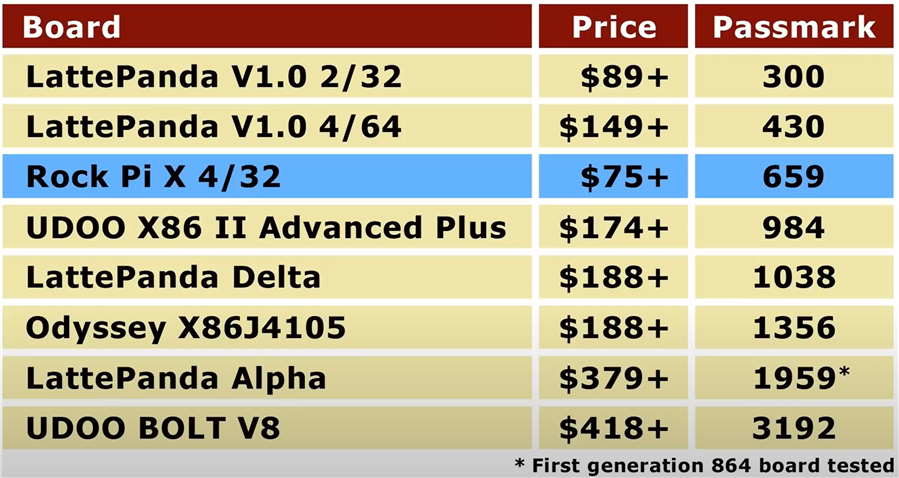
This comparison chart, done by our friends at Explaining Computers, is a helpful overview:
Windows Drivers (Important for a Smooth Setup)
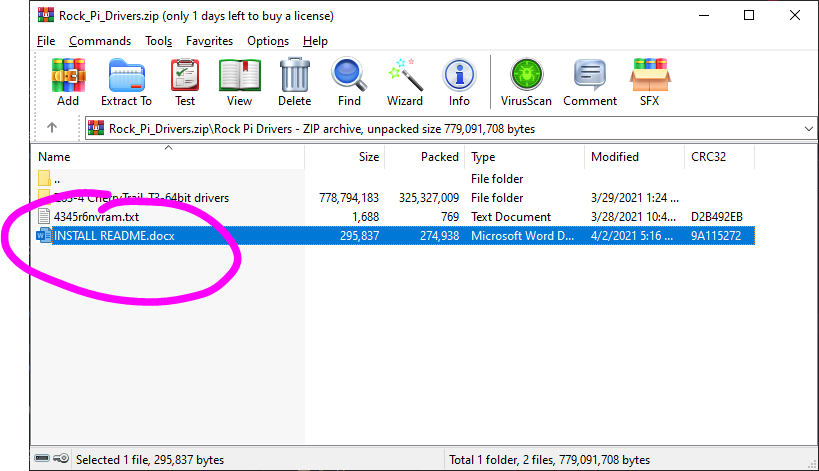
Some ROCK Pi X boards require specific Windows drivers so that hardware features (such as Wi‑Fi, audio, graphics acceleration, etc.) work correctly. Synthiam has assembled a driver package to help you get your ROCK Pi X running reliably.
The driver package includes a step-by-step document. Be sure to read it and follow the instructions carefully.
Getting the Best Performance (SBC Installation Tips)
Small computers can run robots very well, but they sometimes need a little tuning—especially with Windows. We’ve put together a guide that covers common improvements such as:
- Freeing storage space (important if your board has limited built-in storage)
- Improving performance (startup apps, power settings, updates)
- Powering the SBC reliably (stable voltage/current is critical for robotics)
- Running “headless” (no monitor/keyboard attached) using Remote Desktop tools

@Nink, here's what I'm using to powe the Rock Pi/X - I'm super happy with the battery life of this unit.
@DJ Cool. Nice tip on the cell phone battery.
@Nink I had no idea you were so far along! Nice job.
Thanks DJ, I look forward to seeing your turtlebot running. A friend at work got one last week.
I may add a second battery on the dog so good tip. I have a couple of similar batteries my kid uses to charge his switch when we go on vacation and that won’t be happening for a while.
I am not sure if I want to add a second battery as you have to keep the centre of mass as even and as low as possible on the legged robot or he can tip over on slopes and I also need to keep weight down. The power used to carry battery may be almost as high as power used to power Rock Pi X.
The Dog is powered by an 18vdc P192 lithium Ion battery for a Ryobi drill. I actually had to import batteries from US as it has a High Performance version that I could not buy in Canada. Sadly I only get about 30 minutes from it.
One advantage of a second battery though is it may allow me to swap drill batteries without having to shut him down first if I run Pi and Pi X off same second battery. I may just switch everything to two redundant 5S LiPo batteries in parallel though so I can replace one battery then the other and keep systems running. I need to redesign the internal housing if I do this and there is the pain of LiPo’s although I could get longer battery life with a higher power to weight ratio.
The Rock Pi X will run up to 20vdc but that is where I went wrong I think. When the dog jumps it generates power so apparently you can get a power spike of over 30vdc when it lands. This can flow back through the circuits if I don’t have good isolation. I believe this maybe why my Pi X blew up and another good reason for a second battery like the one you proposed.
this is the battery he has at the moment. Model P192 https://www.amazon.com/Ryobi-P192-Lithium-performance-battery/dp/B07N54F9PL/ref=sr_1_1?dchild=1&keywords=ryobi+p192&qid=1615217032&sr=8-1
Your robot has a Pi and pi/x? Can’t it all be done with just the pi/x?
Robot uses CANBUS-FD to communicate at very high speed with the Moteus FIeld Orientated Controllers that run the Brushless DC motors. The rock Pi X does not support the Pi Hat that has the controller as it does not have the SIO ports it needs on the header block. I raised this with Rock Pi X dev team that they did not make the header fully compatible with the Pi and they acknowledged this and said they may address in next version.
The code that runs robot is open source so I assume it could be converted with some effort to run on X86 and windows but X86 also consumes a lot more power than ARM and the code is quite CPU intensive as there is a lot of IO so 3 of the 4 cores on the Pi are dedicated to controlling robot and only 1 core is left to run Linux. So I don’t believe the Pi X could handle running ARC and Robots code anyway.
We looked at writing a FOC driver for the robot using USB CANBUS but it was apparent we could only support about 3 -4 Servos over USB due to the IO constraints so we went in a new direction of talk to the existing robot control software using JSON and web sockets and that’s when you came in.
The web socket idea looks positive although as I mentioned there is an incredible amount of data coming back and I haven’t been able to affectively get the robot to respond to commands yet. This week though a servo died I had to dismantle robot to replace and now I wait for a new servo and new rock Pi x.
@Nink, just a thought, would it be dangerous to swap just one of the lipo's if they were in parallel as this would mean they would have a different charge capacity? I had a bad experience with a lipo, they are a dangerous technology!
Hi @skidroe good point. Maybe I just a need a single large LiPo pack and a small Lithium Ion in circuit to hold charge during battery swap to keep systems running.
I have blown up the odd LiPo in my day. (I really need to dispose of these old batteries but I keep saying OH one cell still works I will save that for a new battery)
The manul above for the Rock Pi/x includes a download link for all of the Windows 10 x64 drivers with instructions.