
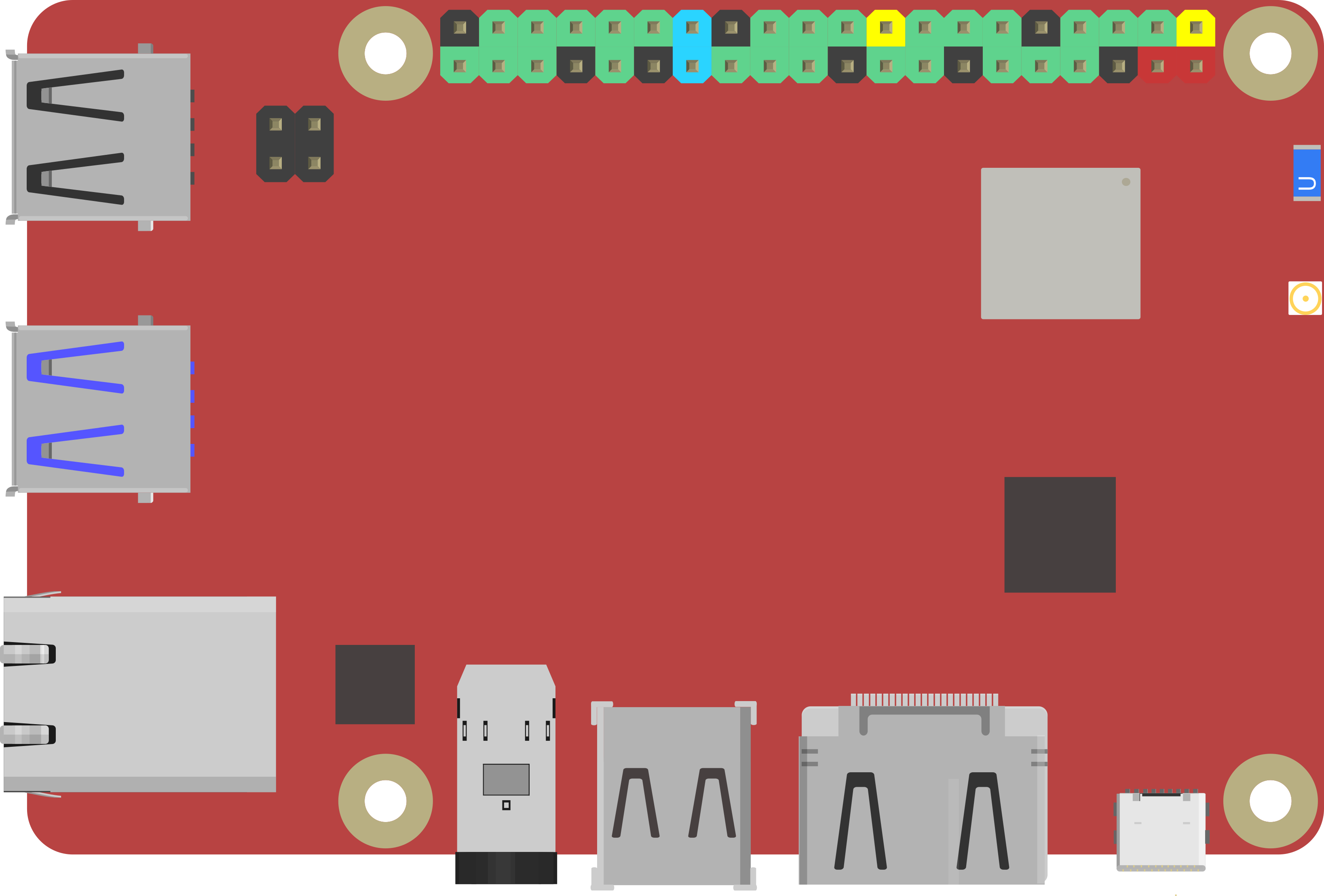
Rock Pi X by Radxa
If you’re looking for a small computer to run a robot, the Radxa ROCK Pi X is one of the best values we’ve seen for embedded computing. It’s a Single Board Computer (SBC), which means it’s a full computer (CPU, RAM, Wi‑Fi, USB, etc.) on one compact board. It’s similar in concept to the Up Board and LattePanda, but is typically more affordable.
The board includes an HDMI port for a monitor/TV and a 3.5mm audio jack for speakers or a headset (audio + microphone). This makes it easy to set up on a workbench with a screen and keyboard, then later mount it inside a robot.
ROCK Pi X is Radxa’s first x86 SBC. “x86” is important because it’s the same family of processors used in most Windows PCs, which generally means great compatibility with Windows software and drivers.
Key Features (What They Mean)
- Intel Cherry Trail quad-core Z8350 processor: The “brain” of the board. Quad-core means it can handle multiple tasks at once (useful for robotics).
- 64-bit LPDDR3 RAM (up to 4GB): Working memory for Windows + ARC. More RAM usually means smoother multitasking.
- HDMI video up to 4K @ 30Hz: Can run high-resolution displays (4K), though robotics projects typically don’t need 4K.
- 3.5mm audio jack with mic support: Helpful for sound output, voice recognition, or microphone input.
- 802.11ac Wi‑Fi: Fast wireless networking.
- Bluetooth 4.2: Connect Bluetooth devices (keyboards, controllers, some sensors).
- USB ports: Connect accessories like cameras, keyboards, mice, storage, and many robot controllers.
- Gigabit Ethernet (GbE LAN): Reliable wired networking (often best for robot development and remote desktop).
- 40-pin color expansion header: Hardware expansion pins for add-ons (advanced use; not required to run ARC).
- Real-time clock (RTC): Helps keep time (useful for logging and scheduled tasks), especially if configured with a battery.
- USB PD and QC power support: Can be powered using compatible USB-C/charging standards (see power tips below).
Model A vs Model B (And RAM Options)
ROCK Pi X comes in Model A and Model B, and each model is available with 1GB, 2GB, or 4GB RAM options.
For the exact hardware differences between Model A and Model B, please refer to the manufacturer specifications for your specific board version.
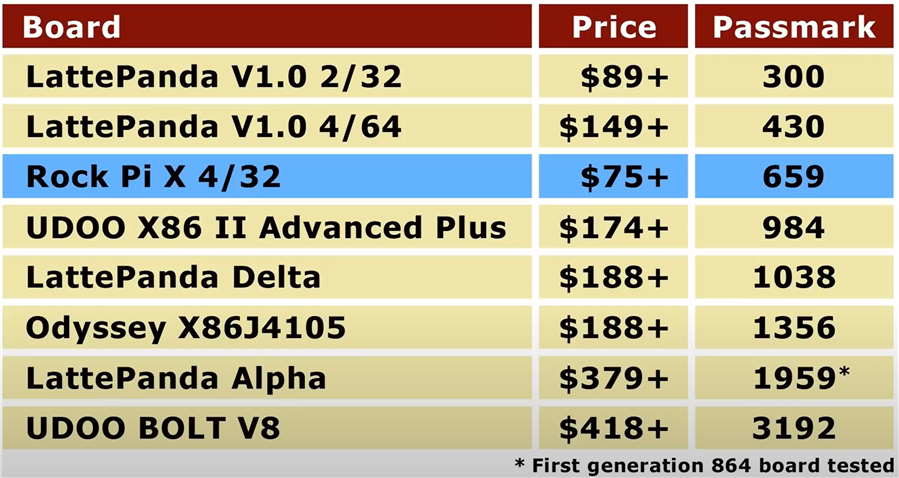
This comparison chart, done by our friends at Explaining Computers, is a helpful overview:
Windows Drivers (Important for a Smooth Setup)
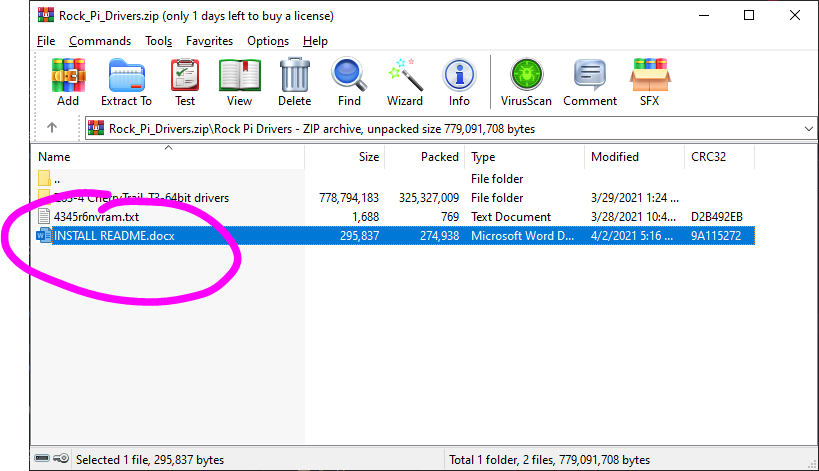
Some ROCK Pi X boards require specific Windows drivers so that hardware features (such as Wi‑Fi, audio, graphics acceleration, etc.) work correctly. Synthiam has assembled a driver package to help you get your ROCK Pi X running reliably.
The driver package includes a step-by-step document. Be sure to read it and follow the instructions carefully.
Getting the Best Performance (SBC Installation Tips)
Small computers can run robots very well, but they sometimes need a little tuning—especially with Windows. We’ve put together a guide that covers common improvements such as:
- Freeing storage space (important if your board has limited built-in storage)
- Improving performance (startup apps, power settings, updates)
- Powering the SBC reliably (stable voltage/current is critical for robotics)
- Running “headless” (no monitor/keyboard attached) using Remote Desktop tools

NUC? Is this secret code for something between you guys? I hate acronyms.
We use the NUC at my job. Its a neat lil computer. ,
,
Is NUC just an acronyms for mini computer?
What Is Intel NUC? Intel NUC is a small form factor PC with a tiny footprint. Short for Next Unit of Computing, Intel NUC (say it like "luck" or "truck") puts full-sized PC power in the palm of your hand.
See more: https://www.intel.ca/content/www/ca/en/products/boards-kits/nuc.html#:~:text=What%20Is%20Intel%C2%AE%20NUC,the%20way%20you%20need%20it.
Thanks. Know I know
My Rock Pi X turned up last week, it is pretty cute and not bad performance but I can't get the WLAN drivers running. I am in windows update hell now so can't give a review as I haven't loaded ARC on it yet. Anyone else have trouble with the Broadcom drivers. I did a fresh windows install versus the WIM file (I hope I don't have to go back and do it all again). Playing with some 3rd party utils for driver updates but the bcmfn2 driver and the Broadcom 802.11ac both fail to start.
One thing I don't like was the decision to use USB-C for power. Seriously who has a USB-C to XT-90 connector laying around. Wish me luck.
The drivers are on their wiki: https://wiki.radxa.com/RockpiX/downloads
Power the rock pi two ways on the robot:
usb-c to type A cable connected to a 5v power bank. Here is one that is 10 amps and has usb-c so you don't need a type a adapter cable: https://www.amazon.ca/MOSFiATA-High-Speed-Charging-Emergency-Flashlight/dp/B08GL95BY2/ref=sr_1_1_sspa?dchild=1&keywords=usb+power+bank&qid=1615949259&s=electronics&sr=1-1-spons&psc=1&spLa=ZW5jcnlwdGVkUXVhbGlmaWVyPUEyU05HNE81TEpPNkw3JmVuY3J5cHRlZElkPUEwMDY5NDY0M0kzTTlJWUoxOUI5USZlbmNyeXB0ZWRBZElkPUEwOTI3NDQ4MlFYTTdOVkJFWE1CSyZ3aWRnZXROYW1lPXNwX2F0ZiZhY3Rpb249Y2xpY2tSZWRpcmVjdCZkb05vdExvZ0NsaWNrPXRydWU=
5v directly to the pin header. I use (and swear by) this voltage regulator: https://www.amazon.ca/gp/product/B07Q5W1BG3/ref=ppx_yo_dt_b_asin_title_o03_s00?ie=UTF8&psc=1
PS, don't forget to check the tips in the above links in the rock pi description for running headless and performance tips.