
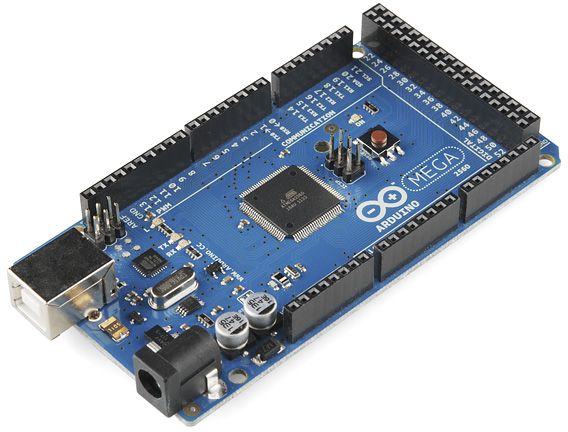
Arduino Due/Mega by Arduino
Firmware
The Arduino Mega 2560 is an excellent high-I/O microcontroller for robotics and automation projects. With this firmware, the Mega becomes an ARC-compatible capability controller, allowing ARC to command servos, read sensors, control motors, and interface with serial devices — all through a single USB connection and without writing Arduino sketches for every project.
The Mega stands out for its large number of pins, multiple hardware UARTs, and 5V sensor compatibility. When paired with ARC, you can simultaneously operate:
- 8 ADC (Analog) inputs
- 13 PWM outputs
- 21 Digital I/O ports
- 24 Servo outputs
This makes the Mega suitable for complex robots with many sensors, actuators, indicators, and serial communication modules — all coordinated through ARC's UI, control blocks, and AI behaviors.
ADC Inputs Mapping (Analog)
ARC can read up to 8 analog inputs on the Mega, mapped as ADC0–ADC7. Common uses include potentiometers, distance sensors, light sensors, force sensors, and more.
(ARC → Arduino)
  ADC0 = A0
  ADC1 = A1
  ADC2 = A2
  ADC3 = A3
  ADC4 = A4
  ADC5 = A5
  ADC6 = A6
  ADC7 = A7
PWM Outputs Mapping
The Mega provides 13 hardware PWM channels for speed control, dimming LEDs, fan control, ESCs, and other applications. ARC maps these as D0–D12:
(ARC → Arduino)
  D0  = 2
  D1  = 3
  D2  = 4
  D3  = 5
  D4  = 6
  D5  = 7
  D6  = 8
  D7  = 9
  D8  = 10
  D9  = 13
  D10 = 44
  D11 = 45
  D12 = 46
Digital I/O Ports Mapping
ARC supports up to 24 digital I/O ports. The Mega exposes 21 ports mapped as D0–D20. These can drive relays, switches, LEDs, logic signals, and also support software serial transmit for simple UART modules.
(ARC → Arduino)
  D0  = 2
  D1  = 3
  D2  = 4
  D3  = 5
  D4  = 6
  D5  = 7
  D6  = 8
  D7  = 9
  D8  = 10
  D9  = 11
  D10 = 12
  D11 = 13
  D12 = 44
  D13 = 45
  D14 = 46
  D15 = 62
  D16 = 63
  D17 = 64
  D18 = 65
  D19 = 66
  D20 = 67
Servo Outputs Mapping
Up to 24 servo outputs are exposed to ARC using the Mega’s Servo library. Perfect for animatronics, robot arms, pan/tilt systems, and legged robots.
(ARC → Arduino)
  D0  = 22
  D1  = 23
  D2  = 24
  D3  = 25
  D4  = 26
  D5  = 27
  D6  = 28
  D7  = 29
  D8  = 30
  D9  = 31
  D10 = 32
  D11 = 33
  D12 = 34
  D13 = 35
  D14 = 36
  D15 = 37
  D16 = 38
  D17 = 39
  D18 = 40
  D19 = 41
  D20 = 42
  D21 = 43
  D22 = 68
  D23 = 69
I/O Expansion (Recommended)
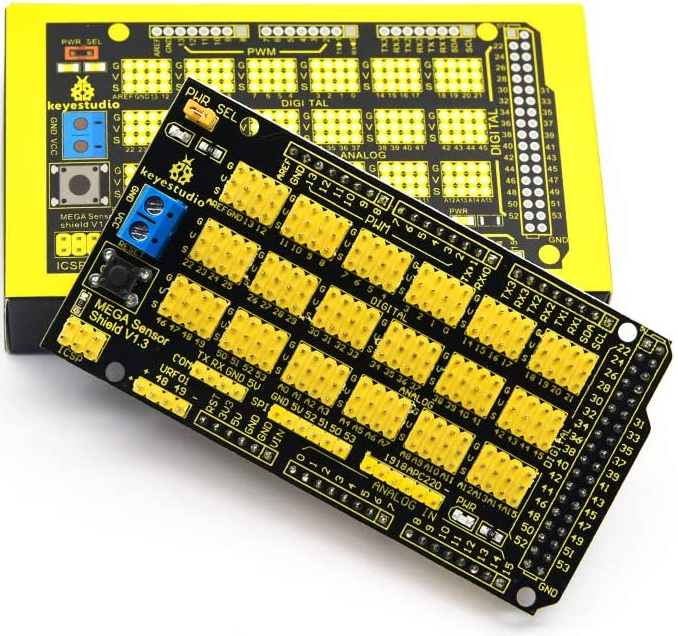
Since the Mega exposes raw pin headers, using a sensor or servo shield makes wiring dramatically easier and reduces cable strain. A commonly used option is the:
Get Started
Flashing the firmware is straightforward. Follow the tutorial below to compile and upload it to your Mega:
Firmware Upload Tutorial
Does this firmware support I2C?
I see the following in the code
But I can't see anyplace the code below for these two commands.
what does it say in the debug window when you connect to it?
Thanks DJ I see it does not support I2C communications.
I guess I will have to create my own code.
Okay - it shouldn't be difficult to add. Can you check any of the other arduino libraries and see if they support i2c? The pin coun won't match but they should load fine. If we find one code with i2c support we can add it.
I would think we can use the WIRE.h lib
https://www.arduino.cc/reference/en/language/functions/communication/wire/
That looks correct. I have no experience with it, though. I2C has never really been good to me in the past haha
https://a.co/d/7sbZw9J
Edit: I looked at the tech specs of the Arduino Giga R1 on Arduino's website, and it uses a Cortex ARM M7.
Idk, but I looked and found that the OpenCR uses CortexARM M7 as well, but the Arduino Giga R1 has a Arduino Mega form factor and compatible pinout. Correct me if I'm wrong, but I guess I could use the firmware for the OpenCR provided on this site but kinda frankenstein with the Arduino Mega firmware so as to get the correct pin addresses.
Ardunio is not a particular microcontroller. Instead it’s a software sdk for many different micros. It’s a c sdk so as long as a micro has an ardunio compiler, it’ll work.
the difference is the port mapping. Different micros have gpio mapping and for various features. For example, servos use pwm and some micros may only support a few or several gpio ports for servos.
so my answer would be yes, it’s compatible - even if it requires slight modifications for the ports.
if you go this route, starting a new thread would be easiest to focus attention on modifying the firmware for the port mapping.