

Displays HC-SR04 ultrasonic distance readings in ARC; scriptable via GetPing(), pausable, sets a variable with multiplier, optional NMS output
 Hardware Info
 Windows
How to add the Ultrasonic Distance robot skill
- Load the most recent release of ARC (Get ARC).
- Press the Project tab from the top menu bar in ARC.
- Press Add Robot Skill from the button ribbon bar in ARC.
- Choose the Ultrasonic category tab.
- Press the Ultrasonic Distance icon to add the robot skill to your project.
Don't have a robot yet?
Follow the Getting Started Guide to build a robot and use the Ultrasonic Distance robot skill.
How to use the Ultrasonic Distance robot skill
What this skill does NOT do: It does not automatically steer, stop, or avoid obstacles. For navigation/avoidance, use the Ultrasonic Radar skill.
Ultrasonic sensors measure distance using sonar (sound navigation ranging)—they send out a quick burst of sound and listen for the echo. The time it takes for the echo to return is used to estimate how far away an object is. This is similar to how bats and dolphins “see” with sound.
Good to Know (Beginner Tips)
- Works well on hard surfaces (walls, wood, plastic, boxes).
- Less reliable on soft or angled surfaces (fabric, carpet, curtains, plush items) because they absorb or deflect the sound.
- Unlike many IR sensors, ultrasonic sensors are generally not affected by sunlight or black materials.
- Temperature and voltage can affect readings (sound travels differently in warm vs. cold air).
When an HC-SR04 (or equivalent) Ultrasonic Distance Sensor is wired to your EZB and configured in this skill, the skill will display a distance value for whatever is directly in front of the sensor.
How Readings Work (Important)
The value shown by this skill is typically 0–255. This number is a raw sensor value and is not automatically “cm” or “inches”. The raw value can vary depending on the sensor model, input voltage, the surface you’re detecting, and even room temperature.
Main Window
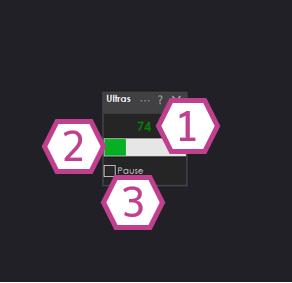
What You See
1. Ultrasonic Distance Value
- Shows the current distance reading (usually 0–255).
- Higher/lower values represent farther/closer objects depending on sensor and configuration.
2. Bar Display
- A quick visual way to see changes in distance without watching the number.
- Helpful for testing wiring and sensor direction (point it at a wall and move closer/farther).
3. Pause Checkbox
- When checked, the skill stops continuously sampling the sensor.
- This is useful if you only want readings on demand from a script (see next section).
Using This Skill with Scripts (GetPing)
This skill integrates with ARC scripting. If the Pause checkbox is checked, the skill will not constantly poll the sensor.
Instead, it will update when your script calls GetPing() (as long as the skill’s configured ports match your wiring).
Why pause + GetPing() is useful
- Reduces unnecessary communication traffic to the EZB.
- Lets you control exactly when a reading is taken (for example, only when the robot is moving forward).
- You can keep the skill paused permanently and still see updated values whenever
GetPing()is called.
Settings
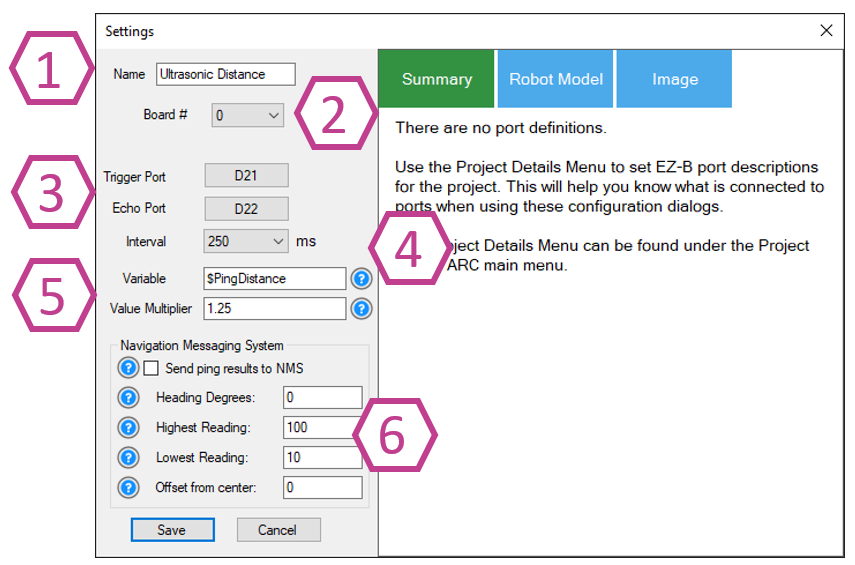
Sets the name shown on the skill’s window. You can rename it to match where it’s installed (example: “Front Ultrasonic”).
Note: Changing the title also changes the name used in the controlCommand() reference for this skill.
Choose which EZB you are using (example: EZB #0). If you only have one EZB connected, it is usually 0.
- Trigger port: the digital pin used to send the ultrasonic “ping”.
- Echo port: the digital pin used to listen for the returning echo.
- 3-wire sensors: some combine trigger/echo into one signal wire—when using that type, set Echo to the same port as Trigger (as required by the sensor design).
Controls how often the skill samples the sensor (in milliseconds). Range: 100–60000 ms. Default: 250 ms.
- Smaller number = faster updates (more frequent readings).
- Larger number = fewer updates (less traffic and CPU usage).
Variable
- Stores the most recent reading into a variable automatically.
- This can reduce the need to call
GetPing()repeatedly, which can add unnecessary communication overhead.
Multiplier
- Scales the raw value into a more useful unit.
- Example: the default multiplier of 1.25 is commonly used to convert the reading into centimeters (depending on the sensor and setup).
- For best accuracy, calibrate: measure a known distance with a tape measure, compare to the raw value, then adjust the multiplier until it matches.
Optionally pushes distance data into the NMS (Level #3, Group #1) so other navigation skills (such as The Navigator) can use it. If you are new, you can leave this disabled until you start working with navigation behaviors. Use the ? help icons in ARC and the NMS manual for details on each option.
Wiring Diagram
Ultrasonic distance sensors commonly come in two styles: 3-wire (trigger+echo combined) and 4-wire (separate trigger and echo). Some versions include a voltage regulator (inline or built-in).
If your ultrasonic sensor has a regulator, it typically needs +6V or higher (often connected to Vin).
If it does not have a regulator, it typically needs +5V.
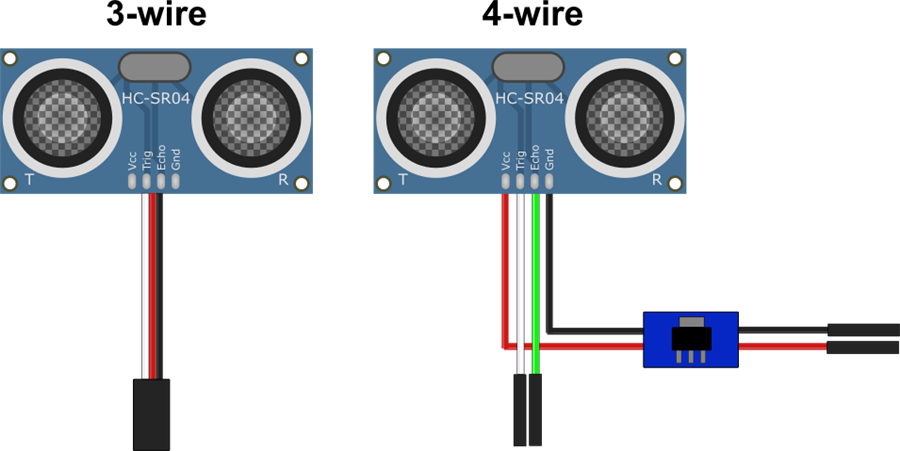
3-wire Wiring (with built-in regulator)
- Ground: Black wire to GND
- Power: Red wire to Vin
- Trigger/Echo: White wire to a Digital pin
4-wire Wiring (with regulator)
- Ground: Black wire from regulator to GND
- Power: Red wire from regulator to Vin
- Trigger: White wire to a Digital pin
- Echo: Green wire to a second Digital pin
Beginner Troubleshooting Checklist
- No reading / stuck value: confirm GND and power wiring, then confirm the configured digital ports match where you plugged in trigger/echo.
- Reading seems random: try changing the Interval to a slower value (e.g., 500–1000 ms), and test with a flat wall 30–100 cm away.
- Always detects “something”: check for nearby surfaces that could reflect sound (robot body panels, brackets), and see the “Fix Resolution” section below.
- Inconsistent on fabric: test with a hard surface; fabric often absorbs sonar.
Fix Resolution (False Positives on Some Housings)
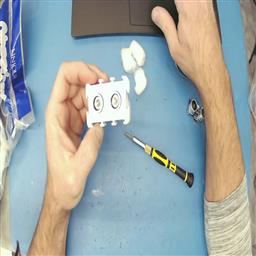
If you use an EZ-Robot ultrasonic distance sensor, you may occasionally see false positives caused by the ping echoing inside the sensor casing. A common fix is placing a few small cotton balls inside the case around the sensors to dampen internal reflections.
Tech Details (Video)
Resources
Synthiam’s ultrasonic hardware reference design is available here.


Related Tutorials
Related Robots
Related Questions
Wire Length For The EZB Ultrasonic Sensor
How Do I... Not Be Hopelessly Lost?

Upgrade to ARC Pro
Stay at the forefront of robot programming innovation with ARC Pro, ensuring your robot is always equipped with the latest advancements.
I have an oscilloscope that says otherwise
The logic is held high and can't go low in the scenario you describe.
Well then! Figure 9 of this page has a compelling formula. The formula will help identify the resistor values for a successful test: https://next-hack.com/index.php/2020/02/15/how-to-interface-a-3-3v-output-to-a-5v-input/
Lol, that's the page I was referencing! Unfortunately, as I described above, a voltage divider configuration only works in a step-down scenario, not a step-up. The R1 resistor is too strong of a pull-up in the step up scenario. Lower resistance means lower path of resistance to 5V aka stronger pull-up. The signal stays high. I tried what you described, and have proven with an oscilloscope that it doesn't work, sorry man.
Anyway, I received the Elegoo Ultrasonics, and this will be vindication for Thomas, they also don't work with the EZ-Bv4 and ARC. All 255 all the time. I do hear clicking though so the trigger seems to be working. I tried 5 of them and they all produce the same results.
I am at home at the moment so I don't have a ton of equipment to work with but just in case I did try a 100kOhm pullup with a potentiometer from the trigger to VCC pins on the Ultrasonic and tested it at intervals all the way down to 0 ohms. Still all 255 readings all the time.
I will try a level shifter circuit later tonight and let you know, my hunch now is that the issue is on the echo side since I can hear the sensor pulsing. So they may produce an echo signal that's different than what ARC is expecting.
Oh yeah, the echo could be it as well. Many people on the internet appear to have the same issue with some knock-off hc-sr04 distance sensors on modern 3.3v micros. As microcontrollers get faster, they need less heat which means less voltage... so don't expect that to change any time soon
While in the shower today I was going over a few thoughts about this issue. I did realize that I was missing something in terms of using a voltage divider to step up the logic voltage level. I was using low resistance values (R1 = 220 ohms, R3 = 2200 ohms) and this makes for a very strong R1 pullup so much so that the EZ-B can't pull the signal down. So today I tried very high resistance values (R1 = 22 kohms, R3 = 220 kohms) and found that the EZ-B could pull the signal down, but unfortunately with this weak of a pullup the signal was no longer raised in its voltage level (stayed at 3.3V). While I could try and dial in the values to see if there would be a precise happy medium, this isn't actually related to the issue we are facing with the 255 readings so it's really chasing ghosts.
While reading the trigger signal of the Elegoo and Smraza Ultrasonics (which both only read 255 all the time) under the scope I found that the trigger pulse isn't being affected, it's a precise 10uS at 3.3V from the EZ-B. Which is expected.
When comparing to an HC-SR04 Ultrasonic that works, they are nearly identical:
Here's the Echo screenshot from the Elegoo/Smraza at a 3cm distance to a flat surface:
Here's the Echo screenshot from the Good Ultrasonic at a 3cm distance to a flat surface:
The echo voltage level from the Elegoo/Smraza sensors is 5V as expected, and it's surprising that an Echo signal is actually being produced, but I did notice that the echo signal is a bit wider on the Elegoo/Smraza than the good sensor. I would not expect a wider (slower) signal to be reading 255 rather I would expect it to just read a little higher in value than the good sensor (ex: should read a value of 10 instead of 3, not 255).
I'm at a bit of a loss as to what the issue actually is, it seems like everything that is needed is there.
The longer pulse width is the distance. So the knockoff sensors return are returning a much longer pulse.
I really am running out of energy on this subject. The sensors are out of spec and have consumed way too much of my time. So I’ll leave you with this question. Does that pulse width change with closer objects?
i ask because that pulse width is the same width as "infinite" on a standard hc-sr04. That knockoff sensor might be always returning "infinite" or it’s pulse width on echo is always a bit longer.
You’d need to test on the ezb with a variety of distances - not one. Id recommend 15cm, 30cm, 50cm, 100cm, 200cm, and infinite
One thing I did find is that the Echo signal pulses come in at a rate of ~4MHz with the good Ultrasonic sensors and ~7MHz with the Elegoo/Smraza sensors. So it seems the Elegoo/Smraza sensors do have an Echo reading coming in at a faster rate.
It's difficult to get an exact frequency as the Echo signal from all the sensors is a bit sporadic and isn't a clean repeating waveform.
*Edit: I guess I was writing my comment at the same time as you @DJ, I'll have a look at your suggestion.
Oh and the answer to your question is yes the Echo pulse width does move as the sensor is pulled further away from a flat surface. The Echo signal grows wider as expected the further you move it away.
While I don't have time to try all those distances, I will try a few and let you know.