
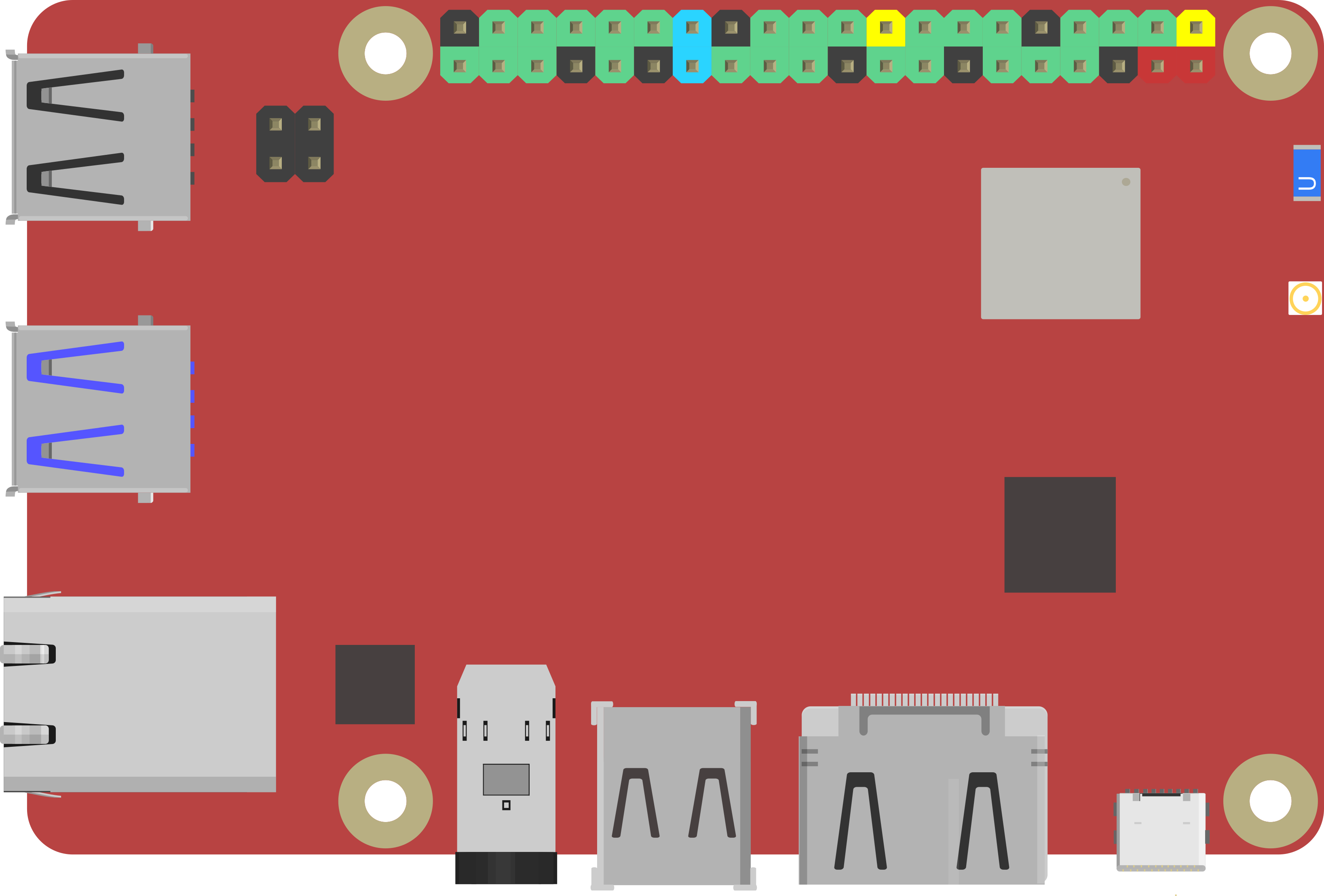
Rock Pi X by Radxa
If you’re looking for a small computer to run a robot, the Radxa ROCK Pi X is one of the best values we’ve seen for embedded computing. It’s a Single Board Computer (SBC), which means it’s a full computer (CPU, RAM, Wi‑Fi, USB, etc.) on one compact board. It’s similar in concept to the Up Board and LattePanda, but is typically more affordable.
The board includes an HDMI port for a monitor/TV and a 3.5mm audio jack for speakers or a headset (audio + microphone). This makes it easy to set up on a workbench with a screen and keyboard, then later mount it inside a robot.
ROCK Pi X is Radxa’s first x86 SBC. “x86” is important because it’s the same family of processors used in most Windows PCs, which generally means great compatibility with Windows software and drivers.
Key Features (What They Mean)
- Intel Cherry Trail quad-core Z8350 processor: The “brain” of the board. Quad-core means it can handle multiple tasks at once (useful for robotics).
- 64-bit LPDDR3 RAM (up to 4GB): Working memory for Windows + ARC. More RAM usually means smoother multitasking.
- HDMI video up to 4K @ 30Hz: Can run high-resolution displays (4K), though robotics projects typically don’t need 4K.
- 3.5mm audio jack with mic support: Helpful for sound output, voice recognition, or microphone input.
- 802.11ac Wi‑Fi: Fast wireless networking.
- Bluetooth 4.2: Connect Bluetooth devices (keyboards, controllers, some sensors).
- USB ports: Connect accessories like cameras, keyboards, mice, storage, and many robot controllers.
- Gigabit Ethernet (GbE LAN): Reliable wired networking (often best for robot development and remote desktop).
- 40-pin color expansion header: Hardware expansion pins for add-ons (advanced use; not required to run ARC).
- Real-time clock (RTC): Helps keep time (useful for logging and scheduled tasks), especially if configured with a battery.
- USB PD and QC power support: Can be powered using compatible USB-C/charging standards (see power tips below).
Model A vs Model B (And RAM Options)
ROCK Pi X comes in Model A and Model B, and each model is available with 1GB, 2GB, or 4GB RAM options.
For the exact hardware differences between Model A and Model B, please refer to the manufacturer specifications for your specific board version.
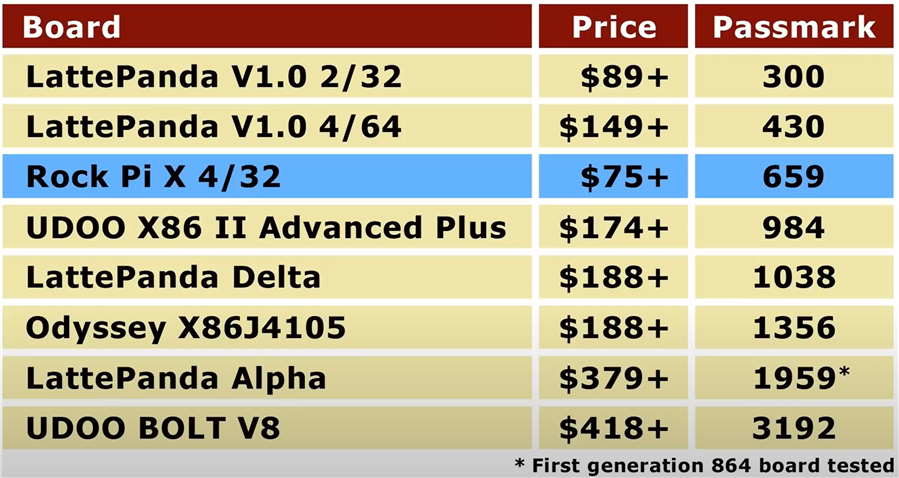
This comparison chart, done by our friends at Explaining Computers, is a helpful overview:
Windows Drivers (Important for a Smooth Setup)
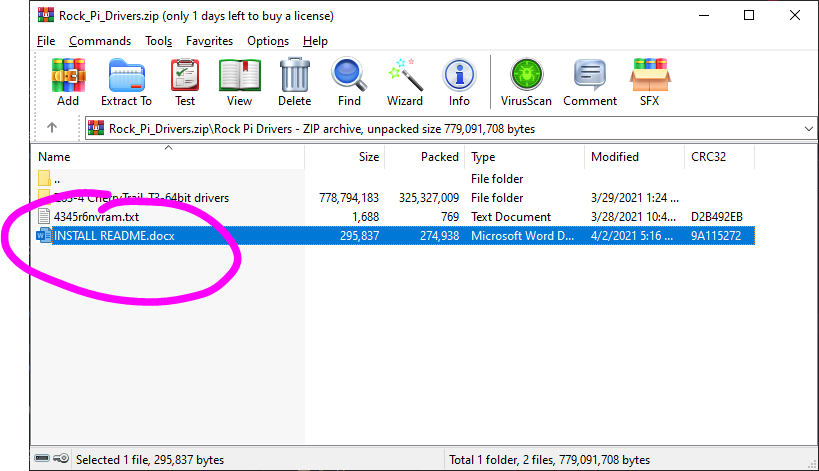
Some ROCK Pi X boards require specific Windows drivers so that hardware features (such as Wi‑Fi, audio, graphics acceleration, etc.) work correctly. Synthiam has assembled a driver package to help you get your ROCK Pi X running reliably.
The driver package includes a step-by-step document. Be sure to read it and follow the instructions carefully.
Getting the Best Performance (SBC Installation Tips)
Small computers can run robots very well, but they sometimes need a little tuning—especially with Windows. We’ve put together a guide that covers common improvements such as:
- Freeing storage space (important if your board has limited built-in storage)
- Improving performance (startup apps, power settings, updates)
- Powering the SBC reliably (stable voltage/current is critical for robotics)
- Running “headless” (no monitor/keyboard attached) using Remote Desktop tools

Oh - and if you have a Rock Pi X in the invmoov, you can connect it to exosphere and turn it into a telepresence robot. So you can be out for dinner or at your friends and control the robot in your house. You can move stuff around, pick things up, what ever... That's pretty awesome
I should set that up as a live hack one day . Use the inmoov as a telepresence robot and control it remotely from dinner or something haha
Wow, things keep getting better and better. Jeremie is like your mad scientist at Synthiam! It's ALIVE!!!!
hey everyone - I created a quick guide in the support section on improving performance and freeing storage space with SBC (single board computers). This applies to the rock pi x, atomic pi, lattepanda, etc...
You can view it here: https://synthiam.com/Support/Install/free-space-with-windows-10
Thanks for the tips DJ, Optimizing Disk, RAM and CPU will be crucial especially when we want to run a lot of skills and multiple clients.
One area we are lacking is GPU support for ML at edge and the dependance on X86 Architecture is a challenge. Migrating to .NET core with multi architecture support for Lin/Win/Mac opens up a lot more cross platform capabilities. With ARC supporting ARM and CUDA on NVIDIA (Nano, Xavier etc) would be ideal for robotics platforms. Obviously that requires a fair amount of work on Synthiam part. Another option is to look at partnerships with companies like AMD. ROCm is maturing, they are an X86 platform and are launching edge devices enabled by chips like the V2000 so this could be an option to explore in future.
@Nink, All I read and understood was Bla, bla, bla, bla. LOL! I'm so left behind. Thank God for guys like you and DJ that can conger up the magic we all dreamed about when we were kids.
Unfortunately I can’t conjure anything up Dave. All I know is my robot needs a brain. My logic is if I post a lot of three letter acronyms I copied from a random Reddit post, DJ will come back and say, here you go, and it works.
Sadly core doesn’t have a GUI yet. It’s on the dev horizon. Migrating to core wouldn’t be difficult and a significant part of our code would migrate well. Until core matures and becomes something more than a web server.
I also don’t really believe in the ml running local. It doesn’t make sense to consume that much power in the robot locally - specifically since the global internet communication infrastructure is barely at capacity. It was significantly over engineered expecting less data compression. But with media compression the way it is, bandwidth and low latency is readily available for cloud computing.
offloading ml to the cloud is the right thing to do. I don’t even want to consider what batteries would be needed to power a gpu for "useful" ml.
Like, come on... tensor flow is a joke to run locally even on the most powerful hardware. There’s a lot of technologies we kinda skip at Synthiam / mostly because we wait for it to mature and stabilize.
just look at google dialog flow. Ugh that’s the worst. It’s changed so much that it’s impossible to integrate. I should have waited longer before making a skill. Now it’s just a mess.
The open source and education/exploration space is really fragmented and unreliable. By the time you figure out how to implement something, the technology had changed.
so back to core... until it matures AND has a GUI, we can’t use it. However I should add that our entire cloud infrastructure and website is core entirely.
I love the EZB and this is why I got into EZ-Robot. Suddenly I didn't need a 10 pound laptop duct taped to a robot platform. Everything was offloaded to a desktop and now we had extremely intelligent nimble robots. THANK YOU!!!
Moores law kicked in and now you can put an SBC like Rock Pi X directly on the robot so I don't need an external computer anymore. 7nm has brought in 10w SBC's with CPU/GPU/TPU cores onboard. This opens up a whole new world for Autonomous robots. Network goes down, robots keep running. Sure you can still offload complex ML to the cloud you don't need to process local when network is up, but there is enough smarts on board to allow the robot to continue to function off line. You really don't want a robot that a 12 year old kid can shut down with a $10 jammer he bought on Ebay.
Hopefully as MAUI matures ARC moves over, it sounds like you have given it a lot of thought and it's on your roadmap. I understand that avalonia probably isn't a strategic move when an official UI is in development.