
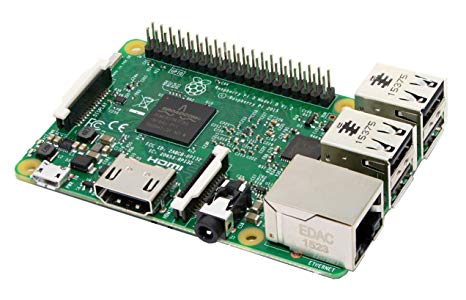
Raspberry Pi by Pi Foundation
Firmware
Turn a Raspberry Pi into an EZ-B V4 server for EZ-Builder: open-source Python, camera support, EZ-Builder connection, hardware precautions.
Turn a Raspberry Pi into an EZ-B to control Pi Camera, GPIO and UART from ARC over LAN/WiFi; supports bi‑directional UART servos.
A Raspberry Pi is a small, affordable computer that can be used as the “brain” of your robot when running Synthiam ARC or when running an EZB Server (which lets ARC connect to the Pi over the network).
There are two common ways to use a Raspberry Pi with ARC:
Option A (Recommended): Run ARC on Windows 11 installed on the Raspberry Pi
Install Windows 11 on a Raspberry Pi 4 (or newer), install ARC, and then use a dedicated robot I/O controller (an “EZB”) such as an Arduino, ESP32, or an EZ-Robot controller for servos and sensors.
Option B: Use the Raspberry Pi as an EZB Server
In this setup, ARC runs on another computer and connects to the Pi over WiFi/Ethernet. The Pi hosts an EZB Server firmware. If you choose this route, select one of the firmware options shown at the top of this page (for example, DJ’s EZBPi or PTP’s Blueberry).
Raspberry Pi onboard I/O is generally not ideal for robotics motion control. Many robots need features like stable servo timing, hardware PWM, ADC (analog inputs), and multiple UART/serial ports. For most robots, you will get a much better experience by using the Pi to run ARC (or to run your robot “brain”) and using an external controller (Arduino/ESP32/EZ-Robot) for the I/O.
Install ARC on Raspberry Pi with Windows 11 (recommended)
You can run ARC directly on a Raspberry Pi by installing Windows 11 for ARM. This is recommended if you want the Pi to be the robot’s main computer (running the ARC project locally).
- Raspberry Pi 4 or newer (Pi 4 is the oldest model that runs Windows properly)
- 8GB RAM minimum (more is better if available)
- External SSD strongly recommended (Windows + ARC on microSD is usually very slow)
While Windows 11 can boot from a microSD card, robot builds are much more enjoyable when booting from a fast drive (SSD or fast USB 3.x flash drive). Slow storage can cause long boot times, laggy UI, and delayed responses.
When running ARC on Windows 11 (on the Pi), connect an external I/O controller (EZB) via USB or WiFi:
- Arduino (common choice for sensors/servos)
- ESP32 (WiFi + I/O, good for distributed robot parts)
- EZ-Robot controller (purpose-built robotics controller)
If you want to boot from a fast USB thumb drive, these models have worked well:
- Samsung 128GB USB 3.1 Flash Drive BAR Plus (MUF-128BE3)
- SanDisk 128GB Extreme PRO USB 3.x Solid State Flash Drive (SDCZ880-128G-G46)
Windows-on-Pi instructions can change over time, so it’s okay to follow the video below and also search for newer guides if something is different on your setup.
- Windows build downloader: https://uup.rg-adguard.net
- Performance/robot setup guide: Tips To Making a Robot
It’s possible to install Windows 11 on a Raspberry Pi without using a separate PC. You can prepare the Windows installer directly from the Pi while it’s running a Debian-based OS (like Raspberry Pi OS) using WoR Flasher by Botspot.
The method shown in the video can install Windows 11 to:
- microSD card (works, but usually slow)
- USB drive (fast USB recommended)
- USB-to-SSD (recommended for the best experience)
- WoR Flasher GitHub: https://github.com/Botspot/wor-flasher
- Install from a PC (alternative guide): https://youtu.be/UYSytYtyqCk
- Raspberry Pi 4 or newer: https://amzn.to/3qBNZCQ
- Optional Raspberry Pi 400 or newer: https://amzn.to/3duZEOi
- Pi CPU cooler (recommended if running heavy workloads): https://amzn.to/3hpmVT0
- 240GB SSD: https://amzn.to/3hpEIti
- SSD to USB adapter: https://amzn.to/3jydp2G
- Optional microSD card: https://amzn.to/3hodXWa
- USB drive: https://amzn.to/364qLvK
Installation Tips & Performance for SBCs
If you are using a Raspberry Pi or any other single-board computer (SBC) in a robot, setup details matter a lot (power, cooling, storage speed, and remote access). Our Support guide includes helpful steps such as freeing storage space, improving performance, powering an SBC reliably, and running “headless” (no monitor/keyboard) using Remote Desktop tools.
View the instructions here: /Support/Tips to Make a Robot/Overview
- Windows 11: Raspberry Pi 4 or newer is recommended.
- EZB Servers: can be run on older Raspberry Pi models, but onboard I/O is still limited for many robotics needs.

Hello,
Thank you for the reply once again. I did the updates and also tried your new server version from this webpage. Still same error.
So not sure what else to try. Has someone recently loaded this and confirmed it's working?
I even had someone else do this and follow the instructions and came up with the exact same error. I'm wanting to use the Pi for an event coming up soon for a robot, if I had more time I'd have purchased the EZB4 with wifi but don't.
The ezb v4 is by ezrobot and is only one of the options for controller. There’s also arduino and others which can be viewed on the getting started page.
However, there’s a lot of others running the pi server - and I can’t imagine how it couldn’t work for you if executed as SUDO
sudo executes the application as Root, which is needed for the broadcast and server features. The access denied error is because access is denied . That’s due to user privileges
The only other option I can suggest is to use netstat and view the listening and broadcasting ports to see if there’s already an application using it.
The trouble with attempting to support Linux is that there’s no support for Linux . Everyone is kinda on their own when it comes to the raspberry pi, but normal installations should work without trouble.
Access Denied is an error when access is denied due to limited user privileges. That can be rectified by executing as root with sudo
Thank you.
I'm definitely using the sudo for raised permissions. At any rate, I'll change my plans a bit but no biggie. Really appreciate your responses. If I find a fix I'll post it.
pi@raspberrypi:~/EZBPi $ sudo mono ./EZBPi.exe Raspberry EZBPi Version: 2019.3.29.0 Verbose logging is: False Serial port is: /dev/serial0 EZB: TCP Started on port 23 EZ-B Server started on TCP Port: 23 Camera: TCP Started on port 24 Camera Server started on TCP Port: 24 Press ESC to quit Broadcast error. The broadcast service has stopped. Here is why: System.Net.Sockets.SocketException (0x80004005): Access denied at System.Net.Sockets.UdpClient.Connect (System.String hostname, System.Int32 port) [0x001b0] in :0 at System.Net.Sockets.UdpClient..ctor (System.String hostname, System.Int32 port) [0x00044] in :0 at EZBPi.Broadcaster.doSendUDP (System.String str) [0x00001] in <0d7091e22ba140df8312a9ba44fa579a>:0 at EZBPi.Broadcaster._timer_Elapsed (System.Object sender, System.Timers.ElapsedEventArgs e) [0x00050] in <0d7091e22ba140df8312a9ba44fa579a>:0 Broadcast error. The broadcast service has stopped. Here is why: System.Net.Sockets.SocketException (0x80004005): Access denied
@Legion:
can you post the output of the following commands:
mono --version
Mono JIT compiler version 5.18.0.240 (Debian 5.18.0.240+dfsg-3 Sat Apr 20 05:16:08 UTC 2019) Copyright (C) 2002-2014 Novell, Inc, Xamarin Inc and Contributors. www.mono-project.com TLS: SIGSEGV: normal Notifications: epoll Architecture: armel,vfp+hard Disabled: none Misc: softdebug Interpreter: yes LLVM: supported, not enabled. Suspend: preemptive GC: sgen (concurrent by default)
uname -r
4.19.57-v7+
lsb_release -a
No LSB modules are available. Distributor ID: Raspbian Description: Raspbian GNU/Linux 10 (buster) Release: 10 Codename: buster
route
Kernel IP routing table Destination Gateway Genmask Flags Metric Ref Use Iface default GatewayRouter 0.0.0.0 UG 202 0 0 eth0 192.168.1.0 0.0.0.0 255.255.255.0 U 202 0 0 eth0
@Legion:
more commands:
etstat -l -n | grep udp
udp 0 0 0.0.0.0:68 0.0.0.0:*
udp 0 0 0.0.0.0:53446 0.0.0.0:*
udp 0 0 224.0.0.251:5353 0.0.0.0:*
udp 0 0 224.0.0.251:5353 0.0.0.0:*
udp 0 0 0.0.0.0:5353 0.0.0.0:*
udp6 0 0 :::5353 :::*
udp6 0 0 :::53523 :::*
cat /proc/device-tree/model
Raspberry Pi 2 Model B Rev 1.1
I can reproduce your error ! Give me a couple minutes to check some details.