
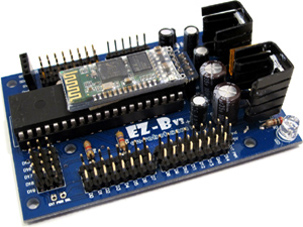
EZ-B V3 by EZ-Robot
This page explains what the EZ-B v3 is, what it can do, and how a beginner can get connected in ARC.
What the EZ-B v3 Is (Beginner Overview)
The EZ-B v3 is a small microcontroller board designed for robotics. Think of it as the “brain connector” between your computer (running ARC) and robot parts like servos, sensors, LEDs, and motors. Instead of writing firmware or uploading sketches like some other controllers, you typically connect ARC to the EZ-B v3 over Bluetooth and then control ports using ARC’s tools and scripts.
Why people liked EZ-Robot controllers
EZ-Robot hardware was designed as an all-in-one hardware + software robotics platform. The EZ-B v3 includes helpful built-in circuitry (like regulation and wireless), and ARC provides an easy way to control the board without needing a separate hardware programmer.
EZ-Robot Advantages
The EZ-B v3 was designed as a reusable robotics controller. Many builders created multiple robots and simply moved the same controller from one project to another. The board combines several robotics-friendly features in one place, such as:
- Voltage regulation to help provide stable power for the controller (and in many builds, servos/sensors depending on wiring)
- Bluetooth wireless communication so ARC can connect without a USB cable
- Digital I/O for switches, LEDs, and general on/off signals
- Analog inputs (ADC) for reading sensors that output a variable voltage
- Servo control ports for controlling RC servos
- Serial interfaces for modules that communicate over TTL serial
- TellyMate interface support (legacy feature used by some older builds)
EZ-Robot Features (Specifications)
Common features of the EZ-B v3 include:
- Compact in size
- Does not require a hardware programmer
- EZ-B is shipped pre-assembled
- Optional XBee/Synapse/WiFi long-distance communication (requires the correct add-on hardware)
- Wireless Class 2 (2.5 mW, 4 dBm) Bluetooth (~10 m / 30 ft typical range)
- iRobot Roomba support
- Arduino shield support for sensors & peripherals
- 8 analog-to-digital converter (ADC) inputs
- 20 standard serial TTL ports (9600, 19200, 38400, 57600)
- 1 high-speed serial TTL port (115200)
- 20 digital input/output ports
- 20 servo ports
Getting Connected in ARC (Beginner-Friendly Steps)
The EZ-B v3 connects to ARC through Bluetooth. The exact steps vary slightly by Windows version and Bluetooth adapter, but the overall flow is:
1) Power the EZ-B v3
- Connect a proper battery or power source as recommended for your EZ-B v3 setup.
- Confirm the board powers on (LED indicators may vary by revision).
- Keep the board close to your computer for initial pairing.
2) Pair Bluetooth in Windows
- Open Windows Bluetooth settings and choose Add a device.
- Select the EZ-B v3 when it appears.
- If asked for a PIN, try common defaults such as 1234 or 0000 (depends on module/firmware).
- After pairing, Windows typically assigns a COM port.
3) Find the COM Port
- Open Device Manager in Windows.
- Look under Ports (COM & LPT).
- Find the Bluetooth serial port assigned to the EZ-B (example: COM5).
4) Connect from ARC
- Open ARC.
- Add the proper EZ-B connection (or choose the COM port in the connection settings).
- Select the COM port you found (example: COM5) and connect.
- Once connected, you can add controls (servo control, ADC graphs, digital controls, etc.).
- Can’t find the EZ-B in Bluetooth: verify the EZ-B is powered, try moving closer, and restart Bluetooth on the PC.
- ARC won’t connect: confirm the correct COM port, disconnect other serial apps, and re-pair the device if needed.
- Frequent disconnects/resets: this is commonly caused by insufficient power (battery sag under servo/motor load).
Connection Video Tutorial (Legacy)
The EZ-B v3 is discontinued, but ARC still supports it. The video below is an older tutorial, but it remains one of the closest demonstrations of connecting an EZ-B v3 to ARC.

Wow, are there any of these wonderful classic units still out there in the wild?
Hey Dave, funny you mention that I still have mine and love it, use it with the EZ4 for extra sensor outputs.No added voltage regulators needed .One of the guys on the Forum in Vancouver drove all the way to EZ robot in Calgary,Met DJ and asked to buy an older EZ3,He was telling me it was handed over by DJ and was happy about the great service. So I mentioned I wanted one for an older robot I had and this guy in Vancouver sent me that same EZ3 here in Toronto!
Cool. I can see how the old unit could come in handy for extra ports. The added voltage regulator would be a welcomed bonus if you need a compact 5vdc output source. Can't think of much else I'd want it for. I sent in all the old V3's I had for credit a long time ago. I thought I'd miss them but that's not the case. Glad you are finding use for them though. Retro is in. LOL.
We have 3 or 4 boxes full of V3's from the buy back - they all would tell a good story I'm sure. Good to see so many people enjoying the v4's - they're power houses
Mostly I have V4s, but I do still have two V3s, all working great. A V3 would be great in a BB8's dome with a V4 in the body. Might be fun to rebuild an old non working BB8 and make him smarter than he was.
Totally! The v3's were such a great little unit. The onboard voltage regular was a blessing and a curse though.
Ya I love the voltage regulator on the V3 ,currently using one to give power to sensors and control the guns attached to the hands on new Cylon project I have going.
Just unboxing a complete kit I got in 2013 just before a series of unfortunate events derailed any opportunity to use it. Here looking for info. Is there a data sheet? Are the 3D printed parts stl’s still around? Any of the old docs?