
Estimate pose odometry from movement distance for robots without encoders, calibrated by speed. Suited for DIY navigation; pose drifts with lidar.
 Windows
How to add the NMS Faux Odometry robot skill
- Load the most recent release of ARC (Get ARC).
- Press the Project tab from the top menu bar in ARC.
- Press Add Robot Skill from the button ribbon bar in ARC.
- Choose the Navigation category tab.
- Press the NMS Faux Odometry icon to add the robot skill to your project.
Don't have a robot yet?
Follow the Getting Started Guide to build a robot and use the NMS Faux Odometry robot skill.
How to use the NMS Faux Odometry robot skill
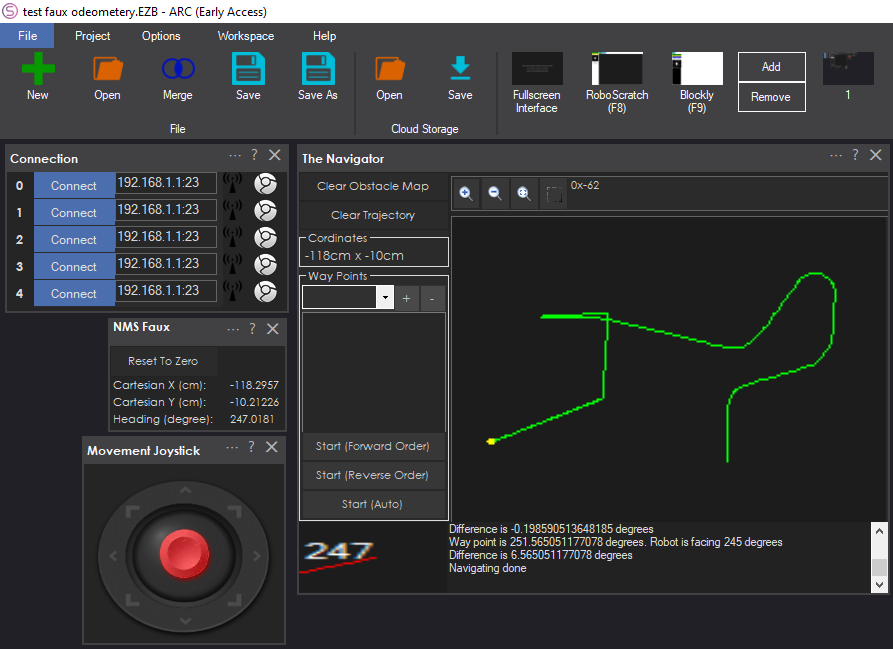
For robots that do not have odometry sensor feedback (e.g., wheel encoders, RealSense D435i, etc.), this will generate estimated pose odometry based on the travel distance reported by the movement manager. While this robot skill could be used in conjunction with lidar, it's generally not advised because the pose data from this skill will become very inaccurate over time.
How To Use This
If your robot has a lidar, it's recommended not to use this robot skill and instead use The Better Navigator, with the Lidar skill faking pose data. Those instructions will be covered in the Lidar's respective robot skill manual. For this robot skill, you are expected not to have a lidar and, therefore, to use distance sensors for navigation. While this robot skill will not produce reliable results, it can be used for DIY experimentation.To use this robot skill for navigation, "The Navigator" robot skill is recommended because it does not require lidar.
Configuration Menu
This robot skill calculates the distance the robot has moved based on its speed. Because ARC has dynamic speeds, the calibration will require a few measurements of a robot's travel distance over time. This information is entered in the config menu.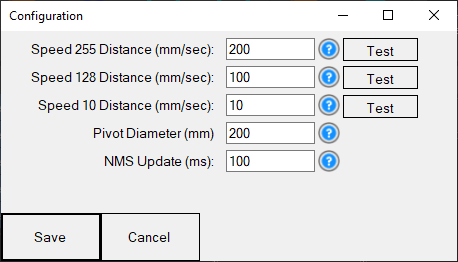
Speed 255 Distance - This is the distance in mm the robot travels at 255 speed in 1 second. Place a tape measure or ruler alongside the robot, starting at the wheel's center. Press the TEST button, and the robot will move quickly at full speed for 1 second. Measure how many mm the robot has moved and enter it here.
Speed 128 Distance - This is the distance in mm the robot travels at 128 speed in 1 second. Place a tape measure or ruler alongside the robot, starting at the wheel's center. Press the TEST button, and the robot will move quickly at full speed for 1 second. Measure how many mm the robot has moved and enter it here.
Speed 10 Distance - This is the distance in mm the robot travels at 10 speed in 1 second. Place a tape measure or ruler alongside the robot, starting at the wheel's center. Press the TEST button, and the robot will move quickly at full speed for 1 second. Measure how many mm the robot has moved and enter it here.
Pivot Diameter - The distance between the center and each wheel.
NMS Update - How often the robot skill will send data to the NMS. It is best to leave this at the default value of 250.



Updated to fix error when closing the robot skill