
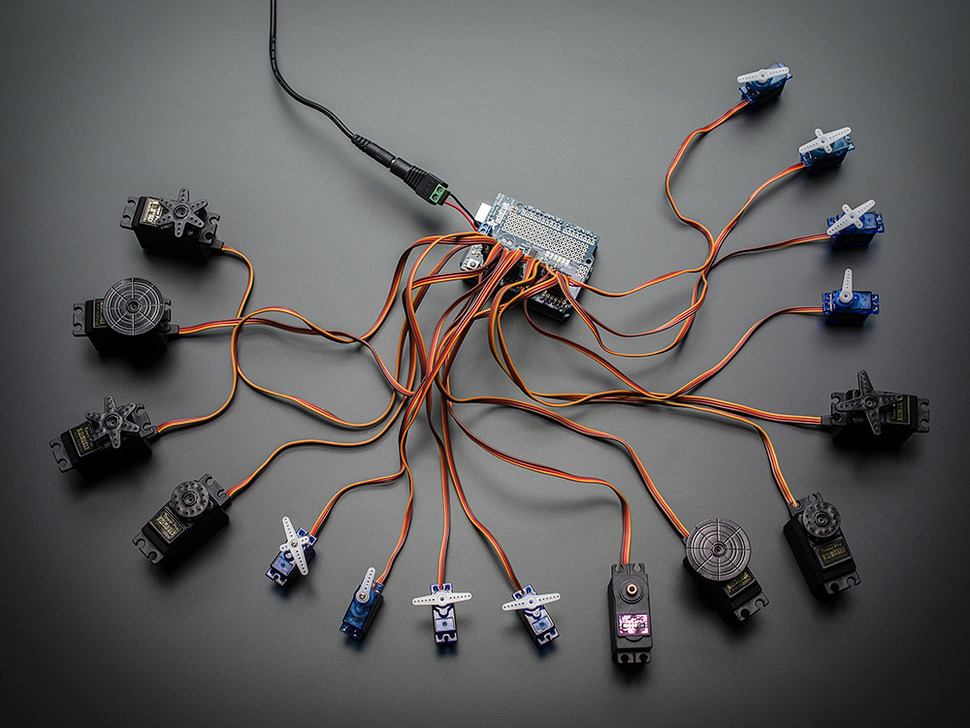
PCA9685 Servo Controller by Adafruit
If you’re building a robot or project with lots of servos (hexapods, animatronics, kinetic art, pan/tilt arrays, etc.), the PCA9685 makes it much easier. Instead of trying to plug many servos directly into an Arduino’s limited pins, the PCA9685 provides up to 16 servo outputs using a simple two‑wire connection (I2C) to the Arduino.
This setup is commonly used with Arduino boards that accept shields such as the Uno, Leonardo, Mega, or ADK. We recommend the Arduino Uno for beginners because it’s compact, inexpensive, and works great with ARC when loaded with the correct EZB firmware.
-
You load EZB firmware onto the Arduino.
This turns the Arduino into a controller that ARC can talk to. -
The Arduino talks to the PCA9685 board.
The Arduino sends I2C commands (usually over pins SDA/SCL). The PCA9685 generates stable servo pulses for up to 16 channels. -
ARC controls the servos.
In ARC you add servo controls/scripts and ARC sends commands through the Arduino (EZB firmware) to the PCA9685 outputs.
-
Servo power: Servos often need more power than USB can provide. In most builds you will use a separate 5–6V power supply for servos.
Tip: Many servo issues (jittering, resetting, random movement) are power-related.
- Common ground: If you use a separate servo power supply, make sure the GND (ground) of the servo power supply is connected to the GND of the Arduino/PCA9685 system.
- Servo count: The PCA9685 provides 16 channels. You can often stack or chain boards in some setups, but start with one board until everything works.
- Firmware choice matters: Different firmware builds exist for different Arduino + PCA9685 configurations. If one firmware does not match your hardware layout, ARC may connect but servo channels may not respond as expected.
Choose one of the firmware packages below. If you’re unsure which one to use, start with the newest official-looking option first, then try the others if needed.
-
ESP32Cam
For ESP32 Camera
-
Mickey's Firmware (Mar 4, 2019)
Useful if you have a similar build to Mickey’s original shield-based configuration.
-
EZ-Genuino_Uno_Adafruit_16_Servo_Shield.zip (Dec 11, 2022)
Newer firmware option for Arduino Uno + Adafruit 16-Channel PWM/Servo Shield style setups.
-
Miller's Generic PCA9685 EZB_UNO_PCA9685.zip
Generic PCA9685 firmware option (often helpful for non-shield PCA9685 breakout boards).
After downloading the firmware, follow the step-by-step tutorial to install it on your Arduino: https://synthiam.com/Tutorial/17526
What you will do in the tutorial:
- Install and open the Arduino IDE.
- Open the firmware project you downloaded (ZIP file).
- Select your Arduino board type (ex: Uno) and correct COM port.
- Upload the firmware to the Arduino.
- Connect ARC to the Arduino running EZB firmware.
- Add servo controls in ARC and test a single servo first (one channel) before connecting all servos.
- If a servo moves the wrong direction or doesn’t reach the expected range, use ARC servo configuration options (such as reverse and limits) to fine-tune motion.
- If servos jitter or ARC disconnects, re-check your power supply and ensure all grounds are connected together.

DJ that was the code EzAng said was needed in Post #10 of his. That is why I said what I said in my post. Anyway I loaded your new firmware and the above video shows you how well it works. Note I did test that all this hardware works using the Adafruit PWM servo script and it worked great.
Also ARC is the latest version and is connected to the UNO at 57600 baud as stated above.
comment removed
EzAng
A4-5 are SCL and SDA on the Arduino
DJ, tried the .zip you posted earlier, still no servo control. All is wired and assigned correctly. Hardware is 100% functional outside of ARC. Inside of ARC, nothing.
Smiller29, Also tried your way with no results. I have mine connected to the dedicated pins, R3 has them closest to the reset button, and labeled on the bottom of the board, with SCL closest to switch and SDA the next one over, beside AREF. I get the same as your video regardless which boards or breakouts used.
As I've said before, used ARC for other projects that DID NOT require an expansion board and all work, so still focusing on ARC-UNO-Breakout communication failure, as my exact set up works outside of ARC... Hours looking through code, etc and can't find the smoking gun here. Good luck, and I'll be following updates.
comment removed.
Using the other pins has no impact on making it work. This is a code issue.
Like I said:
I tried DJ's, Micky's code - it works
I modified their code, it all compiles and uploads it also works,
It maybe working for you but it is not working for Tom and I. I know the hardware works when you take ARC and this code out of the picture. I am using the latest 16 port board lib versions. Also the current IDE and the current ARC. This is not a connection problem or Hardware problem. This is a code issue somewhere.