

kamaroman68
USA
Asked
Seeking EZ-Robot Code Repository Access
Hello,
A few years ago, there was a repository containing programming resources for the Six, Roli, and JD robots, specifically from when EZ-Robot was managing them. I'm curious to know if that sample code repository is still accessible. Having access to these resources could provide a helpful foundation for getting a Six robot up and running. Would anyone know if this repository can still be found on the EZ-Robot website or elsewhere?
Related Hardware (view all EZB hardware)

EZ-B V4
by EZ-Robot
EZ-B v4/2 robot controller: dual Cortex ARM, Wi-Fi, audio/video, 24 servo/digital ports, I2C/UART, camera and Synthiam ARC control for custom robots
Wi-Fi / USB
Servos
24
Camera
Audio
UART
3
I2C
ADC
8
Digital
24
Related Robot Skills (view all robot skills)

Auto Position Movement Panel (Gait)
by Synthiam
Create servo frames/actions to animate humanoid, hexapod or custom gaits with smooth transitions, SW ramping and directional control

Script
by Synthiam
Multi-language ARC Script: build, run and debug Blockly, JavaScript, EZ-Script or Python with Intellisense, run/save/load and Roboscratch support

Or, just load ARC and select the JD project from the popup. And for exercises i'd look at ez-robot's website for their entire guide here: https://www.ez-robot.com/learn-robotics-getting-started-humanoid-robot-kit.html
that's for JD... and for Six it's here: https://www.ez-robot.com/learn-robotics-getting-started-with-the-hexapod-robot.html
You can view ez-robot's website through your web browser to find other videos.
Good tips from DJ_Sures - thanks for pasting them. Here’s a concise, actionable summary plus next steps so you can quickly load the JD / Six example projects and get exercising.
What DJ_Sures pointed out
Where to look in ARC (stepbystep)
If no popup: File Open Examples.
Useful Synthiam/EZRobot references
Also, do not forget that this Synthiam website has a "robot platform" for all the products you mentioned. When you asked the question, the "product" option was displayed for selection. You choose "EZB v4", which is not a particular robot, but the controller used separately for DIY. While selecting, you may have noticed several other products that you mentioned were in the list "JD, Six, Roli, AdventureBot, etc."...
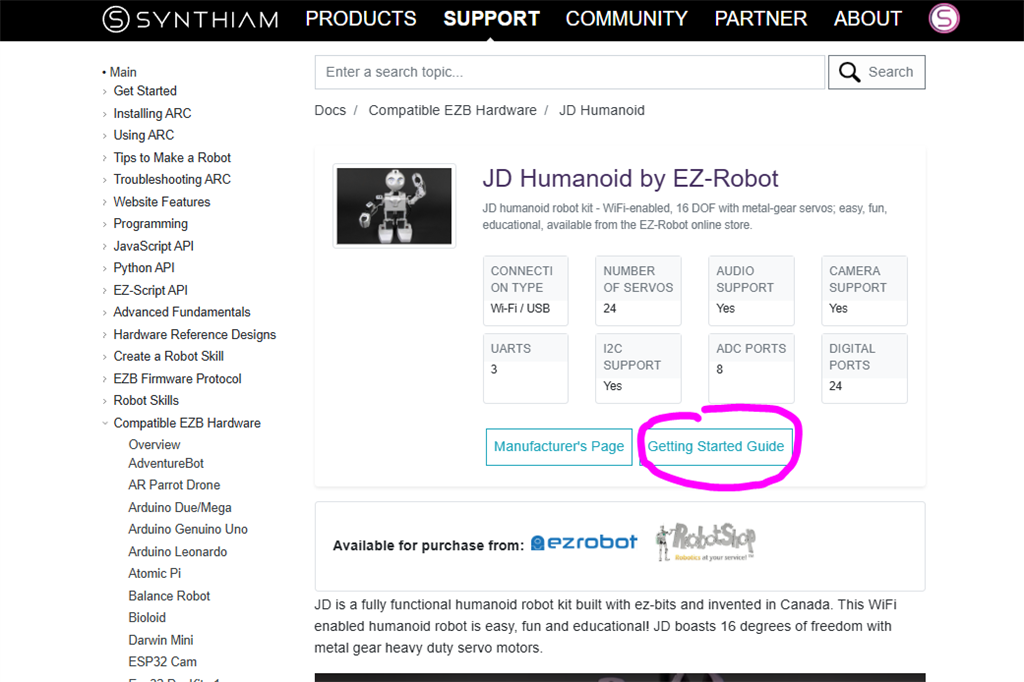
In the Synthiam-supported hardware list, each product includes a link to its respective getting-started guide and manual. Here's the link for convenience: https://synthiam.com/Support/Hardware/Hardware-Overview
On the supported product page, there are links to the respective getting-started guides. Here is an image of EZ-Robot JD as an example...
Here is a list of ARC-supported hardware, rather than directing you to the support section. You will find the EZ-Robot products listed, each with its own getting-started guide.
Adafruit
Arduino
BBC
DF Robot
DJI
Espressif
EZ-Robot
EZ-Robot & Gael Langevin
iRobot
Ohmnilabs
Parrot
Pi Foundation
Radxa
Robotis
Sain
Sphero
Team IoT
Up