@Holy1 not using a single auto positioner you can't ... Just write simple scripts (using the cheat sheet/control commands) to drive frames or actions on 2 or more different boards. This way you can can control one or more auto-positioner controls at once... e.g... Fingers move in one auto-positioner at the same time head moves in another auto-positioner control... and so on...
Yeah - create a different Auto Position for different servo groups. Such as one for the fingers, and one for everything else...
then you can execute them like so in ez-script..
ControlCommand("Auto Position Body", AutoPositionAction, "Arm Down")
ControlCommand("Auto Position Fingers", AutoPositionAction, "Fingers Out")

# Wait for auto positions to complete
sleep(500)
waitfor($AutoPositionStatus = 0)

ControlCommand("Auto Position Fingers", AutoPositionAction, "Peace Sign")

# Wait for auto positions to complete
sleep(500)
waitfor($AutoPositionStatus = 0)

ControlCommand("Auto Position Body", AutoPositionAction, "Arm Up")
ControlCommand("Auto Position Finger", AutoPositionAction, "Fingers In")
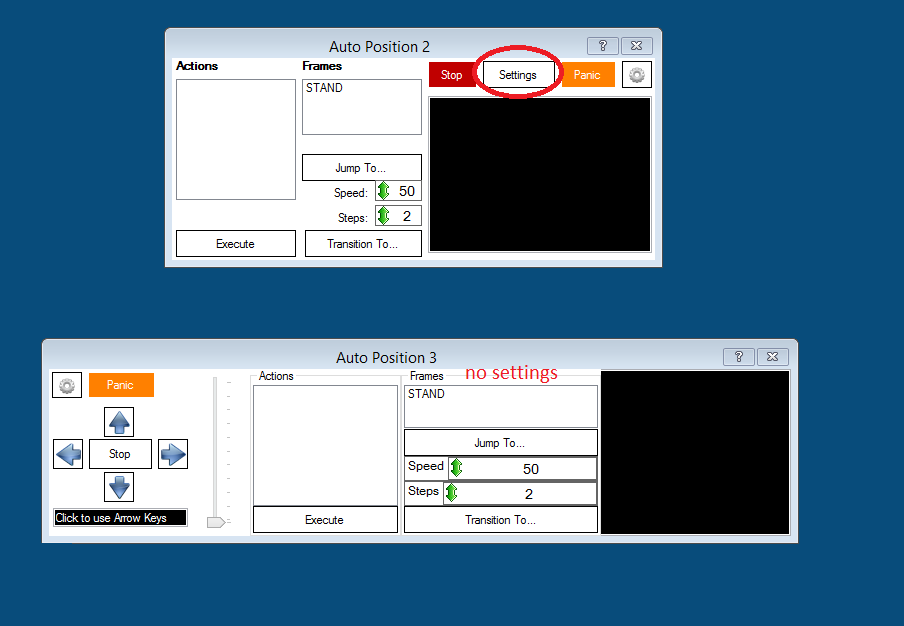
Just for clarity, you can only have one Movement Panel per project but that Movement Panel can be assigned to any EZB. An Autopostion with Movement Panel can only be EZB-0.








holy1
see this topic.
choose ezbv4
Hi Nomad 6R
Thanks, I had seen this but it is not the same thing.
@Holy1 not using a single auto positioner you can't ... Just write simple scripts (using the cheat sheet/control commands) to drive frames or actions on 2 or more different boards. This way you can can control one or more auto-positioner controls at once... e.g... Fingers move in one auto-positioner at the same time head moves in another auto-positioner control... and so on...
@Richard.
Thanks, I will work on that as learning scripting is next on the list as my Inmoov is ready to go ( as much as I am going to do for now) .
Yeah - create a different Auto Position for different servo groups. Such as one for the fingers, and one for everything else...
then you can execute them like so in ez-script..
I can see that the AutoPosition control (non movement) can be set to EZB 0-4 but AutoPosition (movement) is defaulted to EZB 0
Is this correct ?
Frank
Yes, all movement panels are EZ-B 0 only.
Alan
Just for clarity, you can only have one Movement Panel per project but that Movement Panel can be assigned to any EZB. An Autopostion with Movement Panel can only be EZB-0.