

hello robo
USA
Asked
 Resolved by ptp!
Arcpi / Ezbpi On Raspberry Pi 3 Errors
Hello,
I am trying to run ARCPi and EZBPi on a Raspberry Pi 3. I have tried installing them on two different versions of Raspbian, the latest release and the 11/13/18 (stretch) version, which was released closer to "DJ's 9th Live Hack" (I have been following that YouTube tutorial). When I execute ARCPi, I get the following error before ARC launches:
pi@raspberrypi:~/EZ-BuilderPi $ mono ARC.exe
Unknown heap type: #GUlD

Unknown heap type: #Blop

Unknown heap type: #GUlD

Unknown heap type: #Blop

The help viewer could not load. Maybe you don't have chmsee installed or haven't set MONO_HELP_VIEWER. The specific error message was: ApplicationName='chmsee', CommandLine='"https://synthiam.com/Software"';, CurrentDirectory='', Native error= Cannot find the specified file
X11 Error encountered:
  Error: BadMatch (invalid parameter attributes)
  Request:     12 (0)
  Resource ID: 0x1C013B8
  Serial:      48245
  Hwnd:        Hwnd, Mapped:True ClientWindow:0x1C013B9, WholeWindow:0x1C013B8, Zombie=False, Parent:[Hwnd, Mapped:True ClientWindow:0x1C013B7, WholeWindow:0x1C013B6, Zombie=False, Parent:[]]
  Control:     System.Windows.Forms.Panel, BorderStyle: None  at System.Environment.get_StackTrace () [0x00000] in <8f2c484307284b51944a1a13a14c0266>:0
  at System.Windows.Forms.XplatUIX11.HandleError (System.IntPtr display, System.Windows.Forms.XErrorEvent& error_event) [0x00000] in :0
  at System.Drawing.GDIPlus.GdipCreateFromXDrawable_linux (System.IntPtr , System.IntPtr , System.IntPtr& ) [0x00000] in <1917aa1c39d94b1a91807b8cd9f03350>:0
  at System.Drawing.Graphics.FromXDrawable (System.IntPtr drawable, System.IntPtr display) [0x00000] in <1917aa1c39d94b1a91807b8cd9f03350>:0
  at System.Drawing.Graphics.FromHwnd (System.IntPtr hwnd) [0x00000] in <1917aa1c39d94b1a91807b8cd9f03350>:0
  at System.Windows.Forms.Control.CreateGraphics () [0x00000] in :0
  at System.Windows.Forms.TextBoxBase.CreateGraphicsInternal () [0x00000] in :0
  at System.Windows.Forms.Document.owner_VisibleChanged (System.Object sender, System.EventArgs e) [0x00000] in :0
  at System.Windows.Forms.Control.OnVisibleChanged (System.EventArgs e) [0x00000] in :0
  at System.Windows.Forms.Control.OnParentVisibleChanged (System.EventArgs e) [0x00000] in :0
Once ARC launches, if I try to open a previously saved project, a window pops up with a similar message:
Version: 2019.05.08.00

System.IO.DirectoryNotFoundException: Directory 'EZ-Builder/Examples' not found.
  at System.IO.Directory.ValidateDirectoryListing (System.String path, System.String searchPattern, System.Boolean& stop) [0x00091] in <8f2c484307284b51944a1a13a14c0266>:0
  at System.IO.Directory.GetFileSystemEntries (System.String path, System.String searchPattern, System.IO.FileAttributes mask, System.IO.FileAttributes attrs) [0x00023] in <8f2c484307284b51944a1a13a14c0266>:0
  at System.IO.Directory.GetDirectories (System.String path, System.String searchPattern) [0x00000] in <8f2c484307284b51944a1a13a14c0266>:0
  at System.IO.Directory.GetDirectories (System.String path) [0x00000] in <8f2c484307284b51944a1a13a14c0266>:0
  at EZ_Builder.FormOpenEZB.XtZsj07xQ5 () [0x0000b] in <8a9b654daa5e46dc9cae530155c2d0ff>:0
  at EZ_Builder.FormOpenEZB..ctor (System.String folder) [0x0002d] in <8a9b654daa5e46dc9cae530155c2d0ff>:0
  at (wrapper remoting-invoke-with-check) EZ_Builder.FormOpenEZB:.ctor (string)
  at EZ_Builder.FormMain.MenuClick_Open (System.Object sender, System.EventArgs e) [0x00027] in <8a9b654daa5e46dc9cae530155c2d0ff>:0
  at (wrapper delegate-invoke) :invoke_void_object_EventArgs (object,System.EventArgs)
  at System.Windows.Forms.RibbonItem.OnClick (System.EventArgs e) [0x00042] in <8137470ea8f14440974ce9168ccc636e>:0
  at System.Windows.Forms.RibbonButton.OnClick (System.EventArgs e) [0x0003f] in <8137470ea8f14440974ce9168ccc636e>:0
  at System.Windows.Forms.RibbonMouseSensor.Control_MouseClick (System.Object sender, System.Windows.Forms.MouseEventArgs e) [0x00041] in <8137470ea8f14440974ce9168ccc636e>:0
  at System.Windows.Forms.Control.OnMouseClick (System.Windows.Forms.MouseEventArgs e) [0x0001c] in :0
  at System.Windows.Forms.Control.HandleClick (System.Int32 clicks, System.Windows.Forms.MouseEventArgs me) [0x0005d] in :0
  at System.Windows.Forms.Control.WmLButtonUp (System.Windows.Forms.Message& m) [0x00071] in :0
  at System.Windows.Forms.Control.WndProc (System.Windows.Forms.Message& m) [0x0016f] in :0
  at System.Windows.Forms.Ribbon.WndProc (System.Windows.Forms.Message& m) [0x00191] in <8137470ea8f14440974ce9168ccc636e>:0
  at System.Windows.Forms.Control+ControlWindowTarget.OnMessage (System.Windows.Forms.Message& m) [0x00000] in :0
  at System.Windows.Forms.Control+ControlNativeWindow.WndProc (System.Windows.Forms.Message& m) [0x0000b] in :0
  at System.Windows.Forms.NativeWindow.WndProc (System.IntPtr hWnd, System.Windows.Forms.Msg msg, System.IntPtr wParam, System.IntPtr lParam) [0x0008e] in :0
I searched Synthiam Community for a similar thread, so forgive me if this issue has been addressed in a previous post and I missed it. I am happy to answer any questions. Does anyone know what I could have done wrong during the installation?
Thanks Tim
Related Hardware (view all EZB hardware)
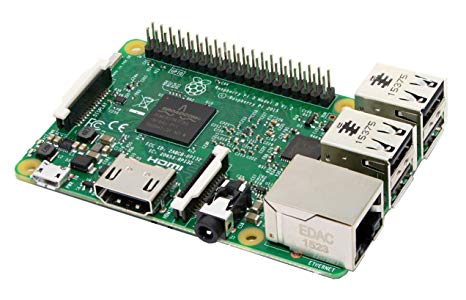
Raspberry Pi
by Pi Foundation
Run Synthiam ARC on Raspberry Pi 4+ with Windows 11 for robot control; use external EZB/Arduino for reliable I/O, SSD/USB storage recommended
Wi-Fi
Servos
✕
Camera
Audio
UART
✕
I2C
ADC
✕
Digital
✕

You don't have one ? What kind of controller do you use to configure (Dynamixel Wizard 2.0) the servos ?
I use an OpenCM9.04 board plugged into an OpenCM 485 Expansion Board.
Does the the EZ-B IoTiny support Dynamixel servos? It says that it does here, but when I try to add/use the Dynamixel plugin in ARC (while connected to the EZ-B IoTiny), I receive the following error:
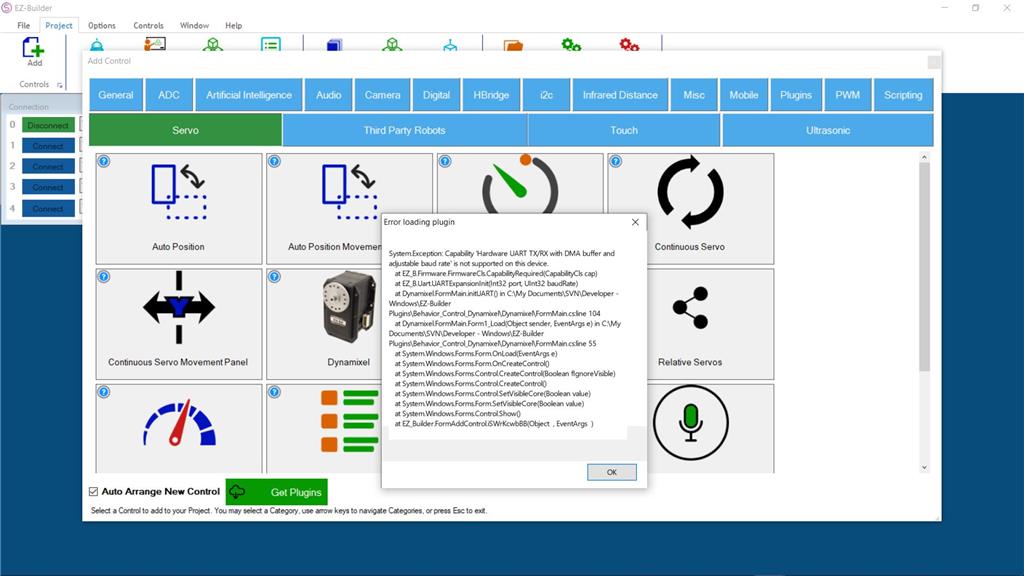
I am still not able to operate Dynamixel servos using the TX/RX pins on the Raspberry Pi, so I decided to try using an EZ-B IoTiny to test the Dynamixel servos. That way, I would know that I have the correct baud rate, servo ID's, etc. before further troubleshooting the direct Raspberry Pi/EZ-BuilderPi route.hi robo
did you take the wright one?the one in pic give no error.
Yes, I believe so. Thank you for taking the time to test the Dynamixel plugin. Was ARC connected to an EZ-B IoTiny while adding the Dynamixel plugin? That is when I receive the error. When not connected, I am able to add the plugin without an error.
i used the io tiny.i have no dynamixels .it opened without an error.
Thank you, I will try reinstalling ARC and the Dynamixel plugin.
I tried reinstalling ARC, the Dynamixel plugin and I updated the firmware for the EZ-B IoTiny board, but I am still not able to use the Dynamixel plugin while connected to the EZ-B IoTiny. I received the same error (from the screenshot attached to post #59).
So I disconnected the EZ-B IoTiny from ARC and once again tried adding the Dynamixel plugin. This time, I did not receive an error from adding the Dynamixel plugin (with the EZ-B IoTiny disconnected). I then tried connecting to the EZ-B IoTiny, but was not able to (I received an error message). I added Debug so that you could see what is causing the error:
Just to confirm the source of my connection issue, I removed the Dynamixel plugin, and was then able to connect to the EZ-B IoTiny:
Any thoughts?