

hello robo
USA
Asked
 Resolved by ptp!
Arcpi / Ezbpi On Raspberry Pi 3 Errors
Hello,
I am trying to run ARCPi and EZBPi on a Raspberry Pi 3. I have tried installing them on two different versions of Raspbian, the latest release and the 11/13/18 (stretch) version, which was released closer to "DJ's 9th Live Hack" (I have been following that YouTube tutorial). When I execute ARCPi, I get the following error before ARC launches:
pi@raspberrypi:~/EZ-BuilderPi $ mono ARC.exe
Unknown heap type: #GUlD

Unknown heap type: #Blop

Unknown heap type: #GUlD

Unknown heap type: #Blop

The help viewer could not load. Maybe you don't have chmsee installed or haven't set MONO_HELP_VIEWER. The specific error message was: ApplicationName='chmsee', CommandLine='"https://synthiam.com/Software"';, CurrentDirectory='', Native error= Cannot find the specified file
X11 Error encountered:
  Error: BadMatch (invalid parameter attributes)
  Request:     12 (0)
  Resource ID: 0x1C013B8
  Serial:      48245
  Hwnd:        Hwnd, Mapped:True ClientWindow:0x1C013B9, WholeWindow:0x1C013B8, Zombie=False, Parent:[Hwnd, Mapped:True ClientWindow:0x1C013B7, WholeWindow:0x1C013B6, Zombie=False, Parent:[]]
  Control:     System.Windows.Forms.Panel, BorderStyle: None  at System.Environment.get_StackTrace () [0x00000] in <8f2c484307284b51944a1a13a14c0266>:0
  at System.Windows.Forms.XplatUIX11.HandleError (System.IntPtr display, System.Windows.Forms.XErrorEvent& error_event) [0x00000] in :0
  at System.Drawing.GDIPlus.GdipCreateFromXDrawable_linux (System.IntPtr , System.IntPtr , System.IntPtr& ) [0x00000] in <1917aa1c39d94b1a91807b8cd9f03350>:0
  at System.Drawing.Graphics.FromXDrawable (System.IntPtr drawable, System.IntPtr display) [0x00000] in <1917aa1c39d94b1a91807b8cd9f03350>:0
  at System.Drawing.Graphics.FromHwnd (System.IntPtr hwnd) [0x00000] in <1917aa1c39d94b1a91807b8cd9f03350>:0
  at System.Windows.Forms.Control.CreateGraphics () [0x00000] in :0
  at System.Windows.Forms.TextBoxBase.CreateGraphicsInternal () [0x00000] in :0
  at System.Windows.Forms.Document.owner_VisibleChanged (System.Object sender, System.EventArgs e) [0x00000] in :0
  at System.Windows.Forms.Control.OnVisibleChanged (System.EventArgs e) [0x00000] in :0
  at System.Windows.Forms.Control.OnParentVisibleChanged (System.EventArgs e) [0x00000] in :0
Once ARC launches, if I try to open a previously saved project, a window pops up with a similar message:
Version: 2019.05.08.00

System.IO.DirectoryNotFoundException: Directory 'EZ-Builder/Examples' not found.
  at System.IO.Directory.ValidateDirectoryListing (System.String path, System.String searchPattern, System.Boolean& stop) [0x00091] in <8f2c484307284b51944a1a13a14c0266>:0
  at System.IO.Directory.GetFileSystemEntries (System.String path, System.String searchPattern, System.IO.FileAttributes mask, System.IO.FileAttributes attrs) [0x00023] in <8f2c484307284b51944a1a13a14c0266>:0
  at System.IO.Directory.GetDirectories (System.String path, System.String searchPattern) [0x00000] in <8f2c484307284b51944a1a13a14c0266>:0
  at System.IO.Directory.GetDirectories (System.String path) [0x00000] in <8f2c484307284b51944a1a13a14c0266>:0
  at EZ_Builder.FormOpenEZB.XtZsj07xQ5 () [0x0000b] in <8a9b654daa5e46dc9cae530155c2d0ff>:0
  at EZ_Builder.FormOpenEZB..ctor (System.String folder) [0x0002d] in <8a9b654daa5e46dc9cae530155c2d0ff>:0
  at (wrapper remoting-invoke-with-check) EZ_Builder.FormOpenEZB:.ctor (string)
  at EZ_Builder.FormMain.MenuClick_Open (System.Object sender, System.EventArgs e) [0x00027] in <8a9b654daa5e46dc9cae530155c2d0ff>:0
  at (wrapper delegate-invoke) :invoke_void_object_EventArgs (object,System.EventArgs)
  at System.Windows.Forms.RibbonItem.OnClick (System.EventArgs e) [0x00042] in <8137470ea8f14440974ce9168ccc636e>:0
  at System.Windows.Forms.RibbonButton.OnClick (System.EventArgs e) [0x0003f] in <8137470ea8f14440974ce9168ccc636e>:0
  at System.Windows.Forms.RibbonMouseSensor.Control_MouseClick (System.Object sender, System.Windows.Forms.MouseEventArgs e) [0x00041] in <8137470ea8f14440974ce9168ccc636e>:0
  at System.Windows.Forms.Control.OnMouseClick (System.Windows.Forms.MouseEventArgs e) [0x0001c] in :0
  at System.Windows.Forms.Control.HandleClick (System.Int32 clicks, System.Windows.Forms.MouseEventArgs me) [0x0005d] in :0
  at System.Windows.Forms.Control.WmLButtonUp (System.Windows.Forms.Message& m) [0x00071] in :0
  at System.Windows.Forms.Control.WndProc (System.Windows.Forms.Message& m) [0x0016f] in :0
  at System.Windows.Forms.Ribbon.WndProc (System.Windows.Forms.Message& m) [0x00191] in <8137470ea8f14440974ce9168ccc636e>:0
  at System.Windows.Forms.Control+ControlWindowTarget.OnMessage (System.Windows.Forms.Message& m) [0x00000] in :0
  at System.Windows.Forms.Control+ControlNativeWindow.WndProc (System.Windows.Forms.Message& m) [0x0000b] in :0
  at System.Windows.Forms.NativeWindow.WndProc (System.IntPtr hWnd, System.Windows.Forms.Msg msg, System.IntPtr wParam, System.IntPtr lParam) [0x0008e] in :0
I searched Synthiam Community for a similar thread, so forgive me if this issue has been addressed in a previous post and I missed it. I am happy to answer any questions. Does anyone know what I could have done wrong during the installation?
Thanks Tim
Related Hardware (view all EZB hardware)
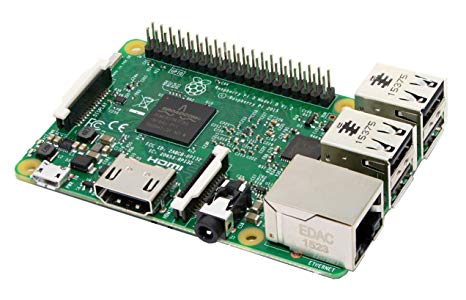
Raspberry Pi
by Pi Foundation
Run Synthiam ARC on Raspberry Pi 4+ with Windows 11 for robot control; use external EZB/Arduino for reliable I/O, SSD/USB storage recommended
Wi-Fi
Servos
✕
Camera
Audio
UART
✕
I2C
ADC
✕
Digital
✕

Ideally, I would like to have ARC and EZBPi run on the Raspberry Pi, but I would also be happy to have just ARC run on the Pi and convert the OpenCM9.04 into an EZ-B connected via USB. That would solve my Dynamixel issue; however, I am still getting errors using the Pi camera with ARC. ptp mentioned in post #15 that there may not be a solution for getting the camera to work with this method (if I understand correctly). Has anyone been able to get the Pi camera working with ARC? If so, please chime in. I am also still having issues installing ARC on the Pi. I have watched DJ's 9th Live Hack a dozen times and I cannot help but notice that when DJ runs:
For the first time, he is not receiving the same errors which I am encountering. In addition, it appears that he does not have to manually create the "Examples" folder. In that tutorial, Mono, ARC and EZBpi were already installed (the folders containing ARC and EZBPi are removed at the start of the tutorial) and I wonder if there is a configuration step (or something else) that I am missing. I primarily work with hardware design and have very limited experience with code, so perhaps I am missing something that would be an obvious step for someone with even basic knowledge.
As for your ZOE platform (I saw your Youtube video from a few days ago), it's really awesome (also great work on the video)! I would love to incorporate Unity into future platforms. I have thoughts on AI, self-localization, etc. which would benefit from using a game engine, but that is a conversation for another time. I also have a Quest, it's a really nice upgrade from the Go.
You can run ARC on the Pi, plus and EZB Pi on your Raspberry Pi...and you could also add your OpenCM with EZB Firmware, an EZB v4, and some Arduino with EZB Firmware! There are lots of different hardware scenarios, just choose the one that suits your project!
I did not experience your issues with the Pis camera when using a Pi 3, but cannot connect when using my Pi Zero...
Good to hear you got an Oculus Quest, its a great way to drive your robot...so much fun!!
I am very positive that future revisions of the EZB Pi will sort out connectivity issues, the Synthiam team is constantly improving the software...
I just looked at the settings for the XL430 servos using Dynamixel Wizard 2.0 and found that the default baud rate is set at 1Mbps.
When I tried to change the baud rate I received a message indicating that there were multiple servos with the same ID. I tried connecting just one servo and changing it's ID (from 2 to 12), but when I attempted to change the baud rate from 1 Mbps to 57600 bps, I received the same message.
I will send Robotis Support an email on Monday, but for now, should I set the baud rate in the Dynamixel plugin (in ARC) to 1000000?
Why do you want to change the servos baud rate?
If 1000000 works, then I’m happy to leave the baud rate as is; however, I am curious as to why the baud rate is different from what is listed in it’s specs and also why that message appears when attempting to change it...
Ah OK, that is really strange...I never used the Dynamixel Wizard, I am curious what customer service will reply!!
@hello robo: If you have a U2D2 https://www.trossenrobotics.com/dynamixel-u2d2.aspx you can use it with EZB server. The specs mentions a HIGH performance FTDI Usb/Serial device, the raspberry pi sees a serial device, and you can specify the serial device with EZB PI server.
It's the recommended solution by Dynamixel and is clean no hacks/modifications needed .
Thanks ptp, I will order one to evaluate. It looks like a promising solution for my issue controlling Dynamixel servos.