

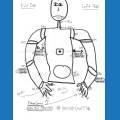




does anyone has done the offset from jd? and second howmany degrees is jd neck ?
Asked
— Edited
9 Participants
 Audio File Out EZB
— Stream MP3 or WAV files from your PC to the primary EZ-B speaker for robot audio playback, alerts, music, and voice clips.
Try it →
Audio File Out EZB
— Stream MP3 or WAV files from your PC to the primary EZ-B speaker for robot audio playback, alerts, music, and voice clips.
Try it →

@nomad... Can you post a picture of your JD connected to ARC with all the servos set at 90?....
well then i have a problem.when i open ARC he shows the init script. i click open and connect jd ,he doesn take the pose off the init.
Just set all JDs servos to 90 (no offsets) and let us see what he looks like when you connect to him in ARC....
@Richard, the brackets are preinstalled (hence the requirement for calibration).
ok i make a pic connected to pc.
the brackets where on the servo allreddy mounted. and my exsperiance tell ,do the offset whithout the brackets.
@Rich... Thanks for that.... Then I guess Nomad is just not using the software correctly?.... I don't have anything else to suggest @Nomad, sorry....
Leave the brackets.
Do the offset on an assembled robot
rr i like anest answers.am uploading a video. for the first time the ARC gifs an error.cant fint init pose.