
Change Release Notes
This is one of my most proud releases of ARC yet! When we advance the functionality of the ARC Robot Control Software, sometimes your projects will need to be updated also... This is one of those updates
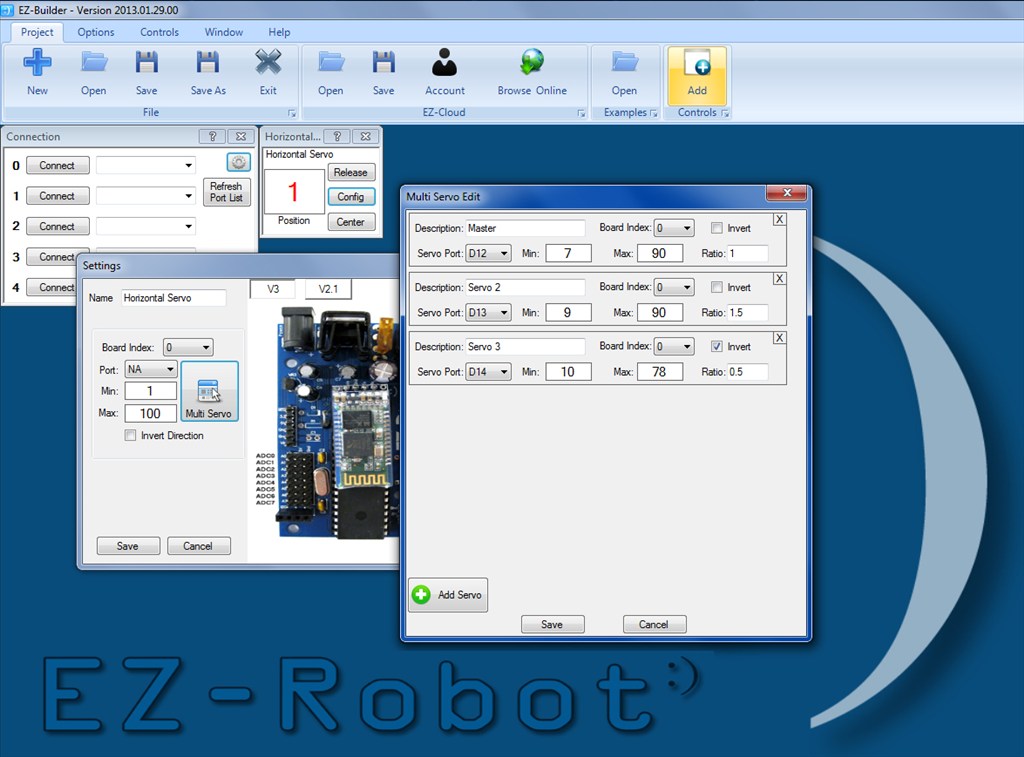
The major change in this update is the servo Configuration in all controls that use Servos. All servo Controls now support Multiple Servos! This is a very unique feature to EZ-Robot and an excellent example of how innovative our product is. I'm very excited to see what amazing uses this feature will be used for.
*Note: Existing projects will need the servo ports and ranges re-selected for this update.
Auto Position Editor has ALT-KEY shortcuts for common used functions
Background Images added to Auto Position and Virtual Robot are resized to decrease EZB saved file size
QR Code Generator has a help file (when clicked on ? question mark icon)
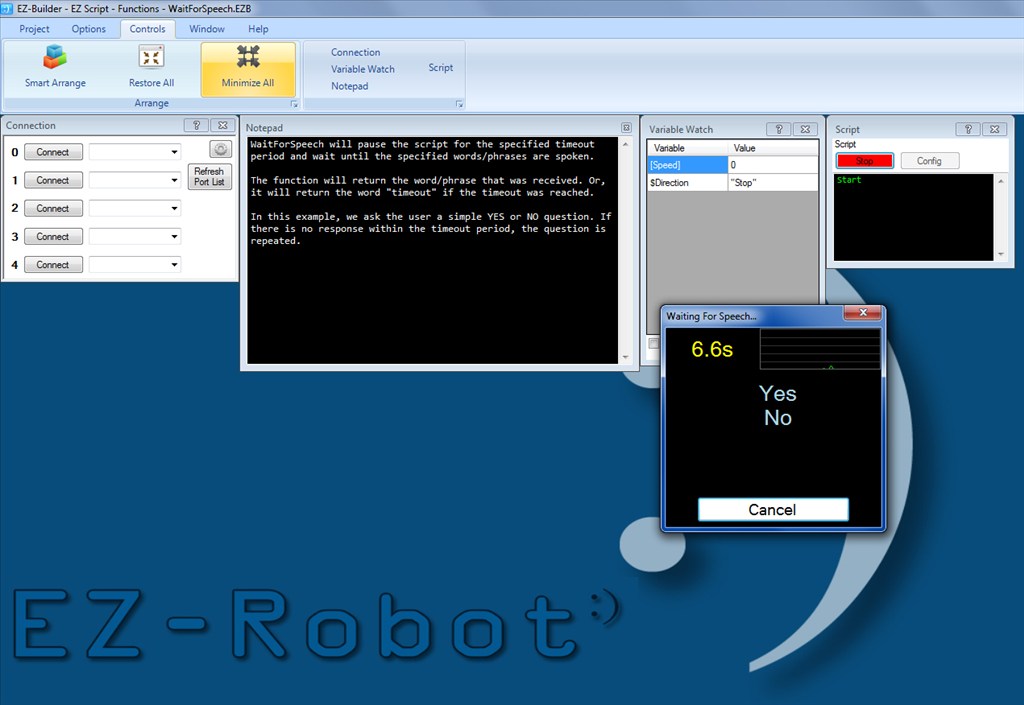
WaitForSpeech() displays a popup with available commands, and also displays a countdown timer
All servo Controls support Multiple Servos (camera, ez430, Joystick, Wiimote, servo Pad, servo Horizontal, servo Vertical, Sound Servo, Vuzix, etc)
Controls that support Mulitple Servos can also be adjusted by a ratio.
Digital Controls display custom text instead of ON/OFF
MP3TriggerPlay() bug fix (does not require Speech Recognition Control)
Speech Recognition has a "Display available commands" button
Preferences has option to hide default EZ-Robot Wallpaper
Some of the CONFIG buttons have changed to icons instead of txt. All will eventually be changed.
EZ-SDK has also been updated
New EZ-Script ControlCommands to Show/Hide the available speech commands
ARC Downloads
ARC
FREE- 1 third-party plugin skill per project
- Trial cloud services
- Personal, DIY & education use
- Updated every 6–12 months
 Download
ARC
PRO- Use on 2+ PCs simultaneously
- Unlimited robot skills
- Cloud backup & revision history
- Weekly features & bug fixes
- Business use permitted
ARC
RUNTIME- Load & run any ARC project
- Read-only mode
- Unlimited robot skills
- Includes early access fixes & features
- Minimum requirements: Windows 10 or higher, 2 GB RAM, 500 MB free disk space.
- Recommended: Windows 10 or higher, 8 GB RAM, 1 GB free disk space.
- Prices are in USD.
- More about each edition: Download & install guide.
- Latest changes: Release notes.
Compare Editions
| Feature |
ARC
FREE
|
ARC
PRO
|
|---|---|---|
| Get ARC Free | View Plans | |
| Usage | Personal · DIY · Education | Personal · DIY · Education · Business |
| Early access to new features & fixes | — | ✓ |
| Simultaneous microcontroller connections * | 1 | 255 |
| Robot skills * | 20 | Unlimited |
| Skill Store plugins * | 1 | Unlimited |
| Cognitive services usage ** | 10 / day | 6,000 / day |
| Auto-positions gait actions * | 40 | Unlimited |
| Speech recognition phrases * | 10 | Unlimited |
| Camera devices * | 1 | Unlimited |
| Vision resolution | max 320×240 | Unlimited |
| Interface builder * | 2 | Unlimited |
| Cloud project size | — | 128 MB |
| Cloud project revision history | — | ✓ |
| Create Exosphere requests | — | 50 / month |
| Exosphere API access | — | Contact Us |
| Volume license discounts | — | Contact Us |
| Get ARC Free | View Plans |
* Per robot project
** 1,000 per cognitive type: vision recognition, speech recognition, face detection, sentiment, text recognition, emotion detection, azure text to speech

Upgrade to ARC Pro
Experience early access to the latest features and updates. You'll have everything that is needed to unleash your robot's potential.
where is the, "make me a sandwich button"!?!?!
Nah don't need it.... Got replaced with a "Make me a Coffee" voice command!
This is the one I've been waiting on. Very nice job.
@DJSures can we have a few settings on this new voice commands screen for full screen, colour and size of font? Perhaps even a line or two of text to repeat the question asked.... hmmm, possibly a graphic as well.... liking this new feature. It could easily become a visual front end!
So what does this mean in a practical sense? Is there gonna be a video for this?
I have missed ..ahem... a few major software releases and all my saved files are not loading using the latest update (ARC Version 2013.03.18.00) with an error window that looks like this..I believe the 2013.01.30 added multiple servos?
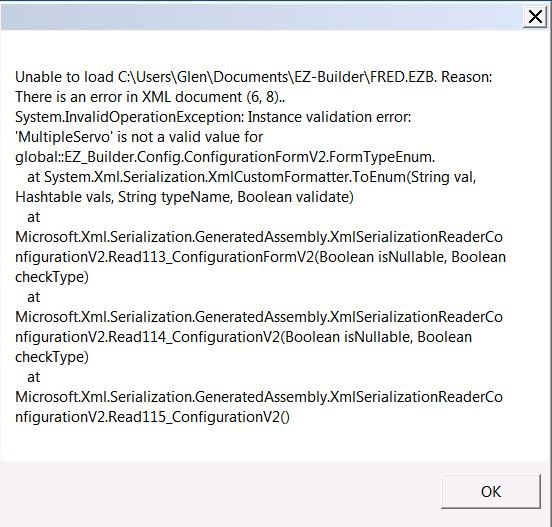
My files WILL load with version 2013.01.12! whew! I think i will require the 2013.01.30 version to allow my files to load..I am gonna thank Rich or DJ in advance and including ALL the EZ communityI don't have the 2013.01.30 version in my downloads, I only have a later one for around mid February. I saw there was a post not so long ago with a similar issue, I will see if I can find it shortly.
IRobot can you post you project file here and ill recover it for you