





hi
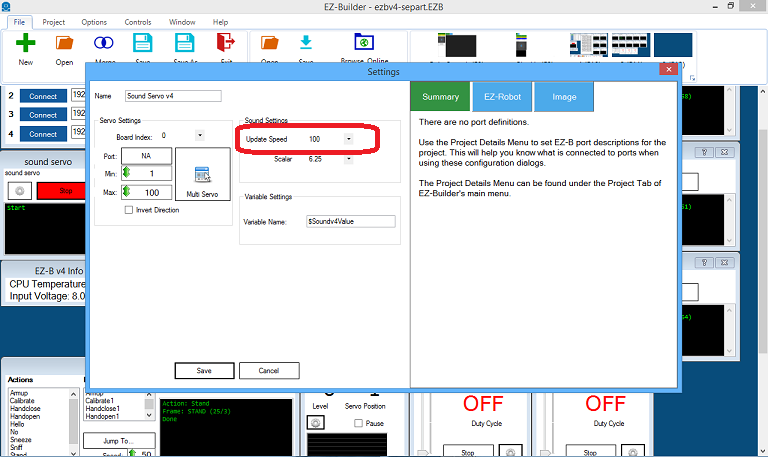
is there a window for talk servo with led?insteadt of inmoove mouth opens, while talking,but with a led then.
 Comm Expansion Configuration
— Configure EZ-B v4/2 Comm Expansion: switch between UART transparent proxy and USB direct PC link (avoids WiFi); EZ-B needs separate power.
Try it →
Comm Expansion Configuration
— Configure EZ-B v4/2 Comm Expansion: switch between UART transparent proxy and USB direct PC link (avoids WiFi); EZ-B needs separate power.
Try it →
 Resolved by Redzone!
hi
is there a window for talk servo with led?insteadt of inmoove mouth opens, while talking,but with a led then.

Nomad did you see the code I pasted?
EzAng
ezang
do you mean this?
$soundright = auto needs to be # $soundright = 0
Yes
in code we initialize it with 0 - zero
$soundright = 0
Just like $pwmvalue = 0
was initialize with 0 - zero
or $soundright = auto
will work
EzAng
ezang
thats good info thanks.
You know , you can use also use:
$pwmvalue = auto
lol
All works
I guess the real question is did Bobsheaux get it?
EzAng
ezang
no i didn know that.
I use
$soundvalue = auto $pwmvalue = 0
works the best
EzAng
Or a simple script to turn on and off
set the servo speed to 2 or whatever, I use 0
ServoSpeed(d0, 0)
:loop
Set LED On
pwm(d0, 0)
wait some time for the pwm to do its ramping thing
sleep(1000)
#set LED Off pwm(d0, 100)
wait some time for the pwm to do its ramping thing
sleep(1000)
goto(loop)