jp15sil24
 Resolved by Synthiam Support!
Depthsensor Plugin Load Error
- I have a question about the ARC robot skill "DepthSensor."
I was looking for the Kinect Body Control skill but couldn't find it. After some research, I saw that it has been replaced by the DepthSensor robot skill in ARC. I attempted to download the DepthSensor skill, but ARC produced the following error when loading the plugin:
Timestamp: 2026-04-23 15:00:30 UTC
ARC Version: 2026.04.16.01
OS Version: Microsoft Windows NT 10.0.26200.0
Base Directory: C:\Program Files (x86)\Synthiam Inc\ARC by Synthiam\
=== Message Information ===
Unable to load one or more of the requested plugin types.
Update ARC and this plugin from the Synthiam website, then restart your PC and launch ARC.
If an update is available, ARC will prompt you at startup.
If the issue persists, report it on the Community Forum and include this error text.
Error:
System.Reflection.ReflectionTypeLoadException: Unable to load one or more of the requested types. Retrieve the LoaderExceptions property for more information.
at System.Reflection.RuntimeModule.GetTypes(RuntimeModule module)
at System.Reflection.RuntimeModule.GetTypes()
at System.Reflection.Assembly.GetTypes()
at ARC.FormAddControl.VmiJVDQC7f7LxJjUoe4a(Object )
at ARC.FormAddControl.sL05JNDV45(String )
Loader exceptions:
System.IO.FileLoadException
Could not load file or assembly 'EZ-Builder, Version=2015.8.9.0, Culture=neutral, PublicKeyToken=c3a3457c97d352d9' or one of its dependencies. General Exception (Exception from HRESULT: 0x80131500)
The drivers for my depth camera/Kinect were installed correctly (I did not get any errors during installation). I haven't modified ARC settings or other plugins.
Do you have any ideas about what might be causing this, or what additional information (for example, whether the camera is connected directly to the PC or through an EZB, or logs) I should provide?
Related Hardware (view all EZB hardware)

Related Robot Skill (view all robot skills)

Upgrade to ARC Pro
Don't limit your robot's potential – subscribe to ARC Pro and transform it into a dynamic, intelligent machine.
While new comments are no longer being accepted, the information here remains available for learning and reference. Check the most recent comment for additional details.
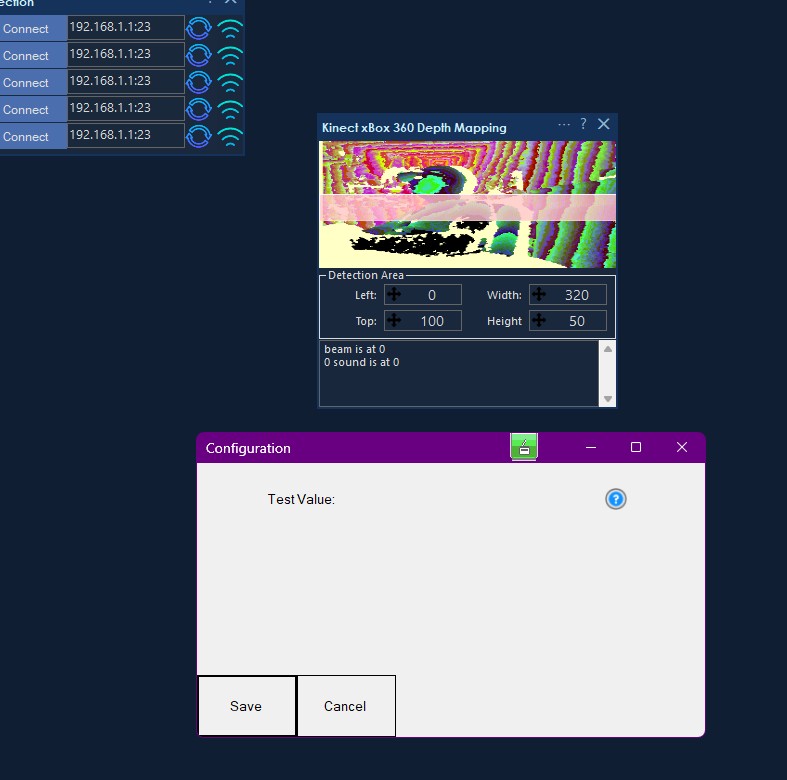
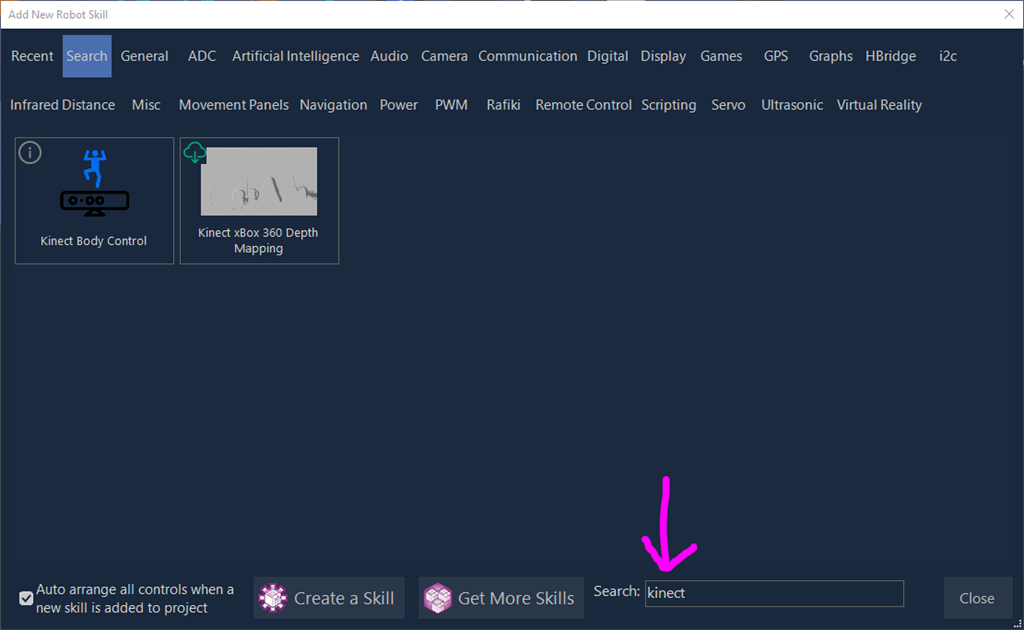
you wrote: If you want, paste the ARC log lines that appear right after trying to add or load the skill. The exact load failure will tell us whether it is. I'd like to but as i can not see the skill , i can not add or load it. maybe i just need the fileplugin.xml?Thanks - the screenshot helps.
What I see
Your Kinect xBox 360 Depth Mapping skill is loading, and the little "test" text you’re seeing is likely just a placeholder/test UI from that plugin. That means ARC is definitely loading that skill.
But Kinect Body Control is still not appearing, even after deleting the plugin folder, which strongly suggests it’s not currently available to ARC in a usable form on your setup.
Important point about
plugin.xmlNo, plugin.xml alone will not fix this.
plugin.xmlis only the metadata file ARC uses to identify and load a skill properly.If the actual plugin package is:
plugin.xml, orEZ-Builder,Version=2015.8.9.0, orthen ARC may refuse to list it or load it correctly.
Why you can’t "add from the store"
You are already doing the correct thing inside ARC:
That is the right place to add it. The web store is only for browsing info.
What this means
Based on everything you’ve shown:
About the Kinect xBox 360 Depth Mapping skill
From your screenshot, that skill is functioning, and it looks like it has:
So the skill is alive, even if it isn’t the old body-tracking feature you expected.
Best next step
If your goal is body tracking / skeleton tracking, tell me exactly what you want to do with the Kinect:
Then I can tell you whether ARC has a current skill for it, or whether we need to build a workaround using a custom robot skill.
If you want to verify the plugin issue
Try this one thing:
If you want, I can help you inspect the plugin folder structure and tell you exactly what files should be there.
The folder containing those files is most likely an incomplete install. Or higher probably, an incomplete uninstall. You can look at the date time on the folder to see when that occurred.
So ARC sees the folder, but the definition file is missing.
an easy fix is to remove that folder:
C:\ProgramData\ARC\Plugins\0518bd78-2ac0-487e-ba58-c8b33bd2c81eIn fact, you could remove all folders within
C:\ProgramData\ARC\Pluginsif you want to ensure a 100% recovery of all robot skills. You will not lose any saved configuration by removing that folder. It would remove the source libraries for the plugins - in which case you would be prompted to install plugins moving forward if needed for a project.Thank you for the detailed feedback. I really appreciate your help in troubleshooting this.
I will follow your advice and clean the C:\ProgramData\ARC\Plugins folder to ensure there are no corrupted files or incomplete installations on my end. It’s a great suggestion to start fresh.
Quick question to help me plan my project: Once I've cleaned everything, if the 'Kinect Body Control' skill still doesn't appear in the search, does it mean it has been moved to a legacy status for the 2026 version?
I am a big fan of the JD robot demos using Kinect, and I was hoping to try the same setup. If that specific skill is no longer available, I’m happy to look into other ways like Auto Position or servo Recorder to achieve my goals, but I wanted to check with the experts first so I don't miss something obvious!
Thanks again for your time and for the great support
The connect body control is not legacy status. The other skill which started the conversation is expired and has been removed until the author updates it.
always feels good starting fresh! You’ll be prompted to install robot skills as needed once the folder is removed.
I have followed your instructions and successfully cleaned the corrupted folders as requested. Unfortunately, the diagnostic is final: despite the cleanup, the skill still does not appear in the ARC Robot Skills search results.
Since the skill remains indexed as missing or unavailable for my version/region, I have decided to pivot my workflow toward the Auto Position skill to move forward with my robot arm integration. Thank you for the assistance provided so far, I will be proceeding with this alternative solution for now.
This is concerning that it's not showing up for you. I am raising priority to have this issue looked into immediately to find out what's happening. It should be caught and logged, so something is slipping through the cracks. Stay tuned while it's being looked into.
We have made some changes on our end - and would like you to start ARC with an internet connection, and verify if the Kinect robot skill that you are looking is available for installation.