

jp15sil24
 Resolved by Synthiam Support!
Depthsensor Plugin Load Error
- I have a question about the ARC robot skill "DepthSensor."
I was looking for the Kinect Body Control skill but couldn't find it. After some research, I saw that it has been replaced by the DepthSensor robot skill in ARC. I attempted to download the DepthSensor skill, but ARC produced the following error when loading the plugin:
Timestamp: 2026-04-23 15:00:30 UTC
ARC Version: 2026.04.16.01
OS Version: Microsoft Windows NT 10.0.26200.0
Base Directory: C:\Program Files (x86)\Synthiam Inc\ARC by Synthiam\
=== Message Information ===
Unable to load one or more of the requested plugin types.
Update ARC and this plugin from the Synthiam website, then restart your PC and launch ARC.
If an update is available, ARC will prompt you at startup.
If the issue persists, report it on the Community Forum and include this error text.
Error:
System.Reflection.ReflectionTypeLoadException: Unable to load one or more of the requested types. Retrieve the LoaderExceptions property for more information.
at System.Reflection.RuntimeModule.GetTypes(RuntimeModule module)
at System.Reflection.RuntimeModule.GetTypes()
at System.Reflection.Assembly.GetTypes()
at ARC.FormAddControl.VmiJVDQC7f7LxJjUoe4a(Object )
at ARC.FormAddControl.sL05JNDV45(String )
Loader exceptions:
System.IO.FileLoadException
Could not load file or assembly 'EZ-Builder, Version=2015.8.9.0, Culture=neutral, PublicKeyToken=c3a3457c97d352d9' or one of its dependencies. General Exception (Exception from HRESULT: 0x80131500)
The drivers for my depth camera/Kinect were installed correctly (I did not get any errors during installation). I haven't modified ARC settings or other plugins.
Do you have any ideas about what might be causing this, or what additional information (for example, whether the camera is connected directly to the PC or through an EZB, or logs) I should provide?
Related Hardware (view all EZB hardware)

Related Robot Skill (view all robot skills)

Upgrade to ARC Pro
Unleash your robot's full potential with the cutting-edge features and intuitive programming offered by Synthiam ARC Pro.
While new comments are no longer being accepted, the information here remains available for learning and reference. Check the most recent comment for additional details.
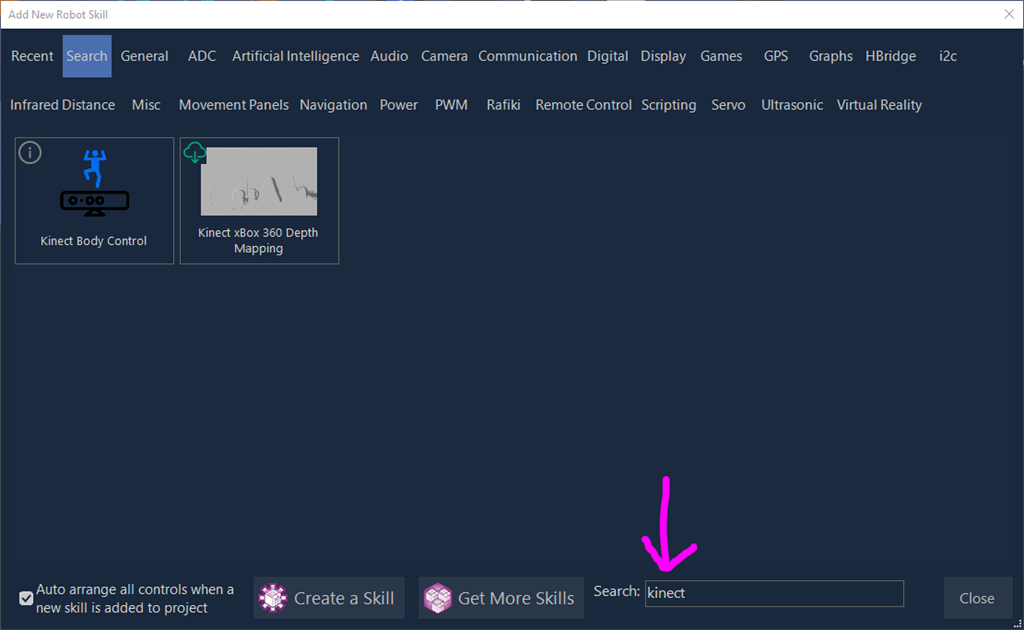
For Kinect sensors, use the Kinect robot skill. You can also use the SEARCH feature in ARC's Add robot skill menu. You can type the words that you are looking for and it will search robot skills. Here is a screenshot
i am using the last version ff ARC. click on project ,add then search kinect. it displays just Kinect Xbox 360 Depth Mapping, can't see kinect body control
Your robot skill list is out of date. Refresh your robot skill list.
no luck. I forced the robot skill list,restarted ARC .Same behavior. I did again a force list, ARC closes automatically , reboot pc, start ARC, the same. I connected the kinect,i thought ,maybe the camera must be plugged, started ARC ,no skill.
Great start! A reminder that an internet connection is required to download and synchronize files. To verify the progress of your download, view the DEBUG log by pressing the button on the top menubar of ARC. From there, you can see the progress and status of your robot skill synchronization. From your screenshot, it appears you are missing several robot skills.
This document is a reference: https://synthiam.com/Support/ARC-Overview/robot-skills/Syncing-and-Updating-Robot-Skills
same problem, can't find the kinect body control skill. i did following: Ensure ARC is not running. Close ARC completely if it is open. Verify you have an active internet connection by opening a web page (for example, synthiam.com) in your web browser. Open File Explorer and navigate to C:\ProgramData\ARC. Delete the file named AvailablePluginsList.txt. Restart ARC.
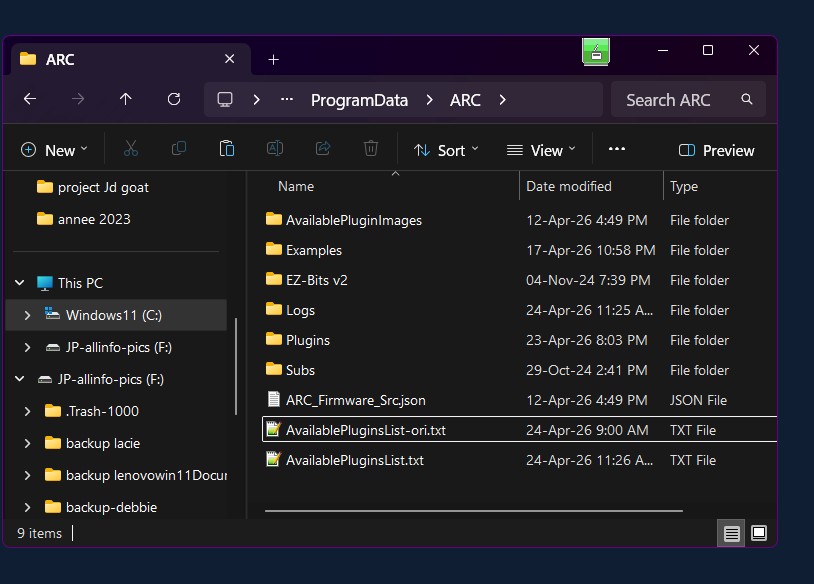
ARC has created the new file AvailablePluginslist.txt at 11:26 am on the web page robot skill store, under camera, i see the kinect body control but why i don't see it in ARC ? i did again a force robot skill list.same problem I thought it might be hidden in another category. I looked through all the categories but found nothing.I can see from your screenshot that ARC did refresh
AvailablePluginsList.txtsuccessfully, so the skill list cache is being rebuilt. Since Kinect Body Control appears on the website but not inside ARC, this usually points to one of these issues:What I’d try next
1) Search by the exact skill name
In Add Robot Skill, use the search box and try:
Body ControlKinect Body ControlKinectMicrosoftSometimes the skill name differs slightly from what the website shows.
2) Check the skill store page directly
Open the skill store entry and verify whether it has an install/download icon or whether it’s marked as unavailable for your version of ARC.
You can also use the skill store search here: https://synthiam.com/Products/Controls
3) Open the ARC log after startup
Since the skill list is refreshing but not showing the skill, the ARC log may reveal whether the plugin is being skipped or blocked during load.
In ARC:
4) Confirm whether the skill exists in your local plugin folder
Check:
C:\ProgramData\ARC\PluginsIf the Kinect skill is downloaded there but not showing in ARC, that would suggest a load/compatibility issue rather than a download issue.
5) Try a fresh ARC restart after the cache refresh
After deleting
AvailablePluginsList.txt, close ARC, wait a few seconds, then reopen it without opening a project first and check Add Robot Skill again.Important note about Kinect support
The older Kinect Body Control skill may no longer be the one intended for current ARC versions. The current Kinect options in ARC may be:
If the website shows Kinect Body Control but ARC doesn’t, it may be a catalog mismatch or the skill may not be enabled for your current ARC build.
About the error you posted earlier
The earlier
ReflectionTypeLoadExceptionmentioning:EZ-Builder, Version=2015.8.9.0suggests an older plugin dependency is being referenced by that skill. That can happen if the skill was built for an older ARC/legacy dependency set and isn’t loading cleanly in the current version.
What I need from you
Could you please tell me:
C:\ProgramData\ARC\Pluginscontain anything related to Kinect?Body Controlinstead ofKinect?If you want, I can also help you interpret the log file if you paste the relevant lines here.
from your questions:
2. in the folder C:\ProgramData\ARC\Plugins , there are 34 folders and into this one: 0518bd78-2ac0-487e-ba58-c8b33bd2c81e from Avril 2026, i found 4 files: Kinect Body Control.dll Microsoft.Kinect.dll Microsoft.Kinect.xml title.png
something interesting , in all other folders, i can always see the file plugin.xml but not in the directory mentioned above where we see Kinect Body Control.
3. xbox 360 kinect microsoft corporation model 1414. Normally it is the Kinect V1