





Alternative To Ezrobot Ezb For Robot Head Project
My course has primarily focused on robotics projects using the EZ-B controller and a camera for real-time interfacing. With recent developments, I am planning to create an additional video that incorporates Synthiam's support for other types of controllers. Although I've successfully flashed an alternative controller, it lacked compatibility with camera integration and Wi-Fi capabilities. The absence of an onboard computer limits the use of a USB camera, posing a significant challenge.
This dependency on specific components like the EZ-B, IO Tiny, and cameras can be problematic. For my course project, Mecha Morphix, which involves controlling five servos, the Arduino Mega seems excessive. I am in search of a suitable controller, compatible with Synthiam ARC, that includes both Wi-Fi and camera support to effectively replace the EZ-B.
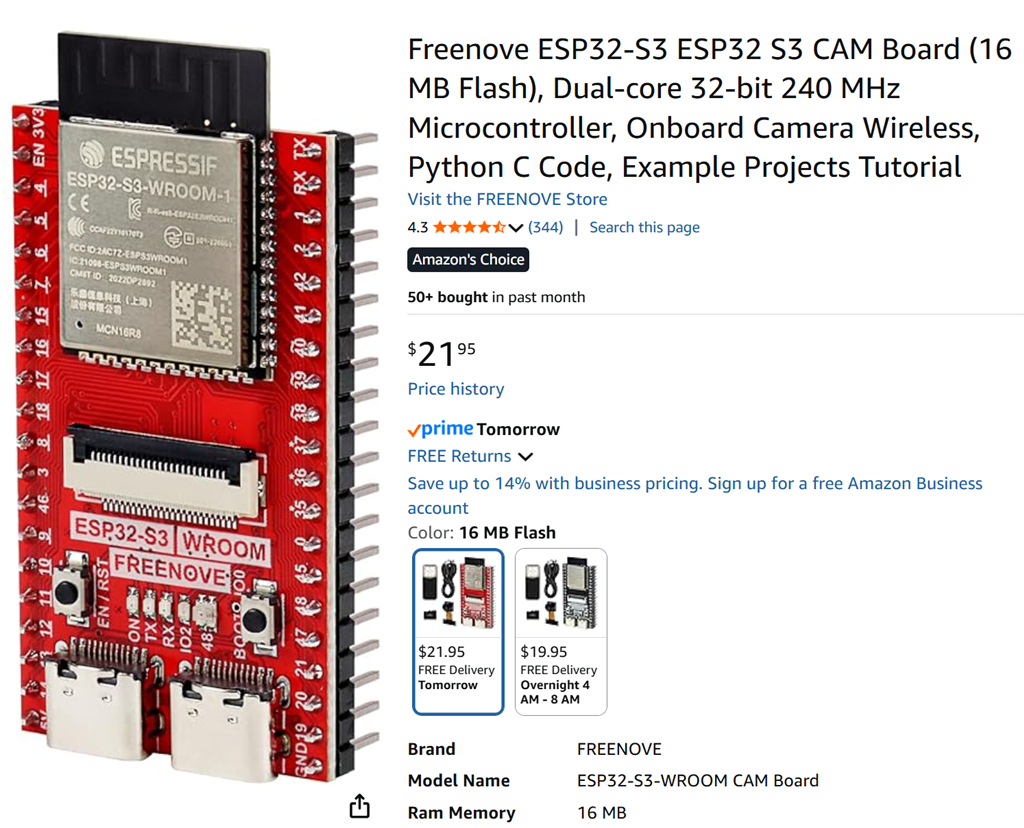
I noticed that the ESP32 with a camera is listed among the supported controllers for ARC. Has anyone experimented with using the ESP32 in conjunction with a camera for such applications? Any insights or experiences would be appreciated.
Related Hardware (view all EZB hardware)

Related Robot Skills (view all robot skills)


I am sure @DJ can make a quick change to ARC to the Horizontal servo Skill and Vertical servo Skill to add a skip function under advanced so when you drag the mouse it goes up or down in increments of 10 (or what ever number you enter) so it doesn't compete with Camera as much for bandwidth.
I will order one of the Fancy boards and try and work out what pin on ESP is causing the Loop. Maybe just need to bend the offending ESP pin so it doesn't plug in and cause issues or cut the trace on the board.
BTW @DJ if you are opening ARC I noticed BLOCKY AutoPosition and AutoPosition Wait are broken in the GUI when you hit the drop down.
Hi guys. I haven't struggled along with you on this but I'm watching. I see that you're getting close to resolving this.
Speaking of resolution, have you tried upping the servo resolution in ARC? I feel that you may be correct in that the servo jerkiness you see may be because of the signal being processed. However maybe a higher resolution may be a workaround?
https://synthiam.com/Community/Questions/Understanding-Servo-Resolution-in-ARC-22771
https://synthiam.com/Support/ARC-Overview/Servo-Controls
...had some time this afternoon... i get the servo slow down blocky movement on the Movement Panel as well and repeats the pattern in the video at the beginning of the thread...slow and blocky movement with no camera running on Pin 14 (D3). So for me it doesn't matter if if its horiz/vert sliders or from the Movement Panel servo movement is the same. Except if I turn on the camera it is even slower.
@dave that didn't seem to make a difference for me.
Also using pin 14 and D3 I think the only difference is I am using client mode connected to house network and all servo pins disabled except 14 I also don’t have the fancy board but that’s it. I will try make video tomorrow just some family stuff I am dealing with at the moment
I'll look at it when i get teh pcb next week. Canada takes longer to receive items from amazon.
All movement panels or servo controls send the same signal - no point in changing robot skills for a single use-case of an esp32 with a incomplete broken firmware.
The solution is not to change arc's behavior of robot skills. The solution is to fix the underlying issue and make it work correctly. I will do that.
The issue with the pcb add-on is most likely resistance from the led circuitry for the camera pins. most likely the pins from the camera will need to be cut so they're not being used in the pcb.
Lastly, your tests are not going anywhere until i look at it so you can step away and focus on something else in the meantime and let me take care of it. There might be issues far deeper than i can explain briefly, i can try... But servos are pwm based on timers. there's a few pwm periphals in microcontrollers. any library/sdk can use any pwm they want as there's no standard. this also applies to the built-in esp32 wifi module. the issues are most likely not related to pins anymore, but instead related to internal allocation of pwm timers and perhaps other conflicting peripherals within the chip. could be dma data channels as well. that can be solved but first i need that pcb.
i'll find some time after work to make your thing work next week when the pcb arrives.
you can't use two esp32's (one as camera and one as servos) because how are you gonna connect to them? You'll need 2 wifi networks and that's not user-friendly. that adafruit servo breakout might work as well but i'm not sure about the i2c yet.
You can see this... in the ezb firmware for esp32 cam i tried forcing the timers for the servos
and the camera is....
but i don't think the servo module is honoring the pwm demand - and/or the wifi module is using samesies. or dma. or even wifi module maybe "just maybe" using one or few of the gpio for the servo.
As a last resort as well i created this: https://synthiam.com/Firmware/ESP32-Cam-with-PCA9685-WOKTPYS1WBN
which you can use with any pca9685 pcb like this: https://www.amazon.ca/dp/B06XSFFXQY
they're cheapest on amazon
i can't test it by not having one. at least, if we do i don't know where it is in all the project boxes. but i ordered one for $10cad anyway be here next week.
I took a look I do not have one either. I ordered one on Amazon. This is probably the best solution so we will have a camera and support for 16 servos. (or daisy chain if we need more) Also don't need fancy board. I don't care about frame rate for my project ( i just send a photo to AI to process) so I can probably go back to the tiny ESP32-CAM as well. In Bulk the ESP32-CAM is about $3 and pca0685 is $2 on aliexpress so $5 for a camera and 16 servo board is great.