


Asked
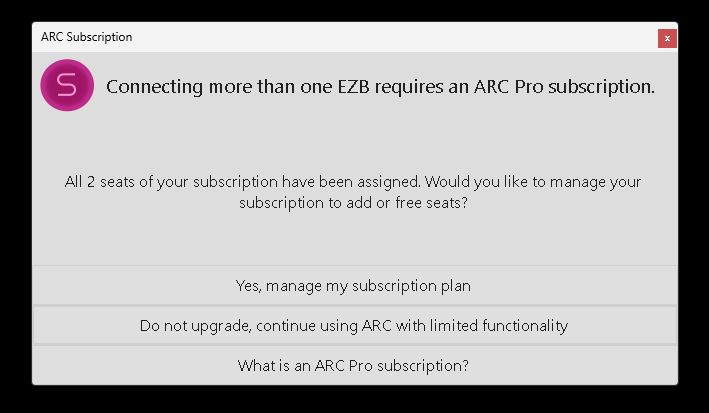
ARC Shutdown Seat Error
Hello,
Since the last ARC update I've started seeing a new issue: ARC shows a popup error and hangs during shutdown, preventing the robot from completing its shutdown sequence. I do not allow Windows 11 OS updates on the robot's mini computer, so this started after the ARC update.
A few details about my setup and workflow:
- Hardware and connection model: I have a mini PC mounted on the robot that runs ARC and is connected to three EZ-B v4 controllers via USB. The sensors/actuators (including ADC inputs) are connected through the EZ-Bs and are visible to ARC.
- Remote access: I do not attach a monitor to the mini PC. I control and view it remotely over TightVNC. Most animations and behaviors are autonomous.
- Shutdown automation (ARC scripting): I have an ARC script that watches a momentary button on the robot. When I push that button during shutdown, one of the EZ-B v4 ADC ports (as seen by ARC) detects the expected voltage change. That triggers a PC shutdown script, and after some additional automation the whole robot has powered down cleanly for a long time.
- Problem behavior: After the PC shutdown script runs, ARC begins to shut down: my scripts close (it looks like ARC is turning off), and any running scripts stop. Just before ARC closes, it hangs and a popup appears (screenshot below). The popup claims both seats have been assigned and gives choices. I then must click the "X" in the popup to close it, after which ARC exits and the robot finishes shutting down.
- Account/seat observation: When I check my Synthiam account, the robot's mini PC is listed as one of the seats. It’s odd that ARC starts and runs correctly on the mini PC, but then hangs at shutdown with a message saying my two seats are full.
- Attempts so far: I tried removing the robot’s mini PC from my account seats and then re-enabled it as a seat when ARC starts on the mini PC, but the error still occurs and ARC hangs at shutdown.
Screenshot of the popup: img
How can I get this to stop and allow ARC to shut down properly? Any help is appreciated. Thank you.

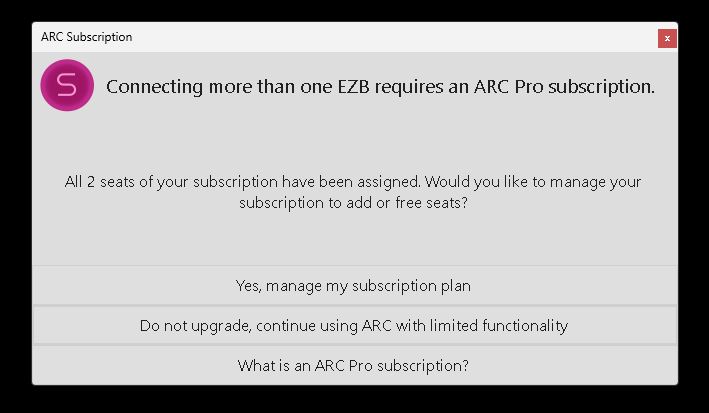
Please post an image of the pop-up message. If the popup is the same as before, you are not running the new build that DJ published.
ARC
FREEARC
PROARC
RUNTIMESomething that I noticed - you have successfully registered the ROBOT-BRAIN computer twice in the last 24 hours. Do you have two computers with the same name?
I tried it again following @Customer Support advice. No change and yes, the popup is exactly the same as it's always been. There is no debug information in the popup.
This time I deleted every instance of the ARC installer from my download folder. Yes I had several.
I then had Windows uninstall ARC through the control panel.
After reinstalling, I ran ARC, loaded my project. After everything was set up through the INT script, i ran the shutdown script. I got the same results as before.
@DJ, no I am not running two computers with the same name. I think what you saw was me manually release my seat to ROBOT-BRAIN computer between uninstall and the new install of ARC. I kept the seat in place this last ARC reinstall.
Hmm maybe the file didn't copy. I'll take a look tonight when I get home. We're trying to trick the system by not having an update but having an update. So it's kinda strange what we're trying to do without pushing a whole update out for your one computer haha
I'm honored. Thanks.
It is not advised for DJ to push an update with the same version information. It's important that we maintain updates that incorporate several fixes. There are a few other fixes in the works, so we can merge these together tomorrow and push a new versioned update. David, the next update will include as much error handling as possible for your situation - which we believe should solve the problem of that PC.
Understood. no worries. No real rush. I'll keep my eyes open. What is available I'll follow the same instructions you gave me before for uninstall and reinstall. And let you know.
Dave, we're pushing an ARC update tonight that should help with the trouble you're having on this PC. Stay tuned!