


Asked
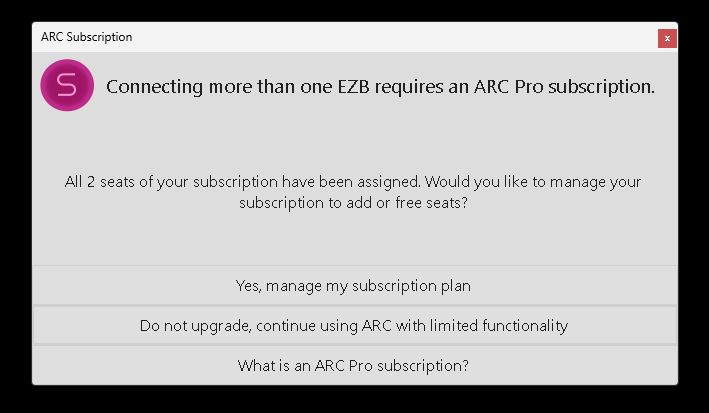
ARC Shutdown Seat Error
Hello,
Since the last ARC update I've started seeing a new issue: ARC shows a popup error and hangs during shutdown, preventing the robot from completing its shutdown sequence. I do not allow Windows 11 OS updates on the robot's mini computer, so this started after the ARC update.
A few details about my setup and workflow:
- Hardware and connection model: I have a mini PC mounted on the robot that runs ARC and is connected to three EZ-B v4 controllers via USB. The sensors/actuators (including ADC inputs) are connected through the EZ-Bs and are visible to ARC.
- Remote access: I do not attach a monitor to the mini PC. I control and view it remotely over TightVNC. Most animations and behaviors are autonomous.
- Shutdown automation (ARC scripting): I have an ARC script that watches a momentary button on the robot. When I push that button during shutdown, one of the EZ-B v4 ADC ports (as seen by ARC) detects the expected voltage change. That triggers a PC shutdown script, and after some additional automation the whole robot has powered down cleanly for a long time.
- Problem behavior: After the PC shutdown script runs, ARC begins to shut down: my scripts close (it looks like ARC is turning off), and any running scripts stop. Just before ARC closes, it hangs and a popup appears (screenshot below). The popup claims both seats have been assigned and gives choices. I then must click the "X" in the popup to close it, after which ARC exits and the robot finishes shutting down.
- Account/seat observation: When I check my Synthiam account, the robot's mini PC is listed as one of the seats. It’s odd that ARC starts and runs correctly on the mini PC, but then hangs at shutdown with a message saying my two seats are full.
- Attempts so far: I tried removing the robot’s mini PC from my account seats and then re-enabled it as a seat when ARC starts on the mini PC, but the error still occurs and ARC hangs at shutdown.
Screenshot of the popup: img
How can I get this to stop and allow ARC to shut down properly? Any help is appreciated. Thank you.

@Customer Service . You guys are awesome! Thanks so much. I'll install when I see it come through. I'll let you know what I find. .
David, bringer of bad news. The build didn’t pass the quality control tests so we’ll have to check it tomorrow and reschedule the update. Thanks for understanding!
Yikes! Good luck getting things figured out. Thanks for letting me know. I appreciate it.
I don't know if what I experienced is in any way related to Dave's issue, but I had my robot connected to my laptop's wifi, then I disconnected and turned the robot off but left my laptop on with ARC still running and my robot project running and then returned to it 2 days later and connected back to my robot and when I went to add a new skill in my already open project in my already running ARC, I got the subscription popup warning that I needed to upgrade to PRO when PRO is what I've been running, lol.
So I had to disconnect from the EZ-B (because I was not using a secondary wifi to keep internet going at the same time when connected to the robot), connect back to the internet and re-enter my ID and password in the popup to appease the ARC software that I indeed have a valid PRO account. I didn't alter my subscription or change my seats and I have never had the subscription complaint popup like that before after leaving ARC running.
Hi @JustinRatliff , Good to hear from you. Yes, your occurrence does sound a little like mine. It's a pop up thing I guess. LOL. While the circumstances are different the fact still remains that ARC Pro should know you have an active subscription and not bother you (or me). Odd that this "pops up" for us at different events. Mine actually stops the shutdown. Like you it asks me for my password and when I supply the correct one it says it's wrong.
It's comforting that Synthiam is on top of it for us. Looks like it's just a matter of a short time before our troubles are behind us and Synthiam slays this baby dragon. Good news is that it's not a crippling problem and we can easily work around it and continue to play with our toys. LOL.
Have fun old friend! Happy robot building!
Dave, it looks like we're going to attempt an update tonight. We'll let you know if there's any other issues. The latest update includes a few larger back-end changes so we're thoroughly testing anything affected.
Outstanding! Thank you for all your hard work and the heads up to this update. Looking forward to it.
I finally got a chance to download the latest ARC update, v2026.06.13.00 . I removed the disconnect commands I had placed in the PC shutdown script that disconnects my three USB connected EZBs and then ran the script. As you remember disconnecting the EZBs in that script before the PC Shutdown command lets the ARC and PC shutdown process successfully complete. Sadly the update made no difference. I still have the pop up appear and ARC stalls and does not close. Of course then the PC does not automatically shut down. So, after the update, nothing has changed. The pop up is still exactly the same as first described. There is no added debug information in the pop up that @DJ had described earlier either.