


Asked
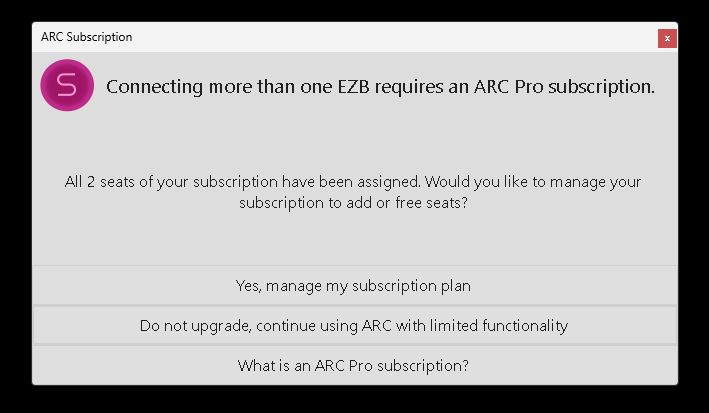
ARC Shutdown Seat Error
Hello,
Since the last ARC update I've started seeing a new issue: ARC shows a popup error and hangs during shutdown, preventing the robot from completing its shutdown sequence. I do not allow Windows 11 OS updates on the robot's mini computer, so this started after the ARC update.
A few details about my setup and workflow:
- Hardware and connection model: I have a mini PC mounted on the robot that runs ARC and is connected to three EZ-B v4 controllers via USB. The sensors/actuators (including ADC inputs) are connected through the EZ-Bs and are visible to ARC.
- Remote access: I do not attach a monitor to the mini PC. I control and view it remotely over TightVNC. Most animations and behaviors are autonomous.
- Shutdown automation (ARC scripting): I have an ARC script that watches a momentary button on the robot. When I push that button during shutdown, one of the EZ-B v4 ADC ports (as seen by ARC) detects the expected voltage change. That triggers a PC shutdown script, and after some additional automation the whole robot has powered down cleanly for a long time.
- Problem behavior: After the PC shutdown script runs, ARC begins to shut down: my scripts close (it looks like ARC is turning off), and any running scripts stop. Just before ARC closes, it hangs and a popup appears (screenshot below). The popup claims both seats have been assigned and gives choices. I then must click the "X" in the popup to close it, after which ARC exits and the robot finishes shutting down.
- Account/seat observation: When I check my Synthiam account, the robot's mini PC is listed as one of the seats. It’s odd that ARC starts and runs correctly on the mini PC, but then hangs at shutdown with a message saying my two seats are full.
- Attempts so far: I tried removing the robot’s mini PC from my account seats and then re-enabled it as a seat when ARC starts on the mini PC, but the error still occurs and ARC hangs at shutdown.
Screenshot of the popup: img
How can I get this to stop and allow ARC to shut down properly? Any help is appreciated. Thank you.

OK, I've tried a few more things.
First I tried a full ARC uninstall and then reinstall. I even released the computer's seat on my account page between removal and installation. Same issue after ARC was installed fresh using my regular project. As mentioned before, this issue happens to me even with a new empty project loaded in ARC.
Here's the weird part........... Next, I made sure the "disconnect all" command wasn't in the shutdown script and tried to do three separate shutdowns, each time manually disconnecting one connection each time. So on the first computer shutdown I manually disconnected "Connection 0". Then the next shutdown was "connection 1, then next "Connection 2". Oddly, each time, with only 2 live connections and one manually disconnected by me, I had a clean shutdown with no pop up or shutdown stall. Then as a control test, one last time I tried fourth shutdown. This last time with all three connections active (no "disconnect all" command in the shutdown script) and again got that dreaded popup and ARC shutdown stalled.
@DJ, I understand that this issue is most likely my Windows 11 computer and I do appreciate your and @Customer Support help so far. I'm puzzled also and I'm nowhere near your level of expertise. As long as I can shutdown ARC and the robot properly by having the shutdown script disconnect all connection so the robot's shutdown will proceed I'm OK with that. Perhaps something will happen that will explain what's going on and I can stop using this workaround.
I wonder if a full Windows reinstall might help?
I know what's happened. Well, to clarify, I know "when it happened," but I don't really know what caused it. Probably a Windows update or something with Windows broke. Let me explain...
The Moment It Happened - When the computer was shutting down, a message prompted to assign the PC to a seat; from that moment on, the computer could not register a seat. For whatever reason, at that moment, while was using the PC, Windows decided to stop working. That's the moment it happened, and you have a screenshot to prove it.
So, for whatever reason, the enumeration is failing, and it started failing during that session when you were using the PC. It could be Win11 to blame - but that's almost impossible to tell because Microsoft has been releasing updates to random computers. So your computer may have received an update that ours hasn't. Or, the Windows just broke, and it's entirely not Win11 - but we'll never really know.
So, heres what I am doing I'm making a minor change to the enumerator that will attempt various methods if one fails. So this way, if it's Win11 failing or broken windows, we'll get a good idea of how to work around it. It'll require an ARC update, so it'll take a bit to push through as an emergency release. Let me see if that's something I can do tonight. Stay tuned.
Okay - i forced an update for Pro only. It did not update the version so you won't get a notice.
Uninstall your current ARC
Download the latest ARC Pro from this website
Install the new ARC
It'll be the same version and everything - but the difference is it will try various new enumeration methods and also provide more logging.
Well, that's all weird and exciting. Sounds like something out of the Twilight zone.
I'm impressed by your detective work and dedication.
I'll remove and redownload ARC tomorrow and let you know. Thanks again!
Thanks for the kind words, Dave! You know me - I'm always making sure there are no roadblocks for people to achieve their goals! Even if that means fighting against Microsoft's breaking changes haha.
@DJ, yep, I must admit (and I even knew 14 years ago shortly after I found the DJ/EZ Robot brain trust), that you have always been there for us. Amazing support unequaled by anyone I've ever worked with. You always seem to find a way.
One thing I need to point out that may have a bearing on your Windows being broken somewhere comment; I have Windows update turned off on this computer in question. To my knowledge my Windows 11 OP hasn't updated in a many months. It seemed to be turning itself back on shortly after I'd turn it off. Like it had a mind of it's own and kept rising from the grave. I finally went on Google and found suggestions on what to adjust in Windows to keep that from happening. Can't remember all that was involved but it was several steps involving the registry and other services. I don't know if this is relevant.
I'll be reinstalling ARC in a few hours to test your new update. Thanks again for hanging in there. :-)
Wicked - let me know how the update works!
@DJ , sadly nothing has changed after the update.
I uninstalled the old and reinstalled the new ARC version you worked on. When I started up ARC I activated Synthiam's seat request for this computer (I had removed it from my Synthiam account between removal and install of ARC).
After ARC start up and was connected to the robot's 3 EZBs, I made sure the "disconnect all" command was gone from the shutdown script.
Finally, I triggered the shutdown script.
Sadly, I still get the same pop up and ARC stalls and won't shut down like before.