




Hello,
Since the last ARC update I've started seeing a new issue: ARC shows a popup error and hangs during shutdown, preventing the robot from completing its shutdown sequence. I do not allow Windows 11 OS updates on the robot's mini computer, so this started after the ARC update.
A few details about my setup and workflow:
- Hardware and connection model: I have a mini PC mounted on the robot that runs ARC and is connected to three EZ-B v4 controllers via USB. The sensors/actuators (including ADC inputs) are connected through the EZ-Bs and are visible to ARC.
- Remote access: I do not attach a monitor to the mini PC. I control and view it remotely over TightVNC. Most animations and behaviors are autonomous.
- Shutdown automation (ARC scripting): I have an ARC script that watches a momentary button on the robot. When I push that button during shutdown, one of the EZ-B v4 ADC ports (as seen by ARC) detects the expected voltage change. That triggers a PC shutdown script, and after some additional automation the whole robot has powered down cleanly for a long time.
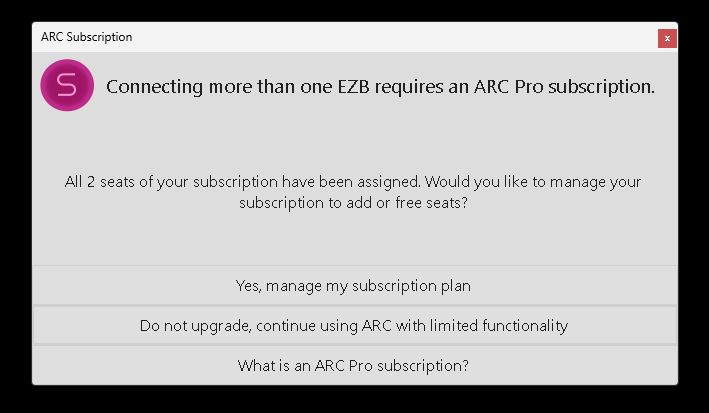
- Problem behavior: After the PC shutdown script runs, ARC begins to shut down: my scripts close (it looks like ARC is turning off), and any running scripts stop. Just before ARC closes, it hangs and a popup appears (screenshot below). The popup claims both seats have been assigned and gives choices. I then must click the "X" in the popup to close it, after which ARC exits and the robot finishes shutting down.
- Account/seat observation: When I check my Synthiam account, the robot's mini PC is listed as one of the seats. It’s odd that ARC starts and runs correctly on the mini PC, but then hangs at shutdown with a message saying my two seats are full.
- Attempts so far: I tried removing the robot’s mini PC from my account seats and then re-enabled it as a seat when ARC starts on the mini PC, but the error still occurs and ARC hangs at shutdown.
Screenshot of the popup: img
How can I get this to stop and allow ARC to shut down properly? Any help is appreciated. Thank you.

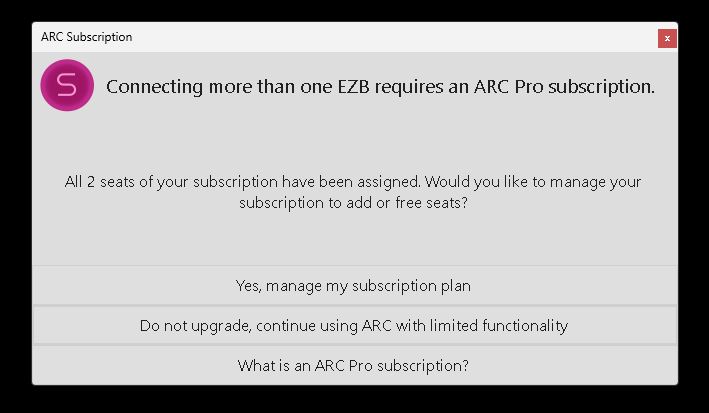
The editor didn't show my pop up screenshot that I attached. Here it is:
That is a really strange popup to see during shutdown. We’ll see if it can reproduced and get back to you
@Customer Support. I've done some more thinking on what lead up to this popup and some troubleshooting on my end. However this issue pursuits
More bits of information on events that I did after the last ARC update before I first saw this issue:
Here's a couple more things that I've tried since.
I hope this new info helps you figure what's happening. Thanks for your help!
That makes sense. From what I understand, it looks like you are trying to use three copies of ARC with a two-seat subscription. A two-seat subscription allows two copies of ARC to run at the same time. However, you cannot load ARC, release a seat, and then load another copy to work around the seat limit. The system will only allow the number of active copies that your subscription is licensed for.
@Customer Support. The same copy of my project was used in each instance of ARC I was using. Still, how does this explain why this pop-up happens at the end when I want to shut down and hold ARC from shutting down and not at the beginning when I start up?
That behavior is consistent with seat validation happening during shutdown, not only at startup.
A few key points:
Utility.shutdownPC()suggests ARC is re-checking the subscription state while it’s already in the middle of closing, and that validation is failing or getting confused because the app is being torn down while a seat check is still active.Why it happens at shutdown and not startup
At startup, ARC can complete the seat claim cleanly.
At shutdown, your script is still running when this line executes:
That tells Windows to begin shutdown immediately, but ARC may still be trying to:
If ARC now believes the machine is not authorized or the seat state is inconsistent, it can show the seat popup right as it exits.
What to try
1) Make sure only one ARC instance is actually running on that PC
Even if you use the same project, ARC still counts instances, not projects.
Check Task Manager and confirm there isn’t another ARC process still active on the robot mini PC or on another machine using the same seat.
2) Avoid triggering Windows shutdown directly from inside the same ARC instance
A safer approach is to:
If possible, use a separate Windows shutdown trigger outside ARC, or launch a small external shutdown helper after ARC exits.
3) Insert a delay before shutdown so ARC can finish closing its own resources
For example:
4) Test a minimal shutdown script
Temporarily remove the audio and extra script calls and test only:
If the popup still appears, then we’ve isolated the issue to ARC’s shutdown/licensing interaction rather than your shutdown sequence.
5) Check whether the AI feature changed seat behavior
Since this started after the update that included the AI assistant, it’s possible the new licensing logic is being evaluated differently on exit. That would explain why the issue only began after the update.
Best next step
Please try this test:
Utility.shutdownPC()If it does, then the most useful detail would be:
If you want, I can also help you rewrite your shutdown script so ARC has a cleaner shutdown path before Windows powers off.
I looked into this to see what could be happening, and maybe I’m misunderstanding - so add any clarification if possible. But from what I understand, you’re loading the arc, removing the seat of that arc, and adding the seat to another pc. Is that correct?
You can have as many copies of ARC per CPU as you like. So two seats mean two separate PCs.
The error is regarding multiple ezbs - so shutting down still says "hey, you're talking to more than one ezb, but this computer doesn’t have a seat anymore."
Removing a seat, even after the ARC is loaded, won’t trick the subscription system.
I could be interpreting the issue differently, so please correct me if I’m missing something.
@DJ, thanks for your help. I appreciate your support. However, I'm not trying to trick the subscription system. I release and add seats online in my Synthiam account when ARC is shut down. I've done this many times in the past over many years. Don't know, maybe I did something different this time. I have only one robot and I'm only one user. I simply wanted to run my ARC project on a different computer to try this new AI without having to remote into the robots onboard computer. Logic would dictate to my brain that once a seat is released I could add any other computer, running any project, as long as I only have two. Maybe I need to buy another seat to keep this from happening.
I think what may be the issue (according to Athena) is that there may be a script that is still running when the shutdown PC command is sent. I have noticed a motor that hasn't totally parked in its commanded shut down position (called by the shutdown script) when this happens and the robot is finally powered down
I'll adjust the sleep command tomorrow and see what happens.
Thanks again for the great service and support.