







Hello all,
I am trying to connect 2 H-bridges to my EZ-B. I followed the online tutorial and successfully connected 1. However, when attempting to connect the 2nd one I ran into some trouble.
The second H-bridge would only move one servo, in the up, down, and "stop" positions ... odd. The other servo showed no movement
I want 1 bridge to control forward and backward movement, b/c these two servos will be dedicated to only F and R
The other bridge is to control left and right movement.
Please advise me,
Thank you

Awesome
Now do the second like you did the first. And tell me what ports you connect it too.
CRich glad to see you have the first bridge running! Any pics of your build yet? I like this project you don't see that many fun balance bots. Controlling this little guy with the wii is going to be entertaining! - Josh S
Nothing pic worthy yet ... I will take a few once all "this" is done
Dj,
I'm using :
D0 D1 D2 D3
And
D9 ....will that work?
Hey DJ, have you had a chance to do that yet?
I'm interested in using 2 H bridges too.
I've got a Sabertooth as my main H-bridge, which works, but I need to be able to start / stop/ reverse another motor in the robot for a given duration (to be specific, I'm controlling a semi-automatic car antenna).
Using relays seems to be an option, but it seems like it'd be easier with an H bridge.
Can someone explain how to write a script to do this? or post an example?
Many thanks,
Frank
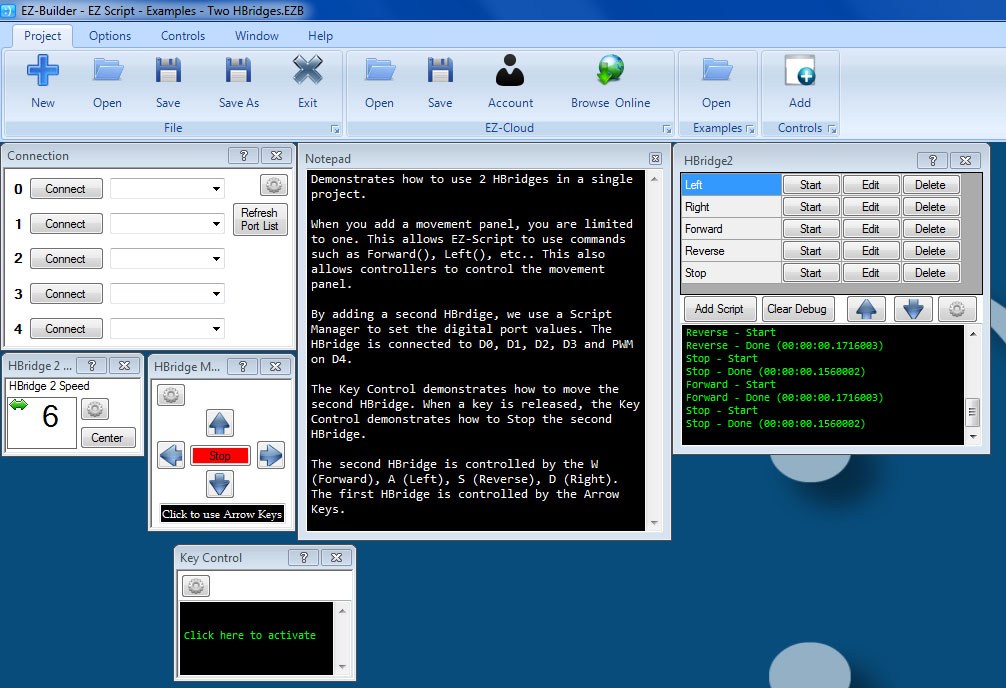
Yeah, use this file: EZScript-Examples-TwoHBridges.EZB
It uses a Script Manager to control the second HBridge. I used a Key Control to show how to turn on and off the second HBridge.
Thanks!